

Aximote: Car Data
- 12.00
- 4.8
- Installs
- 10.00K
- Price
- Free

Screenshots
Analysis by Reviewed
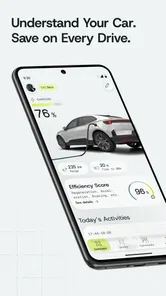
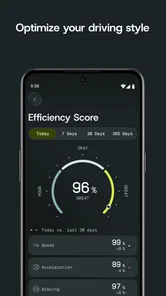
I have always liked the idea of knowing what a car really costs, but keeping that information useful is harder than it sounds. Fuel receipts disappear, charging sessions are easy to forget, and short trips often get treated as “too small to record.” Aximote: Car Data takes a more practical approach by bringing car cost tracking, charging, fuel, trips, and driving insights into one Android app. After using it as a personal log rather than a one-time calculator, I found its strongest value in turning scattered driving expenses into a pattern I could actually understand.
That focus makes it different from a simple fuel-price app or a maintenance reminder. It is designed for the ongoing record of how a vehicle is used. The developer is Aximote, and the app sits in the Auto & Vehicles category. It is free to install, rated for Everyone, and requires Android 10 or later. There are optional in-app purchases ranging from $4.99 to $244.99 per item, so I would check the available purchase choices before assuming every part of the experience is included at no cost.
Why the cost-tracking capability matters
The most useful capability here is not merely entering a fuel amount or a charging session. It is the possibility of connecting those entries with trips and driving habits, so the car becomes something I can review over time instead of a series of isolated payments. That distinction matters because a single expensive fill-up tells me very little. A longer record can show whether commuting, errands, weekend travel, or repeated short journeys are driving the total.
I found this especially helpful when thinking about costs in terms of use rather than emotion. A vehicle can feel inexpensive during a quiet week and surprisingly costly after several small journeys. Recording those journeys gives them a place in the overall picture. The same applies to an electric vehicle: charging may feel less visible than buying fuel, but it still belongs in the running-cost story. Aximote: Car Data is most convincing when used as a consistent journal for both kinds of driving.
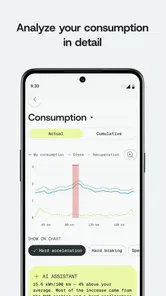
The driving-insight angle also changes how I interpret the information. Instead of asking only, “How much did I spend?” I can ask, “What kind of driving is creating that cost?” That is a more useful question for deciding whether to combine errands, change a regular route, compare vehicles, or simply accept that a particular journey is worth the expense.
One practical tip is to treat the first weeks as a setup period rather than expecting an instant verdict. Early entries are useful, but they represent only a small slice of real life. I would record ordinary commuting days, unusual longer trips, and the occasional quick errand before drawing conclusions. The app becomes more informative as the log reflects the variety of driving I actually do.
Turning separate entries into a usable picture
Fuel and charging records answer different questions, so combining them requires a little discipline. For a fuel car, the important habit is to enter refuelling consistently, ideally at the same point in the tank cycle. For an electric car, I would record charging in a similarly repeatable way instead of logging only the largest sessions. Inconsistent entry points can make comparisons misleading, even when the app itself is doing exactly what it should.
More From Our News Desk

 Gmail
GmailGmail in a Busy Inbox: Who Benefits Most?
From first account to crowded workday, Gmail earns its place through dependable search and flexible sorting—but its best fit depends on how much inbox maintenance you can tolerate.

 Prime Video
Switching to Prime Video: What Changes in Your Viewing Routine
Prime Video can make a compelling second home for streaming, but switching means learning a different catalog, rental layer, and route from browsing to playback.

 Universal TV Remote Control
Universal TV Remote Control Works Best as a Reliable Backup
A phone remote earns its place through quick setup and reliable habits. Here is how to get more from Universal TV Remote Control—and where its limits show.

 Weather - By Xiaomi
Weather by Xiaomi Review: Clear at a Glance, Less Clear Up Close
Xiaomi’s weather app makes everyday forecasts quick to scan, but its calm surface can leave useful details and recovery paths harder to find than they should be.

 X
XX Under Pressure: Can It Recover When Posting Goes Wrong?
A resilience-focused review of X, examining setup, mistaken posts, interruptions, weak connections, and the gaps that matter when recovery needs to be dependable.

 Clash of Clans
Clash of Clans Is Won Between the Battles
Its raids are quick; its community is a long-term project of coordination, teaching, rivalry, and shared responsibility—with all the friction that entails.
Latest News



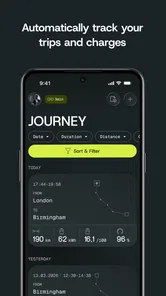
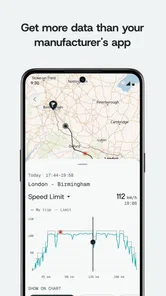
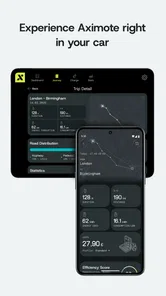
Trips add another layer. A journey log can help explain why costs changed, but only if I use it to capture the journeys that matter. I would not try to create a perfect diary of every metre. Instead, I would focus on recurring routes, unusually long drives, and trips that are easy to forget. That keeps the process manageable while preserving the information most likely to affect decisions.
This is one of the less obvious strengths of a dedicated car-data app: it encourages me to think in categories. A fuel receipt is an event. A trip is a reason. A driving insight is a pattern. Keeping those ideas together is more useful than storing receipts in a notes app and hoping to interpret them later.
How it feels in an everyday routine
In normal use, I would open the app after refuelling or charging, enter the relevant information, and use the trip record when a journey seems worth remembering. That workflow is simple, but its success depends on whether it becomes a habit. If I wait until the end of the month, details blur together and the record loses accuracy. A short entry made close to the event is much more valuable than a carefully reconstructed history.
A realistic example is a week of mixed driving. I might use the car for a regular commute, stop for groceries on the way home, and take a longer trip at the weekend. The individual journeys do not feel dramatic, but together they explain the week’s energy use and expense. By reviewing them as a group, I can see whether the weekend trip dominates the total or whether repeated short drives are quietly adding up.
This also helps with shared vehicles. If more than one person uses the same car, the app can serve as a common record rather than leaving one driver to remember everything. I would still agree on a simple household rule: whoever refuels, charges, or completes a notable trip records it soon afterwards. Without that agreement, the app cannot compensate for missing entries.
Another useful workflow is preparing for a monthly budget conversation. Rather than estimating from memory, I can review the recorded activity and separate ordinary use from exceptional travel. That makes the discussion more grounded. It can also reveal that a perceived increase in cost came from more driving, not necessarily from a change in vehicle efficiency.
The main friction is the same one found in most manual tracking tools: the app needs input. It is not a magic connection between the car and my bank account. I have to remember to log events, and I have to enter them consistently if I want meaningful comparisons. People who dislike manual records may find the routine tedious, particularly if they drive frequently and want every detail captured automatically.
A better way to read driving insights
I would avoid treating every insight as a command. An increase in cost does not automatically mean I should drive less, and a low-cost trip is not automatically a better trip. Context matters. A longer journey may replace several separate errands, while a short trip may be necessary even if it looks inefficient in isolation.
The app is more valuable when I use its information to ask better questions. Did several small trips happen on the same day? Are certain journeys recurring without being combined? Does a change in routine explain a higher total? These questions turn the record into a planning tool rather than a source of guilt.
For electric-car owners, I would also be careful when comparing charging entries from different situations. Home charging and public charging can have different costs, and a casual comparison may suggest a trend that is really just a change in where the vehicle was charged. The useful lesson is not to chase a single low figure, but to keep the records consistent enough to show the normal pattern.
The scenario where it makes the biggest difference
The strongest use case, in my view, is a driver who feels that car expenses are unpredictable but does not want a complicated spreadsheet. Aximote: Car Data gives that person a focused place to build a running picture. It is particularly suitable for someone deciding whether a new commute, a second vehicle, or a different driving routine fits the household budget.
Imagine a person who has recently changed jobs and now drives a different route. The first instinct might be to compare one fuel receipt with another. That is too narrow. The better approach is to log the new trips over several weeks, include ordinary errands, and then review the overall pattern. The app’s value comes from making the change visible as a routine rather than reducing it to one payment.
It can also help a driver evaluate a vehicle before replacing it. I would not use the app alone to decide which car to buy, because purchase price, insurance, repairs, depreciation, and personal comfort matter too. However, a clear record of actual driving costs can prevent unrealistic assumptions. The experience of owning a car is often different from the estimate made before driving it every day.
For families, the trip record can be useful when one car serves several purposes. School runs, shopping, commuting, and leisure travel place different demands on a vehicle. Seeing those uses together can support a more honest decision about whether a car is being used efficiently, whether journeys can be combined, or whether a different arrangement would make sense.
I also see value for drivers who are not naturally interested in automotive details. They do not need to become experts in engine efficiency or charging technology. They can start with a simple question: what did this car cost during the way I actually used it? That approachable framing is more likely to produce a lasting habit than a system that asks for technical knowledge at every step.
When a usual alternative may be better
A spreadsheet remains a better choice for someone who wants complete control over categories, formulas, shared editing, and custom reports. It can also be preferable for a small business that needs records shaped around accounting procedures rather than personal driving. Aximote: Car Data is more focused and approachable, but that focus may feel restrictive to users who want to build their own reporting system.
A notes app can be enough for a driver who only wants to remember the last refuelling date or jot down a single expense. In that case, setting up a dedicated log may feel unnecessary. The advantage of this app appears when the information needs to accumulate and become useful for comparison.
Vehicle dashboards and manufacturer apps may be more convenient for drivers who mainly want live vehicle information or automatic technical readings. Those tools can be closer to the car itself. Aximote: Car Data makes more sense when the priority is a personal record of costs, charging, fuel, trips, and the patterns that emerge from them, rather than a replacement for the vehicle’s built-in display.
Trade-offs before making it part of your routine
The clearest trade-off is convenience versus accuracy. Manual tracking gives me control over what I record, but it asks me to participate. If I skip several entries, later insights become less dependable. I would rather maintain a smaller, consistent record than attempt to capture everything for a few days and abandon it.
There is also a difference between financial tracking and mechanical maintenance. The app’s purpose is centered on costs, charging, fuel, trips, and driving insights. I would not treat it as a substitute for a service schedule, inspection record, repair history, or professional diagnosis. A cost log can show that a vehicle is becoming expensive to run, but it cannot explain every mechanical reason behind that change.
The free entry point is welcome, especially for someone who wants to test the workflow before committing. At the same time, the presence of optional purchases means I would review the upgrade screen carefully and decide whether the extra tools fit my needs. A user who only wants occasional entries may be satisfied without spending anything, while a more committed tracker may consider the paid options worthwhile if they support the way that person works.
Privacy is another point I would consider in practical terms. Any driving log can become a detailed picture of someone’s movements, even when the original intention is simply budgeting. I would avoid recording more personal detail than necessary and would think carefully before sharing the log with other people. The useful information is usually the cost and trip pattern, not a complete diary of every location.
The app’s public reception is encouraging: it has a 4.8 average from around 361 ratings and has passed 10K installs. Those figures suggest that many early users find the concept valuable, but they should not replace personal testing. A tracking app succeeds or fails based on whether its routine fits my habits. A highly rated tool can still be wrong for someone who refuses manual entry.
Because it was released on April 25, 2025, I see it as a relatively new option rather than a long-established automotive standard. That is not automatically a weakness. Newer apps can have a clearer focus, but I would still pay attention to how comfortably it fits my long-term routine before relying on it as the only record of important expenses.
Who will get the most from it
I would recommend Aximote: Car Data to drivers who want a clearer answer to “where is my car money going?” without building a spreadsheet from scratch. It is a good match for commuters, households sharing a vehicle, owners comparing fuel and charging habits, and anyone preparing to make a practical decision about driving costs.
It is also useful for people who enjoy small improvements based on evidence. The app will not make a route shorter or a vehicle cheaper by itself. What it can do is expose repeated patterns that are easy to miss in daily life. That is where I think its real benefit lies: not in one impressive screen, but in helping ordinary driving become easier to evaluate.
I would skip it if I need automatic, hands-off vehicle telemetry, a full maintenance-management system, or business-grade accounting. I would also skip it if I know I will not enter fuel, charging, or trip information regularly. In those situations, a connected vehicle service, a spreadsheet, or a simpler notes workflow may be more suitable.
For everyone else, I suggest starting with one vehicle and one clear goal. Track the events that matter, keep the entries consistent, and wait until the record covers normal as well as unusual driving. The key is not recording more data; it is recording enough of the right data to support a decision. Used that way, this free Auto & Vehicles app offers a sensible, focused way to understand the real cost of driving, with optional purchases available for users who want to explore more of its capabilities.
Aximote: Car Data Frequently Asked Questions
Can Aximote: Car Data help me monitor fuel, charging, and trip costs?
Aximote: Car Data is aimed at keeping everyday vehicle information organized, including costs, charging, fuel, and trips. It may be useful if you want to review these details in one place and gain insight into your driving habits. The information available can depend on how you enter or collect vehicle data and on the equipment and features supported by your setup.
Which phones can run Aximote: Car Data?
Aximote: Car Data is an Auto & Vehicles app from Aximote, and it requires Android 10 or later. Check your phone’s operating system before downloading so you know it meets that requirement. The app is free to download, and its age rating is Everyone. If you use an iPhone, check the relevant app store for availability and device requirements before proceeding.
What is Aximote: Car Data used for?
Aximote: Car Data is designed to help drivers access and organize information related to their vehicle. Depending on the connected hardware and supported functions, the app may display car data, diagnostic readings, trip details, or other vehicle-related information. Before downloading, check whether your car model, adapter, and smartphone are compatible, since the available features can vary considerably between vehicles and devices.
Does Aximote: Car Data require additional hardware or a compatible vehicle?
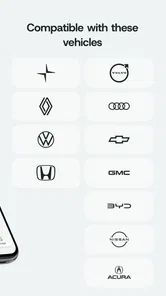
The app may require a compatible vehicle interface, adapter, or Aximote-related hardware to collect information from your car. Installing the application alone might not provide access to live vehicle data. Users should review the official compatibility requirements, connection method, and supported car models before proceeding. Compatibility can also depend on the vehicle’s diagnostic system, adapter version, phone operating system, and Bluetooth or network permissions.
Is Aximote: Car Data easy to connect and use?
The initial setup is generally intended to be straightforward, but the experience depends on the equipment being used and the vehicle’s configuration. You may need to pair the phone, grant Bluetooth or location permissions, connect an adapter, and select the correct vehicle profile. If readings do not appear immediately, checking permissions, restarting the connection, and consulting the app’s instructions may be necessary.
Pros
- Tracks key vehicle data in one convenient mobile dashboard.
- Can help identify driving patterns and potential maintenance concerns.
- Useful for keeping personal records of trips and vehicle performance.
- Simple concept for drivers who want connected-car insights.
- May reduce the need for separate vehicle monitoring tools.
Cons
- Requires compatible vehicle hardware or data access to work fully.
- Accuracy may depend on the car model and available sensor information.
- Some features may require Bluetooth
- GPS
- or constant phone access.
- Background tracking can increase battery consumption on your device.
- Limited usefulness for users without a supported connected vehicle.











