

AutoZonePro Mobile
- 551.00
- 4.5
- Installs
- 100.00K
- Price
- Free

Screenshots
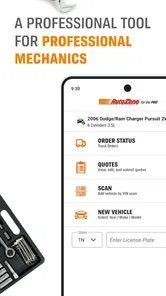
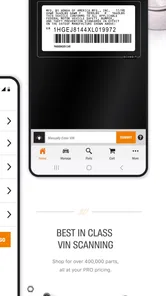
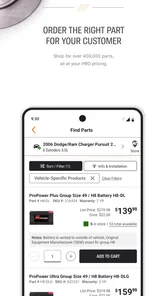
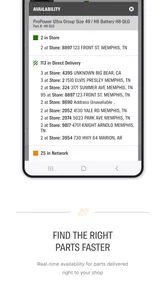
Analysis by Reviewed
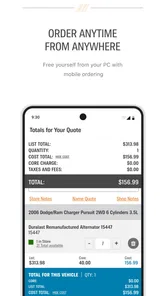
Ordering vehicle parts from a phone sounds simple until you are standing beside a customer’s car, trying to match the right component before the repair bay loses time. AutoZonePro Mobile is built for that professional situation rather than for casual browsing. Developed by AutoZone, Inc., this free Auto & Vehicles app focuses on parts ordering for the PRO, and my experience with it is strongest when I treat it as a work tool instead of a general shopping app.
The first thing I noticed is its narrow purpose. It is not trying to replace every AutoZone interaction on a phone. Its value comes from helping automotive professionals move from a repair need to a parts order with less back-and-forth. That makes it potentially useful for repair shops, technicians, service writers, and other users who regularly need AutoZone parts during the working day. For someone buying a single accessory for personal use, the ordinary consumer-facing route may feel more natural.
The best way to use AutoZonePro Mobile is as part of a repeatable shop routine. Before opening it, I want the vehicle information, the repair description, and any important fitment details ready. The app can support the ordering step, but it cannot replace careful diagnosis or a proper check of the vehicle. That distinction matters: a convenient ordering screen is only as reliable as the information entered into the process.
How the everyday ordering workflow feels
I find the everyday order easiest to manage when I keep the app session focused on one repair at a time. This section looks at how that routine can reduce mix-ups, while the next turns to the small preparation checks that make it smoother before the workday gets busy.
Start with the repair, not the part number
My baseline workflow begins with the vehicle and the job in front of me. If I am replacing a sensor, brake component, filter, or electrical item, I first confirm the vehicle details through the shop’s normal inspection process. Then I use AutoZonePro Mobile to look for the required part rather than guessing from a familiar product name. This is a small habit, but it prevents a common mistake: searching quickly by a vague description and treating the first plausible result as a confirmed fit.
For a professional user, the app makes more sense when it is connected to a larger conversation. A technician may identify the need, a service writer may communicate the estimate, and the person placing the order may be working from that information. In that setting, the app is a practical bridge between the repair decision and the parts counter. It is less useful when someone expects the app alone to diagnose a fault or decide which repair is appropriate.
A realistic example is a busy morning appointment involving a vehicle that needs a replacement ignition component. I would confirm the vehicle details, check the exact repair request, search for the appropriate item, and review the result before submitting anything. If the job has more than one possible configuration, I would pause and verify the vehicle information again instead of rushing because the part name looks familiar. That extra moment is cheaper than arranging a return or delaying the repair.
More From Our News Desk

 Gmail
GmailGmail in a Busy Inbox: Who Benefits Most?
From first account to crowded workday, Gmail earns its place through dependable search and flexible sorting—but its best fit depends on how much inbox maintenance you can tolerate.

 Prime Video
Switching to Prime Video: What Changes in Your Viewing Routine
Prime Video can make a compelling second home for streaming, but switching means learning a different catalog, rental layer, and route from browsing to playback.

 Universal TV Remote Control
Universal TV Remote Control Works Best as a Reliable Backup
A phone remote earns its place through quick setup and reliable habits. Here is how to get more from Universal TV Remote Control—and where its limits show.

 Weather - By Xiaomi
Weather by Xiaomi Review: Clear at a Glance, Less Clear Up Close
Xiaomi’s weather app makes everyday forecasts quick to scan, but its calm surface can leave useful details and recovery paths harder to find than they should be.

 X
XX Under Pressure: Can It Recover When Posting Goes Wrong?
A resilience-focused review of X, examining setup, mistaken posts, interruptions, weak connections, and the gaps that matter when recovery needs to be dependable.

 Clash of Clans
Clash of Clans Is Won Between the Battles
Its raids are quick; its community is a long-term project of coordination, teaching, rivalry, and shared responsibility—with all the friction that entails.
Latest News



Keep the order tied to the work order
One useful professional habit is to keep the app session aligned with the shop’s work order. I would avoid mixing several customers’ parts in one mental list, especially when two vehicles need similar components. A simple routine—finish one order, confirm what it belongs to, then move to the next—reduces the chance of selecting the correct part for the wrong vehicle.
This is where the app’s focused design can be an advantage. Instead of opening a broad marketplace and getting distracted by accessories, reviews, or unrelated products, a PRO user can keep attention on the immediate parts task. The trade-off is that the experience may feel less flexible for personal shopping. The app is designed around professional ordering, so users who want extensive consumer comparison tools may prefer another route.
I also recommend reviewing the entire order before treating the task as finished. Check the vehicle context, quantity, and the role each item plays in the repair. When a repair requires multiple related parts, it is easy to remember the main component and overlook a supporting item. AutoZonePro Mobile can help organize the purchase, but the final responsibility still belongs to the person managing the repair.
What the app does well for repeat users
After repeated use, the biggest strength is not a flashy feature; it is reduced friction in a familiar process. A technician who already knows how the shop handles vehicle information and approvals can use the app as a consistent ordering point. That consistency is valuable because it makes the sequence easier to repeat during a crowded day.
The app has a 4.5 average from around one thousand ratings, which suggests that many users find the overall experience useful. I would not treat that number as a guarantee for every shop, though. A professional’s satisfaction will depend on how well the app fits the shop’s existing workflow, how often parts are ordered through AutoZone, and whether the user needs a simple ordering tool or a broader inventory-management system.
Where a first-time user may hesitate
The first session may require more attention than a regular consumer shopping app. Professional ordering involves details that cannot be safely skipped, and the focused nature of the app means the user needs to understand the shop’s process before relying on it. If you are unfamiliar with vehicle fitment or are ordering for a car you do not know well, the app will not remove that responsibility.
I would also avoid using it as the only place to record repair decisions. Keep the diagnostic notes, customer approval, and job details in the system your shop already uses. AutoZonePro Mobile works best as the parts-ordering step inside that process, not as a complete replacement for service documentation.
Settings and habits that deserve attention
I treat a work phone as part of the ordering process, not just a screen for searching: a clear display and a settled team habit can prevent avoidable pauses. Here I consider the checks worth making before relying on the app, then move on to faster patterns that still leave room for careful review.
Check the basics before a busy shift
Because this is a work-oriented app, I would make a quick pre-shift check part of the routine. Confirm that the app opens normally, that the signed-in professional context is correct, and that the phone is ready for use at the counter or in the service area. These are ordinary checks, but they matter more when an order is time-sensitive.
The current release is version 5.2.0, and the app supports Android 7.0 and later. That broad compatibility is helpful for shops that keep older work phones in service. At the same time, older hardware can make any ordering task feel slower or less comfortable than it would on a newer device. If a shop uses several phones, I would test the app on the actual devices employees carry rather than assuming identical results.
Privacy and notification choices are also worth reviewing in the phone’s normal settings. I prefer work-related alerts to remain noticeable during an active order, while nonessential interruptions stay out of the way. The goal is not to turn every notification on; it is to make sure an important order update is not buried while the technician is moving between the vehicle and the counter.
Use a consistent information standard
The most important “setting” is really a team rule: decide what vehicle information must be confirmed before anyone searches. One shop may use a work-order number and vehicle details; another may rely on a service writer’s handoff. Either way, the app becomes more dependable when every employee follows the same minimum standard.
I would also agree on how the team handles uncertain fitment. If the vehicle has a mid-year change, an unusual configuration, or a repair that involves several compatible options, the person placing the order should know when to stop and ask for clarification. Speed is useful only when it does not create a second job later.
Another practical habit is to keep the phone screen readable and the device accessible without putting it in an unsafe position around a vehicle. I would not operate the app while driving or while handling tools. The app belongs at the desk, counter, or a safe stationary point, where the order can be reviewed carefully.
When an update changes the feel of the app
After an app update, I would not wait until the busiest appointment to discover that a familiar screen or ordering step has changed. Open the app during a quiet moment, run through a non-urgent search, and confirm that the team still understands the sequence. This is especially sensible when several employees share the same workflow.
AutoZonePro Mobile is free, which removes a direct purchase barrier for a shop deciding whether to test it. Still, “free” does not mean the trial costs nothing in time. The real evaluation is whether employees can complete orders accurately and whether the app fits the business’s existing way of approving and tracking parts.
Faster patterns that save time without encouraging mistakes
I look for speed in better preparation rather than skipping confirmation. The following section covers ways to keep urgent requests distinct from routine purchasing and to catch mismatches early, before considering the app’s boundaries and cases where a different tool makes more sense.
Prepare the input before opening the search
The quickest users are not necessarily the ones who tap fastest. They are the ones who open the app with the necessary information already organized. Before searching, I would have the vehicle details, the requested repair, and the required quantity in front of me. This avoids repeatedly leaving the app to ask someone what vehicle is on the lift or which side of the vehicle needs attention.
That preparation also makes errors easier to spot. If the result does not match the repair context, I can question it immediately. If I search without a clear starting point, I am more likely to accept an item simply because it appears relevant.
Separate urgent orders from planned replenishment
Not every parts order has the same priority. A vehicle waiting for a repair needs a different rhythm from a planned shop-stock purchase. I would handle urgent repair parts individually and review them before moving on. For routine replenishment, I would use the shop’s inventory process first, then place the order through the app once the list is settled.
This separation is a non-obvious advantage of treating the app as a professional tool. It prevents a long stock list from hiding a time-critical repair item. It also makes it easier to explain what an order is for when another employee needs to check it.
Use a two-person confirmation for costly mistakes
For parts that are difficult to return, expensive relative to the job, or easy to confuse with a similar option, a second look is worthwhile. The second person does not need to repeat the entire search. They can confirm the vehicle, part purpose, and quantity before the order is finalized.
This is not a claim that the app requires a second person. It is a workflow recommendation based on the reality of professional repairs. AutoZonePro Mobile can make the ordering step faster, but a quick confirmation can protect the shop from the much larger cost of an incorrect order.
Keep similar repairs from blending together
When several vehicles need related components, I would complete and document one order before starting the next. If the shop has a counter computer or paper work order nearby, keep the matching reference visible during the app session. This is particularly helpful when multiple technicians ask for parts at the same time.
The trade-off is that this method may feel slower than entering several orders in one burst. In practice, it is often faster than sorting out a mix-up afterward. The app supports the ordering action, while the shop’s discipline protects the identity of each job.
Advanced limits and situations where another option is better
A focused ordering tool can be useful without being the right answer for every shop or every vehicle owner. I weigh where this professional workflow fits, where diagnosis or broader business tools are needed instead, and how to make a practical decision about keeping it in the routine.
It is not a diagnostic platform
The most important limitation is scope. AutoZonePro Mobile is for parts ordering for the PRO, not a substitute for diagnostic equipment, repair manuals, wiring information, or a shop-management platform. If you need fault-code analysis, labor tracking, customer approvals, or a complete vehicle history, you will need the tools your shop already uses for those tasks.
This distinction also affects who should skip it. A private vehicle owner who only occasionally buys parts may find a standard retail experience easier. Someone comparing brands, reading broad consumer guidance, or shopping for non-repair accessories may prefer a general automotive marketplace. The professional focus is a strength only when it matches your reason for opening the app.
Fitment still needs human judgment
Even a well-structured ordering process cannot eliminate every vehicle-configuration issue. Model-year transitions, engine variations, previous modifications, and incomplete customer descriptions can all complicate a parts decision. I would never let a fast search override the technician’s inspection or the shop’s verification procedure.
When the result looks questionable, the right response is to pause, recheck the vehicle information, and use the shop’s normal confirmation channel. The app should shorten the path to a correct order, not pressure the user into accepting an uncertain one.
Older devices can affect comfort
Support for Android 7.0 and later makes the app accessible on a wide range of phones, but compatibility is not the same as an equally comfortable experience on every device. A small screen, worn battery, slow performance, or poor visibility in a bright service area can turn a simple order into an awkward task.
If a shop is choosing between a shared older phone and a newer dedicated device, I would consider the number of daily orders and the physical environment. A newer phone may be worthwhile for heavy use, while an occasional user may be perfectly satisfied with an existing compatible device.
It depends on the AutoZone workflow
The app is most compelling for professionals who already work with AutoZone as a parts source or who want a focused way to place PRO orders there. If your shop mainly buys from another supplier, needs cross-vendor comparison, or manages a large inventory through specialized software, AutoZonePro Mobile may be only one small piece of the process.
Its 100K-plus installs show that it has reached a meaningful professional audience, but reach does not decide whether it belongs in your shop. I would judge it by a short practical trial: can a new employee understand the ordering sequence, can an experienced user complete a request without unnecessary repetition, and can the shop verify every order before the vehicle is delayed?
My verdict after building a repeatable routine
AutoZonePro Mobile earns its place when the job is clear: a professional needs to order AutoZone parts from a mobile device and wants a focused workflow rather than a broad consumer shopping experience. I like it most when the user prepares the vehicle information first, keeps each order tied to a work order, and treats final fitment review as part of the process.
The app’s free price and Everyone content rating make it easy to consider, while its release history and current version show that it is an established tool rather than a brand-new experiment. Its developer, AutoZone, Inc., has kept the product centered on the professional ordering use case. That focus is exactly why it can feel efficient in a repair shop and limited in a private garage.
My recommendation is straightforward. If you regularly order parts through AutoZone in a professional setting, I would try AutoZonePro Mobile and build it into a consistent routine. Prepare the details, search deliberately, review the result, and separate urgent repair orders from stock planning. Those habits bring out the app’s practical strengths.
If you only buy parts occasionally, need detailed diagnostics, or want one application to manage every part of a repair business, I would choose a different primary tool and use this app only when its PRO ordering role fits. For the right user, AutoZonePro Mobile is not about replacing expertise; it is about making the parts-ordering step more orderly, repeatable, and easier to handle during a busy day.
AutoZonePro Mobile Frequently Asked Questions
Who publishes AutoZonePro Mobile, and is it free to download?
AutoZonePro Mobile is published by AutoZone, Inc. and is a free app in the Auto & Vehicles category. Its store summary describes it as “Parts Ordering for the PRO,” so it is aimed at users handling professional parts needs. The app has an Everyone content rating, making it suitable for a general audience, though users should still review its permissions and privacy details before installing.
What is AutoZonePro Mobile used for?
AutoZonePro Mobile is designed to help drivers and vehicle owners manage common automotive needs from a mobile device. Its store summary focuses on parts ordering for professionals, and the app may also provide access to vehicle information, maintenance-related tools, product or parts searches, service details, and other resources connected with AutoZonePro. Before downloading, confirm that it supports your country, vehicle type, and intended automotive tasks.
Is AutoZonePro Mobile available for both Android and iOS?
Availability can vary according to the official publisher, operating system, country, and app-store listing. Android users should check Google Play, while iPhone and iPad users should search the Apple App Store for the exact AutoZonePro Mobile name and verified developer. The Android release supports devices running version 7.0 or later. Avoid downloading unofficial APK files or similarly named applications, because they may be outdated, modified, or unrelated to the legitimate service.
Does AutoZonePro Mobile require an account or personal information?
Some features may be accessible without signing in, while functions involving saved vehicles, orders, professional services, account history, or personalized information may require registration. During setup, review which permissions and details are requested, such as contact information, location, or vehicle data. Only provide information necessary for the features you intend to use, and read the privacy policy before creating an account.
Can AutoZonePro Mobile diagnose or repair my vehicle?
The app should be treated as a convenience and information tool rather than a replacement for a qualified mechanic. Any vehicle data, maintenance suggestions, parts information, or troubleshooting guidance may help you investigate a problem, but it cannot guarantee an accurate diagnosis. For warning lights, safety-related faults, brake or steering problems, or uncertain repairs, have the vehicle inspected by a professional before driving.
Pros
- Quick access to vehicle parts
- tools
- and maintenance products
- Store locator helps find nearby AutoZone locations and services
- Product details make it easier to compare compatible replacement parts
- Order tracking keeps you updated on delivery progress
- Useful for checking store hours
- availability
- and contact information
Cons
- Vehicle compatibility results may require careful verification before purchase
- Some features depend on accurate vehicle information being entered
- Product availability can vary significantly between nearby stores
- The app may promote account creation for a smoother shopping experience
- Large catalogs can make finding a specific part feel time-consuming












