

AutoCodes Tech
- 5.00
- 4.1
- Installs
- 10.00K
- Price
- Free

Screenshots
Analysis by Reviewed
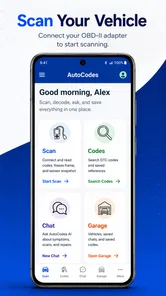
When a warning light appears on the dashboard, the hardest part is often not finding a code but understanding what it might mean and what to check next. AutoCodes Tech takes a practical approach to that problem by combining an AI-based OBDII troubleshooter with a chat tool aimed at mechanics and people who maintain their own vehicles. I found it most useful as a second opinion: it helps turn technical fault-code language into a more understandable starting point before I decide whether a repair is simple enough to investigate myself or serious enough for a professional.
This is a free Auto & Vehicles app from AutoCodes.com, with optional in-app purchases ranging from $0.99 to $4.99 per item. It is available for users aged Everyone, requires Android 7.0 or later, and its current version is 2.5.3. The app has reached over ten thousand installs, with a 4.1 average from a little over forty ratings. Those numbers suggest a small but active audience rather than a long-established mainstream diagnostic platform, so I approached it as a focused tool instead of a complete replacement for workshop equipment.
How AutoCodes Tech fits into real vehicle troubleshooting
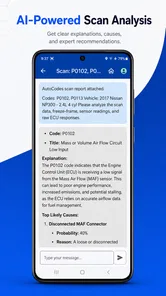
The central appeal is straightforward: connect the information from an OBDII diagnostic process with a conversational explanation. Instead of searching a fault code through scattered forum posts, I can use a dedicated automotive tool to ask what the code generally points toward, what symptoms may accompany it, and which checks make sense before replacing parts. That workflow is especially helpful when the code itself is too broad to identify a single failed component.
For example, a check-engine light may be caused by a sensor, wiring, an air leak, fuel delivery, or a problem elsewhere in the same system. A basic code lookup can tell me the official description, but it rarely tells the whole story. The chat format is more useful when I provide context such as the vehicle symptoms, whether the light is steady or flashing, and whether the issue appeared after maintenance. The quality of the answer depends on the quality of those details, but the conversation encourages a more complete description than a one-line search normally does.
I would describe the app as a diagnostic companion rather than a repair authority. It can help organize my thinking, explain terminology, and suggest a sensible order for checks. It should not be treated as proof that a particular sensor or component is defective. That distinction matters because replacing the part named in a code is often the most expensive way to troubleshoot a vehicle.
What the current version does well
Version 2.5.3 presents AutoCodes Tech as a focused product rather than a general car ownership app. Its identity is built around OBDII troubleshooting and AI-assisted conversation, which keeps the experience relevant when I am dealing with a warning light or a fault-code question. I do not have to sort through fuel prices, route planning, vehicle classifieds, or unrelated maintenance content before reaching the problem I want to understand.
The conversational angle is particularly useful for beginners. Automotive terms can be intimidating, especially when a code description uses language that sounds more precise than it really is. Asking a follow-up question lets me request a simpler explanation, compare possible causes, or clarify what a suggested check involves. That is more flexible than a static list of definitions and makes the app easier to use when my knowledge is limited.
More From Our News Desk

 Gmail
GmailGmail in a Busy Inbox: Who Benefits Most?
From first account to crowded workday, Gmail earns its place through dependable search and flexible sorting—but its best fit depends on how much inbox maintenance you can tolerate.

 Prime Video
Switching to Prime Video: What Changes in Your Viewing Routine
Prime Video can make a compelling second home for streaming, but switching means learning a different catalog, rental layer, and route from browsing to playback.

 Universal TV Remote Control
Universal TV Remote Control Works Best as a Reliable Backup
A phone remote earns its place through quick setup and reliable habits. Here is how to get more from Universal TV Remote Control—and where its limits show.

 Weather - By Xiaomi
Weather by Xiaomi Review: Clear at a Glance, Less Clear Up Close
Xiaomi’s weather app makes everyday forecasts quick to scan, but its calm surface can leave useful details and recovery paths harder to find than they should be.

 X
XX Under Pressure: Can It Recover When Posting Goes Wrong?
A resilience-focused review of X, examining setup, mistaken posts, interruptions, weak connections, and the gaps that matter when recovery needs to be dependable.

 Clash of Clans
Clash of Clans Is Won Between the Battles
Its raids are quick; its community is a long-term project of coordination, teaching, rivalry, and shared responsibility—with all the friction that entails.
Latest News



Experienced DIY users may get value from a different part of the same design. Rather than asking only what a code means, I can use the chat to build a troubleshooting sequence. I might begin with the code, add the vehicle’s symptoms, mention recent work, then ask which basic checks should come before any purchase. This does not replace a service manual, wiring diagram, or multimeter, but it can help me avoid jumping randomly between possibilities.
The app’s free entry point also lowers the barrier to trying it. Someone who only occasionally sees a dashboard warning does not need to commit to a specialist subscription before finding out whether an AI diagnostic conversation fits their habits. The optional purchases mean that some capabilities may sit behind paid items, so I would check what is included before relying on it as my only troubleshooting resource.
A realistic driveway scenario
Imagine I am driving home and the check-engine light comes on, but the car still feels normal. I can first record the exact symptoms instead of immediately clearing the light. After reading the code with compatible diagnostic equipment, I can enter the code into AutoCodes Tech and describe when it appeared, whether the engine idles normally, and whether fuel economy or starting behavior changed.
The useful next step is not simply accepting the first explanation. I would ask the app to separate likely causes from less likely ones, identify checks that require no parts, and point out signs that would make continued driving unwise. I could then inspect a connector, look for an obviously loose hose, check whether recent work disturbed anything, or compare the suggested sequence with the vehicle’s service information.
That workflow gives the app a practical role: it helps me move from anxiety to an organized list of questions. If the light is flashing, the vehicle is losing power, the engine is overheating, or there are strong mechanical symptoms, I would stop treating the app as a casual guide and seek professional assistance. An AI explanation cannot inspect the car, verify a measurement, or judge a dangerous condition from a chat alone.
Three ways to get more from the chat tool
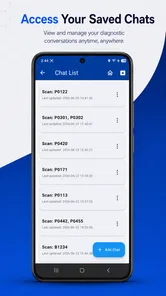
My first tip is to treat every conversation as a diagnostic record rather than a single search. Start with the code, then add symptoms, recent repairs, mileage context if relevant, and what has already been checked. This reduces the chance of receiving a generic answer and makes later follow-up questions more meaningful. If I only paste a code, I should expect a broad explanation rather than a confident diagnosis.
Second, ask for tests in an order that minimizes unnecessary spending. A useful prompt is to request the simplest visual, connection, fuse, hose, or basic measurement checks before replacing a component. This is an important trade-off: the app may help me identify a sensible path, but I still need the correct tools and the vehicle-specific procedure to perform each test safely.
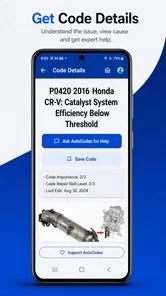
Third, ask the app to distinguish a code’s system description from the actual failed part. That distinction is easy to overlook. A code associated with an oxygen-sensor circuit, for instance, does not automatically prove that the sensor itself needs replacement; wiring, power, grounds, exhaust leaks, or control issues can also matter. Making the app explain that difference turns it into a better learning aid and reduces parts-swapping.
Where it compares with familiar alternatives
The usual alternative is a search engine. Searching can produce more variety, including repair manuals, owner forums, technical bulletins, and videos, but the information is uneven and often disconnected from the details of my vehicle. AutoCodes Tech is more convenient at the beginning because I can keep the code, symptoms, and follow-up questions in one conversation. The trade-off is that a chat response may be less authoritative than a vehicle-specific factory procedure.
Another alternative is a dedicated code reader app supplied with an OBDII adapter. Those tools may be better for live data, clearing codes, viewing sensor readings, or monitoring vehicle parameters, depending on the hardware and software involved. AutoCodes Tech should not be chosen on the assumption that an AI chat alone provides the same depth as a full scan tool. Its strength is interpretation and guided questioning, not automatically turning a phone into professional diagnostic equipment.
Repair videos and owner forums remain valuable when I need to see a component’s location or learn how a particular model commonly fails. They can also reveal practical details that a general AI answer may miss. However, they take longer to filter and may encourage me to copy a repair that does not match my vehicle. I see AutoCodes Tech as a useful first layer before those sources, followed by model-specific documentation when the job becomes serious.
What has changed, who benefits, and what still needs care
The move to the current version, 2.5.3, is relevant mainly because it identifies the product readers are using today. I would not interpret the version number alone as evidence of a particular feature or performance improvement. What I can judge from the current experience is that the app’s direction remains centered on combining automotive code help with AI conversation, rather than expanding into an unrelated collection of driving tools.
For existing users, that focused direction is a positive if their main need is explaining fault codes and planning initial checks. A mechanic can use the chat to frame questions for a customer or organize a diagnostic discussion, while a DIY owner can use it to translate unfamiliar language before opening a manual. The app is also approachable for someone who does not want to learn a complex scan-tool interface just to understand one warning light.
There are still important limitations. AI can sound certain even when the available information is incomplete, and automotive faults often overlap. A code may identify a monitored circuit without identifying the failed item. Advice can also become less useful if I omit the vehicle context, misread the code, or describe symptoms inaccurately. I would verify any repair plan against reliable vehicle-specific documentation and use proper safety practices around a running engine, raised vehicle, fuel system, or electrical system.
The purchase model deserves attention as well. Although the app is free to install, optional items cost between $0.99 and $4.99. That is not automatically a problem, but it means I should understand which parts of the experience are available without payment and whether a paid item is worthwhile for my pattern of use. Occasional users may be satisfied with limited troubleshooting conversations, while frequent DIY users should compare the cost with a dedicated scan tool, repair database, or manual they already trust.
I would skip this app if I want a complete professional diagnostic suite, guaranteed vehicle-specific repair instructions, or a substitute for hands-on training. It is also not the right choice for someone who expects a code to produce a definitive part recommendation without any testing. In those situations, a workshop-level scanner, manufacturer documentation, or an experienced technician is the better investment.
On the other hand, I would recommend trying it if I regularly face unfamiliar OBDII codes, want explanations in plain language, or tend to search widely without knowing which checks should come first. Its best audience is the careful owner who uses technology to improve decisions, not the impatient owner looking for permission to replace the first component mentioned.
Questions I would consider before relying on it
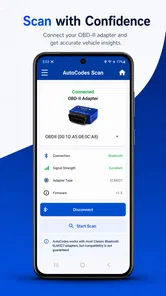
Do I need an OBDII adapter? I would not assume that installing an AI troubleshooter means the phone can read the vehicle by itself. The app’s value is in troubleshooting and conversation, while the actual way I obtain a code depends on the diagnostic equipment and workflow available to me. I would confirm compatibility and avoid buying an adapter solely on the expectation that every vehicle and every function will work identically.
Can it tell me whether the car is safe to drive? It can help me think through symptoms and warning signs, but I would not use a chat response as a safety certification. A flashing warning light, severe misfire, overheating, brake concern, loss of steering assistance, smoke, or unusual mechanical noise deserves a cautious decision based on the vehicle’s manual and professional inspection.
Is it useful without much mechanical knowledge? Yes, provided I ask clear questions and treat the answers as guidance. The plain-language conversation can make a code less mysterious, but beginners should resist skipping the verification stage. The most useful beginner workflow is to learn what the system does, identify safe observations, and then decide whether the next step is within their ability.
Can a mechanic use it professionally? It may be helpful for brainstorming, explaining possibilities to a customer, or creating an initial checklist. I would still keep a proper scan tool, service information, test equipment, and documented procedures at the center of professional work. The app can support reasoning, but it should not become the evidence behind a repair decision when measurements are available.
What should I watch as the app develops? I would look for clearer separation between general code education and vehicle-specific diagnosis, transparent explanations of what information an answer is based on, and a smooth way to preserve useful troubleshooting context. Those improvements would matter more to me than simply adding more conversational polish. For an automotive tool, trust grows when suggestions are easy to verify and uncertainty is communicated plainly.
My recommendation
AutoCodes Tech is a promising, focused tool for the first stage of vehicle troubleshooting. I like it because it encourages questions instead of immediately pushing a part replacement, and because the chat format is less intimidating than a dense diagnostic reference. The app is particularly worthwhile for DIY users who want help interpreting OBDII information and building a sensible checklist.
My recommendation comes with a clear boundary: use it to understand, organize, and investigate—not to declare a final diagnosis. Keep model-specific repair information nearby, verify important claims with measurements, and escalate serious symptoms to a qualified professional. With that mindset, the free app from AutoCodes.com can be a practical addition to a toolbox, especially for the moment when a dashboard light appears and I need a clearer next question.
AutoCodes Tech Frequently Asked Questions
Can I use AutoCodes Tech with an OBDII scanner or vehicle diagnostic adapter?
AutoCodes Tech is described as an AI OBDII troubleshooter and chat tool for mechanics and DIY users. Before downloading, consider whether you want help interpreting automotive issues through an app or need a tool that connects directly to a scanner or adapter. Check the app’s current description for the functions available to you, and follow your vehicle and diagnostic-device instructions when carrying out checks.
Who is AutoCodes Tech designed for?
AutoCodes Tech is intended for mechanics and DIY users looking for automotive troubleshooting support. It may suit someone who wants to explore vehicle-related information from a mobile device, whether they are learning about a problem or working through a repair. As with any diagnostic resource, users should take care with safety-critical work and seek qualified help when a repair is beyond their experience.
What is AutoCodes Tech and what can I use it for?
AutoCodes Tech is designed to help users access automotive-related information and tools from a mobile device. Its store summary describes it as an AI OBDII troubleshooter and chat tool for mechanics and DIY users. Depending on the version and available services, it may provide vehicle codes, diagnostic references, technical details, or other resources useful for understanding car problems. Before downloading, check the app description carefully to confirm that its functions match your vehicle, region, and intended use.
Is AutoCodes Tech compatible with my Android or iPhone?
Compatibility depends on the operating system, device model, and the version of AutoCodes Tech currently available in the official store. The Android version requires Android 7.0 or later; older phones may not support every feature. If you use an iPhone, check the Apple App Store listing for its requirements before installation. Ensure your device has enough storage and a stable internet connection for the best experience.
Does AutoCodes Tech provide accurate diagnostic or automotive information?
AutoCodes Tech can be a useful reference for identifying and understanding automotive codes, but its information should not be treated as a complete replacement for professional diagnosis. Vehicle systems vary by manufacturer, model, engine, and production year. Always verify important findings with the vehicle’s service manual or a qualified mechanic, especially before replacing parts or carrying out repairs that could affect safety.
Pros
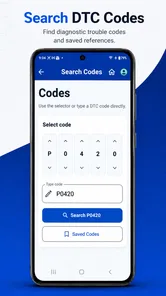
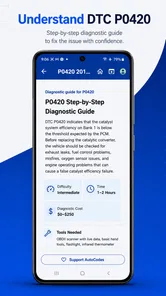
- Quick access to vehicle diagnostic codes and technical references.
- Useful for mechanics
- technicians
- and experienced DIY car owners.
- Search tools make finding specific codes more convenient.
- Can help identify possible causes before visiting a repair shop.
- Practical reference to keep available during roadside troubleshooting.
Cons
- Coverage may vary depending on vehicle make
- model
- and year.
- Technical explanations can be difficult for beginners to understand.
- Some information may require verification with official service manuals.
- A compatible scanner may still be needed for accurate vehicle diagnosis.
- App usefulness depends on regular updates for newer vehicles and codes.











