

Auto Monkey
- 41.00
- 3.7
- Installs
- 10.00K
- Price
- Free

Screenshots
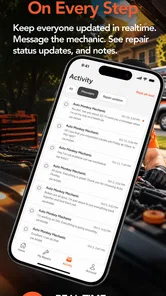
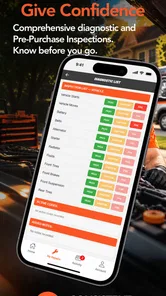
Analysis by Reviewed
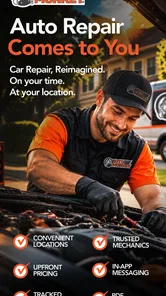
When a car problem appears at the worst possible moment, the difficult part is often not understanding that something is wrong. It is finding a practical way to get help without rearranging the entire day around a repair shop. Auto Monkey, an Auto & Vehicles app from Auto Monkey, is built around that exact situation: bringing a mobile mechanic to the customer instead of making the customer bring the vehicle to a garage.
I approached it as a service-request tool rather than as a diagnostic app. That distinction matters. It is most useful when you already know that your vehicle needs attention and want to begin arranging assistance from your phone. It is less suitable when you need a detailed mechanical diagnosis, a guaranteed emergency response, or a complete replacement for a trusted local workshop.
From a car problem to a mobile repair request
The starting condition is easy to imagine. Your car will not start in the driveway, a warning light has appeared before a trip, or a small issue has become too inconvenient to ignore. In a normal situation, you might search for nearby garages, call several businesses, explain the same symptoms repeatedly, and then work out how to move the vehicle. Auto Monkey changes the first step by putting the mobile-mechanic idea at the center of the process.
That makes the app particularly appealing for people who value convenience more than browsing a long list of traditional repair shops. I found the concept easy to understand: instead of treating the garage as the fixed destination, the app treats the vehicle’s location as the starting point. That is a meaningful difference for a car that cannot safely be driven.
The app is free, carries an Everyone age rating, and works on devices using Android 6.0 or later. Those details make it approachable for a broad range of drivers, including someone using an older phone. Its current version is 3.6.0, so I would still keep the application updated before depending on it for an important repair request.
What I would prepare before opening it
The smoother workflow begins before the first tap. I would have the vehicle’s exact location ready, along with its make, model, approximate year, registration details if relevant, and a short description of the problem. I would also note whether the car starts, whether it can move safely, and whether the issue appeared suddenly or gradually.
This preparation is more important than it may sound. “The car is broken” gives a mechanic very little to work with, while “the engine turns over but does not start after the warning light appeared” gives a much clearer starting point. A mobile service may be able to handle a straightforward repair at the vehicle, but a vague request can create extra messages, delays, or an unsuitable visit.
More From Our News Desk

 Gmail
GmailGmail in a Busy Inbox: Who Benefits Most?
From first account to crowded workday, Gmail earns its place through dependable search and flexible sorting—but its best fit depends on how much inbox maintenance you can tolerate.

 Prime Video
Switching to Prime Video: What Changes in Your Viewing Routine
Prime Video can make a compelling second home for streaming, but switching means learning a different catalog, rental layer, and route from browsing to playback.

 Universal TV Remote Control
Universal TV Remote Control Works Best as a Reliable Backup
A phone remote earns its place through quick setup and reliable habits. Here is how to get more from Universal TV Remote Control—and where its limits show.

 Weather - By Xiaomi
Weather by Xiaomi Review: Clear at a Glance, Less Clear Up Close
Xiaomi’s weather app makes everyday forecasts quick to scan, but its calm surface can leave useful details and recovery paths harder to find than they should be.

 X
XX Under Pressure: Can It Recover When Posting Goes Wrong?
A resilience-focused review of X, examining setup, mistaken posts, interruptions, weak connections, and the gaps that matter when recovery needs to be dependable.

 Clash of Clans
Clash of Clans Is Won Between the Battles
Its raids are quick; its community is a long-term project of coordination, teaching, rivalry, and shared responsibility—with all the friction that entails.
Latest News



I would also take a few clear photographs when they are safe to capture. A picture of visible damage, a dashboard warning, or a flat tire can communicate context more quickly than a long explanation. Photos do not replace a professional assessment, but they can help the person receiving the request understand what kind of visit might be needed.
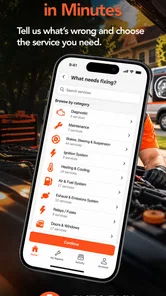
The first stage: describing the need
Once I opened Auto Monkey, I treated the request as a handoff from driver to mechanic. The quality of that handoff depends on how accurately the driver explains the situation. The app can make the connection more convenient, but it cannot turn an uncertain symptom into a confirmed diagnosis.
For a routine issue, I would describe the symptom, the vehicle’s condition, and the preferred timing in plain language. For example, I might explain that the battery seems weak, the car is parked at home, and the vehicle is needed later in the day. That gives the service a useful combination of problem, location, and urgency without pretending to know the exact failed component.
This is one of the app’s practical strengths: it encourages me to think about the repair as a service visit rather than simply a search result. Instead of collecting phone numbers and starting over with each call, I can organize the initial request around the actual vehicle and its immediate situation.
Location is part of the repair
With a mobile mechanic, location is not a minor detail. A driveway, office parking area, roadside shoulder, and underground car park all create different working conditions. I would make the location as precise as possible and add useful access information, such as a gate, parking level, or landmark, if the request process allows it.
This is also where expectations need to stay realistic. A mechanic arriving at the right address does not guarantee that every repair can be completed there. Some jobs need specialist equipment, a controlled workshop environment, replacement parts, or more space than a roadside visit provides. Auto Monkey’s central idea solves the transport problem, but it does not remove the physical limits of mobile repair.
The second stage: waiting for the service handoff
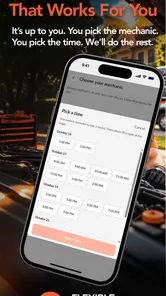
After the request is sent, the next important moment is the handoff. The app’s value is not only the form or screen used to describe the issue; it is the connection between the driver and the person who may carry out the work. I would watch for any follow-up communication and keep my phone available, especially when the vehicle is in an awkward or unsafe location.
Before agreeing to a visit, I would make sure the mechanic understands the symptom, the exact location, and whether the vehicle can be moved. I would also ask practical questions about what the visit is expected to cover, what happens if the problem requires a workshop, and how any parts or additional work will be handled. Asking these questions early prevents the common disappointment of expecting a complete repair when the visit can only provide an inspection or temporary solution.
This is a useful trade-off compared with calling a traditional garage. A garage may offer a clearer established process once the vehicle is inside, while a mobile service can save the effort of arranging transport. The better choice depends on the vehicle’s condition and the complexity of the job, not simply on which option feels more modern.
A realistic everyday scenario
Imagine leaving work and finding that the car will not start in the office car park. The first impulse might be to call a friend, search for a tow truck, or ask a nearby garage whether it can collect the vehicle. With Auto Monkey, I would begin by recording the exact parking location, checking whether the dashboard lights appear, and writing a short description of what happened.
I would then submit the request and remain near the vehicle if it were safe to do so. If a mechanic could attend and the cause were something manageable on-site, the main benefit would be avoiding a separate trip to a garage. If the vehicle needed towing or workshop equipment, the app could still serve as the first contact point, but I would be prepared for a second handoff rather than assuming the initial visit would end the problem.
That scenario shows the app at its best. It reduces the friction between noticing a vehicle problem and asking for assistance. It does not promise that every repair is quick, inexpensive, or possible in a car park, and I appreciate that distinction because it keeps the tool grounded in the real constraints of vehicle maintenance.
Where the workflow can break
The first weak point is diagnosis. Drivers often describe symptoms using everyday language, and the same symptom can have several causes. A “strange noise” might be minor or urgent; a warning light might relate to a problem that needs immediate attention. I would never use the app as a reason to continue driving a vehicle that seems unsafe.
The second weak point is availability. A mobile-mechanic model depends on the right person being able to reach the vehicle at a suitable time. If the request is urgent, remote, outside normal working patterns, or unusually specialized, the convenient first step may not lead to a fast resolution. In those cases, a roadside-assistance provider or a garage with towing capacity may be a better first choice.
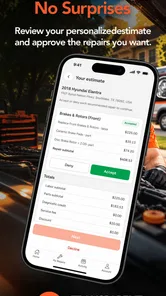
The third weak point is the boundary between request and completed repair. A service app can help start the conversation, but the final outcome still depends on the mechanic’s assessment, required parts, access to the vehicle, and the nature of the fault. I would treat the first response as an opportunity to clarify the job, not as a guarantee that the original description has already been accepted as the final diagnosis.
How it compares with ordinary alternatives
Compared with searching online for nearby garages, Auto Monkey offers a more focused route for people who want help brought to the vehicle. A search engine gives more choice, but it also leaves the driver to compare businesses, make calls, describe the problem, and decide how to transport the car. Auto Monkey’s appeal is the reduced number of separate decisions at the beginning.
Compared with a traditional workshop, the mobile approach is strongest when the vehicle is difficult to move or when the repair may be convenient to perform where the car is parked. A workshop remains the stronger option for extensive mechanical work, jobs requiring a lift, or situations where the vehicle needs a full inspection and access to a broad range of tools.
Compared with a roadside-assistance service, Auto Monkey feels more oriented toward arranging a mechanic rather than simply moving a disabled vehicle. If the immediate priority is safety on a busy road, towing, or rapid recovery, I would prioritize the service designed for that emergency. If the car is safely parked and the goal is to arrange mechanical attention, the mobile-mechanic route makes more sense.
Compared with asking a friend who knows cars, the app offers a more direct path to professional help, but it cannot provide the personal trust that comes from an established relationship. I would still keep contact details for a mechanic or workshop I know, especially for recurring maintenance. Auto Monkey is most valuable as an additional route when convenience and location are the main problems.
Small workflow choices that improve the outcome
The most useful habit is to separate symptoms from guesses. Tell the mechanic what happened, what you observed, and what the vehicle can or cannot do. Avoid presenting a suspected failed part as a confirmed fact. This gives the professional room to diagnose properly and reduces the chance that the request is framed around the wrong repair.
A second practical habit is to make the handoff easy at the destination. If the car is behind a locked gate or in a multi-level car park, arrange access before the mechanic arrives. If someone else will meet the mechanic, make sure that person knows the symptoms and has permission to discuss the vehicle. These details are easy to overlook when the focus is on the breakdown itself.
A third is to define the desired outcome before the visit. Sometimes the goal is simply to get the car started; sometimes it is to identify the fault; sometimes it is to complete a repair. Those are different expectations. Being clear about the goal helps me judge whether a mobile visit is enough or whether I should arrange a workshop appointment at the same time.
A fourth is to keep a written record of what was discussed. I would note the reported symptom, any suggested next step, and whether the vehicle was considered safe to drive. This is not a special feature claim about the app; it is a sensible way to avoid confusion when a repair turns into a second visit or a workshop handoff.
Who will get the most from it
Auto Monkey is a good fit for drivers who dislike the logistics of taking a car to a garage, people with limited access to towing, and households that need a flexible first step when a vehicle is stuck at home. It can also be useful for someone who wants to request assistance without spending the first part of the process phoning several workshops.
It is less suitable for someone who expects an instant emergency response, wants a complete price before any inspection, or needs advanced repairs that are clearly workshop-based. Drivers who already have a trusted mechanic may prefer to contact that person directly, particularly when the vehicle has a complicated history or an existing maintenance plan.
The app’s public reach is still modest but meaningful: it has passed ten thousand installs and holds a 3.7 average from around eighty ratings, with reviews numbering in the low forties. I read that as evidence of real interest rather than a reason to assume every request will feel identical. A rating in that range suggests a service worth trying with sensible expectations, not one I would rely on blindly for a high-risk emergency.
My final view after following the full journey
Auto Monkey makes a clear and useful promise through its basic workflow: start with the vehicle where it is, describe the problem, connect with mobile mechanical help, and decide whether the issue can be handled on-site. I like that focus because it addresses a real inconvenience that ordinary garage searches often leave unresolved.
Its strongest result is not that it magically fixes a car from a phone. Its strength is reducing the distance between a driver with a vehicle problem and a mechanic who may be able to come to that vehicle. The quality of the outcome depends on accurate details, safe expectations, communication, and the type of repair involved.
For a safely parked car and a problem that may be manageable outside a workshop, I would recommend giving it a try. I would prepare the vehicle information first, describe symptoms rather than assumptions, confirm the practical details before the visit, and keep a workshop or roadside alternative in mind. In my experience, the app works best as a convenient first handoff, not as a replacement for every form of automotive assistance.
Developed by Auto Monkey and offered free for Everyone-rated users, it is an approachable option for drivers who want mobile mechanical help to come to them. Just remember that convenience starts the repair process; it does not remove the need for professional judgment when the vehicle’s fault is serious, unclear, or beyond what can reasonably be done at the roadside.
Auto Monkey Frequently Asked Questions
Does Auto Monkey bring a mechanic to my location?
Auto Monkey is described as an app that brings mobile mechanics to you, with the aim of providing fast fixes without lines. It is intended for people looking for vehicle help at their location rather than having to visit a service counter. Before downloading, consider whether this kind of mobile mechanic service is what you need and check that the app is available for your device.
What is Auto Monkey and what can I use it for?
Auto Monkey is an app in the Auto & Vehicles category, developed by Auto Monkey. Its store summary says it brings mobile mechanics to you, with fast fixes and no lines. It is therefore aimed at users seeking help with vehicle-related needs. Check the app’s details and service options to see whether they match what you are looking for before you download it.
Is Auto Monkey free to download?
Auto Monkey is free to download. That makes it possible to try the app without paying an upfront download price. Before arranging any service through it, review the terms and any charges shown for the service itself, since the free download does not necessarily mean that vehicle work is free. The app is rated for Everyone, so it is intended for a general audience.
Is Auto Monkey available for my Android phone?
Auto Monkey requires Android 6.0 or later, so check your phone’s operating system before downloading. The app’s current version is 3.6.0, and it was released on January 15, 2021. If your device meets the minimum Android requirement, you can check the app page on your device to confirm compatibility and proceed with the installation.
Is Auto Monkey safe to install and use on my phone?
Before installing Auto Monkey, download it only from a reputable source and check the developer name, permissions, user reviews, and update history. Automation apps often require accessibility or other system permissions so they can interact with the screen, which can create privacy and security concerns if the app is untrustworthy. Avoid granting access to sensitive services unless you understand why it is required and how your data is handled.
Pros
- Simple interface that is easy to understand for first-time users.
- Lightweight design should run smoothly on many Android devices.
- Quick access to the app’s main tools without complicated menus.
- Useful for casual users seeking basic automation features.
- Can reduce repetitive taps during routine mobile tasks.
Cons
- Automation may require accessibility permissions that concern privacy-minded users.
- Compatibility can vary between Android versions and device brands.
- Some features may need careful setup before working reliably.
- Background operation could increase battery usage during extended sessions.
- Limited usefulness if your device restricts background activity or permissions.











