

Auto Agent
- 1.10K
- 4.8
- Installs
- 100.00K
- Price
- Free

Screenshots
Analysis by Reviewed
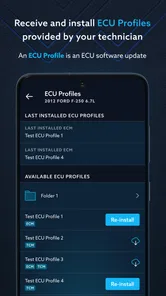
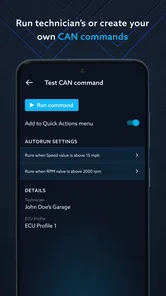
I approached Auto Agent as the kind of tool you open when a vehicle problem needs more than a guess. It is an Auto & Vehicles app from EZ LYNK, designed to connect vehicle monitoring, diagnosis, and reprogramming in one place. That combination makes it more serious than a simple fuel log or maintenance reminder, because the app can sit close to decisions that affect how a vehicle behaves.
My overall impression is that it makes the most sense for drivers who already use compatible EZ LYNK hardware or work with a technician who does. If you only want basic reminders, trip tracking, or a generic dashboard, this is probably more specialized than you need. If you want a practical digital window into vehicle information and have a clear reason to diagnose or reprogram a supported vehicle, its focused approach is much more appealing.
Trust starts with knowing what the app is allowed to do
Trust is especially important here because monitoring is one thing, diagnosis is another, and reprogramming is more consequential still. I would not judge this app only by how polished its screens look. I would first check which vehicle connection is being used, what account is required, what information is shown before an action is confirmed, and whether I can stop before making a change.
The developer is EZ LYNK, and the app has been available since September 20, 2016. Its long presence in the category gives it a recognizable history, but age alone is not a substitute for checking current behavior. The version shown is 1.35.1, so I would still read the current permission prompts and account screens on my own phone rather than assuming an older experience is unchanged.
Auto Agent is free to install, with optional purchases listed from $1.99 to $199.99 per item. That pricing detail matters because the app itself is not necessarily the entire cost of using a vehicle-diagnostic setup. Before committing time to it, I would identify which parts of the workflow require compatible equipment, a service relationship, or a purchase inside the app. A free download can still lead into a specialized paid ecosystem, and it is better to understand that before connecting a vehicle.
The public response is encouraging: the app carries a 4.8 average from around three thousand ratings, with roughly one thousand one hundred written reviews and more than one hundred thousand installs. I see that as a useful confidence signal, not proof that every vehicle, phone, or connection will behave identically. Diagnostic tools are unusually dependent on compatibility and setup, so personal fit matters more than a high score alone.
What I would verify before the first connection
I would begin with the vehicle and connection path, not with the app’s most advanced option. Auto Agent is not a universal replacement for every scan tool. Its value depends on whether the vehicle, adapter, and account arrangement fit together. If a mechanic or installer recommended it, I would ask exactly what I am expected to monitor myself and which actions should remain in the shop.
More From Our News Desk

 Gmail
GmailGmail in a Busy Inbox: Who Benefits Most?
From first account to crowded workday, Gmail earns its place through dependable search and flexible sorting—but its best fit depends on how much inbox maintenance you can tolerate.

 Prime Video
Switching to Prime Video: What Changes in Your Viewing Routine
Prime Video can make a compelling second home for streaming, but switching means learning a different catalog, rental layer, and route from browsing to playback.

 Universal TV Remote Control
Universal TV Remote Control Works Best as a Reliable Backup
A phone remote earns its place through quick setup and reliable habits. Here is how to get more from Universal TV Remote Control—and where its limits show.

 Weather - By Xiaomi
Weather by Xiaomi Review: Clear at a Glance, Less Clear Up Close
Xiaomi’s weather app makes everyday forecasts quick to scan, but its calm surface can leave useful details and recovery paths harder to find than they should be.

 X
XX Under Pressure: Can It Recover When Posting Goes Wrong?
A resilience-focused review of X, examining setup, mistaken posts, interruptions, weak connections, and the gaps that matter when recovery needs to be dependable.

 Clash of Clans
Clash of Clans Is Won Between the Battles
Its raids are quick; its community is a long-term project of coordination, teaching, rivalry, and shared responsibility—with all the friction that entails.
Latest News



I would also review the sign-in flow carefully. An account can be useful when vehicle information needs to follow a service relationship, but it introduces another place where access must be managed. I would use a unique password, keep recovery details current, and avoid leaving the account signed in on a phone that other people regularly use. Those are simple controls, but they matter more when the app is connected to a real vehicle rather than a disposable project.
On Android, the stated minimum operating system is Android 6.0. That broad compatibility is convenient for people using an older phone as a dedicated vehicle screen, although I would still prefer a device that receives security updates and has a stable Bluetooth or data connection. A phone that is technically supported but unreliable in the car can make a diagnostic workflow feel broken even when the app itself is functioning.
Monitoring is useful when it answers a specific question
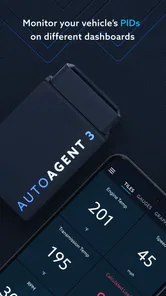
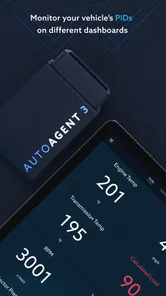
The monitoring side is where I would expect the least risk and the quickest everyday benefit. Instead of opening the app simply to watch numbers move, I would use it with a question in mind: did something change after maintenance, is a warning condition returning, or does the vehicle behave differently under a particular load?
That approach prevents a common mistake with vehicle apps: collecting information without knowing what action it should lead to. A screen full of readings can look reassuring while still leaving the driver unsure what matters. I find Auto Agent more useful when I already know which symptom I am investigating or which value a technician asked me to observe.
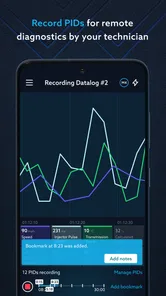
A realistic example would be a vehicle that occasionally shows a warning during a long drive but seems normal by the time it reaches a workshop. I could use the app during a safe stop, record what the vehicle is reporting, and share that context with the technician instead of relying on memory. I would not operate the phone while driving, and I would never treat a live reading as permission to ignore a warning light or an unusual sound.
Another practical use is checking the vehicle after service. If a technician has made a change and explained what should improve, monitoring can help me notice whether the same symptom returns. The important trade-off is that observation is not the same as diagnosis. The app can make information easier to access, but it does not turn every driver into a trained mechanic.
Diagnosis needs restraint, not just curiosity
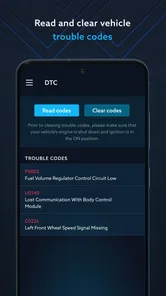
Diagnosis is more valuable when it narrows a conversation with a professional. I would use Auto Agent to gather clues, then compare those clues with the vehicle’s symptoms, recent work, and the technician’s advice. I would be cautious about clearing a fault merely to make a warning disappear, because removing the visible symptom can also remove useful evidence.
This is one of the less obvious workflow choices that can save frustration: capture the condition before changing anything. If the app presents a fault or abnormal reading, I would note when it appeared, what the vehicle was doing, and whether the engine was cold or warm. Only after that would I consider clearing or resetting anything, and only if I understood why the action was appropriate.
I would also separate intermittent problems from confirmed mechanical failures. A single event may point toward a connection issue, a sensor concern, or a condition that needs more testing. Auto Agent can help organize the digital side of that investigation, but it should not be used as a shortcut around physical inspection. For brakes, steering, overheating, fuel leaks, or any safety-critical symptom, I would stop treating the app as the main answer and arrange proper service.
Compared with a generic code-reader app, the attraction here is the closer relationship between the app, its vehicle connection, and reprogramming-oriented work. Compared with a professional scan tool, the limitation is that I would not expect a phone interface to replace the breadth, training, and responsibility of a workshop environment. Auto Agent sits between those worlds: more purposeful than a basic dashboard app, but still dependent on the surrounding hardware and human judgment.
Reprogramming is the point where user choice matters most
Reprogramming is the feature that changes my standard for caution. I would want a clear reason for every change, a stable connection, enough battery in the phone, and a vehicle that is not needed immediately afterward. I would not start a programming operation in a driveway just before an important trip, and I would avoid interrupting the process because another app sent a notification.
The safest habit is to treat reprogramming as a planned service event rather than an experiment. I would confirm the intended vehicle, verify that the phone is connected to the correct equipment, and read every confirmation screen instead of tapping through it. If a technician supplied the procedure, I would follow that procedure rather than improvising from a forum comment or a video made for a different vehicle.
This is also where visible user controls matter. Before accepting an action, I want to know whether the app identifies what will change, whether it asks for confirmation, and whether the account shows which vehicle is selected. I would not assume that an option is safe simply because it is available in the interface. Availability and suitability are different things.
For an enthusiast who understands the vehicle and has a supported setup, this focused access can be genuinely convenient. For a driver who cannot explain what a programming action is meant to accomplish, I think a qualified technician is the better option. The app’s strength is access; its weakness is that access can encourage overconfidence.
Data-sensitive moments deserve deliberate choices
Because Auto Agent is tied to a vehicle and an account, I would pay attention whenever the app asks me to connect, identify, share, or authorize something. I would read the permission dialog in full and grant only what is needed for the task I am performing. If a request seems unrelated to monitoring, diagnosis, or the connection method, I would pause and investigate before accepting it.
I would also think about who can see the vehicle information in practice. A shared family phone, a workshop tablet, or an account used by several people can create access concerns even when the app is working normally. I would sign out on devices I no longer control, remove old vehicle connections where the interface allows it, and avoid handing over an unlocked phone with the account open.
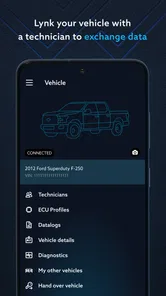
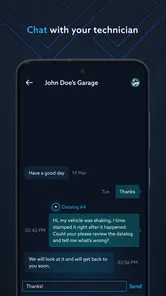
When sending diagnostic information to a technician, I would share the smallest useful amount. A screenshot or reading that explains a fault may be enough; there is no reason to forward unrelated account details or personal information visible elsewhere on the screen. This is a simple but important distinction between using the app as a service tool and treating it as a permanent record of every vehicle interaction.
I would look for account controls that let me review connected vehicles, change credentials, and manage access. I would also check the app’s privacy and permission pages directly on the device, because those are the places where the choices available to me are most visible. I do not treat a general promise of security as a replacement for practical controls I can actually use.
Where the app fits into daily ownership
For normal ownership, I would use Auto Agent in short, purposeful sessions rather than leaving it open constantly. Before a trip, I might check a known concern while parked. After service, I might review the vehicle once the technician has explained what to watch. During a recurring issue, I might gather consistent observations to make the next workshop visit more productive.
That workflow is better than turning the app into a source of anxiety. Vehicle data can tempt drivers to react to every small fluctuation, especially when they do not know which readings are meaningful. I would establish a baseline with help from someone who understands the vehicle, then pay attention to changes that match a real symptom.
The app is also not the right choice for someone who wants a broad ownership organizer. It is not presented as a general maintenance calendar, roadside-assistance service, insurance tracker, or navigation tool. If those are the main tasks I need, a dedicated maintenance app or the vehicle manufacturer’s own application may be more convenient. Auto Agent earns its place when monitoring, diagnosis, or reprogramming is the actual problem.
Likewise, casual drivers with no compatible connection equipment may find the first step more complicated than expected. The app can be free while the complete setup still requires decisions about hardware, service, and in-app purchases. I would not install it merely because the download costs nothing; I would install it because I have a supported vehicle and a clear use for its functions.
My cautious verdict
After looking at Auto Agent through the lens of control and responsibility, I see a focused tool rather than a universal car companion. Its best quality is that it brings monitoring, diagnosis, and reprogramming into a phone-based workflow connected to the EZ LYNK ecosystem. That can make a technician conversation more concrete and give an informed owner better visibility into a vehicle.
Its main friction is equally clear: the more powerful the action, the more the user needs compatible equipment, technical understanding, and discipline. I would not use it to guess at serious faults, erase warnings without recording them, or reprogram a vehicle casually. I would also review permissions, account access, and sharing choices before trusting it with regular use.
With that caution in place, I can recommend Auto Agent to owners and technicians who have a specific EZ LYNK-supported workflow. The app is free, rated for Everyone, and its current version is 1.35.1, but those convenient entry points do not remove the need to understand the connected setup. For a driver seeking only reminders or simple trip information, I would choose a less specialized alternative. For someone who needs informed vehicle monitoring and is prepared to stay within safe, clearly understood limits, this is a credible and purposeful choice.
My final advice is to start with observation, confirm what the readings mean, and treat every programming action as a service procedure. If the app gives you clearer evidence without encouraging risky decisions, it is doing its job well. If it makes you feel pressured to change something you cannot explain, stop and ask a qualified professional instead. That balance is the key to getting value from Auto Agent without handing over more control than you intend.
Auto Agent Frequently Asked Questions
What vehicles and devices can I use Auto Agent with?
Auto Agent is listed in the Auto & Vehicles category and is developed by EZ LYNK. Before downloading, check that your phone meets the app’s minimum operating-system requirement and that your vehicle is supported for the functions you want to use. Compatibility matters because the app’s purpose is to monitor, diagnose, and reprogram vehicles, and available capabilities can depend on the vehicle and its setup.
What is Auto Agent and what can I use it for?
Auto Agent is an automation-focused application designed to help users perform repetitive actions with less manual effort. Depending on the version and supported device, it may assist with routines such as launching apps, managing tasks, triggering actions, or organizing workflows. Before downloading, review its exact feature list, because available tools can differ between Android and iOS and may depend on system permissions.
Is Auto Agent safe to install and use?
Auto Agent can be safe when downloaded from an official store and configured carefully, but automation apps often require access to sensitive device functions. During setup, check every permission request and only enable access that is necessary for the features you plan to use. Avoid unofficial APK files, read the privacy policy, and confirm how the app handles personal data, activity information, and connected accounts.
Does Auto Agent require special permissions or accessibility access?
Many automation tools need permissions to interact with other applications, display notifications, run tasks in the background, or use accessibility features. Auto Agent’s requirements may vary according to your device and the routines you create. These permissions can be powerful, so do not approve them automatically. If a feature does not work, check the app’s permission settings and your phone’s battery-optimization restrictions.
Is Auto Agent free, or does it include subscriptions and in-app purchases?
Auto Agent is free to download, with in-app purchases ranging from around two dollars to around two hundred dollars per item. The available purchase options may affect what you can do in the app, so review the purchase details shown in your store before confirming anything. Check any recurring-payment terms and cancellation instructions carefully, and remember that uninstalling an app does not necessarily cancel a subscription.
Pros
- Automates routine tasks with minimal manual input.
- Can improve productivity by handling repetitive workflows.
- Useful for users who prefer voice- or text-based assistance.
- May reduce the need to switch between multiple apps.
- Simple concept that can help streamline everyday activities.
Cons
- Some features may require access to sensitive device permissions.
- Results can vary depending on the quality of your instructions.
- Automation may occasionally perform an unwanted action.
- Advanced capabilities could be limited by subscription plans.
- Requires a reliable internet connection for many functions.











