AR Spiders & Co: Scare friends
- 30.00
- 4.6
- Installs
- 10.00K
- Price
- $2.99

Screenshots

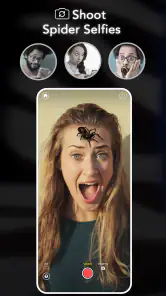
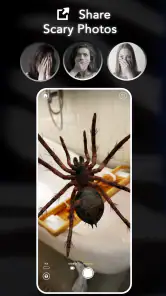
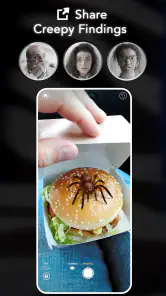
Analysis by Reviewed
I’d treat AR Spiders & Co: Scare friends as a small, social novelty rather than an app I’d open every day. Its appeal is the quick switch from an ordinary camera view to a creepy surprise you can stage for someone nearby. That makes it best suited to friends who enjoy harmless jump scares, not anyone who is genuinely afraid of insects or easily startled.
What to expect from the camera trick
The basic idea is easy to grasp: choose a creature, point the camera at a suitable spot, and place it in the scene. The fun depends less on complicated controls than on timing and framing. I’d test the shot before bringing someone into view, then keep the phone steady and leave enough of the surface visible for the creature to look as though it belongs there. A cluttered background or a rushed camera movement can make the effect less convincing.
The app’s premise also makes it different from the usual entertainment options. A funny clip or a filter is something people watch on a screen; this is a little performance built around a real person and a real setting. That can make the reaction feel more personal, but it also puts more responsibility on the person setting up the prank. I’d avoid using it on strangers, in public places where a startled reaction could cause trouble, or with anyone who has already said they dislike this kind of joke.
Network moments and recording choices
Because the experience centers on the camera and staged scenes, I’d plan the prank itself before assuming that every part of sharing or saving a clip will feel equally immediate. If you want to send a recording to someone, a weak connection may interrupt the sharing step even if you have already captured the moment. I’d keep the joke enjoyable on the spot rather than making it depend on posting or sending it afterward.
A practical approach is to decide in advance whether you want a live reaction or a clip to keep. Trying to frame the scene, watch your friend, and manage a recording at the same time can make you miss the reaction that was the point of the joke. For a group hangout, one person can handle the phone while another keeps the conversation natural; for a one-to-one prank, I’d prioritize a safe, clear setup over getting a perfect video.
How it fits everyday use
For a relaxed evening at home, this can work as a brief icebreaker: place a virtual spider on a table while a friend is settling in, then reveal the trick quickly once they react. That sort of short, controlled moment is a better fit than springing it on someone while they are walking, driving, carrying something hot, or focused on a task. The joke should never put a person or their belongings at risk.
It is also worth thinking about the audience before opening the camera. A friend who laughs at spooky films may enjoy the surprise, while someone with a strong phobia may not. If you are unsure, choose a gentler joke or a regular photo effect instead. This app’s central gag is deliberately built around creepy creatures, so it is not the right choice when you want calm, broadly appealing entertainment.
More From Our News Desk

Weather by Xiaomi Review: Clear at a Glance, Less Clear Up Close

X Under Pressure: Can It Recover When Posting Goes Wrong?

Clash of Clans Is Won Between the Battles

Android Auto Makes the Case for Quieter Car Software

MobiOffice: Transforming Mobile Productivity with Seamless Integration

EA SPORTS FC™ Mobile Soccer: Redefining Mobile Sports Gaming
Buying and device considerations
Created by Linda Schnetzinger, this is an entertainment app with a Teen age rating. It costs $2.99, so I’d consider whether I have a few people in mind who would genuinely enjoy the gag before paying. The listing shows a 4.6 average from 342 ratings and over 10K installs; those figures suggest interest, but the app’s very specific prank style matters more than popularity when deciding whether it suits your group.
Version 1.4.2 requires OS 10 or later. Before buying, I’d check that the device you plan to use meets that requirement and that its camera is comfortable to use in the places where you expect to stage a scene. It is less compelling if you mainly want a general-purpose camera editor, a large library of filters, or entertainment you can enjoy alone without involving another person.
When a setup does not go smoothly, I’d pause rather than repeatedly trying to force the prank in front of the target. Reframe the shot, find a less busy surface, and try again away from the moment you want to capture. That gives you a chance to see whether the effect is readable and avoids turning a small joke into a frustrating interruption. If the camera view or a recording is not working as expected, I would not promise myself that a network change will fix it; the more useful recovery step is to simplify the scene and decide whether the live gag is still worth doing.
Where connectivity matters
My connectivity verdict is modest: keep the experience focused on the immediate prank, and treat sending a clip as a separate step that may depend on your connection and the service you use to share it. I would not plan a gathering around an assumption that every online action will work instantly. If the network is unreliable, enjoy the reaction in person and leave sharing for later; if sharing is the main reason you want the app, a more dependable connection is part of the plan.
Let’s dive into the experience
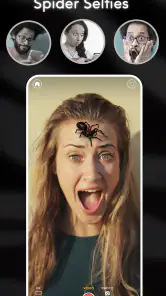
Once you fire up the app, it’s super intuitive. You select the spider or creepy critter of your choice, aim your camera at your unsuspecting target’s vicinity, and tap to place the creature. The reactions you get? Priceless! The app’s graphics are surprisingly realistic, often making even the most composed individuals jump in shock. The variety of creatures is also impressive, ranging from spiders to cockroaches and even snakes, providing ample options to suit your prankster needs.
One of the standout features is the app’s user-friendly interface. Even if you’re not tech-savvy, you’ll find it easy to navigate and set up your pranks. Plus, it’s not just about scaring people. You can also record the moments to relive the laughter or share them on social media. It’s like creating your own little viral video moment!
Why you should try it
Now, you might be wondering, why would you want to download an app just to scare people? Well, besides the obvious fun factor, it’s a great way to break the ice or add a bit of unexpected excitement to gatherings. Whether it’s a family get-together or a casual hangout with friends, the app adds an element of surprise and joy, making it a memorable experience for everyone involved.
The app is also perfect for those moments when you’re bored and looking for something to spice up your day. It takes minimal effort to set up a prank, and the payoff is always worth it. Plus, with the recording feature, you can keep a collection of hilarious memories to look back on or share with others.
Choosing the right moment and audience
I’d get the most out of this app in a familiar, low-pressure setting where everyone can see the phone and laugh once the trick is revealed. A quiet visit with a friend is more promising than a busy party: there is less background movement, and you can tell whether the person is comfortable before taking the joke further. That makes it easier to stop if the reaction is nervous rather than amused.
It can also suit a family gathering, but I wouldn’t assume that “family-friendly” means suitable for every person in the room. A younger child, an older relative who dislikes sudden scares, or a guest with an insect phobia may not enjoy the same gag as a friend who actively likes horror. I’d choose the audience first and the creature second, and avoid filming anyone who has not agreed to be recorded.
A simple workflow that keeps the prank natural
One useful trick is to separate the setup from the reveal. I’d first check the framing when nobody is watching, using an ordinary surface with a clear outline and enough space around it. Then I’d put the phone away briefly and bring it back only when there is a natural reason to use the camera. That small pause helps the prank feel less like a staged demonstration and gives me a chance to abandon it if the timing no longer feels right.
If the aim is a keepsake rather than a live reaction, I’d ask a friend to help with the phone instead of trying to do everything myself. The person holding the camera can concentrate on framing while the other keeps the conversation going. This trade-off matters: a clean recording may be nice to have, but a natural interaction is usually more enjoyable than a perfect shot that makes everyone aware of the setup.
After the reveal, I’d show the person how the effect was made rather than dragging out the deception. That turns the scare into a shared joke and gives them control over whether the moment is saved or shared. It also avoids an awkward situation where someone discovers later that their startled reaction was recorded or sent around without their consent.
How it compares with filters and prank videos
Compared with a standard camera filter, this is more focused on placing a creepy creature into a real scene than on polishing a selfie or changing your appearance. A filter is usually the better pick when everyone wants to pose together or make a playful picture without startling anyone. A prank video is easier when you want a joke that works without involving a person in the room, but it does not create the same face-to-face reaction.
The strength here is also its limitation: the experience depends on a willing audience and a believable setting. It is not a replacement for a general camera app, a broad collection of effects, or a game with goals to return to over time. I’d think of it as a one-joke prop for the right social moment, not a regular entertainment hub. If you mostly use your phone alone, or prefer comedy that does not rely on surprising someone, the usual video and photo options will probably serve you better.
When something goes wrong
If the scene looks unconvincing, I’d troubleshoot the composition before blaming the connection. A plain, well-lit surface is easier to read than a patterned cushion or a crowded desk, and holding the phone still gives the effect a better chance to sit naturally in the view. I’d also check the framing before inviting anyone over; a quick preview can reveal whether the creature is too close to the edge or hidden by objects.
If the camera or recording step behaves unexpectedly, I’d stop and try again later rather than turning the moment into a technical exercise. Close distractions, make sure the phone is being held steadily, and decide whether the joke still works without a saved clip. Because sharing is a separate part of the experience, I’d avoid promising that a video will be sent immediately; if a connection is poor, the simplest recovery is to enjoy the prank in person and deal with the clip when conditions are better.
Who should spend the money
The $2.99 price makes most sense to me if you can already picture a few consenting friends who enjoy creepy humor and you expect to use the app at more than one gathering. Its value is less about the amount of time spent in the app than about whether the people around you will appreciate the specific gag. If you are buying it for one reluctant target, or hoping it will entertain a group with very different comfort levels, I’d save the money and choose a less startling activity.
Linda Schnetzinger’s app has a 4.6 average based on 342 ratings, with 30 reviews and over 10K installs. Those figures offer a sense of its audience, but they cannot tell me whether my own friends enjoy being startled. The Teen age rating is another reason to use judgment with younger people and to keep the joke considerate; a rating does not replace knowing the person you are aiming the camera toward.
For device planning, the current version is 1.4.2 and it requires OS 10 or later. I’d check that before paying, especially if I’m borrowing a phone or using an older device for a gathering. If the app is mainly for a one-off joke, it is worth making sure the camera setup and the intended setting are practical before the group is waiting for me to get it working.
My connectivity verdict
Connectivity matters most when the plan extends beyond the live camera moment. The prank itself is easiest to treat as a short, in-person bit; sending or posting a recording adds another step, and that step can be less predictable when the network is weak. I would not make the success of the joke depend on an upload or immediate message.
For me, this is a niche entertainment app with a clear use: a quick, carefully chosen scare among people who will laugh afterward. It is not the best fit for solo downtime, a public prank, or a group whose boundaries I do not know. If that kind of playful performance sounds right for your friends, AR Spiders & Co: Scare friends can make an ordinary visit more memorable. I’d keep the camera steady, the audience willing, and the reveal kind; that is what turns the creepy effect into a good shared joke rather than an uncomfortable surprise.
AR Spiders & Co: Scare friends Frequently Asked Questions
What devices can run AR Spiders & Co: Scare Friends?
AR Spiders & Co is an entertainment app for Android and iOS, with a minimum operating-system requirement of version 10. Before downloading, check that your device meets that requirement and has a working camera, since the app’s augmented-reality effects rely on filming your surroundings. The app is priced at $2.99, so it is worth checking the purchase details shown for your device before proceeding.
What is AR Spiders & Co: Scare Friends?
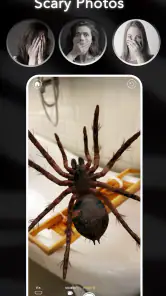
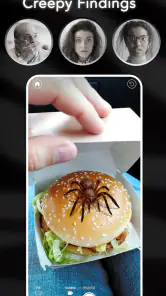
AR Spiders & Co: Scare Friends is an augmented reality app designed for both Android and iOS devices. It allows users to create realistic spider images using AR technology, placing them in real-world settings through their smartphone cameras. This app is mainly used for fun and entertainment to prank or scare friends. Its store summary describes it as a scary prank camera and on-face app for making videos and selfies with spiders and scorpions.
How does AR Spiders & Co work?
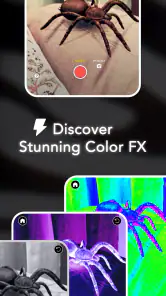
The app uses your device's camera to overlay realistic 3D spider animations onto the real-world environment. By utilizing augmented reality technology, it allows users to interact with these animations as if they were part of the physical space. Users can choose different spider types and sizes to enhance the prank experience. The camera-based format is suited to capturing staged reactions, videos, or selfies with the creatures appearing in the scene.
Is AR Spiders & Co safe for children?
While AR Spiders & Co is designed for entertainment, it may not be suitable for young children or individuals with arachnophobia due to its realistic depictions of spiders. Parents should consider the app’s content and their children’s sensitivity to such imagery before allowing them to use it. The app is rated Teen, so caregivers should take that age guidance into account when deciding whether it is appropriate.
Does AR Spiders & Co require an internet connection?
AR Spiders & Co does not necessarily require a constant internet connection to function since it primarily uses your device's camera and AR capabilities. However, an internet connection may be necessary for downloading additional content or updates to enhance the app's features and performance. Since the app is centered on camera-based AR, make sure you are comfortable granting camera access when you use it.
Pros
- Realistic spider animations.
- Interactive AR experience.
- Easy to use interface.
- Suitable for pranks.
- No internet required.
Cons
- Limited spider variety.
- Ads can be intrusive.
- No multiplayer mode.
- Requires AR-compatible device.
- Limited to newer OS versions.
- Category
- Entertainment
- Version
- 1.4.2











