AllSides
- 172.00
- 3.4
- Installs
- 50.00K
- Price
- Free

Screenshots
Analysis by Reviewed
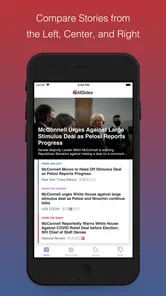
When I open a news app, my first problem is usually not finding another headline. It is figuring out how much of the story comes from the event itself and how much comes from the outlet’s point of view. AllSides is built around that problem. It is a free news and magazines app from AllSides Technologies, Inc that helps me compare coverage and notice media-bias patterns instead of treating the first article I see as the whole picture.
That makes it different from a normal headline reader. A conventional news app is mainly designed to keep me informed quickly, often by collecting stories from publishers I already follow. This app asks me to slow down for a moment and examine how the same subject is presented from different editorial positions. In my experience, that is its most useful role: not replacing every news source, but acting as a checkpoint between seeing a headline and deciding what I actually believe.
The app is available at no cost and is rated for Everyone 10+, which fits its subject matter while still making it more suitable for thoughtful older children and teenagers than for very young readers. Its Android listing shows over 50 thousand installs, an average rating of 3.4, and several hundred ratings, so it has a modest but established audience rather than the reach of a major general-purpose news platform. I tested it with the expectations I would have for a media-literacy tool, not a full newspaper subscription.
From a single headline to a wider view
I use this section to look at the moment AllSides is most useful: when a headline catches my attention and I want to see how its framing changes across coverage. The comparison is not a shortcut to certainty; it is a way to decide which stories deserve a closer read and what questions I should carry into the original reporting.
The starting condition: when one article feels too complete
A realistic use case is checking a major political story before sharing it with friends. I might see a dramatic headline in a social feed, read a few paragraphs, and feel that I understand what happened. The trouble is that the article may emphasize one consequence, use emotionally loaded language, or leave out context that another newsroom considers central. AllSides becomes useful at that exact point.
I can open the app with a topic in mind and use its coverage as a prompt for comparison. The key change in mindset is important: I am not asking the app to tell me which side is correct. I am using it to identify differences in framing, then returning to the underlying facts and original reporting. That distinction prevents the bias labels from becoming a new shortcut.
The interface is most valuable when I arrive with a question that can be tested. “What happened?” is a good starting question, but “Which details are emphasized by outlets with different perspectives?” is better. I can look for shared facts, disagreements about interpretation, and details that appear in only one part of the coverage. This turns casual scrolling into a small research routine.
More From Our News Desk

Weather by Xiaomi Review: Clear at a Glance, Less Clear Up Close

X Under Pressure: Can It Recover When Posting Goes Wrong?

Clash of Clans Is Won Between the Battles

Android Auto Makes the Case for Quieter Car Software

MobiOffice: Transforming Mobile Productivity with Seamless Integration

EA SPORTS FC™ Mobile Soccer: Redefining Mobile Sports Gaming
For everyday news, that routine does not need to take long. I might spend a few minutes comparing coverage of a public decision, an election issue, or a controversial cultural story. The app is less helpful when I only want a quick weather update, local traffic information, sports scores, or a single publication’s live reporting. Those tasks are better handled by specialized services that are built for speed and depth in one area.
The step-by-step flow: finding the comparison point
My first step is to choose a story rather than browse without a purpose. I look for a subject where wording and selection matter, because that is where a media-bias comparison can add something beyond a standard feed. Once I find a relevant item, I pay attention to the outlet identity and the way the headline frames the event before reading the article itself.
The next step is to move across the available viewpoints. I do not read every article from beginning to end. Instead, I compare the headlines, opening paragraphs, key descriptions, and the facts each outlet places near the top. This is a practical way to reduce reading time while still noticing editorial choices. If the topic is important to me, I then read the full pieces that contain the most useful primary details.
A particularly useful habit is to separate three layers of information. The first is the event: who did what, when, and where. The second is the interpretation: why it matters and who is responsible. The third is the emotional presentation: words that suggest approval, alarm, blame, or urgency. AllSides helps me notice the second and third layers, but I still need to verify the first through the articles themselves and, when appropriate, original documents or direct statements.
I also avoid assuming that a label settles the question. A rating can help me choose what to compare, but it does not prove that every article from a publication has the same quality or viewpoint. Newsrooms contain different writers, sections, and editorial decisions. The sensible workflow is to use the rating as a map, then judge the specific article on evidence, sourcing, clarity, and relevance.
Handoffs between the app, the reader, and the original sources
This is where the app’s role becomes clearer. It hands me from a broad topic to selected coverage, then from a bias label to the actual reporting. The important work still happens in my reading. I have to open the stories, compare claims, notice missing context, and decide whether a disagreement is factual or interpretive.
That handoff is both a strength and a limitation. It is a strength because the app does not encourage me to accept one summary as a complete answer. It is a limitation because users looking for a polished, all-in-one briefing may find the process less convenient than a conventional news aggregator. AllSides is asking me to participate in the evaluation instead of doing all the filtering invisibly.
I find the app especially useful when I use a simple note-taking method alongside it. For a complicated story, I write down facts that appear across multiple reports, claims that need checking, and questions that remain unresolved. I then follow the strongest source for each question. This prevents the comparison from becoming a contest between headlines and gives me a clear outcome to work toward.
Another practical handoff happens when I share a story with someone else. Rather than sending the most persuasive article I found, I can explain that I checked coverage from different perspectives and identify where the reports agree. That makes conversations less dependent on “my link versus your link.” It does not eliminate disagreement, but it gives the discussion a more honest starting point.
For parents, teachers, and older students, this workflow can also support media-literacy exercises. A student could compare how several outlets describe one event, highlight loaded terms, and distinguish reporting from commentary. The app is not a replacement for teaching source evaluation, but it gives that lesson a practical starting point. The age rating of Everyone 10+ makes the subject accessible to a broad audience, although an adult should still guide younger readers through difficult news.
What the result looks like after a careful session
After using the app properly, I usually do not leave with a single “approved” viewpoint. I leave with a more structured understanding of the story: the facts that seem broadly shared, the points that are disputed, the assumptions behind different interpretations, and the questions that deserve more checking. That is a better outcome than simply feeling confident after reading one article.
The app is also useful for detecting my own habits. If I consistently find one viewpoint convincing and dismiss another before reading it, the comparison exposes that reaction. I can ask whether I am rejecting weak evidence or merely encountering an uncomfortable framing. This self-check is one of the less obvious benefits of the service, and it is more valuable than a simple list of headlines.
There is a trade-off between breadth and depth. AllSides can help me see the range of presentation around a subject, but it cannot make every article equally detailed, equally reliable, or equally relevant. A short overview from one outlet may sit beside a deeply reported piece from another. Comparing them requires judgment about the reporting itself, not just the position associated with the publisher.
That means the best result comes from combining the app with established reading habits. I check dates, look for named sources, distinguish analysis from straight reporting, and search for original material when the stakes are high. I also resist sharing an article immediately after seeing its label. A balanced-looking comparison can still contain errors, and a strongly framed article can still include important, accurate reporting.
Where the flow breaks down
The biggest friction is that media bias is not a simple measurement. Readers may disagree with a classification, and a label can feel more authoritative than it deserves. If someone treats the app’s categories as final verdicts, the tool can reinforce a different kind of polarization: instead of evaluating an article, the reader dismisses it because of the outlet’s position.
The modest average rating of 3.4 suggests that the experience will not satisfy everyone, and I can understand why. People who want a fast, personalized feed may find the comparison process slower and more deliberate than expected. Others may want more local reporting, specialist coverage, or a richer reading experience inside one app. Those users may be better served by a trusted local outlet, a specialist publication, or a broader aggregator used alongside independent source checking.
There is also a practical limit to how much comparison I can do before the process becomes tiring. For a minor story, reading across several perspectives may take more effort than the subject deserves. I use the app selectively: important or contentious topics get the full comparison treatment, while routine updates do not. That choice keeps the tool useful instead of turning every headline into a research project.
Readers should also understand what the app cannot do for them. It cannot guarantee that I have found every relevant viewpoint, prove that a story is true, or replace direct access to primary evidence. It can point out editorial patterns and encourage a wider view, but the final responsibility remains with the reader. That is not a flaw unique to this app; it is the unavoidable cost of taking news seriously.
Who should use it, and who should choose something else
I recommend AllSides to readers who regularly consume political or controversial news and feel they are trapped inside one stream of opinion. It is a good fit for anyone willing to compare articles rather than collect headlines, especially students, educators, families discussing current events, and adults trying to challenge their own media routines.
I would also recommend it to a friend who often shares stories after reading only the headline. The app creates a useful pause between discovery and reaction. Even a short comparison can reveal that two outlets agree on the event while disagreeing sharply about its meaning. That pause is the product’s real value.
I would not make it my only news source. Someone who needs breaking local information, specialist reporting, financial detail, or a deep archive should choose a publication designed for that purpose. A reader who dislikes labels or has no time to open and compare original articles may also find the workflow frustrating. In those cases, a carefully chosen direct news subscription is likely to be more satisfying.
On Android, the app currently appears as version 2.2.2 and requires Android 7.0 or later. That makes it accessible on many older devices, although the overall experience will still depend on the phone, connection, and the articles opened from within the service. I would check compatibility before installing on a particularly old handset, then use the app for comparison rather than expecting it to replace every other news tool.
My final view is positive but deliberately limited. AllSides works best as a media-literacy checkpoint, not as a complete newsroom in your pocket. It helps me move from one emotionally convincing headline to a more informed comparison, and its handoff to original reporting encourages better judgment. The process takes effort, its labels should not be treated as absolute truth, and its coverage will not satisfy every specialist need. Still, for readers who want to understand how news is framed before passing it on, this free app offers a practical workflow that ordinary headline feeds often miss.
AllSides Frequently Asked Questions
What devices and operating systems can run AllSides?
AllSides is a News & Magazines app for Android, with a minimum operating-system requirement of Android 7.0. Before downloading, check that your device meets that requirement and has enough available storage. The app is developed by AllSides Technologies, Inc, and its focus is helping readers compare coverage and media perspectives rather than serving as a general-purpose news publisher.
Who is AllSides designed for, and is it suitable for younger users?
AllSides is aimed at readers who want to compare how news sources present current events and explore media bias from more than one perspective. Its content rating is Everyone 10+, so families can use that rating as a starting point when deciding whether the app suits a younger reader. It can also be useful as a prompt for discussing how framing and viewpoints shape news coverage.
What is AllSides, and what does the app offer?
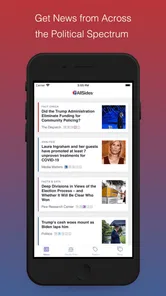
AllSides is a news and media-bias platform designed to help users compare how different outlets cover the same topics. Instead of presenting only one perspective, it groups stories from sources rated across the political spectrum and provides bias information, balanced news features, and media-literacy resources. This makes it useful for readers who want broader context before forming an opinion.
How does AllSides determine whether a news source is left, center, or right?
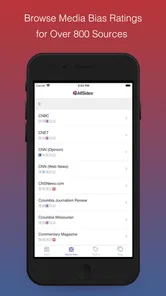
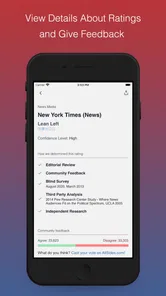
AllSides uses a combination of editorial research, blind bias surveys, community feedback, and analysis of published content to rate media outlets. The ratings are intended to describe the perspective or framing commonly found in a source, not to label every individual article as accurate or inaccurate. Because media coverage can change, ratings may also be reviewed and updated over time.
Is AllSides a news publisher or does it link to outside sources?
AllSides primarily works as a news comparison and media-literacy service rather than replacing every original publisher. It commonly presents headlines, summaries, or links from external news organizations so users can compare coverage and read the full story at its source. Availability, article presentation, and access may vary depending on the publisher, region, and whether the source requires a subscription.
Pros
- Shows how different outlets frame the same news story.
- Includes media-bias ratings to help compare perspectives.
- Offers balanced
- left
- center
- and right viewpoints in one place.
- Useful for spotting missing context and broadening news consumption.
- Clean layout makes browsing headlines and source ratings simple.
Cons
- Some bias ratings may feel subjective or lack detailed explanation.
- The app may not cover every local or niche news topic.
- Political content can make the experience feel repetitive over time.
- Full article reading often redirects you to external news websites.
- Users may need an account or subscription for certain features.











