All Email Login
- 2.30K
- 4.1
- Installs
- 1.00M
- Price
- Free
Screenshots
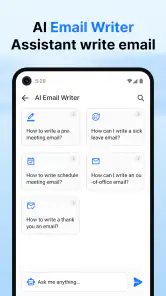
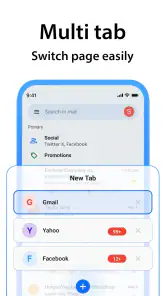
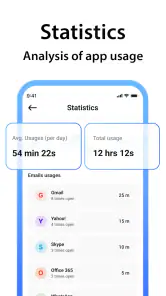
Analysis by Reviewed
I found All Email Login most relevant as a way to bring several inboxes into one place, rather than as a replacement for every dedicated email app. That distinction matters: the appeal is less account-hopping, while the best choice still depends on how you handle messages and what you expect from your mail app.
How it fits into a normal email routine
Before deciding whether a combined inbox is useful, I’d think about when I actually check email. If I only open one address once or twice a day, another app may be unnecessary. If I move between a work inbox, a personal address, and a subscription account throughout the day, though, reducing those small transitions can make quick checks less disruptive. The benefit is modest but practical: fewer app changes, not a magically organized mailbox.
I’d also consider how I separate those accounts mentally. Keeping work and personal messages together can save time, but it can make the boundaries between them less obvious. One useful habit is to check the account identity before replying, especially when a message includes private information or a work commitment. That pause is a small trade-off for the convenience of looking in one place.
Using one app for several inboxes
In an ordinary day, I might check a work address before a meeting, then look at personal mail later without wanting to open separate apps each time. A combined inbox can make that routine feel simpler, especially when I only need to scan for new messages. I would still keep account names in mind before replying, though: when several addresses are together, pausing to confirm the sender account is a useful habit.
Quick checks and busy inboxes
The app’s summary focuses on access to email accounts and checking mail after calls. That points to a practical use: when a call ends and I’m waiting on a confirmation, I can move straight to email rather than remembering to check several inboxes later. I’d treat that as a convenience for brief checks, not as a reason to interrupt every conversation with notifications.
For a busy day, I’d decide which accounts deserve attention first and keep less urgent mail from taking over my focus. A shared place to look can reduce the friction of checking, but it does not automatically make a crowded inbox easier to manage. If your main challenge is sorting newsletters, tracking tasks, or working through long conversations, the account tools and habits you already use may matter more than having everything together.
A useful way to test the speed
When I’m deciding whether a mail app feels fast, I don’t judge it by a single opening. I repeat the small tasks that make up my day: moving between accounts, opening a recent message, and returning to the inbox without losing track of what I was doing. For this app, that kind of trial is more useful than expecting a particular speed on every phone. Network conditions, account response, and the device itself can all affect how quickly mail appears.
You May Like

Clash of Clans Is Won Between the Battles

Android Auto Makes the Case for Quieter Car Software

MobiOffice: Transforming Mobile Productivity with Seamless Integration

EA SPORTS FC™ Mobile Soccer: Redefining Mobile Sports Gaming

How Microsoft OneDrive Became a Mobile Productivity Giant

How Google Translate Breaks Language Barriers Effortlessly
There’s also a difference between getting into an inbox quickly and finding the right message quickly. A combined place to check may save the first few taps, but it won’t necessarily make a large mailbox easier to search or process. I’d try it with the kinds of messages I handle most often—such as appointment confirmations or work follow-ups—before deciding that it improves my whole routine.
Who benefits, and who may prefer another app
This communication app is aimed at people who regularly use more than one email address and want a single place to check them. It may suit someone balancing personal and work mail, or a person who keeps a separate address for shopping and subscriptions. If you use one account and already find its dedicated app comfortable, switching may add little. Likewise, anyone who depends on specialized workflow tools should compare those needs before moving their daily email routine.
Compared with using each provider’s own app, the main trade-off is convenience versus a provider-specific experience. Separate apps can make it easier to keep each account mentally distinct and use the tools familiar to that service. A combined app can cut down on app switching, but I would first check that the accounts I actually rely on can be added and that the way messages are presented works for me. For important work correspondence, I’d test with a non-urgent message before making it my only way to manage that inbox.
Trust, setup, and everyday habits
Email is sensitive, so I would take a moment to review the sign-in prompts and account access during setup rather than tapping through automatically. I’d also check which address is active before sending a reply, especially when a message concerns work or personal details. Those small habits are useful in any multi-account app, where convenience can make it easy to overlook which inbox is in view.
The developer is All Email Login, and the app is free. It has a 4.1 average from around 11,000 ratings, with over 1 million installs. Those figures suggest it has reached a substantial audience, but they do not tell me whether its particular account handling fits my needs; trying it with a secondary inbox first is a more practical test.
Checking more than one account without adding noise
A realistic test for me would be a day with a meeting, an online order, and a personal message I’m expecting. After the meeting, I could check for a follow-up without opening each provider app in turn; later, I could see whether the order confirmation and personal note are easy to distinguish from work mail. The important question is not just whether all the inboxes appear together, but whether I can still tell which message needs attention and which address I’d use to answer it.
I’d keep the first trial deliberately low-risk. Add an account that is useful but not essential, then check whether its messages appear in a way I understand and whether replying feels clear. That makes it easier to evaluate the app’s real value without immediately changing the route I rely on for urgent work. If the test goes well, I can decide whether another account belongs there; if not, removing it from the routine is less disruptive than rebuilding all my email habits at once.
Speed, reliability, and device fit
When I’m checking mail between other tasks, I care more about whether the app gets me to the right inbox promptly than about elaborate presentation. The version is 1.42, and it is listed for devices running Android 7.0 or newer. If your phone is older or has limited free space, I’d be cautious about adding another app before checking how it behaves alongside your usual tools. I can’t assume that every device will feel equally quick, so I’d judge it through the tasks I repeat most: opening an inbox, finding a recent message, and switching accounts.
Stability matters most when a message is time-sensitive. I’d avoid relying on any single app as the only route to a critical confirmation until I’ve used it consistently and know how it behaves on my device. Keeping access to the provider’s usual sign-in route gives me a sensible fallback if I need to reach an account another way.
What heavy use reveals
Checking a few messages is different from using one app as the front door to every account all day. During heavier use, I’d pay attention to whether switching between inboxes remains clear, whether I can return to the message I was handling, and whether notifications help or simply pull me away from other tasks. Those are practical measures of reliability for a multi-account setup, even when an app seems quick during a short first test.
I’d also avoid assuming that combining accounts reduces the work of managing them. If several inboxes receive newsletters, receipts, and ongoing conversations, their volume still needs attention. The app can make it easier to look across accounts, but I’d keep my existing habits for deciding what to archive, answer, or leave for later. For someone whose main problem is email overload rather than account switching, a provider’s filtering and organization tools may be the better place to start.
What to expect before deciding
The app is rated Teen and was released on December 13, 2023. I’d try it if managing multiple inboxes is a regular nuisance and I want a simpler place to check them. I’d skip it if a single provider app already handles my routine well, or if my work depends on provider-specific features I don’t want to give up. My practical suggestion is to start with a less critical account, spend a normal day switching between messages, and see whether the convenience outweighs the extra step of learning another mail app.
Have you ever found yourself juggling multiple email accounts and wished for a way to streamline the process? Well, I’ve been there too, and that’s why I was eager to try out the app. After spending some quality time with it, I’m here to spill the beans about what makes this app tick.
Why All Email Login?
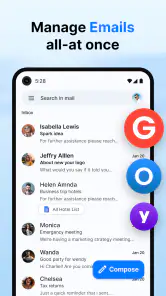
First things first, if you’re like me and have an inbox for work, another for personal stuff, and maybe even one for those random subscriptions, the app promises to be your email savior. It’s designed to bring all your email accounts under one roof. No more hopping from one app to another, which honestly feels like a breath of fresh air.
Setting Up
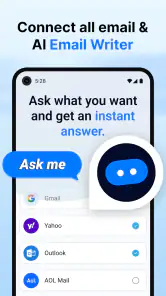
The setup process was pretty breezy. I just downloaded the app, logged in with my various email accounts, and voilà! It supports a wide range of email providers, so whether you’re using Gmail, Yahoo, Outlook, or any other, you’re covered. It’s like having a universal remote for your emails.
User Interface and Experience
Now, let’s talk about the user interface. It’s sleek and intuitive, making navigation a piece of cake. The app’s design is clutter-free, which is something I really appreciate. You get to see all your emails listed neatly, and switching between accounts is as easy as pie. I didn’t have to go through any complicated menus or settings, which is always a plus in my book.
Features That Stand Out
One feature that caught my eye is the customizable notifications. You can set up alerts for specific accounts or even filter them by importance. This way, you’re not bombarded with notifications every time a new email arrives, which, let’s be honest, can be quite overwhelming. Plus, the search functionality is top-notch, allowing you to dig through your emails with ease.
Another neat feature is the app’s security measures. It supports fingerprint and face recognition, adding an extra layer of protection to your emails. In today’s world, where data breaches are all too common, this feature is a reassuring addition.
Performance
Performance-wise, the app runs smoothly without any noticeable lag. Emails load quickly, and I didn’t encounter any crashes during my review period. It’s reliable, which is exactly what you need from an app handling your emails.
For everyday use, I’d still make reliability a habit rather than an assumption. I would check that an important reply has been sent and keep the provider’s usual access route available for urgent situations. That is not a reason to avoid a combined inbox; it is simply sensible practice when email is part of work, travel, or account recovery. On an older or busy phone, I’d also judge the experience over a normal day instead of a quick setup session, since how responsive any app feels can depend on what else the device is doing.
Final Thoughts
All in all, the app does exactly what it sets out to do. It simplifies email management, offers a seamless user experience, and packs in some useful features to make your email life easier. If you’re tired of switching between multiple email apps and want something that just works, this app is definitely worth a shot. So go ahead, give it a try, and let your inbox breathe a little easier!
My recommendation is specific: consider it when checking several addresses is the nuisance you want to solve, and take time to confirm that its account switching and message flow suit the way you work. If you mainly need one provider’s deeper tools, prefer keeping accounts strictly separate, or rarely check more than one inbox, the usual dedicated app is likely the simpler choice. For everyone else, a cautious trial with a secondary account is a sensible way to find out whether the convenience earns a place in your daily routine.
All Email Login Frequently Asked Questions
Is All Email Login free to download, and what should I know before installing it?
All Email Login is a free communication app for bringing email access together in one place. Before installing, check that your device runs Android 7.0 or later and that you are comfortable signing in to your email accounts through a single app. Its focus is convenient access to multiple inboxes, including the option to check mail after calls.
Who develops All Email Login, and is it a widely used app?
All Email Login is developed by All Email Login and has been released as an email-access app for mobile devices. It has over one million installs, with an average rating of 4.1 from around 11,000 ratings and approximately 2,300 written reviews. These figures offer a general sense of its reach and user feedback, though individual experiences can differ.
What is All Email Login and how does it work?
All Email Login is a versatile app designed to streamline your email management by allowing you to access multiple email accounts in one place. It supports various email providers, enabling you to log in and manage your emails without switching between different apps. After downloading, you simply log in using your existing email credentials, and All Email Login aggregates your inboxes for convenient access.
Is All Email Login secure for managing multiple email accounts?
Yes, All Email Login prioritizes user security by implementing encryption protocols to protect your data. The app does not store your passwords; it only uses them to authenticate with your email providers. Additionally, it regularly updates its security features to safeguard against unauthorized access, making it a reliable choice for managing multiple accounts.
Does All Email Login support all email service providers?
All Email Login is designed to support a wide range of email service providers, including popular ones like Gmail, Yahoo, Outlook, and more. However, it's always a good idea to check the app's official documentation or settings to ensure compatibility with your specific email provider before downloading. This ensures you can seamlessly integrate all your accounts within the app.
Pros
- Supports multiple email providers.
- User-friendly interface.
- Customizable email notifications.
- Fast and reliable performance.
- Secure login options.
Cons
- Limited cloud storage space.
- Occasional sync issues.
- Ads in the free version.
- No offline mode.
- Lacks advanced filtering options.
- Category
- Communication
- Version
- 1.42











