

AlfaOBD
- 621.00
- 3.5
- Installs
- 100.00K
- Price
- $49.00

Screenshots
Analysis by Reviewed
I find AlfaOBD most useful when I want to understand what a Fiat Group vehicle is reporting before deciding what to do next. It’s an Android auto-diagnostics app from AlfaOBD Autodiag, built around access to a car’s electronic systems rather than general driving or maintenance reminders. That focus makes it a specialist tool: it can help an owner investigate a warning or explore vehicle settings, but it isn’t a substitute for mechanical judgment or a repair manual.
Start with the car, not the app
Before buying a diagnostic app, I’d first ask whether I expect to work with a compatible Fiat Group vehicle regularly. AlfaOBD is aimed at that particular family of makes, so its value depends much more on the car in your driveway than on a general interest in car technology. If your vehicle falls outside its intended range, a broad, make-agnostic reader is likely the more sensible starting point.
I’d also think about what I want to learn. If I only need to check an occasional basic fault code, paying for a specialist tool and arranging a suitable interface may be unnecessary. If I want to investigate electronic systems on a compatible vehicle, keep useful notes for a repair discussion, or understand settings before making a considered change, the deeper focus is more relevant.
Why access to vehicle diagnostics matters
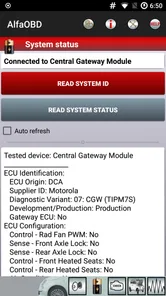
With a compatible vehicle and OBD interface, the app gives you a way to examine electronic systems such as the engine, transmission, and ABS. The practical benefit is context. Instead of treating a dashboard warning as a mystery, I can use diagnostic information to narrow down what system may need attention and then decide whether I can investigate further or should book a mechanic.
That distinction matters: reading diagnostic information can support a repair decision, but it does not automatically identify the physical cause or make a repair safe. I’d treat the app as a way to ask better questions, not as proof that a car is roadworthy. A warning involving braking or another safety-critical system deserves professional attention even if I can access related information on my phone.
Unleashing the Power of Diagnostics
One of the first things you'll notice about AlfaOBD is its comprehensive diagnostic capabilities. Designed primarily for Fiat, Alfa Romeo, and Chrysler vehicles, this app lets you peek under the hood of your car's electronic systems. Whether it's the engine, transmission, or ABS, you can access a wealth of information right at your fingertips. This kind of access was traditionally reserved for professional mechanics, but now it's available to everyday users like you and me.
Making a useful check without guessing
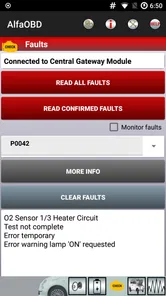
A realistic use for me would be seeing a warning before a planned drive and wanting to understand whether it points to an issue that needs immediate attention. I’d connect the appropriate interface, check the relevant system, and note what the vehicle reports before clearing or changing anything. Keeping a record of what appeared and when gives a mechanic a more useful starting point than simply saying that a light came on.
More From Our News Desk

 Gmail
GmailGmail in a Busy Inbox: Who Benefits Most?
From first account to crowded workday, Gmail earns its place through dependable search and flexible sorting—but its best fit depends on how much inbox maintenance you can tolerate.

 Prime Video
Switching to Prime Video: What Changes in Your Viewing Routine
Prime Video can make a compelling second home for streaming, but switching means learning a different catalog, rental layer, and route from browsing to playback.

 Universal TV Remote Control
Universal TV Remote Control Works Best as a Reliable Backup
A phone remote earns its place through quick setup and reliable habits. Here is how to get more from Universal TV Remote Control—and where its limits show.

 Weather - By Xiaomi
Weather by Xiaomi Review: Clear at a Glance, Less Clear Up Close
Xiaomi’s weather app makes everyday forecasts quick to scan, but its calm surface can leave useful details and recovery paths harder to find than they should be.

 X
XX Under Pressure: Can It Recover When Posting Goes Wrong?
A resilience-focused review of X, examining setup, mistaken posts, interruptions, weak connections, and the gaps that matter when recovery needs to be dependable.

 Clash of Clans
Clash of Clans Is Won Between the Battles
Its raids are quick; its community is a long-term project of coordination, teaching, rivalry, and shared responsibility—with all the friction that entails.
Latest News



For example, if a warning appears on the way home and the car still seems to drive normally, I wouldn’t use that impression alone to decide it is safe for a long trip. I’d park somewhere safe, consult the relevant diagnostic information, and make a note of the warning and the circumstances in which it appeared. If the result concerns a safety-critical system, or I don’t understand what it means, I’d stop there and ask a professional rather than turning an uncertain reading into a confident diagnosis.
I’d also avoid clearing a warning just to make the dashboard look tidy. If it returns, the underlying issue is still there, and removing the evidence can make diagnosis harder. A better workflow is to investigate first, save or write down what the app shows, and make changes only when I understand their purpose. That small bit of discipline is especially valuable when the car belongs to someone else or is needed for daily travel.
Customization at Your Fingertips
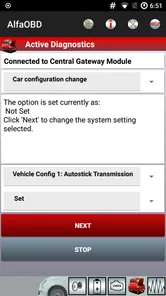
Beyond diagnostics, AlfaOBD offers impressive customization features. Want to enable or disable specific functions? No problem. The app allows you to tailor your vehicle's settings to suit your preferences. From adjusting the sensitivity of your parking sensors to reprogramming your key fob, the possibilities are endless. It's like having a mini-garage in your pocket!
For me, configuration is where careful preparation matters most. Before changing a setting, I’d confirm that it applies to my exact vehicle and write down the original value or state. I’d make one adjustment at a time and check the result before moving on. That makes it easier to reverse an unwanted change and helps separate a genuine improvement from a setting that only seemed appealing in theory.
A useful habit is to keep a simple change log: note what I changed, why I changed it, and whether the result matched what I expected. This is not busywork. If a later adjustment causes confusion, that record gives me a path back to the previous state and makes it easier to explain the sequence to a technician. I’d avoid changing several options in one session, since that makes it much harder to identify which one produced an unexpected result.
Some vehicle settings can affect convenience or how a system behaves, so I wouldn’t experiment casually just because an option is visible. If I’m unsure what a setting does, leaving it untouched is the sensible choice. The app is most rewarding when the user already has a clear goal, not when they are changing options at random.
Getting set up and choosing the right tool
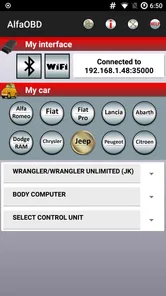
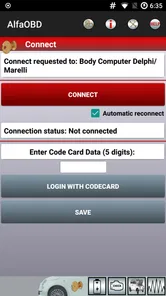
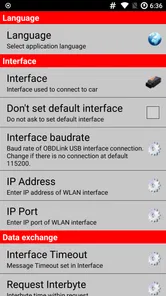
The app supports a range of OBD interfaces, but that flexibility doesn’t mean every adapter will suit every vehicle or task. Before spending money on an interface, I’d check that it is compatible with the car and the connection method I plan to use. A poor connection can turn a straightforward check into wasted time, so confirming the hardware first is part of using the app well.
I’d treat the interface as part of the purchase decision, not as an afterthought. The app itself cannot compensate for an unsuitable adapter or a connection that drops during a check. Before relying on the setup, I’d test it while parked, make sure the intended system is accessible, and give myself time to understand the workflow. That is a better first session than trying to pair hardware in a hurry after a warning appears.
Compared with a basic code reader, AlfaOBD is aimed at owners who want access beyond a quick fault-code check, including vehicle-system information and configuration. A simple reader may be the better choice if all you want is an occasional basic scan with minimal setup. At the other end, a workshop diagnostic system can be more appropriate when a repair needs guided testing, professional interpretation, or a controlled service procedure.
That middle ground is its real trade-off. A basic reader tends to be easier to approach because its purpose is narrower; a professional setup may offer a more structured process for complex work. AlfaOBD makes most sense when I’m willing to learn the vehicle-specific side and want more than a generic scan, but I don’t expect a phone app to replace workshop expertise.
User-Friendly Interface
Now, I know what you're thinking. All these features sound great, but what about usability? Thankfully, the developers have done a stellar job with the interface. It’s intuitive and straightforward, making it easy even for those who aren’t tech-savvy. You don't need a degree in computer science to navigate through the app and make the most out of its features. Just a few taps on your phone, and you’re good to go!
In practice, though, a clear interface can’t remove the learning curve that comes with vehicle diagnostics. You still need to select the right vehicle and system, understand what a result means, and know when not to proceed. I’d take time to get familiar with the menus while parked rather than trying to troubleshoot in a hurry beside a road. That approach is safer and gives me room to read carefully.
I’d also avoid treating a displayed result as a complete explanation. Diagnostic information can point me toward an area to investigate, but a symptom may have more than one possible physical cause. The sensible next step depends on the vehicle’s behavior, the system involved, and my own ability to assess it. If I can’t confidently interpret what I’m seeing, a mechanic is not a failure of the app; it is the right person to take the investigation further.
AlfaOBD is priced at $49.00, so I’d consider how often I’ll use its deeper access before buying it. It makes more sense for someone who maintains or regularly works with a compatible Fiat Group vehicle than for a driver who only wants a one-off check. The app is rated for Everyone, has a 3.7 average from around 2,000 ratings, and has passed 100,000 installs; its current version is 2.4.4.0, with Android 4.0.3 as the minimum operating-system requirement.
Who benefits most from its specialist approach
Owners who enjoy learning how their vehicle’s electronics behave, or who want more diagnostic access than a basic reader offers, are the clearest fit. It can also be useful to an independent technician who already understands the relevant systems and wants a phone-based tool for compatible vehicles. By contrast, I’d steer a driver who wants a simple, universal scan-and-go experience toward a basic reader, and someone facing a complex or safety-related fault toward a qualified mechanic.
The strongest case for buying it is repeated use: perhaps you look after a compatible car, want to investigate occasional warnings, or prefer to arrive at a repair appointment with a clearer account of what happened. For a one-time question, the cost and setup may outweigh the benefit. I’d also skip it if I’m unwilling to check interface compatibility or learn what a system result can and cannot tell me.
Its age rating of Everyone describes who can access the app, not how much expertise every task requires. I’d be comfortable recommending it to a curious owner who is cautious, reads results carefully, and knows when to stop. I wouldn’t recommend using its configuration options as a trial-and-error playground, especially on a vehicle someone depends on every day.
Final Thoughts
So, is AlfaOBD worth your time and investment? If you're a car enthusiast or someone who simply wants more control over their vehicle's performance and settings, then the answer is a resounding yes. It's not just an app; it's a tool that empowers you to understand and interact with your car in ways you never thought possible.
In a world where technology is constantly evolving, having a tool like AlfaOBD in your arsenal is invaluable. It bridges the gap between professional-grade diagnostics and user-friendly accessibility, making it a standout choice for anyone looking to take their car maintenance to the next level. So go ahead, give it a try, and experience firsthand the convenience and power it brings to your automotive adventures.
My more measured recommendation is to buy it for a specific, recurring need rather than for the promise of exploring every menu. If you have a compatible Fiat Group vehicle, a suitable interface, and the patience to treat diagnostic results as evidence rather than instructions, its specialist access can be genuinely useful. If you only want a quick universal check, or need a definitive answer to a serious fault, another route will serve you better.
AlfaOBD Frequently Asked Questions
Is AlfaOBD the right kind of app for my vehicle?
AlfaOBD is an Auto & Vehicles app developed by AlfaOBD Autodiag. Its focus is native diagnostics for Fiat Group cars, so it is intended for owners and technicians working with vehicles in that group rather than as a general-purpose tool for every make. Before downloading, consider whether your vehicle fits that focus and whether you are looking for diagnostic software rather than a broad car-maintenance guide.
What does AlfaOBD cost, and what should I expect before downloading?
AlfaOBD is a paid app, listed at $49.00, so it is worth checking that its Fiat Group diagnostic focus suits your needs before purchasing. It has an Everyone age rating and has been available since Jul 4, 2012. The app is currently version 2.4.4.0, and its listed minimum Android requirement is 4.0.3.
What is AlfaOBD and what does it do?
AlfaOBD is a comprehensive diagnostic software designed specifically for FCA (Fiat Chrysler Automobiles) vehicles, including brands like Alfa Romeo, Fiat, Chrysler, and Jeep. The software allows users to perform a wide range of diagnostics, adjustments, and modifications on their vehicles' electronic systems, making it a valuable tool for car enthusiasts and professional mechanics alike.
Is AlfaOBD compatible with my vehicle and device?
AlfaOBD is compatible with a variety of FCA vehicles, but it is crucial to check the specific compatibility list on their website to ensure your particular model is supported. Additionally, AlfaOBD is available for Windows PCs and Android devices, so you need to have a compatible device to run the software effectively.
What features does AlfaOBD offer for vehicle diagnostics?
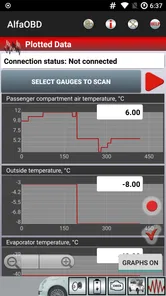
AlfaOBD offers a plethora of features for vehicle diagnostics, including reading and clearing fault codes, performing active diagnostics, monitoring live data, and executing system tests. Furthermore, it allows users to make adjustments to vehicle configurations, such as enabling or disabling features, programming keys, and resetting service intervals, providing a comprehensive toolkit for vehicle maintenance and customization.
Pros
- Comprehensive OBD diagnostics.
- Supports a wide range of vehicle brands.
- User-friendly interface.
- Real-time data monitoring.
- Frequent updates and support.
Cons
- Limited to Alfa Romeo vehicles.
- Requires additional hardware.
- Can be complex for beginners.
- No free trial available.
- Limited customer support hours.











