أخبار المشهد - Al Mashhad
- 18.00
- 4.4
- Installs
- 1.00M
- Price
- Free

Screenshots


Analysis by Reviewed
My most useful way to approach a news app is to decide what I need before I open it: a quick headline check, a closer look at a developing story, or something I can watch. Al Mashhad brings Arabic-language news and video on demand into one place, which makes it appealing when I want more than a text-only feed. I see it as a practical daily stop, not a replacement for every source I might need. It is free, developed by Info Arab Media, and has a 4.2 average from around 2.2K ratings, with over a million installs. Those figures suggest an established audience, though they cannot tell me whether its mix suits my own interests.
Choose a routine before opening the feed
I get more value when I give each visit a small purpose. For a quick check, I scan headlines and stop once I know what has changed. If a subject deserves more attention, I choose an article or video rather than continuing to scroll without a plan. This is a useful distinction in a news app that combines reading with viewing: the two formats serve different moments, and switching between them can make a short visit feel longer than expected.
A realistic routine might be checking headlines over breakfast, then returning to one story during a quieter break. I would save video for a place where I can give it proper attention, rather than starting it while walking or in a shared space. If I have limited connectivity, I would make the headline scan the priority and avoid assuming a video will be convenient. The simple habit of deciding “read, watch, or check” before opening the app helps me stay in control of the session.
Settings and choices that shape the experience
Personalization is most useful when it reflects what I genuinely want to follow, not every subject I might click once. I would begin with a short list of interests, then broaden it only if the feed feels too narrow. A focused selection can make repeat visits easier to scan; a wider one is better for discovery, but it also asks me to spend more time sorting through material. Either way, a personalized feed is a convenience, not a guarantee that it will show every important development.
I would also think carefully about alerts. Notifications can help when I am following a fast-moving story, but constant interruptions are a poor trade if I only want a calm daily catch-up. A useful pattern is to allow news to reach me when immediacy matters, then rely on deliberate check-ins for everything else. For an event with serious consequences, I would still compare reports from another trusted outlet. That extra step is more valuable than treating any one feed as a complete account.
How the app fits into everyday news habits
I use Al Mashhad most effectively when I decide what I want from a visit before opening it: a quick sense of what is happening, a closer look at one story, or a video when I have time to watch. That small choice keeps a news check from taking over a break. In the next section, I focus on how a repeatable routine can make the app easier to fit around the rest of the day.
First Impressions and User Interface
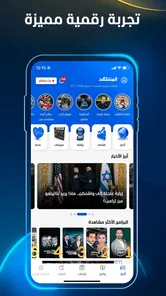
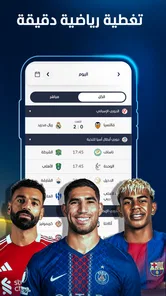
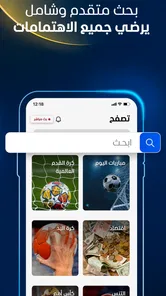
Opening Al Mashhad for the first time, I was greeted with a clean and intuitive user interface. The app is designed with user-friendliness in mind, making navigation a breeze. The categories are neatly organized, allowing me to jump from global news to sports updates with just a tap. The vibrant color scheme adds a touch of modernity without being overwhelming, which is a huge plus for those of us who appreciate aesthetics in app design.
More From Our News Desk

Weather by Xiaomi Review: Clear at a Glance, Less Clear Up Close

X Under Pressure: Can It Recover When Posting Goes Wrong?

Clash of Clans Is Won Between the Battles

Android Auto Makes the Case for Quieter Car Software

MobiOffice: Transforming Mobile Productivity with Seamless Integration

EA SPORTS FC™ Mobile Soccer: Redefining Mobile Sports Gaming
A practical way to catch up
My most useful approach is to open the app with a purpose: scan the main news first, then choose one story to read or a video to watch. That keeps a quick check from turning into endless scrolling. If I have only a short break, I can browse headlines; when I have more time, the video-on-demand element gives me another way to follow coverage. This mix is a meaningful distinction from text-first news apps, though readers who want only long-form written reporting may prefer a publication built around articles.
For example, during a commute or while waiting for an appointment, I might check the latest headlines and save deeper reading for later in the day. I would use video when listening or watching is more convenient than reading, but I would avoid relying on it in a quiet waiting room or where mobile data is limited. A simple habit helps: decide before opening whether I’m checking a developing story, browsing a topic, or watching a particular piece. It makes the app feel more like a useful news stop than a feed that dictates my attention.
Content and Features
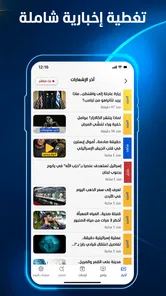
The real magic of Al Mashhad lies in its content. The app aggregates news from a variety of credible sources, ensuring that users are always in the loop with the latest happenings. What I particularly love is the depth of coverage; whether it's politics, technology, or entertainment, Al Mashhad seems to have it all covered. Moreover, the app offers live updates, which is perfect for those moments when you want to stay informed on breaking news as it unfolds.
Another standout feature is the personalized news feed. The app allows me to tailor my feed based on my interests, which means I spend less time sifting through irrelevant articles and more time reading about topics that actually matter to me. It’s like having a personal news assistant!
Make personalization work for you
I’d keep a personalized feed focused rather than selecting every topic that sounds interesting. A smaller set of priorities makes it easier to notice what has changed since the last visit, while a broad mix is better for occasional discovery. This is a choice about attention, not a promise that the app will surface every important story. For major or contentious events, I’d still compare coverage with another trusted source; following updates in one place is convenient, but checking different perspectives is a better way to understand the context.
It is also worth thinking through notification habits. The app is described as sending alerts for major news events, which can be useful when I’m actively following a developing story. If I want a quieter day, I’d avoid letting alerts interrupt every task and instead check in at a time that suits me. That trade-off matters: immediacy helps with fast-moving news, while a deliberate reading window makes it easier to separate an important update from the rest of the day’s noise.
Performance and Reliability
In terms of performance, Al Mashhad runs smoothly on both Android and iOS devices. I haven't encountered any bugs or crashes, which is always a relief. The app loads quickly, and articles open almost instantaneously, allowing for a seamless reading experience.
Reliability is another area where Al Mashhad shines. The app provides news updates around the clock, and I appreciate the push notifications for major news events. It's reassuring to know that I'm not missing out on important stories, even when I'm busy with day-to-day activities.
Compatibility and everyday trade-offs
The current version is 1.5.7, and the app supports devices running Android 7.0 or later. It is rated for Everyone, which makes the age guidance straightforward for households considering a general news app. Video is a useful alternative to reading, but it is not the best fit for every setting: it takes attention, may be awkward without headphones, and is less practical when connectivity is unreliable. For readers who need a quiet, low-data routine, opening articles selectively is the more sensible pattern.
Al Mashhad is strongest for someone who wants Arabic-language news and video together, likes browsing by topic, and is happy to shape a feed around personal interests. It is less suitable for someone seeking a specialist publication, a deliberately ad-free reading experience, or a single definitive account of every event. I’d pair it with another source when a story matters, and use it as an accessible daily entry point rather than my only news habit. The app sits in the News & Magazines category, and its focus on both reading and on-demand viewing gives it a different rhythm from text-only aggregators.
Who will get the most from it
I think it makes the most sense for Arabic-speaking readers who want a general overview and like having video available alongside written coverage. It can also suit someone who checks news in short bursts: scan a section while waiting, then return to a topic when there is time to concentrate. A reader who already knows which subjects matter can use personalization to reduce the amount of browsing, while someone who enjoys exploring different topics may prefer a broader selection and accept a less focused feed.
It is not my first choice for someone who wants deep specialist reporting in a single area, or who expects a newspaper-style reading experience built mainly around lengthy analysis. In those cases, a dedicated publication or a text-focused news reader may be a better fit. I would also hesitate to make it the only source for a disputed or consequential story. The app is useful for keeping up, but comparing reporting is still the sensible way to build context.
Faster patterns without rushing
One small workflow that helps is separating discovery from follow-up. I can use a short visit to see which topics have moved, then choose just one item for a closer read or watch. That prevents the video option from becoming an automatic detour every time I open the app. Another helpful pattern is to check the same selected interests at a consistent point in the day; a familiar routine makes changes easier to spot than opening the app repeatedly whenever a notification appears.
For a developing event, I would treat alerts as a prompt to check rather than a complete explanation. I can read the immediate update, note what is known, and return later for a fuller picture instead of reacting to every notification as if it were the final word. This is especially useful when a headline is emotionally charged: a pause to read the actual coverage is better than forming an opinion from a brief alert. The app’s mix of formats supports this workflow, but the discipline comes from how I use it.
Where the trade-offs become noticeable
News and video in one app are convenient, but that combination can blur the line between a quick check and a longer session. Articles are easier to skim quietly; video asks for sound, a suitable moment, and enough attention to follow what is being shown. If I am on a limited connection or in a place where playing media would be disruptive, I would stick to reading. If I need a source that is easy to consult in silent, low-connectivity situations, a text-first option may suit me better.
Personalization also has a trade-off: it can make the feed feel more relevant, but a narrow selection may leave me less exposed to topics outside my usual interests. I would periodically reconsider what I follow, not because a particular setting guarantees better coverage, but because my priorities change. At the same time, I would not expand the feed just to make it look comprehensive. A manageable selection is more useful than an overloaded one if I want to keep a routine I can actually maintain.
Final Thoughts
In conclusion, Al Mashhad is a solid choice for anyone seeking a reliable and comprehensive news app in Arabic. Its user-friendly design, extensive content library, and robust performance make it a standout in the crowded world of news applications. While there's always room for improvement, such as the integration of more diverse viewpoints, overall, I'm impressed with what Al Mashhad has to offer. If you're in the market for a top-tier news app, I'd definitely recommend giving it a try. Who knows, it might just become your go-to source for staying informed!
My recommendation is a little more specific: I would try it if Arabic-language news, topic browsing, and on-demand video belong in the same daily routine for you. Give the feed a clear purpose, keep notifications proportionate to how closely you follow breaking stories, and use another source when context matters. Its free price and Everyone age rating make it straightforward to consider, while version 1.5.7 and Android support from 7.0 provide practical compatibility details for Android users. With those expectations in place, it works best as a convenient news companion rather than the sole authority on what is happening.
أخبار المشهد - Al Mashhad Frequently Asked Questions
Who publishes Al Mashhad, and what kind of app is it?
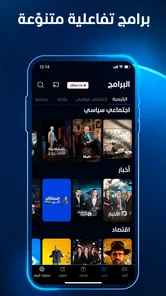
Al Mashhad is a news and magazines app published by Info Arab Media. It brings news browsing and video-on-demand viewing together, so it can suit people who want to follow current events and watch news-related video in one place. The app is free to download, and its age rating is Everyone.
Will Al Mashhad work on my device?
Al Mashhad is available for Android and iOS devices, and the Android version requires Android 7.0 or later. Before downloading, check that your device runs a compatible operating system and has enough storage for an app. The current version is 1.5.7, so keeping the app updated can help you use its latest available features.
What is Al Mashhad and what features does it offer?
Al Mashhad is a comprehensive news application that provides users with the latest updates from the Middle East and around the world. The app offers features such as live streaming of news channels, breaking news notifications, and a personalized news feed tailored to your interests. With its user-friendly interface, Al Mashhad ensures you stay informed with real-time updates, making it a must-have for anyone keen on current events.
Is Al Mashhad available for both Android and iOS devices?
Yes, Al Mashhad is available for download on both Android and iOS platforms. You can easily find the app in the Google Play Store for Android devices and the Apple App Store for iOS devices. This cross-platform availability ensures that users can stay connected and informed regardless of the device they are using.
Does Al Mashhad offer content in multiple languages?
Al Mashhad primarily focuses on delivering news content in Arabic, catering specifically to Middle Eastern audiences. However, it also offers selected content and features in English for a broader audience. The app is designed to provide a seamless experience for users who are fluent in Arabic while also accommodating those who prefer English.
Pros
- User-friendly interface design.
- Offers real-time news updates.
- High-quality video streaming.
- Wide variety of topics covered.
- Available for both Android and iOS.
Cons
- Occasional app crashes.
- Ads can be intrusive.
- Limited offline content access.
- Requires a stable internet connection.
- Notifications can be overwhelming.











