Al Jazeera - الجزيرة
- 1.75K
- 4.8
- Installs
- 1.00M
- Price
- Free

Screenshots
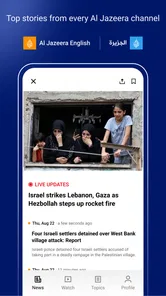
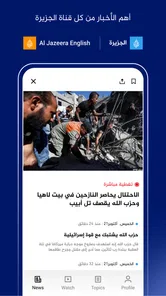






Analysis by Reviewed
When I open Al Jazeera’s news app for the first time, I want a simple answer to one question: can I quickly find a worthwhile account of what is happening beyond my usual news bubble? My first useful step is to choose a language I’m comfortable reading, then scan the main feed for a story I want to follow. That small routine makes the app easier to judge than trying to explore every section at once.
What to expect from the coverage
Al Jazeera - الجزيرة is a free news and magazines app from Al Jazeera Network. Its focus on international reporting is its clearest strength: I’m more likely to open it when I want context on a world event than when I’m looking for neighborhood notices, local service updates, or a narrowly specialized subject. The app has a 4.8 average from around 117,000 ratings and has been installed over a million times, but I’d treat those figures as background rather than a guarantee that its editorial approach will suit every reader.
For a first-time user, the main value is having articles, live video, podcasts, and documentaries within one news experience. I can read when I have a few quiet minutes, or switch to listening or watching when I’m commuting or doing chores. Those formats are useful for different situations, but they don’t replace one another: a video is convenient for following a live event, while an article is usually easier to revisit for detail.
Your Gateway to Global News
One of the things I appreciate the most about Al Jazeera - الجزيرة is its comprehensive coverage of international events. The app goes beyond headlines, offering in-depth analyses and insightful perspectives. Whether you're looking to catch up on the latest in politics, business, or culture, this app has got you covered. And the best part? It's all available in both English and Arabic, making it accessible to a wider audience.
Interface and User Experience
Now, let's talk about the interface. You know how some apps can make you feel like you're navigating a labyrinth? Not this one. The user interface is clean and intuitive, which means you can easily find what you're looking for without getting lost in a sea of tabs and buttons. The design is sleek, with a focus on readability, ensuring that the content takes center stage.
Scrolling through the app is a breeze, and I love how they have organized the news categories. Whether you're interested in trending topics or deep-dives into specific subjects, everything is just a tap away. Plus, the app runs smoothly, with quick load times and minimal glitches.
A practical first-session routine
I’d start by opening one story that catches my eye and reading past the headline before deciding whether I want more coverage. Then I’d try the live stream when an event is unfolding, rather than leaving video on by habit; live coverage can be useful for immediacy, but it asks for more attention than a quick read. If I’m short on time, I’d save my deeper exploration for a podcast or documentary when I can focus. This gives me a concrete sense of whether the app’s mix fits my day.
More From Our News Desk

Weather by Xiaomi Review: Clear at a Glance, Less Clear Up Close

X Under Pressure: Can It Recover When Posting Goes Wrong?

Clash of Clans Is Won Between the Battles

Android Auto Makes the Case for Quieter Car Software

MobiOffice: Transforming Mobile Productivity with Seamless Integration

EA SPORTS FC™ Mobile Soccer: Redefining Mobile Sports Gaming
Notifications are worth setting up with restraint. I’d enable only the subjects I genuinely want to hear about promptly, then use the app itself for everything else. That keeps alerts from turning into a second headline feed competing for attention. If a topic is important but not urgent, checking it during a planned news break is often a calmer way to stay informed.
Features That Stand Out
One feature that really stands out is the live streaming option. It's like having a TV in your hand, allowing you to watch live broadcasts from anywhere in the world. This is particularly handy when you want to stay updated with events as they unfold. Additionally, the app offers a selection of podcasts and documentaries, perfect for those moments when you want to delve deeper into a story.
Another feature I find incredibly useful is the customizable notifications. You can tailor them to ensure you only get alerts for the news topics that matter most to you. It's a simple touch, but it makes a world of difference in keeping your focus sharp and your phone's notification center uncluttered.
Making the app work for different reading habits
I find it helps to decide what I want from a news session before opening the app. If I have only a couple of minutes, I can read a single report and leave without feeling obliged to explore every format. If I’m trying to understand a complicated story, I can give it more time and use the written coverage as my starting point, then move to a broadcast or longer-form piece if that adds useful context. This small distinction stops the app from becoming an endless scroll.
A realistic routine might be checking one international story over breakfast, then returning to it later when I have enough time to watch or listen. The benefit is not simply consuming more news; it is choosing a format that fits the moment. I would avoid starting a live stream when I need to leave in a minute, for example, because a live broadcast is less convenient to pause and scan than a short written update. For a quick check, reading is the more practical first action.
Language choice is another decision worth making early. Having English and Arabic available is valuable if I use both, but it also means I should be deliberate about which language I want for a particular reading session. Switching language can change how comfortable a story feels to follow, especially when I’m tired or reading quickly. I’d choose the one that lets me understand nuance without extra effort rather than treating language options as a reason to read twice as much.
Who it suits—and where I’d look elsewhere
I’d recommend trying it if you follow international affairs, want English and Arabic in the same app, or prefer a combination of written reporting and audiovisual coverage. It can also work well for someone building a daily routine: read a few pieces over breakfast, then use a podcast for a longer journey. The app is free, carries an Everyone 10+ age rating, and its current version is 9.3.1, so it’s approachable for many readers; it supports Android 7.0 and later.
It isn’t the best single source for every need. If your priority is local breaking news, practical city information, or a very broad collection of outlets in one personalized feed, a local publisher or news aggregator may be a better first stop. And if you want to compare how different organizations frame the same developing story, I’d use Al Jazeera alongside other reputable sources instead of expecting one newsroom to provide every perspective. That’s not a reason to skip it; it’s a sensible way to read any international news source.
How it compares with other ways to follow the news
Compared with a general news aggregator, this app gives me a more direct relationship with one newsroom’s reporting rather than a mixed feed assembled from many publishers. That can be a plus when I want to follow a particular international story in a consistent editorial voice. The trade-off is that I need to seek out other sources myself when breadth of viewpoint is the priority. I wouldn’t use one app’s feed as a substitute for comparison on a disputed or rapidly changing issue.
Compared with a local newspaper app, the emphasis is different. A local outlet is usually the more useful choice for council decisions, transit disruptions, school notices, and other details that shape an ordinary day in one place. I’d keep this app for international coverage and use a local source for nearby practical information. If I already rely on a bundled news service, this can still be a useful complement, but it may not replace that service if I want many publishers in one place.
There is also a meaningful difference between reading a report and watching live coverage. Live video can help me understand the pace and atmosphere of an event, but it is not automatically the clearest way to verify a detail. When I need a specific fact, I’d look for it in a written report and compare it with another reputable account. When I want to hear a developing event unfold, the live option may be more engaging. Choosing the format based on the question is a practical way to get more from the app.
Common points of confusion
One possible first-use mistake is assuming that every item in a news app serves the same purpose. A headline is an entry point, not the whole account; a live broadcast is an ongoing presentation, not necessarily a concise summary; and a podcast or documentary is better suited to sustained attention than a quick check. I’d decide whether I want a fast update, background, or a longer listen before choosing, rather than switching formats just because they are all available.
Another thing I would keep in mind is that a notification tells me something may deserve attention, not that I have the complete story. For a major event, I’d open the article, check when the reporting was published or updated if that information is shown, and revisit the story later if details are still developing. This is a useful habit with any news source, especially when a short alert cannot carry all the context.
If I’m unsure whether the app is right for me, I wouldn’t judge it by the number of sections I explore in one sitting. I’d try a small test: follow one international subject I care about, read a full report, and see whether its explanation gives me enough to understand what happened and what remains unclear. If I want local recommendations or a collection of competing headlines, that test will quickly show why another kind of news app may suit me better.
Why It's Worth Your Time
In a world where misinformation can spread like wildfire, having a reliable news source is crucial. Al Jazeera - الجزيرة offers trustworthy reporting and a variety of perspectives that help you form a well-rounded view of global events. It's an app that prioritizes depth and accuracy over sensationalism, which is something I genuinely value.
My advice is to begin with one subject you already care about, compare a headline with the full report, and decide whether the level of context works for you. If a story matters, look at coverage from more than one established outlet before settling on a conclusion. This is especially helpful with fast-moving events, where early details can change and a live broadcast may not offer the same perspective as a later analysis.
For someone new to it, the first meaningful success need not be elaborate: find one story that matters to you, read enough to understand its central point, and decide whether you want a second format or another source. That approach makes it easier to build a useful habit without turning every spare moment into a news session. If I notice that I’m opening alerts automatically or scrolling without learning anything, I’d narrow my notification choices and return to intentional check-ins.
The app is a better fit for readers who want international reporting and are comfortable choosing when to go deeper. It is less compelling as a one-stop answer for local information or for people who want an automatically assembled panorama of many publishers. That distinction matters more than the size of its feature set: the right choice depends on whether I want one newsroom’s coverage, a local guide, or a broad comparison feed on a given day.
Whether you're a news junkie or just someone who wants to stay informed, this app is definitely worth checking out. It's like having a window to the world, offering clarity in a complex news landscape. So, if you're ready to elevate your news consumption game, give Al Jazeera - الجزيرة a try. Trust me, you won't be disappointed!
Al Jazeera - الجزيرة Frequently Asked Questions
Is Al Jazeera - الجزيرة free to download, and what should I know about data use?
Al Jazeera - الجزيرة is free to download and use, so you can explore its news coverage without paying a subscription fee. Keep in mind that streaming live broadcasts or watching videos can use mobile data, which may lead to charges depending on your phone plan. Using a Wi-Fi connection for video can help you manage mobile data use.
Will Al Jazeera - الجزيرة work on my phone or tablet?
The app is available for Android and iOS devices, so it can suit many smartphone and tablet users. For Android, the listed minimum operating-system requirement is version 7.0. Before downloading, check that your device meets the relevant platform requirements and has enough available space for the app and its content.
Can I read Al Jazeera - الجزيرة in English and Arabic?
The app is called Al Jazeera - الجزيرة and is intended for a diverse audience, with content available in multiple languages. This can make it useful if you want to follow international coverage in English or Arabic. Language availability can vary across sections and content, so check the app’s language options after installing it and choose the experience that suits you.
What kind of news and media can I expect to find in the app?
Al Jazeera - الجزيرة is a news app focused on coverage from around the world. Its offering includes news articles, live broadcasts, and video content, with in-depth analysis and a distinctive perspective on global events. The store summary, “Global News, One App,” reflects that broad focus. If you mainly want news rather than a general entertainment app, its News & Magazines category gives you a clear idea of its purpose.
What is Al Jazeera - الجزيرة app's primary purpose?
Al Jazeera - الجزيرة app is designed to provide users with up-to-date news coverage from around the world. It offers access to a wide range of news articles, live broadcasts, and video content, focusing on providing in-depth analysis and a unique perspective on global events. The app is available in multiple languages, catering to a diverse audience.
Pros
- Comprehensive news coverage
- User-friendly interface
- Live streaming available
- Multiple language options
- Regular updates
Cons
- Occasional ads interruptions
- Requires internet connection
- Limited offline content
- Some regional restrictions
- Notifications can be overwhelming











