Hairstyle Try On - AI Haircut
- 1.49K
- 3.9
- Installs
- 1.00M
- Price
- Free

Screenshots
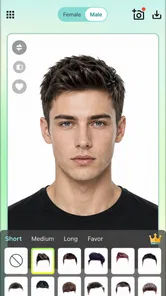
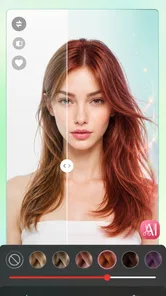
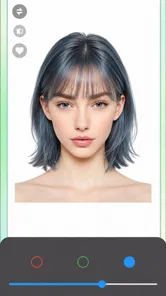
Analysis by Reviewed
I’d use AI Hairstyle Try On・Bangs・Wigs as a low-stakes way to bring a hair idea into a household conversation. A new fringe or a big color change can be hard to picture from a salon photo, so trying a look on a portrait gives everyone something concrete to react to. I’d treat the result as a starting point, not a promise of exactly how a cut will sit in real life.
One phone, several opinions
For a shared-device scenario, the simplest approach is to take turns with the same phone and make clear whose photo is on screen. That keeps the fun collaborative without assuming the app offers separate household profiles or shared galleries. If a child wants to join in, I’d have an adult handle the photo and decide what gets saved or shared; a playful makeover does not need to become a public post.
It also helps to agree on the goal before browsing. One person may be looking for a believable salon reference, while another just wants to see a dramatic wig or color for laughs. Those are different uses: the first calls for a clear, front-facing portrait and careful comparison, while the second can be more carefree. I’d avoid judging a real haircut from a single generated image, especially if the photo’s angle, lighting, or hair covering makes the preview less convincing.
Photo choices and practical boundaries
My most useful tip is to begin with one well-lit, unobstructed photo, then keep it unchanged while comparing styles. If you swap pictures midway, it becomes harder to tell whether a difference comes from the hairstyle or the image itself. A plain background and hair pulled away from the face can also make it easier to assess the outline around the forehead and cheeks. That small bit of preparation is more useful than rapidly tapping through styles without a consistent reference.
Before handing over a shared phone, I’d close or clear any personal image that the next person should not browse. I would also decide in advance whether a preview is just for discussion or something to share. The app supports sharing looks, but I’d ask everyone pictured before posting and keep the original photo in mind as well as the edited result. That is sensible household etiquette, not a claim about a particular privacy or account feature.
Who will get the most from it?
This is a good fit for someone who has a real appointment coming up and wants to narrow down a few possibilities, or for friends comparing fringe, length, and color ideas before making a change. It can also help a cautious user explain a preference to a stylist: save or show a couple of previews and describe what appeals to you, rather than expecting the image to serve as an exact technical template.
I would skip it if you need a precise simulation of how a cut will move, how your natural texture will behave, or what a stylist can achieve with your current hair. A virtual overlay cannot replace a consultation about face shape, maintenance, styling time, or hair condition. For that, a salon conversation and reference photos of real people with similar hair are more dependable. Compared with browsing ordinary hairstyle galleries, this app makes the idea feel personal; compared with professional consultation, it is much less grounded in the details of an actual head of hair.
More From Our News Desk
 Instagram
’s Power Comes From Its Place in Your Phone
A close look at how Instagram turns Meta’s reach, recommendation systems and everyday camera habits into durable platform power—and what that costs users.

 Gmail
Gmail in a Busy Inbox: Who Benefits Most?
From first account to crowded workday, Gmail earns its place through dependable search and flexible sorting—but its best fit depends on how much inbox maintenance you can tolerate.

 Prime Video
Switching to Prime Video: What Changes in Your Viewing Routine
Prime Video can make a compelling second home for streaming, but switching means learning a different catalog, rental layer, and route from browsing to playback.

 Universal TV Remote Control
 Works Best as a Reliable Backup
A phone remote earns its place through quick setup and reliable habits. Here is how to get more from Universal TV Remote Control—and where its limits show.
 Weather - By Xiaomi
Weather by Xiaomi Review: Clear at a Glance, Less Clear Up Close
Xiaomi’s weather app makes everyday forecasts quick to scan, but its calm surface can leave useful details and recovery paths harder to find than they should be.

 X
X Under Pressure: Can It Recover When Posting Goes Wrong?
A resilience-focused review of X, examining setup, mistaken posts, interruptions, weak connections, and the gaps that matter when recovery needs to be dependable.
Latest News



A quick appointment-prep routine
For a realistic everyday use, I’d open it a few days before a salon visit rather than while rushing out the door. I’d choose one straightforward portrait, test a small range of looks, and save only the previews that answer a real question: for example, whether a shorter outline feels appealing or whether a fringe changes the overall impression too much. This turns browsing into a decision aid instead of an endless scroll.
When showing a stylist a result, I’d point to the parts I like rather than ask for an exact copy. “I like this length around the face” is more useful than treating an AI image as a cutting diagram. A stylist can then account for texture, density, growth pattern, and upkeep—details the preview cannot reliably settle. This is one of the app’s best uses: helping me put a vague idea into words before the appointment.
Experiment with Endless Styles
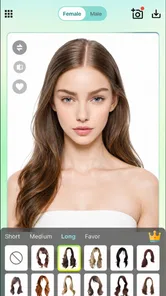
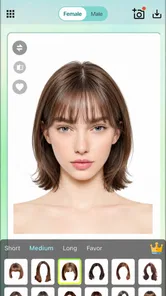
First things first, the app is packed with a plethora of hairstyles. Whether you're contemplating bangs, curious about wigs, or just want to try on a different hair color, AI Hairstyle Try On・Bangs・Wigs has got you covered. The app uses cutting-edge AI technology to let you try on countless hairstyles. Imagine scrolling through an endless catalog of styles, each one just a tap away from being on your head. It's like having a personal stylist who never gets tired!
User-Friendly Interface
One of the things I absolutely love about this app is its user-friendly interface. You don't have to be a tech guru to navigate through. The app is designed to be intuitive, so you can easily upload a photo and start trying on different looks. Plus, the app's sleek design makes the whole experience feel premium. You'll feel like you're getting a high-end salon treatment right from your phone.
As a beauty app, its appeal is the quick visual experiment rather than a detailed hair-care plan. It is free to install, with optional in-app purchases priced from about ten to forty dollars per item, so I’d check the purchase screen carefully if a shared phone is used by more than one person. The app is suitable for everyone, but that broad age label is not a substitute for an adult’s judgement about photo sharing or purchases. JYCoder is the developer, and the app has been available since June 2021; its current version is 189.0.0 and it runs on Android 6.0 or later.
Household setup and account boundaries
On a device used by several people, I’d treat each session as belonging to the person whose portrait is being edited. That sounds obvious, but it prevents a casual experiment from becoming confused with someone else’s saved or shared image. I would also avoid assuming that a device’s app access automatically creates separate personal spaces. If keeping images distinct matters, the simplest safeguard is to use separate sessions and be deliberate about which portrait is open.
Purchase boundaries deserve the same care as photo boundaries. The app is free to install, but optional purchases mean I would not hand a shared phone to a child without first making sure an adult is available to review any purchase prompt. I’d also agree in advance that a preview is not permission to spend money or post an image. That small conversation can make a fun try-on session comfortable for everyone without making assumptions about family controls.
Realistic Results
Now, I'm sure you're wondering, "Does it actually look real?" And the answer is a resounding yes! The AI does a phenomenal job of blending the hairstyles with your photo, making the results surprisingly realistic. Whether it's a chic bob or a long wavy do, the app ensures that the hairstyle looks like it's genuinely a part of you. It's almost like magic, and trust me, you'll be amazed at how accurate the transformations are.
Even when a preview looks convincing, I’d use it to compare broad impressions rather than tiny details. Check whether the length, general shape, and color direction suit the look you want; then take the image to a stylist and ask what would need adjusting for your real texture and routine. A dramatic shade can look appealing on screen but may involve upkeep you do not want, while a fringe can require daily styling. The app is most helpful when it prompts those practical questions instead of making the decision for you.
How it compares with other ways to choose a style
Compared with flipping through salon galleries or saved social-media photos, a portrait-based try-on gives me a more personal first impression: I can see whether an idea feels like me before I commit. Those galleries still have an advantage, though, because real photos show how a cut looks on actual hair and how it sits from different angles. I’d use the app to narrow the direction, then bring real reference images to discuss the cut itself.
Compared with a stylist’s consultation, the app is quicker and easier to use at home, but it cannot judge hair condition or explain the work required to reach a color. It is also not the right tool if I need a dependable preview of movement, texture, or exact salon results. The useful middle ground is to try a few possibilities here, keep the ones that help me describe my taste, and let a professional assess what is practical.
Share Your New Look
Once you've found a style you love, why not share it with your friends? The app makes it super easy to share your new looks directly to social media. Whether you want to get opinions or just flaunt your new virtual do, sharing is just a click away. And who knows, you might just inspire someone else to try a new hairstyle too!
For a calmer household workflow, I’d shortlist a few options rather than send every experiment around for a vote. Ask for feedback on one specific choice—such as fringe versus no fringe—so opinions stay useful instead of turning into a pile of conflicting reactions. If another person wants to try the app, let them choose their own photo and keep their preview separate from yours in the conversation. It is a small boundary that makes shared use feel considerate.
Age, trust, and good judgement
The app’s Everyone age rating makes it broadly suitable, but I would still guide younger users through the parts that involve portraits, sharing, and purchases. A child can enjoy seeing playful styles without needing to publish the result or use another household member’s photo. I’d keep the discussion simple: ask before using someone’s image, ask before sharing, and get an adult before making any purchase decision.
For adults, the same habits are useful on a shared device. A makeover image can feel personal even when it is only a playful edit, so I would not pass it around without the person’s approval. That is especially important when friends or family are giving opinions: ask whether they want feedback, and keep comments about the chosen look rather than turning the image into a judgement of someone’s appearance.
What the numbers mean for a household choice
AI Hairstyle Try On・Bangs・Wigs has an average rating of 3.9 from around 127,000 ratings, with roughly 1,400 written reviews and over a million installs. That suggests it has reached plenty of people, but popularity does not guarantee that every portrait will produce a result you like. I’d approach it as a convenient experiment and judge the output on your own photo, rather than expecting every style to fit equally well.
My household verdict is that it works best as a shared idea board with clear personal boundaries: useful for sparking a conversation, narrowing a few possibilities, or having a harmless bit of fun, but not a substitute for professional advice or careful purchase decisions. If you want a personalized preview before changing your hair, I think it is worth trying; if accuracy, texture behavior, or a technically precise cut matters most, bring real reference images to a stylist instead.
In conclusion, AI Hairstyle Try On・Bangs・Wigs is a game-changer for anyone looking to experiment with their hair. It's fun, easy to use, and gives you the freedom to explore new styles without any risk. So go ahead, unleash your inner fashionista and give it a try. You might just find your next signature look, all from the comfort of your home!
Hairstyle Try On - AI Haircut Frequently Asked Questions
Can I try a hairstyle on a photo before deciding to download the app?
AI Hairstyle Try On・Wigs・Bangs is designed for virtual makeovers, letting you preview hairstyle and color changes with AI. This can be useful if you want to explore a different look before changing your real hair. The previews are visual references, though, so consider how your hair texture, styling, and salon results may differ from an image.
Is AI Hairstyle Try On suitable for someone who only wants to experiment with hair color?
Yes. The app’s stated purpose includes changing hair color as well as trying hairstyle makeovers, so it may be worth considering if color is your main interest. You can explore possible looks virtually before deciding whether to make a real change. Keep in mind that a digital preview is a guide, not a promise of the exact result on your hair.
What should I check before installing AI Hairstyle Try On・Wigs・Bangs?
AI Hairstyle Try On・Wigs・Bangs is a beauty app from JYCoder for trying out virtual hairstyle changes. It is free to download, is rated for Everyone, and requires Android 6.0 or later. Check that your device meets that requirement before installing. The app has more than a million installs and an average rating of 3.9 from around 127,000 ratings.
What is AI Hairstyle Try On and how does it work?
AI Hairstyle Try On is an innovative mobile app that allows users to experiment with different hairstyles, bangs, and wigs virtually. By utilizing advanced AI technology, the app scans your face and superimposes various hairstyles in real-time, offering a realistic preview of how each style would look on you. This helps users make informed decisions about hairstyle changes without any physical alterations.
Is AI Hairstyle Try On free to use or does it offer in-app purchases?
While AI Hairstyle Try On offers a free version that includes basic features, it also provides premium options available through in-app purchases. These premium features typically include access to a wider variety of hairstyles, more advanced customization tools, and ad-free experience. Users can enjoy enhanced functionality by subscribing to one of its available plans. In-app purchases range from $9.99 to $39.99 per item, so review the purchase details before deciding to buy.
Pros
- Realistic hair simulations.
- Wide variety of styles.
- User-friendly interface.
- Quick processing time.
- Regular updates with new styles.
Cons
- Limited free options.
- Requires internet connection.
- Ads can be intrusive.
- Occasional glitches.
- Premium features are pricey.