850 OBD-II
- 30.00
- 4.5
- Installs
- 5.00K
- Price
- $1.99

Screenshots
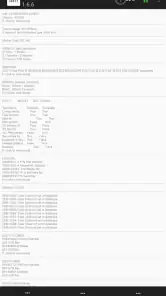
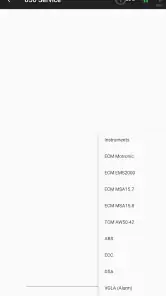
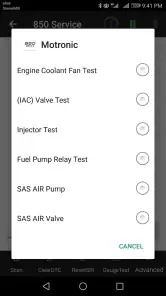
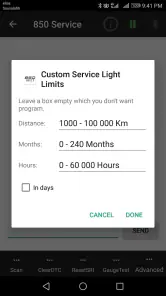
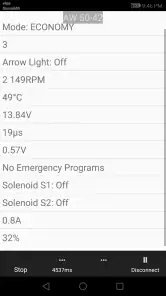
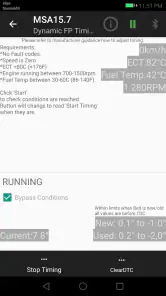
Analysis by Reviewed
If you own a Volvo from the 1996–2000 era and want to understand its OBD-II information without immediately booking a diagnostic visit, 850 OBD-II is a focused tool worth considering. I would treat it as a hands-on terminal for checking vehicle data, not as a replacement for a mechanic or a universal car-health app. Its narrow focus is the main decision point: it may suit an owner of a compatible older Volvo much better than someone looking for a broad scanner for several makes of car.
Choose it for a specific job, not just a warning light
Before paying for any diagnostic app, I’d start with two practical questions: does it fit the vehicle I want to check, and do I already have a compatible OBD-II adapter? This app is aimed at 1996–2000 Volvos, so its appeal is strongest when that matches the car in your driveway. The adapter is a separate part of the setup; having the app alone does not give your phone a connection to the vehicle.
I’d also think about what I want to do with the information. If I only need occasional reassurance and would rather have someone else interpret a warning, a garage visit may be simpler. If I want to look at diagnostic information myself, keep track of a recurring symptom, or arrive at a repair conversation with more context, an in-car terminal can be more useful. The Auto & Vehicles app is from xiaotec, costs $1.99, and is rated for Everyone. That price makes it a small but real purchase decision, especially if you still need to obtain an adapter.
Check the whole setup before buying
A useful decision starts with the car, phone, and adapter together rather than with the app in isolation. I’d confirm that the Volvo falls within the intended model years, check the phone’s operating system, and make sure the adapter supports the connection method the app expects. That quick check can prevent a frustrating first session where the app is installed but the phone cannot communicate with the car.
If you share the car, it is worth deciding who will keep notes and where. A short record of the date, warning, driving conditions, and displayed code is often more valuable than trying to remember a screen later. This is particularly helpful when a symptom appears only occasionally or when another driver uses the vehicle between checks.
Getting Started with 850 OBD-II
First things first, let's talk about getting started. The setup is pretty straightforward. You’ll need an OBD-II adapter, which connects to your car's port (usually located under the dashboard), and then pairs with your phone via Bluetooth. Once you’ve got that hooked up, it’s as simple as downloading the app and following the on-screen instructions to get everything synced up. The interface is user-friendly, even for someone who might not be super tech-savvy.
How it fits a Volvo owner’s routine
The advantage of a dedicated tool becomes clearer when a warning appears at an inconvenient time. Imagine a check-engine light coming on before a commute. Rather than immediately guessing at the cause or deciding from the dashboard light alone how urgent the situation feels, I’d use the app to read the available code, note the circumstances, and then decide whether to seek professional help. That does not make a code a diagnosis, but it can give a mechanic a more useful starting point.
More From Our News Desk

Weather by Xiaomi Review: Clear at a Glance, Less Clear Up Close

X Under Pressure: Can It Recover When Posting Goes Wrong?

Clash of Clans Is Won Between the Battles

Android Auto Makes the Case for Quieter Car Software

MobiOffice: Transforming Mobile Productivity with Seamless Integration

EA SPORTS FC™ Mobile Soccer: Redefining Mobile Sports Gaming
For a fault that comes and goes, I’d check the information when the symptom is present and avoid clearing anything before recording what the app shows. Clearing a code can remove a useful clue, so I’d only do it after I’ve captured the details and understand why I’m doing it. This is a practical distinction between using a scanner to learn and using it simply to make a warning disappear. If the car behaves dangerously, a phone app should not be a reason to keep driving.
Make a scan useful in everyday life
For example, if a light appears while I’m heading home and the car still seems to run normally, I would pull over somewhere safe before interacting with the phone. I’d record the code and any freeze-frame information, then note whether the engine was cold, whether the warning appeared during acceleration, and whether I noticed a change in how the car ran. That compact log makes a later conversation with a mechanic more grounded than “the light came on a few days ago.”
A second sensible use is checking after a repair, but I would not treat a cleared warning as proof that the underlying problem is fixed. I’d watch whether the symptom returns and preserve any new information rather than repeatedly clearing codes. The app is most helpful when it supports a careful process: observe, record, interpret, and then decide. It is less helpful when a code is treated as a shopping list for replacement parts.
Features That Stand Out
The 850 OBD-II app is packed with features that provide real-time data and diagnostics. You can monitor things like engine RPM, vehicle speed, and fuel consumption. It’s like having a mini command center right at your fingertips. One of the coolest features has to be the ability to read and clear diagnostic trouble codes. This means no more guessing why that pesky check engine light is on!
Another highlight is the app's ability to provide freeze frame data. This captures crucial information at the time a fault occurs, giving you a snapshot of your car’s condition at that very moment. It’s incredibly useful for diagnosing intermittent issues that are notoriously hard to pin down.
Read patterns, not isolated numbers
Live figures are most useful when I treat them as clues rather than verdicts. A reading can help me notice whether engine behavior changes when a symptom appears, but a single number on a screen does not automatically identify a faulty part. I’d compare what I see with the way the car actually feels, and I’d write down when the problem happens—such as after a cold start or during a particular drive—before drawing conclusions.
Freeze-frame information is especially worth checking before clearing a code because it preserves a view of conditions around the fault. That makes it a better starting point for a recurring issue than relying on memory after the warning has gone away. It still needs interpretation, though; if the cause is unclear or the fault affects safe operation, I’d take the captured information to a qualified repairer rather than swapping parts based on a guess.
User Experience
Let’s chat about the user experience. The app's design is sleek and intuitive. Navigation feels natural, and the data is presented in a way that’s easy to digest. Whether you’re a car expert or a novice, the app simplifies complex data into understandable insights. Plus, there’s a handy feature that explains what each code means, so you’re not left scratching your head in confusion.
One thing to keep in mind, though, is that while the app is free to download, some of the more advanced features do require a paid subscription. But honestly, for the amount of data and control you get, it feels like a worthwhile investment.
What a code can—and cannot—tell you
A code description can narrow the conversation, but it does not necessarily identify the failed component. Several causes can produce similar symptoms, and a fault may require physical inspection or additional testing. I’d use the explanation as a way to understand the general area involved, then compare it with the car’s behavior instead of assuming the first suggested cause is certain.
That distinction matters most for owners who enjoy working on their own cars. The app can make a home troubleshooting session more organized, but it cannot replace a service manual, appropriate tools, or experience when a repair involves safety-critical systems. If you are unsure what a result means, the best next step may be to share the captured information with a knowledgeable technician rather than experiment on the vehicle.
Where other options may be better
Compared with a generic OBD-II scanner, this app’s clear strength is its Volvo-specific focus. A general-purpose tool may make more sense if you regularly work on different makes, want one app for a mixed household fleet, or need broader vehicle coverage. A basic code reader may be the better choice if your only goal is to retrieve a fault code occasionally and you do not care about exploring live readings.
At the other end, a professional diagnostic service is a better fit when the issue is complex, safety-related, or not explained by the information you can read yourself. An app can help you ask better questions, but it does not inspect wiring, test components, or confirm a repair. I’d see it as a useful middle step between doing nothing and paying for a full diagnosis, not as a substitute for every kind of workshop equipment.
Who should skip this focused tool
I would pass on it if I needed one solution for a collection of newer or mixed-brand vehicles. Its narrow Volvo emphasis is a benefit only when it matches the car being checked. Likewise, if I rarely work on the vehicle and simply want someone to interpret a warning, paying for a diagnostic visit may save time and reduce the risk of acting on a misunderstood result.
It may also be the wrong choice if I expect the phone to identify every fault automatically or guide me through a complete repair. The useful role here is reading and understanding vehicle information, not replacing hands-on diagnosis. For an owner who wants a quick code read once in a while, a simple reader could be more direct; for an involved fault, workshop equipment and expertise are more appropriate.
Compatibility and the cost of switching
The app’s version is 1.9.7, and it supports Android 4.0 or later. Before buying, I’d check that the phone I plan to use meets that minimum and that my OBD-II adapter can communicate with it. Bluetooth pairing is part of the described setup, so adapter compatibility matters just as much as installing the app. If the connection fails, checking the adapter and pairing before assuming the car has a fault is a sensible first step.
It was released on August 1, 2017, and has a 4.5 average from 228 ratings, with 5K+ installs and 30 reviews. Those figures suggest that it has found an audience, but I’d still make the purchase decision based on the specific Volvo and adapter I intend to use. Its $1.99 price is modest; the bigger cost of switching to a different solution is usually the time spent learning another interface or buying a reader that better suits a varied set of vehicles.
Think about the adapter as part of the decision
The app’s price is only one part of the cost if you do not already own a suitable adapter. I’d avoid buying an adapter based only on a broad claim that it works with OBD-II apps; the practical question is whether it can connect to this app and your phone. If you already have a working setup, the decision is much easier. If not, compatibility research matters more than saving a small amount on the app itself.
There is also a trade-off between keeping a dedicated tool for one older Volvo and choosing a broader scanner for several cars. A general solution may reduce the number of tools you need in a household with different vehicles, while a focused app may be more appealing when this Volvo is the main reason for scanning. Switching later can mean replacing the adapter or learning a different interface, so I’d choose around the cars I actually expect to maintain.
Final Thoughts
In a nutshell, the 850 OBD-II app is a fantastic tool for anyone looking to take a deeper dive into their car's diagnostics. It’s like having a personal mechanic in your pocket. Whether you’re trying to troubleshoot an issue or simply want to keep an eye on your car’s performance, this app delivers comprehensive insights with ease. It’s perfect for those who love to get hands-on with their vehicles, or even those who just want to be a bit more informed about what’s going on under the hood.
So, if you’re ready to take the guesswork out of car maintenance and feel a bit more in control, give the app a go. It’s a game changer in the world of car diagnostics. Happy driving!
My recommendation
I’d recommend it to an owner of a compatible 1996–2000 Volvo who already has, or is prepared to choose carefully, a suitable Bluetooth adapter and wants a practical way to inspect vehicle information. The strongest case is someone who can use codes, live readings, and preserved fault conditions to prepare for maintenance or a repair conversation, without mistaking them for a complete diagnosis.
If that describes you, the low app price makes it a reasonable focused purchase. If you need broad multi-brand coverage, want a completely hands-off answer, or are facing a serious drivability or safety problem, I’d choose a different route. The best reason to install it is not to make every warning disappear; it is to arrive at the next decision with better evidence.
850 OBD-II Frequently Asked Questions
How much does 850 OBD-II cost, and is it suitable for everyone?
850 OBD-II costs $1.99 and is listed for Everyone, so its content rating is suitable for a general audience. Before downloading, consider whether its specific focus matches your vehicle and whether you already have the necessary diagnostic adapter. The app is an Auto & Vehicles tool from developer xiaotec, intended for use with an ELM327 terminal and 96–00 Volvos.
What is 850 OBD-II and how does it work?
850 OBD-II is a diagnostic tool app designed for vehicle owners to monitor and diagnose their car's systems. By connecting to the car's onboard diagnostics port, it retrieves data such as error codes, vehicle performance metrics, and real-time sensor readings. This helps users understand potential issues with their vehicle before they become serious problems. Its store summary describes it as an OBDII ELM327 terminal tool for 96–00 Volvos, so owners of those models are the clearest audience for the app.
Is 850 OBD-II compatible with all vehicles?
The 850 OBD-II app is compatible with most vehicles manufactured after 1996, as these are typically equipped with an OBD-II port. However, compatibility might vary with some models, especially older or non-standard vehicles. It's recommended to check your vehicle's manual or consult with the app's support to ensure compatibility. The app is specifically described as an ELM327 terminal tool for 96–00 Volvos, so do not assume that general OBD-II support means every vehicle will work equally well.
What features does 850 OBD-II offer to users?
850 OBD-II offers a range of features including error code reading and clearing, real-time vehicle performance monitoring, fuel efficiency analysis, and customizable dashboards. The app also provides detailed explanations of error codes, helping users understand and address issues without needing professional assistance. Its role as an ELM327 terminal tool makes it especially relevant to drivers who want to access diagnostic information from a compatible vehicle using an adapter.
Does 850 OBD-II require any additional hardware?
Yes, to use the 850 OBD-II app, users will need an OBD-II adapter, which connects to the vehicle's diagnostic port and transmits data to the app via Bluetooth or Wi-Fi. These adapters are usually sold separately, so users should ensure they have a compatible adapter to use the app effectively. Since the app is described as an ELM327 terminal tool, check that your adapter and vehicle are appropriate for that setup before purchasing the app.
Pros
- Real-time engine diagnostics.
- User-friendly interface.
- Comprehensive error code database.
- Affordable price point.
- Supports most car models.
Cons
- Limited advanced features.
- Requires additional hardware.
- Occasional connection issues.
- No offline mode available.
- Basic user manual.
- Category
- Auto & Vehicles
- Version
- 1.9.7