

70mai
- 346.00
- 3.2
- Installs
- 100.00K
- Price
- Free

Screenshots
Analysis by Reviewed
I approached 70mai as a practical companion for drivers rather than as an app that tries to do everything. Its purpose sits firmly in the Auto & Vehicles space, and that focus is important: this is an app connected to the 70mai driving ecosystem, so its usefulness depends heavily on whether you own compatible 70mai hardware. In my experience, that makes it more interesting for someone building a straightforward dash camera setup than for a driver looking for a completely independent navigation, maintenance, or insurance tool.
The app is free to download, available for everyone, and comes from 70mai Co.,Ltd. It has been around since February 7, 2018, and the current Android release is version 4.2.0, requiring Android 7.0 or newer. Those details make it accessible to many older phones, although compatibility with the phone is only one part of the experience. The bigger question is how well the app communicates with the camera and how comfortable you are using a phone as part of your in-car routine.
What using 70mai feels like in everyday driving
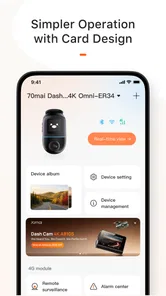
The central appeal is convenience. Instead of treating a dash camera as a device whose recordings remain trapped on a memory card, the app gives the phone a role in viewing and managing what the camera captures. That is particularly useful when I want to check a clip without removing storage from the camera, or when I need to adjust the device while parked.
I would not describe the experience as a replacement for every driving app on a phone. It is better understood as a companion layer for 70mai equipment. If you already use one of the company’s cameras, having a dedicated application can make the hardware less awkward to operate. If you do not own compatible equipment, however, installing it simply to explore the interface is unlikely to provide much value.
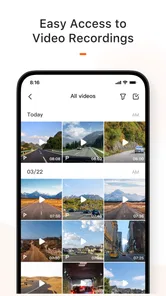
A realistic example is a minor parking incident. I might return to the car and notice a fresh mark on the bumper. Rather than immediately taking the camera apart or searching through a long sequence of files on a computer, I can use the app while the car is stationary to look through relevant recordings and identify the approximate time. That does not guarantee that the event was recorded clearly, but it makes the first step of checking much less tedious.
The same workflow can help after a longer drive. I may remember an unusual traffic situation, a scenic stretch of road, or a moment when another vehicle behaved unpredictably. Reviewing that clip on the phone is more approachable than waiting until I am back at a desktop. The important habit is to do this only when parked. The app may support a driving-related device, but it should never become a reason to handle the phone while moving.
The strongest part is the connection between camera and phone
What stands out most is the way the app turns a separate dash camera into something easier to inspect. A camera mounted behind the windscreen is naturally inconvenient to operate directly. Its screen, buttons, or indicator lights may be enough for basic status information, but a phone is generally more comfortable for browsing visual material and changing settings.
More From Our News Desk

 Gmail
GmailGmail in a Busy Inbox: Who Benefits Most?
From first account to crowded workday, Gmail earns its place through dependable search and flexible sorting—but its best fit depends on how much inbox maintenance you can tolerate.

 Prime Video
Switching to Prime Video: What Changes in Your Viewing Routine
Prime Video can make a compelling second home for streaming, but switching means learning a different catalog, rental layer, and route from browsing to playback.

 Universal TV Remote Control
Universal TV Remote Control Works Best as a Reliable Backup
A phone remote earns its place through quick setup and reliable habits. Here is how to get more from Universal TV Remote Control—and where its limits show.

 Weather - By Xiaomi
Weather by Xiaomi Review: Clear at a Glance, Less Clear Up Close
Xiaomi’s weather app makes everyday forecasts quick to scan, but its calm surface can leave useful details and recovery paths harder to find than they should be.

 X
XX Under Pressure: Can It Recover When Posting Goes Wrong?
A resilience-focused review of X, examining setup, mistaken posts, interruptions, weak connections, and the gaps that matter when recovery needs to be dependable.

 Clash of Clans
Clash of Clans Is Won Between the Battles
Its raids are quick; its community is a long-term project of coordination, teaching, rivalry, and shared responsibility—with all the friction that entails.
Latest News



That convenience can save more time than people expect. A memory card workflow usually involves stopping, removing the card, finding an adapter, opening files on another device, and then returning the card to the camera. A companion app can shorten that chain. For a driver who only checks recordings occasionally, the difference may be modest. For someone who frequently transfers clips or adjusts the camera, it becomes a meaningful reason to stay within the 70mai ecosystem.
There is also a useful separation between driving and reviewing. I can leave the camera doing its job during a trip, then use the app later when there is a clear reason to inspect something. That keeps the phone from becoming part of the driving distraction. My practical advice is to make a routine of connecting and checking the app before leaving, not during the journey. If a setting needs changing, do it in the driveway or at a safe stopping place.
Another non-obvious benefit is that the app encourages a more deliberate approach to footage. When recordings are easy to reach, I am more likely to notice whether the camera angle is correct, whether the windscreen is clean in the lens area, and whether the files I care about are actually being captured. The software cannot fix a badly mounted camera, but it makes those physical mistakes easier to discover.
Where the app earns its place for regular owners
For a regular owner, the value is not only in opening a video. It is in reducing small points of friction around the camera. A dedicated companion app gives me one place to interact with the device instead of relying entirely on physical controls and removable storage. That matters when the camera is mounted in a position that is difficult to reach or when I want to avoid disturbing its alignment.
I also see a practical role for occasional evidence management. If a clip may be useful later, checking it soon after the drive is safer than assuming the camera will preserve it indefinitely. Dash camera storage is not something I would treat casually: recordings can be overwritten, and an important moment can disappear if I wait too long. The app makes it easier to identify a clip while the circumstances are still fresh in my mind.
That leads to one of my strongest recommendations: use the app as part of a simple review habit, not as an emergency rescue tool. After a notable incident, stop somewhere safe, make a note of the approximate time, and inspect the relevant recording as soon as practical. If the clip matters, transfer or preserve it using your normal storage method rather than assuming that leaving it on the camera is enough.
The app can also be useful for family vehicles. If more than one person uses the same car, a phone-based companion is easier to share as a concept than a tiny camera interface. Still, I would establish clear expectations about who can access recordings and where copies are kept. A dash camera can capture more than the road, so convenience should not replace sensible privacy habits.
The meaningful weakness: the experience depends on more than the app
The biggest limitation is also the most important thing to understand before installing it: 70mai is not a universal driving utility. Its usefulness is tied to compatible 70mai hardware. That makes the app focused, but it also narrows its audience. Someone wanting live traffic, route planning, fuel tracking, workshop reminders, or broad vehicle diagnostics would be better served by specialized alternatives.
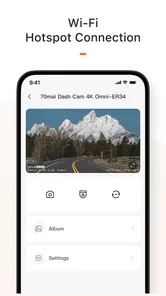
Even for an owner, the connection between phone and camera can become the part that requires patience. Wireless pairing, permissions, distance from the camera, and the phone’s own network behavior can all affect how smooth the session feels. I would not judge the entire system after one failed connection, but I also would not pretend that a companion app removes every technical annoyance. In-car wireless accessories often work best when the phone is not simultaneously trying to manage several competing connections.
My practical workaround is to prepare before the trip. Open the app while parked, confirm that the camera is recognized, and avoid changing multiple things at once. If the connection behaves strangely, closing other demanding apps and restarting the connection is more sensible than repeatedly tapping through the same screen. I would also avoid making a last-minute setup change just before driving, because troubleshooting in a hurry is exactly when the phone becomes a distraction.
The app’s rating reflects a mixed public reception: it holds a 3.2 average from around 900 ratings, alongside hundreds of written reviews. I read that as a warning to keep expectations realistic rather than as an automatic rejection. A companion app can be excellent when the phone, camera, and connection cooperate, yet frustrating when one part of that chain does not. The rating suggests that reliability and ease of use matter as much as the basic feature idea.
What I would check before relying on it
Before treating the app as part of my safety routine, I would test it in calm conditions. I would pair the phone at home or while parked, open a recent recording, and confirm that I understand how to find the files I may need. This small test is more valuable than discovering the workflow after an incident.
I would also check how much phone storage is available before transferring anything important. Video files can become inconveniently large, and a phone that is nearly full can turn a simple copy into another problem. I would keep only the clips I need on the phone and move important material to a more dependable long-term location.
Another useful check is visibility. A recording that exists but cannot be identified quickly is not very helpful in practice. I would note the approximate time of a meaningful event and review a short window around it rather than scrolling randomly. This is a small workflow improvement, but it makes the app feel much more purposeful.
Finally, I would treat firmware and application updates carefully. The current version is 4.2.0, and keeping software reasonably current can help avoid known connection problems, but I would not update immediately before a long trip without testing the setup again. The best time to change a working arrangement is when I have time to verify it, not when I am already depending on it.
Who should use it, and who should choose something else?
I think 70mai is best for drivers who already own compatible 70mai equipment and want a simpler way to interact with it from an Android phone. It suits people who value quick access to recordings, prefer managing a camera through a larger screen, and are willing to spend a few minutes learning a connection workflow.
It is also a reasonable choice for a first dash camera companion if the user wants to stay within one manufacturer’s ecosystem. The free price removes an obvious barrier to trying it, and the Everyone content rating makes it broadly approachable. Still, “free” does not mean cost-free in the wider sense: the meaningful experience depends on owning the relevant hardware, and the time spent setting up a reliable workflow is part of the commitment.
I would be more cautious about recommending it to someone who expects a polished standalone driving dashboard. If your main need is navigation, parking payment, maintenance scheduling, or vehicle data from many brands, a broader automotive app is likely a better fit. Likewise, if you dislike troubleshooting wireless accessories or rarely need to view dash camera footage, the traditional memory-card approach may feel simpler.
There is a further trade-off for privacy-conscious users. Any phone-connected camera workflow deserves careful attention to who can access recordings and how copies are handled. I would avoid sharing the phone casually during a review session and would remove unnecessary clips after they have served their purpose. That is not a reason to dismiss the app; it is a reason to use its convenience deliberately.
My verdict after weighing the convenience against the friction
My overall view is that 70mai has a clear and useful job, but it should be judged as a companion rather than as a complete automotive platform. When paired with the right 70mai camera, it can make recordings easier to inspect, reduce the hassle of physical storage management, and encourage better habits around checking the camera’s position and captured footage.
Its weakness is that the experience is not entirely under the app’s control. Hardware compatibility and the quality of the phone connection shape the result, and the mixed 3.2 average shows that not every user finds the process equally smooth. I would not install it expecting a universal solution for every driving need, nor would I rely on it without testing the workflow while parked.
For existing 70mai owners, I think it is worth trying because the main benefit is practical rather than flashy: easier access to the device you already use. For drivers choosing an app without compatible hardware, I would skip it and look for a tool that matches the actual problem they want to solve. My clear recommendation is to use 70mai as a prepared, occasional evidence-management tool—not as something to operate while driving.
That distinction captures the app fairly. It is focused, free, and potentially convenient, but its value comes from fitting neatly into a specific camera setup. If that setup is already part of your car, the app can remove everyday friction. If it is not, the name alone is not a reason to add another application to your phone.
70mai Frequently Asked Questions
What phones and operating systems can I use with 70mai?
70mai is available for Android and iOS phones, with the Android version requiring Android 7.0 or later. Your phone also needs to support the connection methods used by your particular dash camera, especially when pairing over the camera’s Wi-Fi. Check your device’s operating-system version and the camera’s compatibility details before downloading so you can use the app alongside your 70mai hardware.
What is 70mai, and what can the app do?
70mai is a companion app for compatible 70mai dash cameras and vehicle accessories. After pairing your camera, you can view a live preview, browse and download recorded videos, change supported settings, update firmware, and manage connected devices. Depending on the camera model, the app may also provide GPS information, parking-monitoring alerts, emergency recordings, and access to driving or trip-related data.
Which devices and dash cameras are compatible with 70mai?
Compatibility depends on the specific 70mai dash camera, accessory, and smartphone. The app is designed primarily for 70mai products, but available features can vary between models such as front cameras, rear cameras, interior cameras, and 4G-enabled devices. Before downloading, check the camera’s product page and your phone’s Android or iOS requirements. Some functions may also require a compatible hardwire kit, memory card, or optional accessory.
Does 70mai require an internet connection or mobile data?
The app generally connects to the dash camera through the camera’s built-in Wi-Fi to preview and transfer recordings, so an internet connection is not always necessary for basic local functions. However, mobile data or Wi-Fi internet may be needed for account services, firmware downloads, cloud-related features, map information, or remote functions on supported 4G models. Video transfers can consume considerable storage and data if shared online.
Is a memory card required to use 70mai?
Most 70mai dash cameras rely on a compatible microSD card to save continuous and event recordings, although exact requirements differ by model. The app can help you view storage status, format the card, and download clips, but it cannot replace the camera’s recording media. Use a reliable, supported card with the recommended capacity and speed, and format it through the camera or app when necessary to reduce recording errors.
Pros
- Clear video quality for everyday driving evidence
- Supports multiple camera setups for wider road coverage
- Parking surveillance adds protection while the car is unattended
- Companion app makes footage browsing and sharing convenient
- Many models offer GPS data and useful driving information
Cons
- Some features require a compatible 70mai camera model
- Parking monitoring may need a separate hardwire kit
- Cloud-related options can vary by region or device
- Long recordings can quickly consume phone storage
- App performance may depend on camera Wi-Fi stability











