6Minutes - Local News & Alerts
- 121.00
- 4.0
- Installs
- 100.00K
- Price
- Free

Screenshots


Analysis by Reviewed
I judge a local news app less by how busy its feed looks and more by whether it helps me make a small, timely decision: take another street, check on a community notice, or find out why an ordinary morning feels different. That is the lens I use for 6Minutes - Local News & Alerts. Its appeal is a nearby view of the news, but the value depends on whether the places and topics it covers match the life you actually lead.
A useful check before heading out
A realistic routine might be to open the app while having breakfast, scan for anything that could affect the school run or commute, and then move on with the day. I would not treat that quick scan as a substitute for a live traffic service or an official emergency alert. Instead, it can help me notice a local story I might otherwise miss and decide whether I should look for more detail before leaving.
That distinction matters because local news and practical guidance are not always the same thing. A report about a disruption can alert me to a situation, while a navigation tool is better for choosing a route and an official source is the place to look for instructions. The app makes most sense as an awareness layer: useful when something nearby catches my attention, but not the sole source I rely on when consequences are serious.
Who is likely to get the most from it
I’d recommend trying it if your day takes you around a town or neighborhood and you like knowing what is happening close by without opening several local sources one at a time. Parents, commuters, and people involved in community life may find a nearby feed especially relevant, provided it surfaces coverage for the places they care about. It can also suit someone who wants occasional local context rather than a constant stream of national headlines.
It is a weaker match if your main interest is politics or international reporting, or if you expect a detailed investigation every time a local issue appears. In those cases, a newspaper’s own reporting or a broader news service is more likely to provide the depth you want. I would also hesitate if location-based personalization conflicts with your privacy preferences; manually checking a local newsroom can be a reasonable, more deliberate alternative.
Make the feed fit your routine
For a calmer first week, I’d start by allowing only the kinds of alerts that could change a real decision for me. Then I’d notice which notifications lead to useful information and which ones I routinely dismiss. That simple review is more practical than leaving every alert enabled and eventually tuning them all out. The aim is not to receive the most news, but to make the few interruptions worthwhile.
I’d also separate reading from reacting. A short notification is a doorway into a story, not the whole story; when an item might affect travel, a family plan, or safety, I would open it and check the context before making a choice. For a community tip, I’d be particularly cautious about repeating a claim involving a person or a sensitive incident until a dependable source has confirmed it. This approach lets community reporting be useful without confusing speed with certainty.
More From Our News Desk

Weather by Xiaomi Review: Clear at a Glance, Less Clear Up Close

X Under Pressure: Can It Recover When Posting Goes Wrong?

Clash of Clans Is Won Between the Battles

Android Auto Makes the Case for Quieter Car Software

MobiOffice: Transforming Mobile Productivity with Seamless Integration

EA SPORTS FC™ Mobile Soccer: Redefining Mobile Sports Gaming
Another helpful habit is to judge coverage across ordinary days, not just during a major local event. A lively feed on one unusual day does not necessarily tell me whether it will be useful on a typical Tuesday. I’d check whether the updates relate to my home, workplace, school, or regular routes, and whether they offer enough context to be actionable. That gives a more honest basis for deciding whether to keep notifications on.
Getting to Know 6Minutes
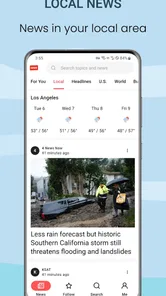
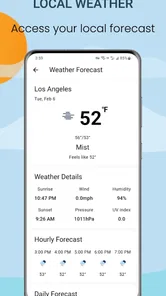
First off, 6Minutes is all about being in the know. It’s like having a local news channel right in your pocket. The app is designed to send you alerts and notifications about news, weather changes, traffic updates, and even community events, all tailored to your location. It’s available for both Android and iOS, and downloading it was a breeze.
It is a free news and magazines app from 6minutes Apps, with an Everyone age rating. Its current version is 4.5.0, and the app first appeared on April 25, 2022. It has a 4.0 average from around 489 ratings and over 100K installs, which gives a new user a useful sense of its reach without telling the whole story of how well local coverage will fit their own area.
What its current version tells me
Version 4.5.0 is the current point of reference for anyone considering the app now. The version number and release date establish that it has been available since 2022 and has moved on from its earliest release, but they do not, on their own, reveal which features changed along the way. I would avoid reading a version number as proof that a particular alert type or interface detail was recently added.
For someone already using it, the practical test is whether the present experience still serves the same local routine: are the items relevant, are the notifications manageable, and does opening a story give enough context to decide what to do next? If an update changes how the feed feels, I’d reassess those basics rather than assume that a newer version automatically means broader coverage or more dependable reporting.
The app’s reach is encouraging for a local service, but local relevance is inherently personal. A reader’s experience can depend on the neighborhoods they follow and the kinds of events occurring there. I’d use the average rating as a broad sign that other people have tried it, not as a promise that its coverage will be equally useful in every location.
Features That Stand Out
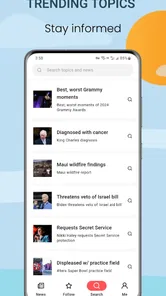
One of the things I love about this app is its simplicity. The interface is clean and user-friendly, making navigation a piece of cake even for those who aren’t tech-savvy. As soon as you open it, you’re greeted with a dashboard that’s neatly organized.
What really caught my eye was the customizable alert feature. You can choose what types of notifications you want to receive, ensuring you're not bombarded with information you don't need. Whether it's local crime reports, school closures, or even power outages, you’ve got control over your news intake.
A useful way to approach those controls is to start with only the alert types that would change what you do that day. If every category is switched on, frequent notifications can turn a helpful local feed into background noise; narrowing it down makes it easier to spot the updates that matter to your household. I’d also treat a notification as a prompt to read the full item, not as enough context to make a decision on its own.
The community aspect is another highlight. It allows users to submit news tips and updates, which means you can contribute to the local news scene. It's like being a mini-reporter, and that's pretty cool!
User contributions can make a local service feel more immediate, but they also call for a little care. I’d look for clear confirmation from a reliable source before sharing a tip as fact, especially when it concerns a safety issue, a school, or a person. That small pause helps preserve the value of community reporting without treating every early post as verified news.
Performance and Usability
Now, let's talk about performance. The app runs smoothly without any noticeable lags or crashes, which is always a plus. The loading times are quick, and the notifications come through instantly, ensuring you're always up-to-date.
However, it does require enabling location services to provide the most accurate updates. While this is understandable, it might be a concern for those who are particular about privacy.
That location trade-off is worth weighing before making the app part of a daily routine. If I’m comfortable sharing location access, I’d still review the phone’s location controls and choose the least intrusive setting that supports the experience I want. If I prefer not to grant location access at all, a city newspaper’s app or a manually selected local news source may be a better fit, even if it takes more effort to check updates.
A question I would consider before settling in is whether the app remains useful when I’m away from my usual neighborhood. For a day spent at home, local alerts may feel well targeted; for errands across town or a visit to another area, I’d check whether the feed reflects the places I need to know about. That is a practical way to assess its fit without assuming that one location setting will suit every routine.
How it compares with other ways to follow local news
Compared with a general news app, the main reason to choose this one is its focus on nearby updates and alerts rather than a broad mix of headlines. A local newspaper app may offer deeper reporting and more background on a developing story, while social feeds can be faster but harder to verify and filter. I’d use 6Minutes for awareness, then open a more detailed source when a story affects a decision or needs context.
It will suit readers who want a quick local check and are willing to tune notifications to their interests. It is less compelling for someone who mainly follows national news, dislikes location-based services, or expects every neighborhood to have the same depth of coverage. The practical question is whether the updates it surfaces are relevant to the places you actually go; I’d judge that by checking the feed over several ordinary days, not by relying on one busy news moment.
There is also a useful trade-off between convenience and editorial depth. A focused alert feed can make it easier to notice a nearby development, while a local newspaper may take more time to read but give a story stronger background and reporting. Social media can help surface eyewitness discussion, yet it can also mix rumors and commentary with confirmed information. I would not ask one format to do all three jobs: use the app to notice, a newsroom to understand, and official channels for instructions.
If I were deciding whether to keep it, I’d ask three practical questions as I use it: do the alerts concern places I visit, can I tell what an item is about before deciding to open it, and does the feed point me toward information I can verify when the stakes are high? Those questions are more useful than comparing notification volume. A smaller number of relevant updates may serve me better than a busy stream that competes for attention.
Final Thoughts
All in all, 6Minutes - Local News & Alerts is a handy app for anyone looking to stay informed about their local area. It’s reliable, easy to use, and the customization options are a nice touch. Whether you’re a news junkie or just someone who likes to know what’s happening nearby, this app is worth checking out.
So, if you’re tired of being out of the loop and want your news delivered straight to your phone, give 6Minutes a try. Who knows? You might just become the go-to source for local news among your friends!
I’d keep my expectations practical: a useful local alert is a supplement to careful reporting and official guidance, not a guarantee that every important event will appear in one place. If that balance works for you, the app offers a straightforward way to keep an eye on nearby happenings; if you need comprehensive coverage or prefer to avoid location-based updates, a local newsroom’s own app may serve you better.
My bottom line is that this is best approached as a quick local-awareness tool, not as a replacement for every other source on your phone. I’d give it a fair trial by tailoring alerts to my real routine, checking whether the feed covers the places I care about, and verifying consequential claims elsewhere. If that combination saves me from missing a useful neighborhood update without adding unwanted noise, it earns a place in my news habits. If the location trade-off or uneven fit makes me work harder than it helps, a manually chosen local source is the more sensible choice.
6Minutes - Local News & Alerts Frequently Asked Questions
What does 6Minutes - Local News & Alerts offer, and who makes it?
6Minutes - Local News & Alerts is a news and magazines app from 6minutes Apps, focused on local news and alerts. Its central appeal is helping you stay aware of what is happening nearby, with live updates and breaking news. It is intended for a general audience, so it may suit readers looking for a straightforward way to follow local developments.
Is 6Minutes - Local News & Alerts available for my device?
The app is available for Android devices running Android 7.0 or later. Before downloading, check your device’s operating system version in its settings to make sure it meets that requirement. 6Minutes is listed as a mobile app, so availability can depend on the platform and store you use; confirm that it appears in the appropriate app store for your device before proceeding.
What is 6Minutes - Local News & Alerts?
6Minutes - Local News & Alerts is a mobile application designed to keep you informed about the latest news and alerts specific to your local area. The app aggregates news from various sources, providing real-time updates on current events, weather alerts, traffic incidents, and more, all tailored to your location.
How does 6Minutes ensure the news is relevant to my location?
6Minutes utilizes location services on your device to determine your geographical area, then curates news and alerts that are specifically pertinent to your region. This allows you to receive updates on local events, government announcements, and emergencies without being overwhelmed by irrelevant information.
Can I customize the type of alerts I receive with 6Minutes?
Yes, 6Minutes allows users to customize their alerts based on their interests and priorities. You can select categories such as weather, traffic, crime, politics, or community events to receive notifications that matter most to you, ensuring you stay informed about what truly impacts your daily life.
Pros
- Local news tailored to your area
- Real-time alerts for emergencies
- User-friendly interface
- Customizable news categories
- Minimal ad interruption
Cons
- Limited global news coverage
- Some alerts may be delayed
- Occasional app crashes
- Subscription required for premium
- Limited offline access











