2nd Line+ Phone Number & eSIM
- 911.00
- 4.4
- Installs
- 1.00M
- Price
- Free

Screenshots
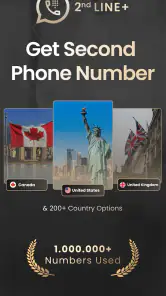
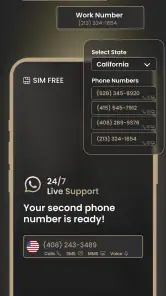
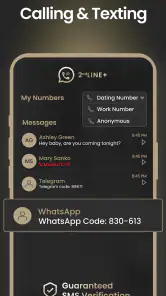
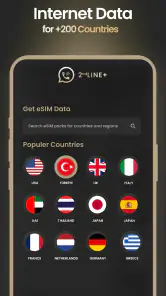
Analysis by Reviewed
When a household shares a tablet or one person’s phone, contact boundaries can get blurry fast. I can see the appeal of keeping a separate line for a side project, marketplace replies, or calls connected to a temporary commitment without handing out a main number. 2nd Line+ Phone Number & eSIM is a communication app from MobileOcean Bilisim that gives that idea a dedicated place on a single device. I’d treat it as a practical extra line, not as a substitute for a family phone plan or a guaranteed way to keep every account private.
A shared device still needs clear boundaries
One useful household scenario is a parent managing messages for a home repair or sale while the regular number stays reserved for friends and family. A second line can make it easier to recognize which conversations belong to that task. But the number itself does not decide who can open the device or see notifications. If several people use the same phone, agree who is responsible for the line and avoid leaving it open for others to browse.
That distinction matters if you are thinking of sharing the app with a partner, teenager, or relative. A separate number can help separate conversations, but it does not automatically create separate device profiles, family supervision, or private access. I’d use the phone’s own lock and account settings for those boundaries, and would not treat a second number as a security feature by itself.
Setting Up Your Virtual Line
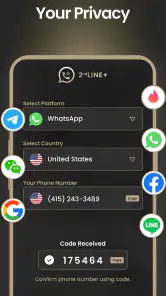
2nd Line+ Phone Number & eSIM kicks off with an easy setup process. No rocket science degree required. Just download, sign up, and boom—you’re picking a new number. It’s like magic but without the wand. The design is intuitive, making it super easy to navigate, even if tech isn’t your best friend. Plus, the app offers a virtual number that’s ready to go in minutes. No waiting, no hassle.
Decide what the second number is for first
Before choosing a line, I’d decide which conversations should use it. For example, a person selling furniture could use the extra number for buyer inquiries, then keep the main number for known contacts. A small side business might use it for customer calls while keeping personal conversations elsewhere. This simple rule makes the second line more useful: tell the people who need it, and don’t scatter it across every account without a reason.
There is also a practical trade-off: people may call or text the extra number later than you expect, so it helps to check it as part of a routine rather than assuming every message will appear where you normally look. If the line is being used by more than one household member, decide who checks it and how urgent messages are passed along. The app can provide another contact route, but coordination remains a human job.
Features That Stand Out
Now, let’s talk features. One of the coolest things is the eSIM capability. If your phone supports it, you can switch between numbers like a pro. It’s a game-changer for frequent travelers. No more swapping SIM cards at the airport. Just toggle between numbers and stay connected wherever you are.
You May Like

Clash of Clans Is Won Between the Battles

Android Auto Makes the Case for Quieter Car Software

MobiOffice: Transforming Mobile Productivity with Seamless Integration

EA SPORTS FC™ Mobile Soccer: Redefining Mobile Sports Gaming

How Microsoft OneDrive Became a Mobile Productivity Giant

How Google Translate Breaks Language Barriers Effortlessly
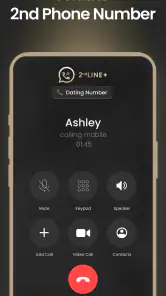
The app also offers nifty texting and calling options. It supports international calls, which is a huge plus if you’re like me and have friends scattered across the globe. And the call quality? Crisp as a fall apple. Texting through the app is seamless, with no lags, so you’re always in the loop.
I would still check that my device and mobile setup suit the way I plan to use the line before relying on it for an important trip or appointment. “Extra number” can mean different things in practice: a virtual line in an app is not automatically the same as adding a conventional carrier line, and eSIM usefulness depends on phone support. For a traveler who mainly wants a separate way to contact people, that can be convenient; for someone who needs a carrier-managed line with specific coverage expectations, comparing the two options first is sensible.
Privacy and Security
In today’s digital age, privacy is a big deal. The app understands that. It doesn’t just give you a second line; it gives you peace of mind. Your real number stays hidden, and the app ensures that your data stays right where it belongs—with you. Plus, with its encrypted messaging feature, you can chat away without worrying about digital eavesdroppers.
I’d be careful not to read “second number” as “complete anonymity.” A separate contact point can keep your main number out of a conversation, but people may still identify you through what you share, and a shared device can expose messages to whoever can access it. For sensitive family, financial, or work matters, I’d use the privacy controls and account practices appropriate to that situation rather than relying on a separate line alone.
Age, trust, and account use
The app is rated for Everyone, so its age label is broad, but that does not mean every child needs an independent number. A younger user may be better served by a parent-managed way to communicate, while an older teen may have a legitimate reason for a separate contact line. Either way, I’d discuss who can contact them, who checks the device, and what the number is used for. Those expectations matter more than the label on an app.
For adults in a household, the same rule applies in a different form: don’t assume that a shared login or phone will keep each person’s conversations separate. If several people need their own private accounts and histories, separate devices or accounts designed for individual use may be a better fit than one extra line on a shared phone.
Making the line useful day to day
The most sensible routine is to give the second number a narrow job and make that job obvious to everyone who uses the device. If it is for a furniture sale, keep buyer replies there until the sale is complete. If it is for a side business, use it for that work rather than gradually handing it to friends, shops, and unrelated services. A narrower purpose makes it easier to decide whether a call belongs to the line and when to stop checking it.
For a realistic household example, imagine a parent arranging a repair while also managing school pickup. The parent can share the extra number with the contractor, keep the personal number for familiar contacts, and check the app at agreed times. If another adult needs to handle the appointment, they should know who owns the account and how to reach the person responsible. The line can clarify the conversation, but it cannot by itself transfer responsibility or make another person an authorized user.
I’d also avoid treating a second number as a disposable identity for important accounts. If a service sends a time-sensitive message to that line, someone has to keep access to it and notice the message. Before using it for account recovery or ongoing commitments, consider what would happen if the household stopped using the app or changed devices. For short-lived inquiries, the convenience may outweigh that concern; for an account you cannot afford to lose, a stable contact method is usually the safer choice.
Coordination without confusion
When a line is used for a shared household task, one small agreement can prevent most mix-ups: name a primary person to check it, decide how urgent information is relayed, and tell the other people involved which number to use. This is especially helpful when a contractor, buyer, or customer may call back after the first conversation. Without that plan, a second number can create another inbox that everyone assumes someone else is watching.
I would not assume the app can divide conversations by household member or provide a shared team workflow. Its value here is having another contact point on a device, not replacing a family calendar, a task list, or a clearly assigned person. If several people need simultaneous access, separate accounts or a service built for team handling may be a better match than passing one phone around.
There is a useful middle ground for couples and families: one person can own the line while others know its purpose and the best way to pass along a message. That keeps the number from becoming an informal shared account with unclear responsibility. If everyone needs private access, however, a second number on one device is the wrong tool, even if it seems cheaper or simpler at first.
Which alternative fits the job?
The usual alternative is simply giving out a personal mobile number. That is easier because there is no new app or separate inbox to remember, but it also makes the personal number the contact point for people you may not want to keep in touch with. For a one-off sale or a temporary project, a second line can create a cleaner boundary. For a trusted circle that already has your number, adding another route may be needless overhead.
A second physical phone offers a stronger separation: another person can use it without needing access to your main handset, and work or household calls do not depend on one shared screen. The downside is carrying and keeping track of another device. An app-based line is more convenient when one person owns both conversations, but it cannot offer the same physical independence. I’d choose based on whether the real need is a different number or a different device.
For travel, the choice depends on what matters most. The app’s calling and texting can be useful when a traveler wants another contact route, while a conventional carrier option may suit someone who needs a mobile plan with particular coverage or service expectations. I would compare the actual needs before leaving, rather than assuming that a virtual line and a carrier line behave alike. A quick test with a non-urgent contact is a sensible way to learn the routine before relying on it away from home.
Cost and expectations
The app is free to start, with in-app purchases ranging from $4.99 to $69.99 per item, so I’d check the purchase details before building a long-term routine around it. It has a 4.4 average from around 111,000 ratings, and more than a million installs. Those figures suggest it has found an audience, but they don’t tell me whether a particular calling pattern or device setup will suit me. The current version is 2.0.8 and it requires Android 7.0 or later.
In practical terms, I would decide what “worth it” means before spending: perhaps the line saves me from giving buyers my personal number, or keeps a side project from interrupting family conversations. If I only expect to use it once, or would forget to check a second inbox, the free starting point may be enough to test the routine before considering any purchase. The listed price range is broad, so I’d inspect the specific option and its terms rather than assume every useful feature costs the same.
It is also worth being clear about what the app is not replacing. It is not a household policy for who answers a call, a second phone for a teenager, or a guarantee that a conversation stays private on a shared device. Those needs call for device-level boundaries, a different handset, or a carrier arrangement depending on the situation. The app makes most sense when the main need is an additional number managed by one person.
Who should choose it—and who should pass
I’d recommend trying it to someone who has a defined reason to separate calls and texts on one device: a marketplace seller, a person with a small side business, or an adult coordinating a temporary household project. It is most appealing when the user can reliably check the app and is comfortable keeping both lines on the same phone. Its broad Everyone age rating does not change that practical point: the person using the line still needs a suitable level of judgment and supervision for their circumstances.
I would steer someone elsewhere if they need several family members to have independent, private conversations, if they need a dedicated work handset, or if their communication depends on a carrier service with specific coverage requirements. I’d also skip it as a shortcut for monitoring a child or hiding activity from other people who share the phone. A second number can reduce how widely a main number is shared; it cannot resolve those larger access and trust questions.
Final Thoughts
So, is 2nd Line+ Phone Number & eSIM worth it? Absolutely. It’s like having a Swiss Army knife for your phone—versatile, handy, and incredibly useful. Whether you’re a jet setter, a business mogul, or just someone who values their privacy, this app has got you covered. Give it a whirl, and you might just find it’s the best thing since sliced bread.
My more measured recommendation is to try it when you have a specific reason for another number: separating a side business, keeping marketplace chats away from your everyday contacts, or coordinating a household task. It is less compelling if you need a fully separate device, independent access for several people, or a line whose behavior you have not checked before relying on it for something important. Used with clear expectations about who owns the line and what it is for, it can be a handy communication option; used as a shortcut to privacy or family supervision, it asks more of the app than a second number can provide.
2nd Line+ Phone Number & eSIM Frequently Asked Questions
Can I use 2nd Line+ Phone Number & eSIM without replacing my existing phone number?
Yes. The app is designed to provide a separate virtual phone number on the same device, so you can use it as a second line rather than replacing your main number. That can be helpful for keeping work calls and messages apart from personal communication. Calls and texts through the app depend on the service and connectivity available to you.
Is 2nd Line+ Phone Number & eSIM free to download?
2nd Line+ Phone Number & eSIM is free to download, and it offers in-app purchases priced from about five dollars to about seventy dollars per item. You can install the app without paying an upfront download price, but some options may cost extra. Review the purchase details shown in the app before confirming a transaction, especially if you only need basic second-line features.
Can 2nd Line+ Phone Number & eSIM be used for both calls and text messages?
Yes. 2nd Line+ Phone Number & eSIM is described as a virtual phone number app for calling and texting, including receiving SMS online. It is intended to provide a private second line on a single device, which may be useful when you want to keep a work or personal number separate from your main one. Your experience can depend on the service and connectivity available to you.
Do I need an eSIM-compatible phone to use 2nd Line+ Phone Number & eSIM?
The 2nd Line+ Phone Number & eSIM app is mainly compatible with smartphones that support eSIM technology, which is commonly found in newer models. Users should check their device specifications to ensure compatibility. Additionally, the app is available for both Android and iOS platforms, making it widely accessible to users of different devices.
What is 2nd Line+ Phone Number & eSIM and how does it work?
2nd Line+ Phone Number & eSIM is an app that provides users with a secondary phone number and eSIM capabilities on a single device. This app is designed for individuals who need a separate number for work or personal use without needing a second phone. It leverages virtual phone number technology and eSIM functionality to allow users to make calls, send texts, and more through an internet connection, offering flexibility and convenience.
Pros
- Easy to set up and use.
- Offers a second line without extra hardware.
- Supports eSIM for flexibility.
- Affordable pricing plans.
- No long-term contracts required.
Cons
- Limited international call support.
- May consume more battery life.
- Privacy concerns with data usage.
- Requires stable internet connection.
- In-app purchases for additional features.

- Category
- Communication
- Version
- 2.0.8











