زخرفة الكتابة بكل انواع الخطوط
- 267.00
- 4.0
- Installs
- 1.00M
- Price
- Free
Screenshots
Analysis by Reviewed
When I choose a text-decoration app, I care less about having endless effects and more about a simple workflow: can I make a name or short message distinctive, then use it where I actually need it? That is the practical lens I bring to زخرفة الكتابة بكل انواع الخطوط. It is a free beauty app from Chama innovation, aimed at styling Arabic and English writing rather than replacing a full graphic-design tool.
A quick test before you commit
Think about the places you want to use decorated text. A profile name, a short bio, or a one-line message is a natural fit; a long announcement or a carefully laid-out poster is a different job. I would test a style with the exact letters and punctuation you plan to use, because decorative characters can look appealing in a picker but become harder to scan once they sit inside a real sentence.
That small test also helps with language and readability. Arabic and English characters do not necessarily behave alike in every decorated style, and symbols that frame a word can crowd it on a narrow screen. I would keep a plain version of anything important, then use the embellished one where visual personality matters more than instant legibility.
First Impressions
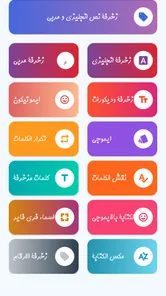
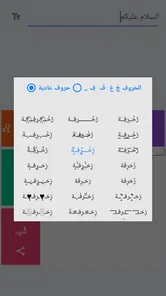
Upon launching زخرفة الكتابة بكل انواع الخطوط, the first thing you'll notice is its user-friendly interface. It's clean, straightforward, and doesn't overwhelm you with too many options right off the bat. The app promises to help you decorate your writing with various fonts and styles, and it certainly delivers on that promise. From the get-go, I could see that it was designed with the average user in mind—no need for any design expertise here!
Features Galore
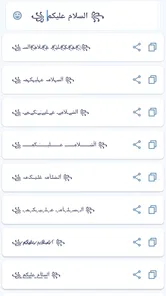
The app boasts a plethora of features that allow users to transform ordinary text into something truly special. With the app, you can choose from a vast array of font styles, each more unique than the last. Whether you're into elegant scripts or bold, eye-catching fonts, there's something here for everyone. I found myself spending quite a bit of time just exploring the different font options and seeing how they changed the feel of my text.
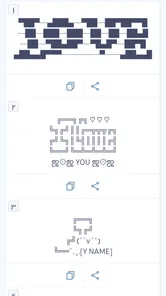
Another standout feature is the ability to add decorative elements to your text. You can incorporate symbols, emojis, and even create text art, making your messages not only readable but also visually appealing. It's like having a mini design studio right in your pocket!
From a quick idea to a usable message
In everyday use, I would treat the app as a drafting stop rather than the place where a whole post gets written. For example, if I were refreshing a social profile, I could try a few versions of the display name, compare how much ornament each one adds, and then transfer the clearest option to the profile. For a group-chat greeting or a short event announcement, the same approach lets me add character without decorating every line.
More From Our News Desk
 Instagram
’s Power Comes From Its Place in Your Phone
A close look at how Instagram turns Meta’s reach, recommendation systems and everyday camera habits into durable platform power—and what that costs users.

 Gmail
Gmail in a Busy Inbox: Who Benefits Most?
From first account to crowded workday, Gmail earns its place through dependable search and flexible sorting—but its best fit depends on how much inbox maintenance you can tolerate.

 Prime Video
Switching to Prime Video: What Changes in Your Viewing Routine
Prime Video can make a compelling second home for streaming, but switching means learning a different catalog, rental layer, and route from browsing to playback.

 Universal TV Remote Control
 Works Best as a Reliable Backup
A phone remote earns its place through quick setup and reliable habits. Here is how to get more from Universal TV Remote Control—and where its limits show.

 Weather - By Xiaomi
Weather by Xiaomi Review: Clear at a Glance, Less Clear Up Close
Xiaomi’s weather app makes everyday forecasts quick to scan, but its calm surface can leave useful details and recovery paths harder to find than they should be.

 X
X Under Pressure: Can It Recover When Posting Goes Wrong?
A resilience-focused review of X, examining setup, mistaken posts, interruptions, weak connections, and the gaps that matter when recovery needs to be dependable.
Latest News



There is a useful trade-off here: a striking style can make a short phrase feel personal, but repeating unusual characters across a long message can slow readers down. I would reserve the strongest decoration for a name, opening line, or small accent, and leave practical details—times, addresses, and instructions—in ordinary text. That way the design draws attention without making the message harder to use.
Before sharing, I would paste the result into its destination and check it there. Some apps and devices may display stylized characters differently, and a symbol that looks balanced in the editor may wrap awkwardly in a profile field. This quick preview is also a sensible way to catch a spelling slip: decorative forms can make individual letters less obvious when scanning quickly.
Ease of Use
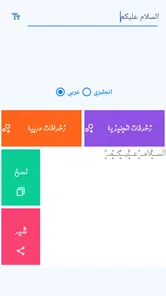
One of the things I appreciated most about this app is how easy it is to use. The developers clearly put a lot of thought into the user experience. Navigating through the app is a breeze, and applying different styles to your text takes just a few taps. Even if you're not the most tech-savvy person, you'll find that getting the hang of this app is quick and intuitive.
Another plus is that the app doesn't bombard you with ads, which is a refreshing change from many other free apps. This allows you to focus on the creative process without constant interruptions.
When another tool is the better fit
The choice becomes clearer if I start with the finished task rather than the effect I want. For a profile name or a quick greeting, a dedicated decoration app keeps the process focused. For a flyer, invitation, or promotional graphic, I would use a layout-oriented editor where I can control spacing, alignment, and the relationship between text and images. Those are different jobs, and trying to force one tool into both can add unnecessary work.
If I only want a different typeface in a document, the font controls already available in a word processor are usually the more dependable route. They keep the text editable and are designed for longer passages. Decorative character styles are better treated as a visual treatment for compact snippets, not a substitute for typography throughout a page.
How it compares with other ways to style text
Compared with typing plain text directly into a social app, this tool is useful when you want a quick selection of decorative treatments without manually assembling symbols. Compared with a general design editor, it is the more focused choice for text styling, not for building a complete image with precise layout or layered visual elements. If your goal is a polished poster, brand asset, or a layout where every line must align, I would choose a dedicated design tool instead.
It is also worth separating decorative text from a true font change. The result may rely on styled characters rather than changing the typeface in the destination app, so it may not offer the same control as a font menu in a document editor. I would avoid it for accessibility-critical copy, formal writing, or anything that needs consistent typography across platforms. For a casual name or playful caption, that compromise is much easier to accept.
Small habits that make the results more usable
For a name that people need to search or mention, I would avoid decorating every character. A lighter treatment is easier to recognize, copy, and type again later. I would also keep a plain spelling somewhere convenient before replacing a profile label; if a friend cannot find the stylized version easily, the ordinary spelling still gives them a clear reference.
For Arabic text, I would preview the whole word rather than judging each character in isolation. Connected writing depends on how letters sit together, so a style that looks attractive as a sample may feel cramped or less clear in a complete phrase. With English, I would pay particular attention to letter shapes that become easy to confuse once ornamented. In both cases, a quick read at the size where the text will appear is more useful than choosing the most elaborate sample.
There is also a practical difference between decorating a personal message and text people rely on. A playful greeting can tolerate a little extra effort from the reader; an address, meeting time, or instruction should not. I would keep essential information in ordinary writing and use the decorated version only for a heading or personal touch. That small division helps the style feel intentional instead of getting in the way.
Who it suits, and what to expect
The app is best for people who often personalize short Arabic or English text and want to experiment without learning a design program. Its Everyone content rating makes it suitable for a broad audience, and its 4.0 average from around 17,000 ratings, alongside more than 1 million installs, suggests that many people have tried it. It is free, so it is easy to test on a small task before deciding whether its style choices match your taste.
On the other hand, I would skip it if you mainly need long-form formatting, precise font control, or a result guaranteed to look identical in every app. Those jobs are better handled by a word processor or a graphic-design app built for layout. The current version is 35.Tools.Zakhrafa, and it supports Android 4.4 and later, which makes it an option for older compatible devices as well as newer ones.
A realistic everyday decision
Imagine I am preparing a brief birthday message for a family group. I might use a decorated opening with the person’s name, then keep the greeting and any practical details plain. Before sending, I would paste it into the chat and check that the Arabic or English characters remain readable and that the symbols do not crowd the line. If the result looks awkward, I can choose a simpler style rather than spending time redesigning the whole message.
The same decision process works for a social bio: try a few versions, but check the finished text in the profile field, where line breaks and available space matter. I would not assume that a style that looks good in the app will fit every destination equally well. Keeping the message short and testing the actual place where it will appear are the two habits that make this kind of tool more useful.
Final Thoughts
In conclusion, زخرفة الكتابة بكل انواع الخطوط is a fantastic tool for anyone looking to add a touch of flair to their digital communications. It's packed with features that are both fun and functional, making it a must-have for anyone who enjoys personalizing their messages. The app's ease of use and wide range of customization options make it suitable for users of all ages.
If you're someone who loves expressing yourself through text, or if you simply want to spice up your social media presence, I highly recommend giving this app a try. It's a delightful blend of creativity and practicality that will surely enhance your everyday communications.
My recommendation is more specific than “use it for everything”: keep it as a handy option for short, expressive text, and judge each result in the app where you will post it. Chama innovation’s text-decorating app was released on May 19, 2019, and its focus remains clear in the way I would use it: try styles, choose a readable one, and save the heavier ornament for moments when a little extra personality is worth the trade-off.
زخرفة الكتابة بكل انواع الخطوط Frequently Asked Questions
What Android version does زخرفة الكتابة بكل انواع الخطوط support?
The app supports Android 4.4 and later, so it may work on many older as well as newer Android phones and tablets. Before downloading, check the Android version on your device and confirm that it meets this requirement. Keeping your device’s software compatible can help the app install and run as expected.
Can زخرفة الكتابة بكل انواع الخطوط decorate both Arabic and English text?
Yes. The app is described as a tool for decorating Arabic and English text, so it can help you give names and writing in either language a distinctive look. This makes it useful for people who switch between Arabic and English in messages or social posts. As with other stylized text, how the result appears can depend on the app or platform where you use it.
What is زخرفة الكتابة بكل انواع الخطوط and what can I do with it?
زخرفة الكتابة بكل انواع الخطوط is a versatile app designed to enhance your text with a variety of decorative fonts. Whether you're looking to spice up your social media posts or personalize your messages, this app provides a wide array of font styles to choose from. Users can transform plain text into visually captivating pieces, adding a unique touch to everyday digital communication.
Is زخرفة الكتابة بكل انواع الخطوط free to use, or does it require any in-app purchases?
The app is free to download and offers a substantial selection of fonts at no cost. However, to access premium fonts and additional features, users may need to make in-app purchases. These purchases are optional and designed to enhance the user experience without limiting the functionality of the free version.
How user-friendly is زخرفة الكتابة بكل انواع الخطوط for beginners?
زخرفة الكتابة بكل انواع الخطوط is designed with user-friendliness in mind, making it accessible for beginners. The interface is intuitive, allowing users to easily navigate through different font options and apply them to their text. The app provides straightforward instructions and tips to help new users get started quickly without any hassle.
Pros
- Wide variety of fonts available.
- Easy to use interface.
- No registration required.
- Customizable text styles.
- Supports multiple languages.
Cons
- Contains ads.
- Limited free features.
- Occasional app crashes.
- Some fonts require purchase.
- In-app purchases can be expensive.