

Word Search Trip
- 1.06K
- 4.7
- Installs
- 5.00M
- Price
- Free

Screenshots


Analysis by Reviewed
When a shared tablet comes out during a quiet stretch at home, I like having a puzzle that people can take turns with without needing to learn a complicated set of rules. That is the sort of casual role Word Search Trip can fill: it is a word game from Kiwi Fun, aimed at quick rounds of looking for words rather than long sessions of strategy. I would treat it as a handy option for downtime, not as a family game built around shared accounts or coordinated play.
Why a simple word search works on a shared screen
Word searches have a useful advantage in a household: the basic task is visible. A person walking past can understand what is happening without needing a long explanation, and a new player can take a turn without learning a complicated control scheme. That makes this game easier to pass around than a puzzle whose progress depends on remembering clues, rules, or a long sequence of decisions.
That convenience comes with a boundary. A shared screen is not the same thing as separate player spaces. I would not hand the device over expecting each household member to have an independent record or personalized settings. If preserving one person’s progress matters, it is better to agree on how the device will be used rather than assume the game will distinguish everyone automatically.
A small everyday routine, not a scheduled family activity
In a realistic household routine, one person might play while waiting for dinner, then hand the device to someone else who wants a turn. Word searches are easy to understand at a glance, so the next player can get started without a tutorial from the previous one. That simplicity is the main shared-device advantage I see. It does not mean progress, settings, or scores are automatically separated by person, so I would avoid assuming that a single device offers distinct household profiles.
If you want a puzzle everyone can solve together by calling out words, this kind of game can work as a small group activity, but the screen remains the focus and the experience is still centered on finding words. For more conversation and team coordination, a tabletop word game may be a better fit. For a solo break, the straightforward format is more convenient.
One practical way to make a shared turn feel fair is to agree on a simple stopping point before someone begins: finish the puzzle already in progress, or play for a short break and then hand over the device. That is not a game feature; it is just a useful household habit when a screen is shared. It reduces the chance that one person feels a casual turn has become an indefinite claim on the tablet.
Choosing when and how to play
I would use it in short gaps: while waiting for an appointment, during a quiet commute as a passenger, or when I want something calmer than a fast-paced mobile game. A useful personal rule is to decide beforehand whether I am playing one puzzle or continuing for a while; the easy-to-pick-up format can make a brief break stretch longer than intended. If I want a deeper vocabulary exercise, a word game that asks me to form words or define them will provide a different kind of challenge.
More From Our News Desk

 Gmail
GmailGmail in a Busy Inbox: Who Benefits Most?
From first account to crowded workday, Gmail earns its place through dependable search and flexible sorting—but its best fit depends on how much inbox maintenance you can tolerate.

 Prime Video
Switching to Prime Video: What Changes in Your Viewing Routine
Prime Video can make a compelling second home for streaming, but switching means learning a different catalog, rental layer, and route from browsing to playback.

 Universal TV Remote Control
Universal TV Remote Control Works Best as a Reliable Backup
A phone remote earns its place through quick setup and reliable habits. Here is how to get more from Universal TV Remote Control—and where its limits show.

 Weather - By Xiaomi
Weather by Xiaomi Review: Clear at a Glance, Less Clear Up Close
Xiaomi’s weather app makes everyday forecasts quick to scan, but its calm surface can leave useful details and recovery paths harder to find than they should be.

 X
XX Under Pressure: Can It Recover When Posting Goes Wrong?
A resilience-focused review of X, examining setup, mistaken posts, interruptions, weak connections, and the gaps that matter when recovery needs to be dependable.

 Clash of Clans
Clash of Clans Is Won Between the Battles
Its raids are quick; its community is a long-term project of coordination, teaching, rivalry, and shared responsibility—with all the friction that entails.
Latest News



It is also worth thinking about who shares the device. The game is rated Everyone, which makes its age context broad, but that rating does not replace a parent’s judgment about screen time or whether a child should use a shared device unsupervised. I would keep purchases and device access in mind when handing over a phone, particularly because the game is free to start and offers in-app purchases priced from $0.99 to $99.99 per item. That is a wide range, so I would check the purchase flow and the device’s own purchase settings before letting a child play.
For a parent deciding whether it belongs on a family tablet, I would separate the question into two parts: is the puzzle style appropriate for the child, and is the device set up for the way the child is allowed to use it? The age label helps with the first consideration, while purchase controls and household rules are matters to handle on the device. I would not treat a broad age rating as a substitute for either one.
A closer look at the puzzle experience
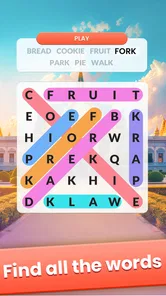
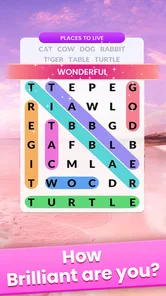
From the moment I launched Word Search Trip, I was greeted with a vibrant and user-friendly interface. The developers have nailed the aesthetics, making it both inviting and easy to navigate. Whether you’re a seasoned wordsmith or a casual player, the game caters to all levels, ensuring everyone can join in on the fun.
Gameplay and Features
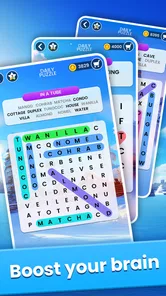
What sets this app apart is its vast array of puzzles. Seriously, there are thousands of them! You’ll never run out of challenges. Each puzzle is designed to test your vocabulary and cognitive skills. The app smartly categorizes puzzles into different themes and levels, so you can easily find the ones that interest you most.
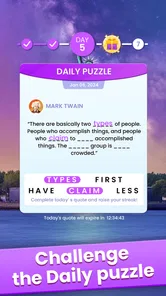
One feature I absolutely adore is the daily challenges. These keep you coming back for more, with fresh puzzles every day that are both rewarding and fun. Plus, the app offers a hint system for those tricky moments when you’re stuck. It’s like having a lifeline without feeling guilty because sometimes, we just need a little nudge.
The daily challenge is best thought of as a reason to return, not an obligation to build into a routine. If I miss a day, I would simply come back when I have time instead of treating a casual puzzle as a task to keep up with. For anyone trying to limit screen use, that distinction matters: a recurring prompt can be enjoyable, but it should not dictate when a household member picks up the device.
A useful way to approach a difficult grid is to look for one likely word at a time instead of scanning every letter without a plan. I start by checking the visible pattern systematically, then use a hint only if the search has stopped being fun. This preserves the satisfaction of finding words independently and makes the help feel like a backup rather than the default method of solving.
Competition, connection, and offline plans
If you’re competitive like me, you’ll appreciate the leaderboard feature. It adds an extra layer of excitement as you compete with friends or other players worldwide. Climbing up the ranks is thrilling, and it definitely gives you bragging rights!
For a household, I would keep that competitive element in perspective. A leaderboard can be motivating for someone who likes comparing results, but it is not the same as taking turns face to face or solving a puzzle as a team. If comparing scores tends to create friction between siblings or other players, I would ignore that part and use the game as a solo pastime instead.
Moreover, the app is offline-friendly. This means you can enjoy your word search adventures wherever you are, without worrying about Wi-Fi or data. It’s perfect for commutes, long flights, or just chilling at home.
That makes it a sensible option to have ready for a trip when connectivity may be inconvenient, though I would still open it before leaving and make sure it is in the state I expect. Offline use is most valuable when there is no easy alternative to pass the time, such as waiting during a journey. It is less compelling if what I want is a conversation-based activity or a game that depends on everyone joining in together.
Making it fit your household
For shared use, I would treat the leaderboard as optional rather than the reason to install the game. Some players enjoy comparing progress; others would rather solve puzzles without turning a quiet pastime into a contest. If people take turns on one device, agree on whether each person is continuing the same run or simply playing when it is available. That small bit of coordination avoids confusion over who used hints or changed the pace.
Hints are best saved for moments when a puzzle stops being enjoyable, rather than tapped as soon as the search slows down. I also find it useful to scan the grid in a consistent way—checking rows, columns, and diagonals separately—before using help. That turns a stuck moment into a small strategy exercise and makes the hint feel like a genuine nudge.
Another small trade-off is how the game fits into a shared device’s normal routine. If one person prefers a quiet puzzle and another wants the tablet for something else, it helps to make the handoff explicit instead of assuming the game will pause a household disagreement. I would also avoid using a shared score as a measure of who is “best” at word games: searching speed and vocabulary are not the same skill, and a relaxed activity can become less pleasant if every turn is judged.
For a solo player, the choice is simpler. I would reach for this when I want to focus on spotting familiar words without keeping track of a story or building an answer from scratch. If I want to practice spelling actively, expand vocabulary through definitions, or work through clues, I would choose a different kind of word game. The distinction is not a flaw; it is a useful way to decide whether this particular format matches the mood I am in.
Who should choose another kind of game
Word Search Trip suits people who want recognizable word-search play, themed puzzles, and an easy way to fill spare minutes. It is less suitable if you are looking for a rich story, a complex multiplayer mode, or a game where household members can manage separate identities and progress. Compared with a paper word-search book, a mobile game is easier to carry and can offer daily challenges and hints; paper is better when you want to avoid screen time or share one puzzle across a table. Compared with crosswords or word-building games, this is more about spotting words than recalling clues or inventing answers.
The game is free, and its current version is 1.4.6. It was released on February 2, 2024, and requires Android 5.1 or later. It has a 4.7 average from around 16,000 ratings, with roughly 1,100 written reviews and over 5 million installs. Those figures suggest it has found a substantial audience, though they do not tell me whether its particular puzzle style will suit you. I would try it if a familiar word search is what you want, and skip it if your priority is a more social, account-separated, or demanding word-game experience.
Those comparisons also help answer a practical question: is a phone puzzle better than a book for a journey? I would choose the app when portability and the option of hints matter, especially if I am already carrying the device. I would choose paper when I want to share a page with another person, avoid looking at a screen, or keep the activity independent of a device that other people need. Neither format wins in every setting; the right choice depends on whether convenience or screen-free sharing matters more.
It is worth weighing the free starting point alongside the purchase range rather than assuming that every part of the experience has no cost. If I were setting it up for someone else, I would review the device’s purchase safeguards first and make sure the person using it knows to ask before approving a transaction. That is especially sensible on a shared phone or tablet, where a child may not know which prompts are purchases and which are ordinary game actions.
For people wondering whether the game is suitable for a short, irregular play habit, I think that is one of its clearest use cases. A puzzle can occupy a waiting period without demanding that I remember a complicated campaign or coordinate with friends. But if you need a game that reliably brings a group together, offers distinct household accounts, or turns vocabulary practice into active word construction, I would look elsewhere rather than expecting a word-search format to do those jobs.
A measured household verdict
In conclusion, Word Search Trip is a must-have for anyone who loves word puzzles. The app is well-designed, engaging, and offers endless entertainment. Whether you’re playing to relax or to sharpen your mind, this app delivers on all fronts. So, if you haven’t already, give it a go and embark on your own word search journey. You won’t regret it!
My household verdict is more measured: I can see it working well as an easy, low-pressure puzzle to pick up alone or pass around briefly, especially for people who already enjoy searching a grid. I would set expectations about purchases and shared-device use first, and choose a paper puzzle or a more collaborative game when the goal is screen-free group time. For the right player, its simple word-search focus is the appeal; it does not need to be more than that.
Kiwi Fun’s word game is a reasonable pick for a household that wants a lightweight option available for quiet moments, with a broad age rating and a familiar puzzle format. I would install it for someone who enjoys scanning grids and is comfortable using a shared screen under clear household rules. I would skip it for a family looking for built-in separation between players or an activity that replaces a board game around the table. That is the distinction I would keep in mind before making room for it on a shared device.
Word Search Trip Frequently Asked Questions
Does Word Search Trip suit someone who wants a relaxing puzzle rather than a competitive game?
Word Search Trip is a word-search game built around finding hidden words in a letter grid, so its basic appeal is a focused puzzle-solving activity. The published description also mentions themes and varying difficulty, giving players different kinds of word-finding challenges. If you enjoy taking your time with word puzzles, this format may suit you; the game also includes competitive features such as leaderboards.
Who makes Word Search Trip, and is it a word game?
Word Search Trip is developed by Kiwi Fun, and it belongs to the word-game category. Its central activity is searching for words in a grid of letters, making it a straightforward choice for players who enjoy spotting patterns and working through word puzzles. The game’s short description is simply “Word Search Trip,” while its summary invites players on a captivating and addictive word-search trip.
What device requirements should I check before downloading Word Search Trip?
Word Search Trip is a word game from Kiwi Fun for Android devices. Before downloading, check that your device runs Android 5.1 or later, since that is the minimum operating system requirement. The game is free to download, and it is rated Everyone, making it an option for a broad range of players who enjoy word puzzles.
Who developed Word Search Trip, and what do players think of it?
Word Search Trip is developed by Kiwi Fun, and its player feedback is generally positive. It has an average rating of 4.7 from around 16,000 ratings, alongside around 1,100 written reviews. Those figures offer a quick sense of how other players have responded, but your own experience will depend on whether you enjoy searching for words in a letter grid.
What is Word Search Trip and how does it work?
Word Search Trip is an engaging puzzle game designed for both Android and iOS devices. It challenges players to find hidden words within a grid of letters. Each level presents a new theme and varying levels of difficulty, offering endless hours of entertainment and brain exercise. The game is perfect for those who love word puzzles and want to improve their vocabulary and cognitive skills.
Pros
- Engaging and challenging puzzles
- User-friendly interface
- Variety of themes
- Offline play available
- Regular updates with new puzzles
Cons
- Contains ads in free version
- Limited free puzzles
- In-app purchases can be pricey
- No multiplayer mode
- Requires subscription for premium features













