Pixel Beads
- 54.00
- 4.4
- Installs
- 10.00K
- Price
- Free

Screenshots


Analysis by Reviewed
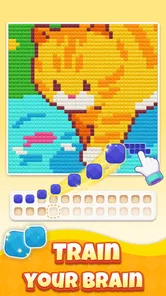
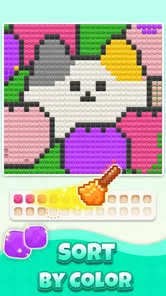
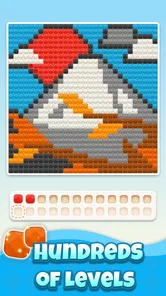
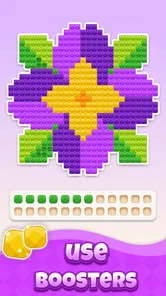
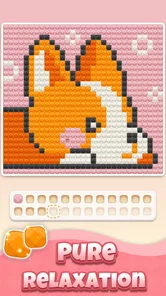
I found Pixel Beads to be the kind of board game that asks very little from me at the start. The basic idea is easy to understand: I sort small gem-like beads by color, place matching pieces, and gradually uncover a pixel-art image. It feels closer to a quiet coloring session than to a competitive board game, so I can open it when I want something gentle rather than mentally demanding.
Kiwi Fun presents it as a free game for everyone, and that description matches my first impression. The visual language is friendly, the objective is immediately recognizable, and the age rating makes it suitable for a broad audience. At the same time, “easy to start” does not mean every moment is effortless. The later sorting decisions can become fiddly, especially when several colors look similar or when I am trying to work quickly.
A calm board-game idea with a visual reward
The most satisfying part is seeing a blank or partially hidden pattern turn into a recognizable picture. Each correct color choice gives the board more structure, which makes progress visible even when the individual move is tiny. I like that the game gives me a reason to continue without requiring a complicated story, a large collection of rules, or a long tutorial.
That makes it a good fit for short breaks. I could imagine playing while waiting for an appointment, winding down before bed, or taking a few minutes away from a more demanding task. The experience is also approachable for someone who normally avoids games because they seem too fast or competitive. There is no need to learn a large control scheme before the central activity makes sense.
Still, I would not describe it as a deep strategy title. The board-game label comes from the structured arrangement and matching decisions, but the main pleasure is sorting and revealing rather than planning several turns ahead. If I want bluffing, competition, tactical battles, or a strong campaign, this is not the right direction. If I want a small visual puzzle that rewards patience, it makes much more sense.
What happens after installing it
Pixel Beads runs on Android devices using at least version 7.0, which keeps it accessible to many older phones and tablets. The current release is version 1.2.8. I would still make sure the device has a comfortable screen for precise tapping, because the experience depends on distinguishing and selecting small colored pieces rather than simply pressing a large button.
The game is free to install, but it includes optional purchases ranging from $1.99 to $99.99 per item. That is worth keeping in mind before handing the device to a child. The free entry point is useful because I can try the central loop first, but I would treat any purchase prompt carefully and use the operating system’s purchase controls if other people share the device.
More From Our News Desk

 Gmail
GmailGmail in a Busy Inbox: Who Benefits Most?
From first account to crowded workday, Gmail earns its place through dependable search and flexible sorting—but its best fit depends on how much inbox maintenance you can tolerate.

 Prime Video
Switching to Prime Video: What Changes in Your Viewing Routine
Prime Video can make a compelling second home for streaming, but switching means learning a different catalog, rental layer, and route from browsing to playback.

 Universal TV Remote Control
Universal TV Remote Control Works Best as a Reliable Backup
A phone remote earns its place through quick setup and reliable habits. Here is how to get more from Universal TV Remote Control—and where its limits show.

 Weather - By Xiaomi
Weather by Xiaomi Review: Clear at a Glance, Less Clear Up Close
Xiaomi’s weather app makes everyday forecasts quick to scan, but its calm surface can leave useful details and recovery paths harder to find than they should be.

 X
XX Under Pressure: Can It Recover When Posting Goes Wrong?
A resilience-focused review of X, examining setup, mistaken posts, interruptions, weak connections, and the gaps that matter when recovery needs to be dependable.

 Clash of Clans
Clash of Clans Is Won Between the Battles
Its raids are quick; its community is a long-term project of coordination, teaching, rivalry, and shared responsibility—with all the friction that entails.
Latest News



The game has passed the early discovery stage without becoming a huge mainstream download. It has more than 10K installs, with a 4.4 average from around 214 ratings and roughly 53 written reviews. I read that as a reasonably encouraging sign, while also remembering that a smaller rating pool cannot tell me everything about long-term variety or how the game feels after extended use.
My recommended first five minutes
For a first session, I would avoid tapping rapidly across the board. I would begin by looking at the available colors and identifying the clearest match rather than trying to solve everything at once. The first meaningful success comes from completing a small, obvious section and watching the hidden image become easier to read.
That approach matters because the game’s appeal depends on visual feedback. If I rush, I turn a relaxing activity into a hunt for mistakes. If I pause briefly to compare the bead color with the target area, the board becomes much easier to understand. I found that starting with isolated spaces or a color that appears in several obvious locations gives me a better sense of the rhythm than beginning with the most crowded part of the picture.
A useful habit is to scan the whole pattern before committing to a long sequence. I can notice whether one color is concentrated in a corner, spread across the image, or mixed with a similar shade. This turns the opening from random tapping into a simple sorting exercise. It is not advanced strategy, but it reduces the feeling of being lost when the artwork is still mostly concealed.
How to handle the small points of friction
The main challenge is not understanding the goal; it is maintaining visual accuracy. Similar shades can slow me down, particularly when I am playing on a smaller screen or in dim lighting. I would recommend increasing the phone’s general display comfort if needed, cleaning the screen, and playing with the device held steadily. Those small adjustments make more difference here than they would in a game based on broad gestures.
I also found it better to treat mistakes as a signal to slow down rather than as a reason to restart immediately. When several pieces appear close in color, I compare the target area with the selected bead and then move to a different part of the picture if I am uncertain. This prevents one confusing cluster from taking over the whole session.
Another practical tip is to use the image’s developing shape as a guide. A color that seemed ambiguous at the beginning may become obvious once neighboring sections are completed. In other words, I do not need to solve every uncertain spot immediately. Leaving a difficult area for later is often more efficient than repeatedly guessing at it.
Why the reveal feels different from ordinary coloring
Traditional coloring apps usually give me a clearly outlined picture and let me choose the colors or fill regions directly. Pixel Beads adds a sorting layer before the picture becomes visible. That extra step gives each placement a little more purpose, because I am not only decorating an image; I am uncovering it through matching.
Compared with a standard match-three game, the pace is much less urgent. There is no reason for me to chase a chain or react to a changing board. Compared with a jigsaw puzzle, the pieces are not about assembling a scene through shape recognition. The central satisfaction comes from color recognition and incremental discovery, which makes it a better alternative for someone who wants a calmer activity than a timed puzzle.
The trade-off is replay motivation. Competitive board games can keep me involved through opponents, rankings, or changing tactics. A coloring puzzle depends more on the appeal of the artwork and the pleasure of completing it. If a player needs a strong sense of competition or a constantly changing challenge, the quiet format may feel limited after the novelty of the reveal fades.
A realistic everyday use case
Imagine finishing dinner with ten minutes before starting the next chore. I could open the game, complete a few clear color groups, and stop without feeling that I have abandoned a complicated mission. The visible progress makes a short session feel worthwhile. I do not need to remember a story, coordinate with another player, or reach a checkpoint before closing the app.
It can also work as a shared activity between an adult and a child. One person can identify a color while the other searches for its matching spaces. Because the content rating is Everyone, the concept is broadly approachable. I would still supervise purchases and help younger players with tiny visual distinctions, but the basic interaction is simple enough to explain in ordinary language.
For adults, the strongest use case is probably decompression rather than stimulation. I would choose it after a busy day when I want a task for my hands and eyes but do not want a demanding puzzle. Someone who uses games to stay alert during a commute or to compete with friends may find it too passive, while someone seeking a quiet transition between activities may appreciate its modest pace.
What new players may misunderstand
A common mistake is assuming that every visible color difference must be solved immediately. The partially revealed artwork can make the board look more complicated than it really is. I get better results by treating the image as a set of small color groups and postponing the sections that are visually unclear.
It is also easy to think that faster tapping equals better play. In this game, speed can work against accuracy. The meaningful success is not finishing a sequence as quickly as possible; it is making the right matches consistently enough for the picture to emerge. I would rather complete a smaller portion carefully than create frustration by rushing through a dense area.
Another point is that the free label does not mean every possible part of the experience is necessarily free of purchase prompts. Since in-app items are available, I would not assume that every optional convenience or extra element follows the same access model. I would simply play the opening content, decide whether the core loop is enjoyable, and only then consider whether spending is worthwhile.
Who will enjoy it most
This is best for players who enjoy quiet progress more than competition. It suits people who like color matching, pixel-art reveals, and short sessions with a clear visual endpoint. It is also a reasonable first game for someone who is uncomfortable with complex controls, because the central action can be understood without studying a long rulebook.
Families may appreciate the simple premise, particularly when an adult is nearby to help with small shades and manage purchases. Older Android users may also find the minimum operating-system requirement convenient, although screen size and display quality still affect comfort. I would choose a tablet when possible if the phone feels cramped.
I would skip it if I need a rich competitive board game, a narrative adventure, or a puzzle with substantial strategic branching. I would also look elsewhere if repetitive matching quickly loses my interest. The game’s charm comes from the steady reveal, so players who need constant surprises may prefer a more dynamic alternative.
How I would decide whether to keep playing
My advice is to judge the game after completing enough of the opening loop to see whether the reveal itself is rewarding. Do not evaluate it only by the first few taps, because the visual payoff becomes clearer as more of the artwork appears. At the same time, do not feel pressured to continue simply because the game is free. If sorting colors feels like work rather than relaxation, its central appeal is probably not a match.
I would also pay attention to how comfortable the board is on the device. If I regularly misread nearby colors or tap the wrong area, the problem may be the screen rather than the concept. A larger display, brighter surroundings, and slower movements can improve the experience, but they cannot turn a fundamentally quiet puzzle into a strategic board game.
For anyone considering purchases, I would first establish a personal limit and make sure the device’s purchase protection is active. The available item range goes as high as $99.99, so a little caution is sensible even though the game can be started without an upfront price. The best reason to spend would be genuine enjoyment of the matching-and-reveal loop, not pressure to make an uncertain session feel worthwhile.
My final take on Pixel Beads
After spending time with it, I see Pixel Beads as a focused relaxation game rather than an all-purpose board-game replacement. Kiwi Fun keeps the central idea clear: sort by color, place carefully, and let a pixel-art picture appear through steady progress. That simplicity is its strength, especially for first-time players who want to understand the goal quickly.
Its limitations are equally clear. The experience can become visually fiddly, the strategic depth is modest, and players looking for competition or a large adventure will outgrow it. Optional purchases also mean I would approach the free download with normal spending awareness. None of that undermines the core activity, but it helps set the right expectations.
My recommendation is to try it when you want a calm, screen-based coloring puzzle with a small sense of discovery. Start slowly, complete the clearest color groups first, leave confusing sections until the image gives you more context, and decide based on whether the reveal feels satisfying. For a quiet break, that workflow makes the game approachable and pleasantly low-pressure; for intense challenge, another board game will be a better choice.
Pixel Beads Frequently Asked Questions
What devices and operating system does Pixel Beads support?
Pixel Beads is a board game developed by Kiwi Fun, and it requires Android 7.0 or later. Before downloading, check that your device meets this requirement and has enough available storage for the game. The game is free to download, so you can try its bead-sorting and pixel-art puzzle experience without paying an upfront purchase price.
What is Pixel Beads, and how does the app work?
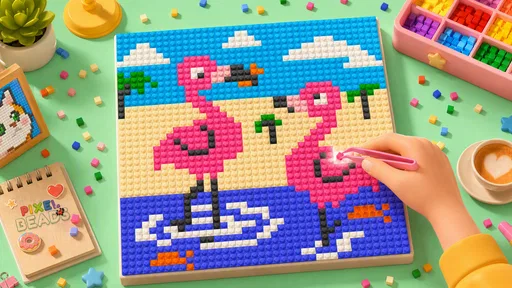
Pixel Beads is a creative crafting app centered on designing pixel-style bead patterns. After opening the app, users can browse available templates, choose a design, and follow the color-by-color layout to recreate it with physical beads. Depending on the version, it may also offer tools for creating custom patterns, changing colors, zooming into individual pixels, and saving finished designs for later use.
Is Pixel Beads suitable for beginners and children?
Pixel Beads is generally easy to understand, making it suitable for beginners who have never created bead art before. The grid-based designs provide clear visual guidance, while zoom controls can make small details easier to follow. Parents should still supervise younger children because the physical beads are small and may present a choking hazard. The app itself is simple, but the crafting activity requires patience and careful handling.
Does Pixel Beads require an internet connection?
The basic pattern-viewing experience may work without a constant internet connection once the necessary content has loaded, which is useful when crafting away from home. However, certain features may depend on online access, including downloading new designs, synchronizing saved projects, viewing advertisements, or accessing cloud-based content. Availability can vary by device and app version, so users should open their preferred patterns before going offline.
Can I create or customize my own Pixel Beads designs?
Pixel Beads may provide customization options that allow users to adjust colors, edit individual grid squares, or build a design from an imported image. These tools are especially useful for making personalized artwork, logos, characters, or gifts. Users should remember that converting detailed images into bead patterns can reduce visual quality, so simple, high-contrast pictures usually produce the clearest and most practical results.
Pros
- Simple interface makes bead designs easy to create.
- Works well for relaxing
- creative downtime.
- Color-based tools help organize detailed patterns.
- Suitable for both casual users and craft enthusiasts.
- Finished designs can inspire real-world bead projects.
Cons
- Some patterns may feel repetitive after extended use.
- Small details can be difficult to manage on compact screens.
- Advanced creative options may be limited for experienced users.
- Larger designs can require considerable time to complete.
- Performance may vary on older phones or tablets.