

Word Mosaic
- 96.00
- 4.8
- Installs
- 100.00K
- Price
- Free
Screenshots

Analysis by Reviewed
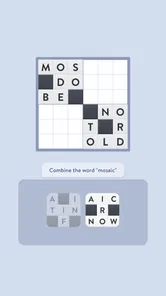
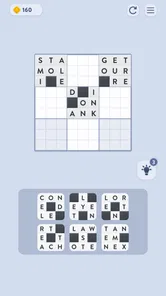
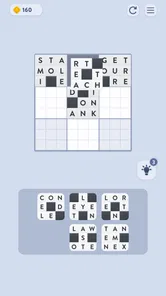
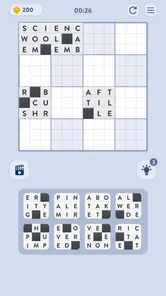
Word Mosaic is the kind of word game I can open without needing a long explanation or a serious time commitment. The basic idea is visual: I place letter tiles into the squares where they belong, then watch the puzzle come together as a completed mosaic. That makes the first few minutes feel approachable, especially if I want something calmer than a fast arcade game or less demanding than a full crossword.
What makes it worth considering is the combination of word recognition and spatial organisation. I am not simply searching for answers in a blank grid. I am also deciding where each tile fits, which means a correct word can still require careful placement. That small extra layer gives the game a different rhythm from ordinary word searches and anagrams.
My main advice for a first-time player is to treat the opening puzzle as a visual sorting exercise, not a race. Once I stopped trying to place every tile immediately, the board became easier to read. The game works best when I use the letters already visible to create a few reliable anchors, then build outward from them.
What to expect when you begin
Word Mosaic is a free word game from Fugo Games, aimed at Everyone and available for devices running Android 8.0 or later. It has a simple premise, but the appeal is not limited to people who normally play word puzzles. I can imagine using it during a short break, while waiting for an appointment, or at the end of the day when I want a quiet activity that still keeps my attention engaged.
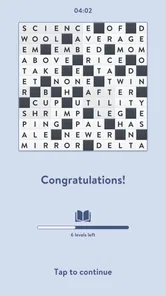
The store summary describes placing tiles into the correct squares to complete a mosaic puzzle, and that is a useful way to understand the central loop. The board gives me a visual target, while the letter tiles provide the information needed to reconstruct it. I get a little satisfaction from seeing scattered pieces become readable patterns rather than merely filling answers into empty boxes.
The game is currently at version 1.7.1. Its average rating is 4.7 from around 11K ratings, and it has passed 100K installs. Those figures suggest that the straightforward format has found an audience, although they do not replace trying it myself. In practice, the most important question is whether I enjoy the slower process of examining tiles and testing their possible positions.
Because it is free to download, the barrier to trying it is low. In-app purchases range from $1.99 to $19.99 per item, so I would approach the game with the usual awareness that optional spending may be part of the experience. I would not install it expecting a completely purchase-free structure without first checking how the current version handles its optional items.
More From Our News Desk

 Gmail
GmailGmail in a Busy Inbox: Who Benefits Most?
From first account to crowded workday, Gmail earns its place through dependable search and flexible sorting—but its best fit depends on how much inbox maintenance you can tolerate.

 Prime Video
Switching to Prime Video: What Changes in Your Viewing Routine
Prime Video can make a compelling second home for streaming, but switching means learning a different catalog, rental layer, and route from browsing to playback.

 Universal TV Remote Control
Universal TV Remote Control Works Best as a Reliable Backup
A phone remote earns its place through quick setup and reliable habits. Here is how to get more from Universal TV Remote Control—and where its limits show.

 Weather - By Xiaomi
Weather by Xiaomi Review: Clear at a Glance, Less Clear Up Close
Xiaomi’s weather app makes everyday forecasts quick to scan, but its calm surface can leave useful details and recovery paths harder to find than they should be.

 X
XX Under Pressure: Can It Recover When Posting Goes Wrong?
A resilience-focused review of X, examining setup, mistaken posts, interruptions, weak connections, and the gaps that matter when recovery needs to be dependable.

 Clash of Clans
Clash of Clans Is Won Between the Battles
Its raids are quick; its community is a long-term project of coordination, teaching, rivalry, and shared responsibility—with all the friction that entails.
Latest News



The visual approach changes how I solve
Traditional word searches usually reward scanning, while anagram games focus on rearranging letters until a word appears. Word Mosaic asks me to combine those habits with visual deduction. The shape of the open spaces matters, the surrounding letters matter, and the emerging pattern can confirm whether a choice is sensible.
That difference is small but meaningful. In a normal crossword, I often begin with a clue and write the answer into a fixed location. Here, I may recognise a useful sequence but still need to decide which square should receive each tile. The game therefore suits players who enjoy making several small decisions rather than solving one clue at a time.
I also find it more relaxing than a timer-driven word challenge because the board itself supplies the pressure. I can take a moment to compare possibilities instead of relying entirely on speed. That makes it suitable for casual play, though players who want intense competition, rapid rounds, or a large vocabulary test may find the pace too gentle.
Getting through the first setup
Installation should be uncomplicated for a compatible device. After opening the game, I would begin by looking at the whole board before touching a tile. This sounds obvious, but it prevents the most common beginner mistake: committing to the first familiar word without understanding how its letters relate to the surrounding spaces.
I recommend holding the phone at a comfortable angle and keeping the entire puzzle visible whenever possible. The mosaic concept depends on seeing relationships across the board, so constantly shifting my attention between a small tile area and a distant empty square makes the task harder than it needs to be. A quick visual survey gives me a better sense of where clear starting points might be.
For the first session, I would avoid trying to solve everything in one sweep. Instead, I would look for a distinctive letter combination or a short word that appears to have only one natural location. Once that first placement is made, the remaining spaces become easier to interpret. The board begins to provide its own clues, which is more useful than guessing from isolated letters.
One practical advantage of this approach is that it reduces accidental confusion. If I place several uncertain tiles at once, one wrong assumption can make the entire board look impossible. If I place only the most confident tile first, I can use the resulting structure to reassess the next move. This is a good habit for beginners because it turns mistakes into information rather than frustration.
The first meaningful success
My first satisfying moment with Word Mosaic would not be completing the entire puzzle quickly. It would be recognising why a tile belongs in a particular square. The game becomes more understandable when I can connect three things: the letters I have, the shape of the available spaces, and the partial words appearing around them.
A useful opening routine is to separate certainty from possibility. I mentally mark tiles that clearly match a visible pattern, then leave ambiguous pieces alone. I do not need to solve every uncertainty immediately. In fact, waiting can help because a confirmed placement may reveal the beginning or ending of another word.
When I reach a difficult section, I work from the edges of what I already know. A completed word can act as an anchor, and a neighbouring tile may suddenly have fewer plausible positions. This is more reliable than repeatedly moving random pieces. It also makes the puzzle feel like a chain of deductions instead of trial and error.
Another helpful technique is to read the board in more than one direction. I first scan horizontally because that is usually the most natural way to recognise words, but I also check vertical relationships and the overall mosaic shape. A tile that seems unhelpful in one direction may make sense when viewed as part of a nearby structure.
If I make a wrong placement, I try not to restart my thinking from zero. I identify the assumption that caused the problem. Was the word incomplete? Did I confuse a similar-looking position? Did I focus on the letters but ignore the shape of the empty squares? Naming the mistake makes the next attempt faster and teaches me how the particular puzzle communicates its clues.
Confusion points worth knowing early
The biggest source of confusion is assuming that recognising a word automatically tells me where it belongs. In this game, the word and the position are connected but not identical problems. I may know the letters and still need to inspect the board carefully before placing them.
Another potential stumbling block is treating every tile as equally useful. Some pieces are much better starting points because their surrounding spaces make the answer clearer. Others are deliberately ambiguous until nearby sections have been solved. I get better results when I postpone the ambiguous tiles instead of forcing them into a location simply to make progress.
It is also easy to overvalue the visible mosaic effect. The picture-like arrangement is attractive, but I should not let the appearance distract me from word structure. I use the visual pattern as a confirmation tool, not as a substitute for reading the letters. If the board starts looking tidy but the words do not make sense, I probably need to reconsider a recent placement.
For players used to conventional word games, the lack of a straightforward clue-and-answer flow may take a little adjustment. Word Mosaic does not feel exactly like a crossword, and it is not simply an anagram generator with decoration added. Its challenge comes from coordinating recognition and placement, so the best strategy is deliberately slower and more observant.
There is a trade-off here. The same calm design that makes the game accessible can make it feel less exciting for someone who wants a constant stream of new mechanics. If I prefer timed rounds, competitive leaderboards, or highly complex clue systems, a traditional crossword app or a faster word challenge may suit me better. Word Mosaic is strongest when I want a focused puzzle with a visual payoff.
How I would use it in everyday life
Imagine I have ten quiet minutes before a train arrives. I could open a social feed and lose track of time, or I could work through a mosaic puzzle in small steps. I would scan the board, place one or two confident tiles, and pause whenever the next move was unclear. Even if I did not finish immediately, I would have made meaningful progress without needing to remember a complicated storyline or control scheme.
The same workflow fits a short evening break. I would keep the sound and pace unobtrusive, focus on one section, and stop when my attention began to fade. Because the puzzle is based on visible arrangements, returning to it can feel more manageable than returning to a game that requires remembering a plot, a map, or a long chain of objectives.
It may also work for families because the content rating is Everyone and the central activity is easy to explain. I would still let each player decide how much help they want. Someone who enjoys wordplay may want to reason independently, while a younger or less confident player might benefit from discussing the possible word shapes aloud.
For language learners, I would be more selective. The game can encourage attention to spelling and word patterns, but it should not be treated as a structured language course. If I encounter unfamiliar vocabulary, I would use the puzzle as a prompt to investigate the word afterward rather than assuming the game will teach its meaning or pronunciation.
Small habits that make the puzzles easier
I find that the most effective habit is to solve in layers. First, I identify obvious letter groups. Next, I check whether those groups fit the dimensions and position of the open spaces. Finally, I use the completed areas to narrow down the remaining choices. This three-stage process keeps me from mixing strong evidence with weak guesses.
I also avoid moving too many tiles while I am uncertain. A crowded board can become mentally expensive when every piece has been shifted several times. I prefer to make one deliberate change, inspect the result, and then decide whether it improved the structure. That is especially useful on a phone, where small movements can make the board harder to follow.
When I am stuck, I change the question. Instead of asking, “What word can these letters make?” I ask, “What kind of word could fit this exact space?” The second question includes location and shape, which are central to this game. It often turns a vague collection of letters into a manageable deduction.
A final tip is to take a short break before repeatedly guessing. Word puzzles can become harder when I stare at the same arrangement for too long. Returning with fresh attention may reveal a pattern that was already visible. Since the game is designed around calm placement rather than frantic action, stepping away is compatible with its strengths.
Who should try it, and who should skip it
I would recommend Word Mosaic to people who enjoy word games but want something more visual than a standard word search. It is also a good fit for players who like arranging objects, spotting patterns, and solving gradually. The free entry point makes it easy to test whether the tile-and-mosaic format feels natural before deciding whether optional purchases are worthwhile.
I would be less likely to recommend it to someone seeking a competitive daily challenge with strict time pressure. I would also point crossword fans toward a dedicated crossword game if clues, themes, and fixed answer grids are the main attraction. Likewise, players who prefer word games based on rapid letter creation may find this format too deliberate.
The game sits in an interesting middle ground. It has more spatial reasoning than a basic anagram app, but it does not ask me to manage the broad vocabulary or clue interpretation of a demanding crossword. That balance is its clearest identity, and it explains why the experience can feel welcoming without being completely mindless.
What to do after the first puzzle
Once I understand the basic placement loop, I would resist the urge to optimise every move. My next step would be to notice which types of board sections I solve most easily and which ones cause hesitation. If I struggle with isolated tiles, I would focus more on surrounding word patterns. If I recognise words but misplace them, I would pay closer attention to the mosaic layout before committing.
I would also decide early how I feel about the free-to-play model. The game costs nothing to download, but optional items are priced from $1.99 to $19.99 each. That does not automatically make the experience poor, yet it is a real consideration for anyone who wants a strictly no-spend puzzle routine. I would enjoy the available play first and only consider spending if the value feels clear to me.
With its Everyone rating, modest device requirement, and approachable visual concept, the game is easy to suggest as a casual trial. The strongest reason to keep it installed is not the size of its feature list; it is the satisfying moment when a scattered set of tiles becomes a coherent word mosaic through my own decisions.
After spending time with it, my view is positive but specific. Word Mosaic is best when I want a quiet, pattern-focused word puzzle that rewards patience more than speed. It does not replace crosswords, anagrams, or competitive word games, and players looking for those exact experiences should choose accordingly. For a first-time user, though, the path is reassuring: inspect the board, place the clearest tile, use each confirmed section as a new clue, and let the completed mosaic emerge one careful decision at a time.
That gradual sense of progress is what makes Word Mosaic worth trying. Fugo Games keeps the central idea easy to grasp, while the combination of letters and positions gives the puzzles enough texture to hold my attention beyond the first attempt. If a calm word game with a visual finish sounds more appealing than a frantic score chase, I think it is a sensible free download to explore.
Word Mosaic Frequently Asked Questions
What device requirements should I check before downloading Word Mosaic?
Word Mosaic is a word game from Fugo Games, and it runs on devices using Android 8.0 or later. Before installing, check that your device meets this minimum operating-system requirement and has room for another game. The current version is 1.7.1, so keeping your device and app up to date can help you use the latest available release.
What is Word Mosaic and how does the game work?
Word Mosaic is a word puzzle game in which you arrange, connect, or identify letters to create words and complete mosaic-style challenges. Each level generally combines vocabulary skills with visual pattern recognition, making it easy to understand but increasingly demanding as you progress. It is suitable for short sessions, although more difficult puzzles may require patience and careful thinking.
Is Word Mosaic free to download and play?
Word Mosaic is free to download, allowing players to access the main puzzle experience without an upfront purchase. However, it offers in-app purchases, with prices ranging from $1.99 to $19.99 per item. These purchases are optional, but they may affect how you choose to play or access extras. Check purchase settings on your device, especially if children will be playing.
Does Word Mosaic require an internet connection?
Many Word Mosaic puzzles may be playable without a continuous internet connection, which makes the game convenient for travel or offline breaks. Nevertheless, an internet connection may still be needed for advertisements, cloud saving, updates, leaderboards, special events, or restoring purchases. If offline play is important to you, test the game after installation and review its permissions and store description.
Is Word Mosaic appropriate for children and language learners?
Word Mosaic can be a useful casual game for children, students, and language learners because it encourages spelling, vocabulary development, concentration, and pattern recognition. It is rated Everyone, though the actual difficulty depends on the word lists and level design, so younger players may need help with advanced vocabulary. Parents should also review advertising, in-app purchases, privacy information, and any online features before allowing independent play.
Pros
- Relaxing word puzzles suitable for short play sessions.
- Simple controls make it easy for new players to get started.
- Gradually increasing difficulty keeps the experience engaging.
- Helpful hints can assist when you are stuck on a puzzle.
- Works well as a casual game for improving vocabulary skills.
Cons
- Some puzzles may feel repetitive after extended play.
- Later levels can become difficult without using hints.
- Hint systems may be limited or tied to in-app purchases.
- The game may include frequent advertisements between puzzles.
- Not ideal for players looking for competitive multiplayer features.













