Truck Star
- 4.36K
- 4.6
- Installs
- 10.00M
- Price
- Free

Screenshots

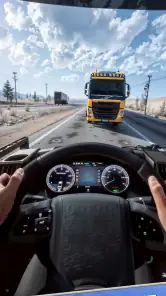
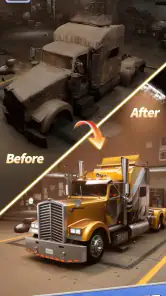
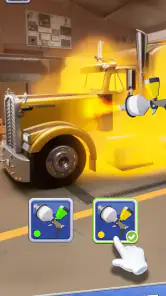
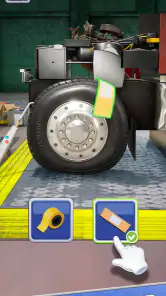
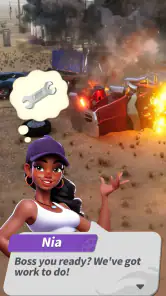

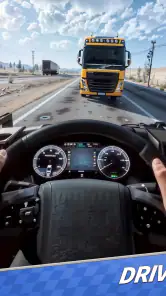
Analysis by Reviewed
I tend to judge a casual game by whether it fits into the small gaps of an ordinary day, not just whether its theme sounds appealing. Truck Star is aimed at players who enjoy working on a vehicle and making it their own, rather than spending every session racing at full speed. That gives it a different household feel from a loud, competitive game: it can be something one person picks up for a quiet break, or a shared point of interest when someone wants to show off a truck they have customized.
A game that can be passed around, with a little care
On a shared phone or tablet, the main practical question is less about teamwork and more about keeping track of whose progress is on screen. I would agree on a simple handoff routine: finish the current activity, let the next person know what they can change, and avoid making purchases or altering a design on someone else’s turn. That is useful for siblings or roommates sharing one device, since a small change to a vehicle can matter to the person who has been shaping it.
For a short evening break, one person might take a turn improving a truck while another suggests a paint choice or a repair priority. That kind of informal coordination suits a customization game better than trying to turn it into a head-to-head contest. I would not assume that a shared device automatically means shared progress or separate profiles; treat the active game as belonging to the person currently playing unless you have checked how your device handles accounts and saved progress.
What the customization loop asks of you
The appeal is in the repeated cycle of spotting what a truck needs, making a change, and seeing the result. That can be satisfying if you enjoy gradual visual progress and small decisions. My practical tip is to pause before spending resources on a change that is mostly cosmetic: decide whether you are trying to improve the look you want or move forward through the game. Keeping those goals separate helps make choices feel deliberate rather than rushed.
Compared with many casual games built around matching pieces or tapping through quick rounds, this one puts its identity in trucks and their appearance. That focus is a plus if you like vehicle-themed play, but a drawback if you want a broad collection of unrelated activities or a deep driving simulation. It is best approached as a light, vehicle-centered pastime rather than a substitute for a full truck simulator.
It is free to start, with in-app purchases ranging from $0.99 to $99.99 per item, so I would be mindful if children use the same device. Agree on purchase permission beforehand and use the device’s own purchase safeguards where appropriate. The game is rated Everyone, which makes its age positioning accessible, but that rating does not decide whether the play style will hold a particular child’s attention. I would try it together first and see whether the repair-and-customize theme clicks.
Truck Star is from Century Games PTE. LTD. and sits in the casual game category. It has a 4.6 average from around 254,000 ratings, with over 10 million installs, and version 1.28.0 runs on Android 6.0 or later. Those figures suggest it has found a sizable audience, though popularity alone does not tell you whether its pace suits your household. I see it as a better fit for people who enjoy vehicle customization than for players looking for realistic road handling or constant competition.
More From Our News Desk

Weather by Xiaomi Review: Clear at a Glance, Less Clear Up Close

X Under Pressure: Can It Recover When Posting Goes Wrong?

Clash of Clans Is Won Between the Battles

Android Auto Makes the Case for Quieter Car Software

MobiOffice: Transforming Mobile Productivity with Seamless Integration

EA SPORTS FC™ Mobile Soccer: Redefining Mobile Sports Gaming
Getting Behind the Wheel
From the moment you launch the app, you're greeted with a user-friendly interface that quickly gets you into the action. The graphics are surprisingly detailed, making you feel like you're sitting in the driver's seat of a massive 18-wheeler. As you navigate through bustling cities and serene countryside, the attention to detail is evident. The visual experience is not just about the truck; it's the scenery, the weather, and even the time of day that changes as you drive. It's like having a mini road trip in your pocket!
The Journey Matters
The core of Truck Star lies in its missions. You start off with simple deliveries, but as you level up, the challenges increase, testing your driving skills and decision-making. Do you take the scenic route with less traffic or the highway that's faster but riddled with tolls? These choices add a layer of strategy to the game that keeps you engaged. The app doesn’t just focus on driving but gives you a taste of managing your business, maintaining your truck, and keeping an eye on fuel consumption. It’s these little things that make your journey feel authentic.
Soundtrack to Your Adventure
No road trip is complete without some tunes, and Truck Star doesn’t disappoint. The app features a diverse selection of music that perfectly complements your drive. From country tunes that make you feel like a cowboy on the road to rock anthems that keep your adrenaline pumping, the soundtrack is a delightful companion. And yes, the ambient sounds of the engine and the occasional honk are spot on, adding to the overall immersive experience.
Challenges and Rewards
As you progress, the game introduces various challenges that keep things interesting. From navigating tricky mountain roads to delivering on a tight schedule, the adrenaline never stops. Completing these tasks earns you rewards that can be used to upgrade your truck or unlock new features. It’s a rewarding cycle that keeps you coming back for more.
In conclusion, if you're on the lookout for a game that offers both fun and a touch of realism, Truck Star is worth a download. It's not just about driving; it's about the journey, the decisions, and the little moments that make it all worthwhile. So, what are you waiting for? Fuel up and hit the road with Truck Star!
Making it fit a real day
A useful way to judge the game is to try it in two different moods. If you have only a brief pause between chores, see whether a single customization task feels complete enough to put down without losing your place. When you have longer, pay attention to whether the missions and upgrades give you a reason to continue beyond the first few changes. That distinction matters: the truck theme may catch your eye quickly, but the repeated repair-and-refit rhythm is what determines whether it becomes a regular habit.
For a household, I would keep expectations modest and specific. It can be an easy conversation starter—“Which finish looks better?” or “What should we fix next?”—but it is not automatically a cooperative game just because people take turns looking at the same screen. If everyone wants independent saves, different goals, or a reliable way to coordinate turns, check the device and account setup before starting a shared session. Otherwise, a quick verbal agreement about who is playing and what they can change avoids most avoidable friction.
Who is likely to enjoy it
I would recommend it to someone who likes trucks as objects to restore and personalize, and who gets satisfaction from visible progress rather than complex controls. It may also suit a younger player who enjoys choosing how a vehicle looks, with an adult nearby to set sensible boundaries around purchases and shared-device use. The minimum Android requirement is version 6.0, and the game is free to download, so trying it does not require an upfront purchase; optional items can still change the spending picture.
On the other hand, skip it if your main reason for installing a truck game is to practice realistic driving, explore a large open road, or compete directly with friends. Its casual framing and customization focus make it a different proposition from a dedicated simulator or a racing game. I also would not pick it for a group that expects everyone to have clearly separated progress on one device; the safer choice is to decide whose session it is before anyone starts changing the truck.
A sensible household verdict
What I like most is the clear theme: the truck itself gives each decision a purpose, so customization feels more grounded than collecting unrelated items. The trade-off is that players who are not interested in vehicles may find the loop narrow, and anyone seeking simulation-level depth should look elsewhere. As a casual choice, it makes sense when a household wants a low-pressure game to discuss and take turns with, provided one person keeps ownership of the active session and spending choices are agreed in advance.
My final advice is to approach it as a small, focused hobby rather than a game that must entertain everyone in the home. Try a few sessions, notice whether the repair and visual changes keep you curious, and decide from there whether it deserves a place on a shared device. For truck fans who enjoy tinkering, that focused appeal is the reason to give it a go; for everyone else, a broader casual game may be a better match.
Choosing it over other casual games
The useful comparison is not simply whether this is “better” than a puzzle game, but what kind of attention you want to give it. A match-based game usually offers a self-contained board and a clear endpoint for each round. Here, the appeal described by the game’s theme is more about caring for a vehicle and shaping its appearance over time. That makes it a sensible choice when you want a continuing project rather than a succession of unrelated quick challenges. If you prefer variety from one session to the next, a broader casual collection may hold your interest longer.
It also sits in a different lane from driving-focused titles. Someone looking for precise steering practice, realistic road rules, or open-ended routes should choose a simulator instead. I would not install this expecting the satisfaction to come chiefly from mastering vehicle handling. Its stronger draw is the truck as a thing to work on and personalize. That distinction can save disappointment: decide whether your interest is in the workshop side of trucks or in the experience of driving them before you commit time to it.
Small decisions that make a better session
When I play a customization game, I find it helps to choose one goal for the session instead of making changes at random. With a truck, that could mean settling on a visual direction first, then considering which improvements support that plan. If progress matters more than appearance at that moment, I would put cosmetic ideas aside and focus on the next useful step. This simple separation makes limited resources easier to think about and reduces the feeling that every choice must serve two purposes at once.
For a shared device, take a quick look at the screen before handing it over and explain what has already been decided. “This is the look I’m working toward” is more helpful than a vague request not to change anything. If the other person wants to experiment, agree that they can do so only when the active player is comfortable with it. This is not a special game feature; it is just a practical way to avoid turning a relaxed session into an argument over someone else’s design.
Another useful habit is to treat a short play period as a test rather than a promise to keep playing. Notice whether you can reach a satisfying stopping point after a small task, or whether you feel pushed to continue before the session feels complete. That tells you more about its fit with your routine than the truck theme alone. A game that works during a quiet break may still be a poor choice for a child who wants fast, varied action every time they open it.
Who should try it, and who may not
I would put it on the shortlist for truck enthusiasts, casual players who like gradual visual change, and households that enjoy talking through choices while one person holds the device. It can be a pleasant shared interest without requiring everyone to play at once. The free download makes it easy to see whether the central appeal lands for you, while the optional purchases mean it is worth setting expectations before a younger player explores the game on a family phone or tablet.
I would pass if your priority is a deep driving model, direct multiplayer competition, or a large set of different activities. It may also be a poor shared-device choice when several people expect separate, clearly owned progress. Before installing, consider who will be the regular player and whether others are comfortable treating that person’s current session as theirs. That small decision is more useful than assuming a single device will naturally work for everyone.
For parents, the Everyone age rating is a helpful starting point, not a complete household decision. I would still sit with a child for an initial session, see whether the truck-focused tasks hold their attention, and talk through purchases before they can become a surprise. The age label does not tell you whether a particular child will enjoy the pace, and it does not replace the purchase settings available through the device. A calm first try gives you a clearer answer than judging by the theme alone.
A final household check
Before making it a regular shared-device game, I would answer three practical questions: who owns the active session, what changes are acceptable when passing the device, and who can approve spending. Those boundaries are especially useful when a child and adult take turns, or when siblings have different ideas about the truck’s appearance. If the household wants independent progress above all else, check its account and save setup first rather than relying on assumptions.
My overall view is that this is a focused casual game for people drawn to trucks and the satisfaction of making one feel personal. Its appeal is less universal than a simple puzzle, but more distinctive for the right player. Give it a try if repair and customization sound like a relaxing way to spend a few spare minutes; choose a driving simulator, racing game, or more varied casual title if those are what you actually want. On a shared device, a clear handoff and agreed spending limits make the experience easier for everyone.
Truck Star Frequently Asked Questions
What is Truck Star and what does it offer?
Truck Star is a comprehensive mobile application designed for truck drivers and logistics companies. It offers features such as real-time GPS tracking, route optimization, fuel management, and maintenance scheduling. The app aims to improve efficiency in transportation logistics by providing timely updates and detailed analytics, making it a must-have for anyone involved in the trucking industry.
How does Truck Star help with route optimization?
Truck Star uses advanced algorithms to analyze traffic patterns, road conditions, and delivery schedules to provide the most efficient routes for truck drivers. By optimizing routes, the app helps in reducing fuel consumption and travel time, leading to cost savings and improved delivery performance. It also provides alternate routes in case of unforeseen roadblocks or heavy traffic.
Is Truck Star available for both Android and iOS devices?
Yes, Truck Star is available for download on both Android and iOS platforms. Users can find the app on Google Play Store for Android devices and the Apple App Store for iOS devices. The app is designed to be user-friendly, with an intuitive interface that ensures smooth operation across different mobile devices.
What are the data privacy measures implemented by Truck Star?
Truck Star takes data privacy seriously and implements several measures to protect user information. The app uses encryption to safeguard data during transmission and employs secure servers to store user data. Additionally, it complies with international data protection regulations, ensuring that users' personal information is handled with the utmost care and confidentiality.
Does Truck Star require a subscription or is it free to use?
Truck Star offers a freemium model, where users can access basic features at no cost. However, to unlock advanced features such as detailed analytics, premium support, and enhanced route optimization, users may need to subscribe to a paid plan. This flexibility allows users to choose a plan that best suits their needs and budget.
Pros
- User-friendly interface for easy navigation.
- Real-time tracking of trucks and deliveries.
- Comprehensive route management features.
- Customizable alerts for various notifications.
- Supports integration with other logistics tools.
Cons
- Requires stable internet connection.
- Limited offline functionality.
- Subscription-based premium features.
- Initial setup can be time-consuming.
- Occasional bugs in the mobile app version.
- Category
- Casual
- Version
- 1.28.0