Tizi Princess Home Design Game
- 1.44K
- 4.5
- Installs
- 10.00M
- Price
- Free

Screenshots


Analysis by Reviewed
When a decorating game feels stuck, it is not always clear whether the trouble comes from setup, a confusing interaction, or simply expecting a different kind of game. I find it helps to approach Tizi Princess Home Design Game as a relaxed, visual play space: make a small change, see how the room looks, and keep the session low-pressure. That mindset is especially useful when introducing it to a child, because it leaves room to explore without turning every tap into a task.
Start With the Simple Checks
If the game will not launch, or seems to behave differently from what you expect, I’d begin with the basics: check that the device runs Android 5.1 or later and that version 5.3.9 is installed. If an update is available, install it through the app store, then close and reopen the game. These steps are not a guarantee, but they can rule out an outdated installation before you spend time trying to solve a problem inside a room.
For a first visit, I’d avoid trying to complete a large decorating project immediately. Instead, let the player explore the royal setting and make a few choices, then pause to see whether the controls and visual style feel comfortable. The game is free to start, developed by Tizi Town Games, and rated Everyone. Optional in-app purchases cost between $2.99 and $6.99 per item, so I’d explain to younger players that a purchase prompt is not a required part of decorating.
Unleash Your Inner Designer
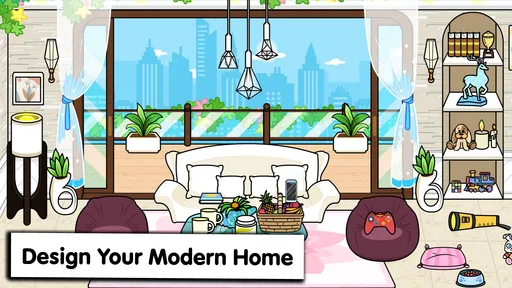
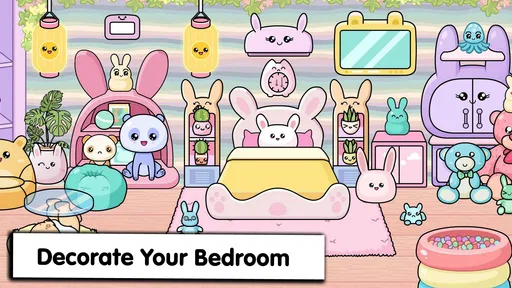
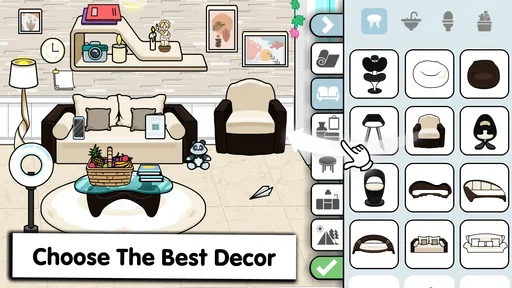
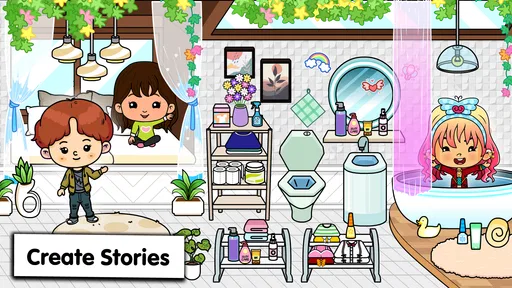
Picture this: you’re handed the keys to a royal palace and given free rein to decorate it as you please. Sounds like a dream, right? That’s exactly what Tizi Princess Home Design Game offers. With an array of luxurious furnishings, elegant wallpapers, and dazzling decor items at your fingertips, you can transform each room into a masterpiece of style and sophistication. The game lets you unleash your creativity, as you choose everything from the color of the curtains to the style of the chandeliers.
Gameplay That Keeps You Hooked
The gameplay is pretty straightforward and incredibly addictive. You start with a modest room and, as you advance, unlock more lavish spaces to design. With every level, you’re presented with new challenges that test your design skills. The best part? There’s no rush! You can take your sweet time perfecting each room to your liking. The game’s intuitive controls make it easy for anyone to pick up and play, whether you’re a seasoned gamer or just someone looking for a fun distraction.
Make Each Session Count
For a useful routine, I’d choose one room as a small creative project: decide on a mood first, then pick a few colors and repeat them across the furnishings and decor. That gives a child or casual player a clear goal without turning the session into a complicated design exercise. I also like taking a moment to look at the room before changing anything; it makes it easier to notice what the new pieces actually contribute instead of placing items at random.
This is a better fit for relaxed, visual play than for someone looking for detailed renovation simulation, strict design scoring, or a competitive challenge. Compared with puzzle games that impose a timer or a single correct solution, the appeal here is the freedom to make a room feel personal. If you want deep building tools or realistic measurements, a dedicated home-planning app would suit you better; if you want a gentle imaginative activity, this is closer to the mark.
More From Our News Desk

Weather by Xiaomi Review: Clear at a Glance, Less Clear Up Close

X Under Pressure: Can It Recover When Posting Goes Wrong?

Clash of Clans Is Won Between the Battles

Android Auto Makes the Case for Quieter Car Software

MobiOffice: Transforming Mobile Productivity with Seamless Integration

EA SPORTS FC™ Mobile Soccer: Redefining Mobile Sports Gaming
Graphics That Dazzle
One of the standout features of this app is its graphics. They’re vibrant, colorful, and truly bring the magic of the royal palace to life. Each piece of furniture and decor item is meticulously detailed, making the entire experience feel incredibly immersive. The attention to detail is impressive, and it’s clear that the developers put a lot of love into crafting a visually stunning game.
When a Session Goes Sideways
If a room does not respond as expected, I’d first slow down and try the selection again, then leave the room and return before assuming the game has lost progress. If the whole game becomes unresponsive, closing and reopening it is a sensible basic recovery step. I would avoid repeatedly tapping purchase controls while troubleshooting, since that can make it harder to tell whether a prompt is part of normal play or a separate store action.
There are also moments when the app may not be the cause. A device that is low on available storage or juggling many open apps can make games feel sluggish, so freeing space or closing unused apps is a reasonable general check. If the problem remains, note what you were doing when it happened and try again later; a repeatable issue is easier to describe if you contact the app’s support through the store page.
A Royal Experience
What really sets this game apart is its ability to transport you to a royal world where you’re the star designer. It’s not just about decorating rooms; it’s about crafting a home fit for royalty. Whether you’re designing a grand ballroom or a cozy bedroom, each project feels unique and special. Plus, the game’s delightful soundtrack adds an extra layer of enchantment, making you feel like you’re truly part of a fairy tale.
In everyday use, I can see this working well as a calm after-school activity: a child can choose one room, make a few design decisions, and show the result to a parent without needing a long play session. Adults who enjoy bright, dollhouse-style decorating may also find it a pleasant break between tasks. For a group, taking turns suggesting one change at a time can make the room a shared creative project rather than everyone crowding around the screen.
Who Will Enjoy It—and Who May Not
The game has an average rating of 4.5 from around 102,000 ratings, with roughly 1,400 written reviews and over 10 million installs. Those figures suggest a broad audience, but they don’t mean every player will want the same thing. I’d recommend it to children who enjoy princess settings, and to casual players who value visual choice over complex rules. Its free entry makes it easy to try, while optional purchases are worth discussing before handing the device to a child.
I’d skip it if your main goal is a realistic interior-design tool, open-ended architectural planning, or a game with frequent strategic decisions. Its royal theme is part of the charm, but it also narrows the mood; players who prefer modern, everyday homes may find the setting less appealing. The game was released on September 7, 2020, and its appeal is still rooted in a simple, accessible decorating fantasy rather than technical design practice.
My Practical Verdict
For me, the best way to approach this game is as a small creative escape, not a serious design simulator. If it stalls, I’d begin with basic device and app checks, then retry the room calmly before assuming something has gone wrong. If those steps do not help, the app store’s support route is more useful than repeatedly restarting the same action. That practical mindset keeps a minor hiccup from spoiling a relaxing session.
In conclusion, if you're looking for a game that blends creativity with a touch of magic, Tizi Princess Home Design Game is a must-try. It’s perfect for those moments when you just want to escape into a world of beauty and imagination. So grab your virtual paintbrush and get ready to design the palace of your dreams!
A Better Fit for Short, Shared Play
One useful way to judge whether the game suits your household is to try it during a quiet gap rather than treating it as a long entertainment session. For example, a child waiting for dinner could spend a few minutes choosing how a room should feel, then put the device away and tell someone what they changed. That gives the play a natural stopping point and makes the activity about making choices, not simply keeping the screen occupied.
For adults, I’d treat it as a visual palate cleanser rather than a productivity tool. It can be enjoyable to make a room feel coordinated, but the satisfaction comes from the look and the imaginative setting, not from learning professional design principles. If you want to compare real fabric samples, plan accurate furniture dimensions, or save a practical renovation plan, use a dedicated planning tool instead. This game is at its best when the goal is playful expression.
Small Choices That Make Decorating More Satisfying
A simple trick is to decide what should be noticed first in a room before choosing pieces. I might make one item or color the focal point, then keep the rest of my choices compatible with it. This is not a rule the game requires; it is a way to make the creative process less random, particularly for a young player who sees many decorative possibilities and has trouble choosing where to begin.
I’d also encourage players to pause between changes instead of rapidly tapping through options. Looking at the room after each adjustment makes it easier to decide whether the new choice improves the overall look or merely adds more decoration. That slower rhythm is a practical advantage for shared play, too: one person can suggest a change, the player can try it, and everyone can judge the result together without competing to control the screen.
What to Expect From Progress and Purchases
The game is built around decorating and moving through spaces, so it is more suitable for players who enjoy gradual visual discovery than for someone who wants every option available immediately. I would not frame progress as a race. If a child becomes frustrated by wanting a particular item or space, it is better to take a break than to turn an optional purchase into the automatic solution. Agreeing on a family rule before play—such as asking an adult before any purchase—is a straightforward way to avoid confusion.
That purchase conversation is also relevant for adults who share a device. Because the game can be played without an upfront charge, it is easy to try, but the optional items mean “free to start” should not be mistaken for “nothing in the game can ever cost money.” I’d check the purchase prompt carefully and use the device’s usual purchase safeguards where appropriate. This keeps the decision clear without making the decorating itself feel like a financial task.
How It Sits Beside Other Decorating Games
Compared with decorating games built around timed challenges, competitive ratings, or a strict sequence of objectives, this one leans toward a softer dollhouse-style experience. That difference matters: players who like to experiment without being judged may feel more at ease here, while players who need clear win conditions could lose interest. It also differs from realistic home-design software, which is meant to support practical choices rather than a fantasy palace makeover.
For a younger player, the visual theme and accessible premise can be more inviting than an app full of technical controls. For an older player who already enjoys complex simulation games, the simplicity may feel limited rather than refreshing. I’d choose based on what the player wants from the session: a calm chance to arrange a royal-looking space, or a system with deeper planning, detailed customization, and measurable goals. Those are different needs, and this game is strongest when the first one is the priority.
When the Problem May Be Outside the Game
If an issue appears only when the device is busy, I would not immediately assume a room or selection has broken. Close other apps, check that the device has some storage available, and try again when it is not under as much strain. If the game still behaves oddly, note whether the problem happens on launch, during a particular action, or after returning to a room. That observation is more useful than repeating the same tap without knowing what changed.
It is also worth distinguishing a purchase screen from ordinary play. A prompt about an optional item may be expected, while a frozen screen or an unresponsive control is a different kind of issue. I’d stop, read what is on screen, and avoid making a purchase just to get past a moment of uncertainty. If the problem continues after the basic checks, describing the exact situation through the store’s support route is a sensible next step.
A Practical Choice for the Right Player
Overall, I see this as a good match for children and casual players who want a bright, forgiving setting for visual creativity, especially when a parent is nearby to help with purchase decisions. It can also suit an adult who wants a brief, low-pressure decorating diversion. The Everyone age rating makes it broadly approachable, but it does not remove the value of adult guidance around spending or screen-time boundaries.
I would steer away from it if the player expects a serious interior-design lesson, a realistic house planner, or a challenging game with strategic depth. Those expectations are likely to make the simple fantasy feel restrictive. If, instead, you want a gentle way to imagine a room, make a handful of choices, and enjoy a colorful royal atmosphere, this is an easy game to sample. The best recommendation I can give is to try one short session and see whether the act of arranging the space itself is enjoyable.
Tizi Princess Home Design Game Frequently Asked Questions
Is Tizi Princess Home Design Game suitable for a first-time player?
It is an educational game built around an easy-to-understand princess home and avatar dollhouse theme, so it may suit players who are new to this kind of game. The idea is to explore a dream house and enjoy imaginative play rather than tackle a complicated simulation. Its Everyone age rating also signals a broad audience, including children.
What age rating does Tizi Princess Home Design Game have?
Tizi Princess Home Design Game has an Everyone content rating, making it suitable for a broad audience. Its princess-themed dollhouse setting is designed for imaginative, accessible play, and the original description highlights exploring an avatar dollhouse. Parents can still check the device’s purchase settings before handing it to a child, since optional in-app purchases are available.
Is Tizi Princess Home Design Game free to download, and are there optional purchases?
Tizi Princess Home Design Game is free to download, so you can try its princess-home design activities without paying upfront. Optional in-app purchases are available, priced from $2.99 to $6.99 per item. These can be worth considering if you want access to additional paid content, but the game is presented as a free experience and purchases are not required to get started.
What kind of game is Tizi Princess Home Design Game, and who makes it?
It is an educational game from Tizi Town Games, centered on a princess-themed home-design setting. The store description invites players to play princess dream house games and explore an avatar dollhouse. Its appeal is likely strongest for children and players who enjoy imaginative dollhouse play, decorating themes, and exploring a colorful virtual home.
What is Tizi Princess Home Design Game all about?
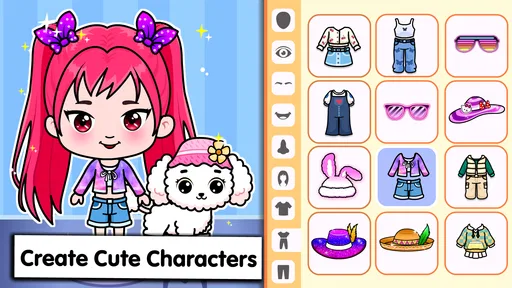
Tizi Princess Home Design Game is an engaging app that allows users to create and design their own princess-themed interiors. Players can choose from a variety of furniture, decorations, and color schemes to bring their dream princess home to life. It's a creative platform aimed at those who love interior design and fairy-tale aesthetics.
Pros
- Engaging for creative minds
- Variety of design options
- Kid-friendly interface
- Regular updates
- Offline play available
Cons
- In-app purchases can be pricey
- Limited free features
- Ads can interrupt gameplay
- Requires frequent internet for updates
- Graphics may not suit all devices













