Tizi Modern Home & Room Design
- 240.00
- 4.2
- Installs
- 10.00M
- Price
- Free

Screenshots



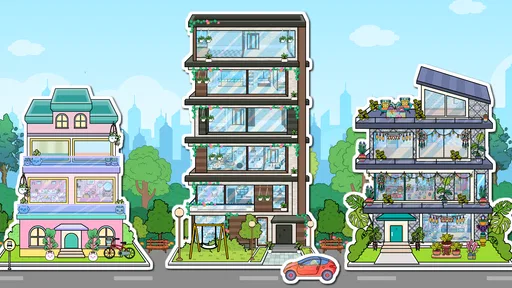
Analysis by Reviewed
When I use a home-design game on a shared device, I look for something that invites a quick creative session without turning the living room into a serious planning project. Tizi Modern Home & Room Design is aimed at that lighter kind of play: arranging rooms, trying out decor ideas, and seeing how a home might feel when its pieces come together. It is an educational game from Tizi Town Games, though I’d treat the learning as informal creative practice rather than professional design training.
That distinction matters in a household. A child can explore colors and layouts, while an adult might use the game to spark ideas for a bedroom refresh or simply relax with a decorating challenge. It is free to start, with in-app purchases priced at $1.99 per item, so I would set expectations before handing over a shared device: free access does not necessarily mean every available item is included. The game is rated for Everyone, and it has a 4.7 average from around 19,000 ratings, with over 10 million installs.
A quick creative activity for a shared screen
The household use I find most convincing is a short, low-pressure design session rather than a long project. Imagine a rainy afternoon when one child wants to play and a parent has a few minutes nearby. They can agree on a room to work on, let the child choose a central piece, then talk through what might go beside it. The activity gives them something concrete to discuss without requiring either person to know design terminology.
For siblings, a simple turn-taking rule helps more than trying to make every choice at once. One person can make the first layout, and the next can suggest a change or choose a different decorative direction. That turns the screen into a shared prompt instead of a contest over who gets to control every detail. I’d keep the goal modest: make one room feel calmer, brighter, or more playful, then stop when the conversation naturally runs out.
That approach also makes the game easier to fit into everyday routines. A child can return to it after homework for a short creative break, while an adult might use it to unwind without committing to a complex simulation. If the device is needed by someone else, finishing a room or reaching a clear stopping point makes the handoff less frustrating. I would not treat it as an activity that needs a fixed schedule or a completed whole-house plan.
A Canvas for Your Imagination
First off, let me tell you, Tizi Modern Home & Room Design is like having a virtual canvas where you can let your imagination run wild. The app is designed to cater to both professional interior designers and casual decorators. Whether you're planning a complete home makeover or just looking to spruce up a single room, this app offers a plethora of options.
Features That Stand Out
One of the coolest features is the 3D visualization tool. Imagine having the ability to walk through your designed space and see how everything fits together before making any real-world changes. It's almost like having a magic wand to test out ideas without any risk.
More From Our News Desk

Weather by Xiaomi Review: Clear at a Glance, Less Clear Up Close

X Under Pressure: Can It Recover When Posting Goes Wrong?

Clash of Clans Is Won Between the Battles

Android Auto Makes the Case for Quieter Car Software

MobiOffice: Transforming Mobile Productivity with Seamless Integration

EA SPORTS FC™ Mobile Soccer: Redefining Mobile Sports Gaming
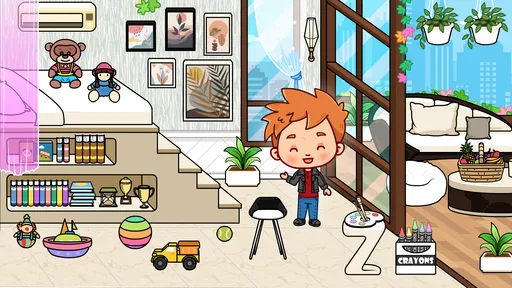
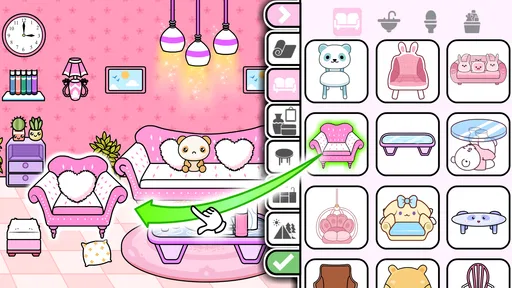
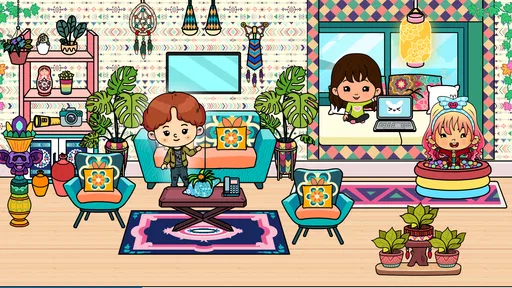
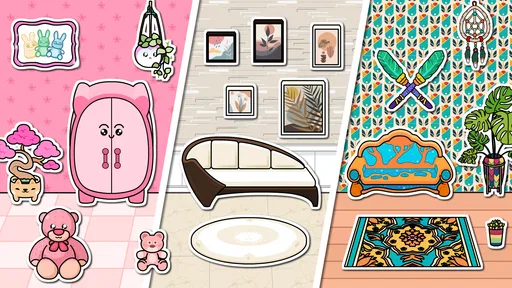
The app also boasts an extensive library of furniture and decor items. From sleek modern couches to vintage lamps, you can find almost anything. The drag-and-drop functionality makes it super easy to experiment with different layouts and styles.
For a practical household use, I’d approach each session as a small design prompt rather than trying to finish an entire home at once. Pick one room, choose a focal item such as a sofa or bed, then arrange the remaining pieces around it. This makes it easier to notice whether the colors and layout feel balanced, and it gives siblings or friends a simple way to take turns contributing ideas. One person can choose the main furniture; the next can handle the smaller decorative touches.
A useful habit is to compare two noticeably different arrangements instead of making many tiny changes without a clear aim. Try placing the main furniture one way, then shift it and see which version feels more open. After that, change the color mood or decorative accents. Separating those choices makes it easier to tell what actually improved the room, and it gives a child a simple way to explain their taste: perhaps they prefer more space around a bed, or a stronger contrast between furniture and decor.
The 3D view is most useful as a way to compare impressions, not as a substitute for measuring a real room. I’d use it to answer questions like “Does this arrangement feel crowded?” or “Would a darker accent make the room cozier?” before making any purchases. For precise floor plans, real dimensions, or renovation decisions, a dedicated planning tool is a better fit. That is an important boundary: the game can help you think visually, but I wouldn’t rely on it for technical building or shopping measurements.
Usability and User Experience
Now, you might be wondering about the usability. Well, the app is incredibly user-friendly. The interface is intuitive, so even if you're not tech-savvy, you’ll find it easy to navigate. The developers have clearly put a lot of thought into making the user's journey as smooth as possible.
What I really appreciate is the app's attention to detail. The textures and color palettes available give a realistic feel to your designs, which is crucial for envisioning the final look.
For a new player, I’d begin with a room that has a clear purpose rather than trying to decorate everything at once. A bedroom, for example, gives a natural starting point: settle on the bed’s position, then see how other pieces and colors support the feeling you want. If the room starts to feel busy, remove or reposition something before adding more. The useful lesson is not that there is one correct arrangement, but that each choice affects the impression of the whole space.
That small workflow makes the game more than a sequence of taps. It encourages a child to compare options and explain a preference, while an adult can use the same process to explore a mood without taking measurements or buying anything. I would still keep the difference clear: an attractive virtual arrangement is an idea to consider, not evidence that a real room will fit the same way. Actual furniture dimensions, doorways, and circulation need a separate check.
On a shared tablet or phone, I’d agree on a simple handoff routine: finish a room or a clear part of one before passing the device along. That keeps a younger player from accidentally undoing someone else’s arrangement and makes collaboration feel more like a joint activity than a scramble for control. I wouldn’t assume that a shared device creates separate personal spaces or that one person’s work is automatically protected from another’s changes; household coordination is best handled with clear turns and expectations.
If several people have different tastes, it helps to make suggestions specific instead of simply saying that a room looks wrong. “Could we try a lighter color?” is easier to act on than “Start again.” This keeps the design conversation friendly and lets the person currently holding the device remain in charge of the final choice. It is a small but practical way to avoid turning a casual game into an argument about whose idea counts.
Age, purchases, and household expectations
For parents, the Everyone rating makes the age context straightforward, but it is still sensible to supervise purchases on a device used by children. The listed in-app price is per item, so I’d discuss whether optional purchases are allowed before play, rather than deciding in the middle of an excited decorating session. The game is free, which makes it easy to try, but a family that wants every decoration available without considering individual purchases may find that arrangement less appealing.
My practical recommendation is to establish the purchase boundary once, in plain language, before a child begins decorating. If purchases are not part of the plan, say so and keep the session focused on choices available without spending. If an adult manages the device, they should handle any purchase decision themselves rather than treating a child’s tap as permission. This avoids the awkward moment when a design idea becomes a request to buy an item.
Age suitability and household suitability are not quite the same thing. The Everyone rating is reassuring for broad age context, but a younger child may still benefit from an adult nearby to explain turn-taking and spending expectations. An older child who enjoys making choices independently may be happier with room to experiment. I’d judge the first session by whether the player enjoys arranging and comparing decor, rather than assuming that every child will find the same activity engaging.
Inspiration, comparisons, and limits
Another neat aspect is the community feature. You can share your designs with other users and get feedback, which is a fantastic way to refine your ideas. Plus, browsing through the community's creations can spark some much-needed inspiration when you hit a creative block.
For household use, I’d treat shared designs as inspiration rather than a standard everyone has to match. A child who sees a polished room can borrow one idea, such as a color contrast, without feeling that their own version needs to look identical. Browsing can also help when a player is stuck, but it works best after they have tried a first arrangement of their own; otherwise, copying a finished look can crowd out the experimenting that makes a design game worthwhile.
Compared with coloring games or open-ended building toys, this one puts the focus on furnishing and styling rooms rather than drawing from scratch or constructing detailed structures. That makes it a better pick for someone who enjoys choosing decor and testing combinations, but less satisfying for a player who wants a long story, competitive goals, or deep architectural controls. I’d also choose a real-world mood board or a measurement-focused design app if the goal is to coordinate actual purchases; the game is strongest when the stakes are low and imagination is the point.
It also sits between passive decorating videos and demanding design software. Watching a room makeover may provide ideas, but it does not ask the viewer to make each choice. Professional planning tools offer more practical control, yet can be unnecessarily involved when someone simply wants to play with furniture and color. This game’s appeal is that middle ground: enough interaction to make choices feel personal, without asking a casual player to approach a room like a renovation job.
There are trade-offs to that simplicity. Someone looking for exact dimensions, detailed construction decisions, or a structured progression may find the experience too light. A player who wants storytelling or competition may also lose interest, because the central pleasure is visual experimentation rather than a demanding goal. I’d skip it if the main purpose is to produce a dependable plan for a real purchase; I’d choose it when the purpose is to explore possibilities or enjoy a short creative break.
Version 1.9.3 supports devices running Android 5.1 or later. In a typical after-school moment, I can picture a child spending a short session trying different furniture arrangements, then showing a parent which version feels most inviting. It can prompt a useful conversation about color, space, and personal taste without needing a formal lesson. Adults who enjoy casual decorating can use it in the same way, though anyone seeking precise professional tools or a more demanding simulation should look elsewhere.
The best fit is a household that is comfortable sharing a screen and treating the game as a relaxed activity, with an adult setting the boundaries around purchases where needed. It is less suited to a family expecting separate, protected play spaces on one device, or to anyone who wants the game itself to manage household coordination. A clear turn-taking agreement and a shared understanding of what is free make the experience easier to enjoy.
In conclusion, Tizi Modern Home & Room Design is a must-have for anyone passionate about interior design. It's like having a design studio in your pocket. Whether you're a seasoned designer or just someone who loves to dabble in decor, this app will surely fuel your creative fire. So, why not give it a try and see how it transforms your spaces?
I’d soften “must-have” for most people: I see it as an easy recommendation for casual decorators, children who like arranging rooms, and families looking for a low-stakes shared activity. Its value is in trying ideas and talking about why a room feels a certain way, not in replacing a proper design plan. If that is what you want, the free starting point makes it reasonable to try; if you need precision or a deep simulation, another kind of tool will serve you better.
Tizi Modern Home & Room Design Frequently Asked Questions
What kind of experience does Tizi Modern Home & Room Design offer?
Tizi Modern Home & Room Design is an educational game centered on creating a modern dream house. Its main appeal is the chance to approach a home as an interior designer, making choices about rooms, floors, and decor. It is a casual creative experience for players who enjoy arranging spaces and exploring home-design ideas rather than a game focused on competition.
What does Tizi Modern Home & Room Design let you design?
The game focuses on designing a modern home, with room decoration and floor design at its heart. You can explore the idea of building a dream house by arranging its interior and choosing how different spaces should look. That makes it a suitable pick for players who enjoy experimenting with decor and imagining how a home can be put together.
Is Tizi Modern Home & Room Design suitable for children?
Tizi Modern Home & Room Design is an educational game rated Everyone, making it suitable for a broad audience, including children. Its focus on designing and decorating a home offers a playful way to explore interior design ideas. Parents can still review the game and its in-app purchase options with their child before downloading.
What is Tizi Modern Home & Room Design app?
Tizi Modern Home & Room Design is a creative and interactive app that allows users to explore and unleash their interior design skills. The app provides a virtual platform where users can design and decorate their dream homes using a variety of furniture, decor items, and design styles. It's perfect for both budding designers and those who enjoy home decoration as a hobby.
Is Tizi Modern Home & Room Design app free to use?
The Tizi Modern Home & Room Design app offers a range of features for free, allowing users to design and decorate rooms without any cost. However, to access premium features, such as exclusive furniture items and advanced design tools, users may need to make in-app purchases. In-app purchases are offered at $1.99 per item, so check the purchase details before confirming anything.
Pros
- User-friendly interface for easy navigation.
- Wide variety of design options available.
- Regular updates with new design features.
- High-quality graphics enhance user experience.
- Interactive design tools for creativity.
Cons
- Limited free features
- many require in-app purchases.
- High data usage for downloading updates.
- Occasional crashes on older devices.
- Some tools may have a learning curve.
- Advertisements can be intrusive at times.













