Tiki Smash!
- 352.00
- 4.8
- Installs
- 100.00K
- Price
- Free

Screenshots

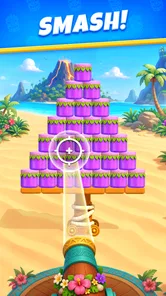






Analysis by Reviewed
I tend to reach for a puzzle game when I have a small pause to fill, not when I want another commitment to manage. Tiki Smash! looks suited to that kind of casual play: it is a free puzzle game from PeopleFun with a tropical visual identity. I would consider it for a relaxed break, while keeping expectations sensible about how much depth or variety any short description can promise. The useful question is whether its style and pace fit your routine, and how to respond if setup or play does not go smoothly.
Where a first session can get stuck
The first useful check is compatibility. The listed minimum operating-system requirement is 7.1, so I would compare that with the software version on the device before troubleshooting anything else. If the game does not install or launch, a mismatch between the device and that requirement is a more sensible first possibility than assuming the puzzle itself is broken.
I would also leave enough free storage for an installation and any updates, then use a stable connection while downloading. Those are ordinary checks, not special requirements unique to this game, but they prevent a half-finished install from looking like a gameplay problem. If a download stalls, I would verify the connection and available space, then try again through the device’s usual app store rather than repeatedly tapping install.
The game is marked Everyone, which makes its stated age classification broad. That does not tell me whether every family will prefer its style or spending options, so I would still review the purchase settings on a child’s device. The game is free to install, while optional in-app purchases are listed from $1.99 to $99.99 per item. That wide range is worth noticing before handing over a device: I would use the store’s purchase controls if accidental spending is a concern.
Once it opens, I would give the first session a little patience. A new game may need a moment to finish its initial loading or settle after installation. If a screen appears stuck, close and reopen the app once, check the connection, and make sure the operating system is current enough to meet the stated requirement. These steps are more useful than repeatedly restarting the phone without first checking the simple causes.
Know what kind of puzzle you are choosing
Tiki Smash! sits in the puzzle category, and its tropical framing suggests a lighter presentation than a stark number puzzle or a word grid. I would approach it as a casual option for short breaks, rather than expect a deep story or a demanding strategy campaign from the description alone. The central question for a potential player is whether a bright, board-clearing puzzle mood sounds appealing.
In the usual puzzle-game landscape, alternatives often divide into slow, deliberate challenges and quick rounds built around visual decisions. This title appears positioned toward the latter. If you want to study a complex logic problem for half an hour, a dedicated logic puzzler is likely a better fit. If you want a game that can sit alongside a coffee break or a wait for the bus, a casual puzzle is more in line with the likely use case.
More From Our News Desk
 Instagram
’s Power Comes From Its Place in Your Phone
A close look at how Instagram turns Meta’s reach, recommendation systems and everyday camera habits into durable platform power—and what that costs users.

 Gmail
Gmail in a Busy Inbox: Who Benefits Most?
From first account to crowded workday, Gmail earns its place through dependable search and flexible sorting—but its best fit depends on how much inbox maintenance you can tolerate.

 Prime Video
Switching to Prime Video: What Changes in Your Viewing Routine
Prime Video can make a compelling second home for streaming, but switching means learning a different catalog, rental layer, and route from browsing to playback.

 Universal TV Remote Control
 Works Best as a Reliable Backup
A phone remote earns its place through quick setup and reliable habits. Here is how to get more from Universal TV Remote Control—and where its limits show.

 Weather - By Xiaomi
Weather by Xiaomi Review: Clear at a Glance, Less Clear Up Close
Xiaomi’s weather app makes everyday forecasts quick to scan, but its calm surface can leave useful details and recovery paths harder to find than they should be.

 X
X Under Pressure: Can It Recover When Posting Goes Wrong?
A resilience-focused review of X, examining setup, mistaken posts, interruptions, weak connections, and the gaps that matter when recovery needs to be dependable.
Latest News



My advice is to judge the opening play by how clearly it communicates what the game expects, not just by whether the first moments feel easy. A useful puzzle should help you understand the immediate objective and let you learn by trying. If you find yourself unsure what a move does, pause and inspect the board before making several rapid choices; in any board-clearing game, slowing down briefly can be more effective than tapping at random.
Making a short session work well
I find that a short puzzle session works best when I give the board my attention instead of trying to squeeze in moves between distractions. In this section, I’ll focus on choosing a comfortable moment and making each move deliberately, so a quick break stays relaxing rather than rushed.
A routine for brief play
For a realistic everyday scenario, imagine having a few minutes before an appointment. I would open the game only when I can give it enough attention to understand the current board, play a little, and leave at a natural stopping point. That is a better fit than trying to play while navigating a busy street or switching constantly between messages, because interruptions can make it harder to remember what you were planning to do next.
A small but useful habit is to look over the available board before committing to a move. In visual puzzles, the most obvious action is not always the one that leaves the best follow-up. I would scan for clusters or opportunities that seem to open more space, then make one considered move and reassess. This is general puzzle discipline rather than a claim about a special Tiki Smash! mechanic, but it can make short sessions feel less like guessing.
Another practical tip is to avoid judging the game from a single distracted round. If you are interrupted, step away rather than making hurried moves just to finish. When you return, take a moment to read the board afresh. This simple reset is especially helpful in a casual game, where the temptation to play on autopilot can turn a pleasant break into a frustrating one.
PeopleFun is the developer, and the game’s audience appears to include players looking for accessible entertainment rather than a specialist puzzle tool. It has a 4.8 average from around 2.6 thousand ratings, with more than 100 thousand installs. Those figures suggest that many players have tried it and responded positively, but they cannot tell you whether its particular visual style or pace will suit you. I would treat them as context, not as a substitute for your own first session.
Make the game fit your day
I would use it as a small, self-contained break rather than something to play while doing another task that needs attention. For example, if I were waiting for a ride, I would first check that I have enough time to settle into a board and stop without rushing. If I only have a moment, I would leave the game closed; starting while distracted makes it harder to tell whether I dislike the puzzle or simply was not in the mood to focus.
That distinction matters when deciding whether to keep playing. A quick puzzle can be a good alternative to scrolling when I want one clear activity, but it is less suitable when I need a quiet, uninterrupted stretch for a more demanding challenge. I would also avoid using it as a substitute for a word or number puzzle if the specific appeal is practicing those skills. Its tropical presentation and board-clearing premise point toward a different kind of casual diversion.
Recover calmly if play or installation falters
If the game closes unexpectedly, I would first reopen it and see whether the issue repeats. Then I would check for a pending update, confirm the device has a stable connection if the game needs one at that moment, and restart the device only if the simpler steps do not help. Changing several settings at once makes it harder to identify what actually fixed the problem.
If progress or a screen seems different after returning, avoid immediately uninstalling. Removing an app can affect locally stored information in some games, and I would not risk that without first checking whether the game offers an in-app way to preserve or restore progress. A safer sequence is to close and reopen, wait for any loading to finish, and check the game’s own menus for account or support options if available. I would not assume that a particular backup or recovery system exists.
When controls seem unresponsive, I would check whether the app is still loading, whether another device task is slowing things down, and whether the touch area is clear. A screen protector, moisture, or a hand resting near the display can interfere with taps on any touchscreen game. Testing the screen in another app can help distinguish a broader touch issue from a game-specific one.
When the device, not the puzzle, is the problem
Not every frustrating moment means something is wrong with the app. A move that produces an unexpected result may be a misunderstanding of the board, while lag or a missed tap can come from the device or its connection. I would watch for a repeatable pattern: does the same action fail in the same way, or does the problem disappear after reopening the game? That distinction helps avoid unnecessary reinstalls.
If the game is slow, close other demanding apps and try again when the device is not busy. If it is only the download that fails, focus on the store connection and storage rather than changing gameplay settings. If the whole device is slow or taps fail elsewhere too, the game is probably not the only thing to investigate. These are basic checks, but they keep troubleshooting proportionate and reduce the chance of losing anything by taking drastic steps too soon.
The current version is 0.5.199. I would check the store page for an available update if I ran into a persistent issue, since updates can address problems, but I would not assume that a version number alone explains a fault. It is also sensible to note what happened and when before seeking help; a short, specific description is more useful than simply saying the game does not work.
Who should give it a try
I’d give it a try if a bright, casual puzzle sounds appealing, but the right fit depends on what I want from a game that day. Here, I’ll weigh that easygoing use against the reasons I might choose a more focused logic, word, or number puzzle instead.
Best suited to casual puzzle breaks
I would recommend giving Tiki Smash! a try if you enjoy casual puzzle games, like a cheerful tropical presentation, and want something that can fit into a short pause in the day. It is free to download, so trying it does not require an upfront purchase. The main trade-off is that optional purchases are available, so anyone who prefers games with no in-app spending should check their comfort level before settling in.
It may also suit players who want a change from word searches, Sudoku, or abstract tile puzzles. Those alternatives can be better when you specifically want vocabulary practice, strict logic, or a quiet, minimalist look. Tiki Smash! is more appealing if you want a lighter visual identity and are happy to explore a casual puzzle on its own terms.
I would skip it if you are looking for a long-form narrative, a detailed competitive scene, or a game whose challenge is clearly built around extended planning. Nothing about the game’s short pitch establishes those as its strengths. Likewise, if you dislike bright tropical themes or prefer puzzles with no purchase options, another title may feel more comfortable from the outset.
My practical verdict
My overall view is cautiously positive: Tiki Smash! has the ingredients of an easy-to-approach puzzle break, and the strong average rating gives a newcomer a reasonable reason to try it. I would keep expectations grounded, though. A short store summary cannot establish how varied the puzzles feel over time, so I would use an initial session to decide whether the presentation and pace genuinely hold my attention.
The most sensible approach is simple: check that your device meets the operating-system requirement, install over a reliable connection, and make one or two thoughtful moves before deciding whether the game clicks. If it does, it could become a pleasant option for waiting rooms, coffee breaks, or a quiet moment at home. If you want a more deliberate brainteaser or a puzzle with a different tone, choosing a specialized alternative is not a failure of patience; it is just a better match for what you want to play.
Tiki Smash! Frequently Asked Questions
What is Tiki Smash!?
Tiki Smash! is an arcade-style game built around quick rounds, simple controls, and smashing tiki-themed targets. Its straightforward setup makes it easy to understand without a long tutorial, while the challenge comes from reacting quickly and trying to improve your results. The exact stages, modes, and features can vary by version, so check the store listing on your device before downloading.
Is Tiki Smash! free to download and play?
The price and payment options for Tiki Smash! depend on the version and app store listing available in your region. Some games are free to install but may include advertising, optional in-app purchases, or other paid features. Review the listing carefully before downloading, and check the purchase settings on your device if you want to prevent accidental spending.
Is Tiki Smash! suitable for children?
Tiki Smash! may appeal to children because its arcade-style gameplay is designed to be easy to pick up, but suitability depends on the content and monetization in the current release. Before letting a child play, review the age rating, screenshots, and store description. Also check whether the game includes ads, in-app purchases, online features, or links to external content.
Does Tiki Smash! need an internet connection?
Whether Tiki Smash! can be played offline depends on the version you install and how its features are implemented. Basic arcade gameplay may work without a connection in some releases, while advertisements, updates, leaderboards, or other online services may require internet access. Check the app-store information and test the game’s available features before relying on it offline.
Which devices support Tiki Smash!, and what should I check before downloading?
Compatibility can differ between Android and iOS versions, as well as between operating-system releases and device models. Before downloading Tiki Smash!, confirm that your phone or tablet meets the minimum requirements shown in its store listing and that you have enough storage space. Checking recent reviews can also help you spot reports about performance, controls, or installation issues on similar devices.
Pros
- Quick rounds make it easy to play in short bursts.
- Simple controls are approachable for casual players.
- Bright visuals give the game a playful arcade feel.
- Unlockable content offers goals beyond the first few matches.
- The competitive format can make repeat attempts rewarding.
Cons
- Gameplay may feel repetitive after extended play.
- Progress can depend heavily on improving timing and reactions.
- New players may need a few rounds to learn the pace.
- Competition can be frustrating when opponents are more experienced.
- The game may not appeal to players seeking a story or deep strategy.