Simple Drums Rock - Drum Set
- 1.03K
- 4.2
- Installs
- 50.00M
- Price
- Free
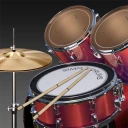
Screenshots
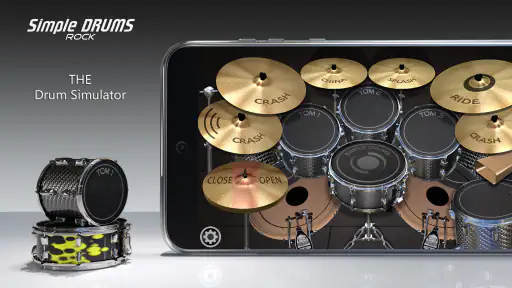
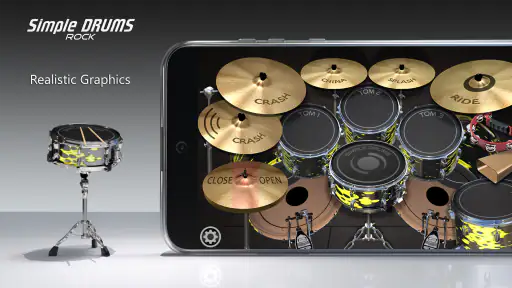
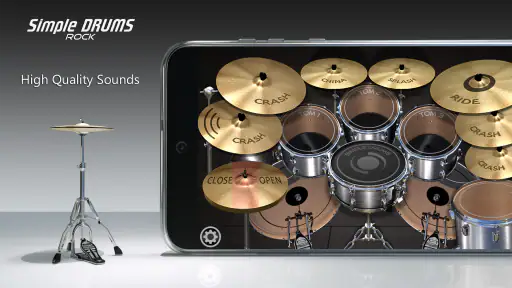
Analysis by Reviewed
I opened Simple Drums Rock - Drum Set expecting a quick rhythm toy, and that is largely what I found: a touch-based drum game that lets me play beats directly on a virtual kit. It belongs to the music category, comes from TPVapps, and is free to install. The appeal is immediate because there is no complicated setup between launching the game and tapping a drum. I can experiment, keep a simple rhythm, or use it for a few minutes of casual practice.
What makes it worth discussing is not a long progression system or a huge collection of competitive features. Its value is in the physical feel of tapping different parts of a virtual drum set and hearing how those hits combine. That makes it more interesting than a passive music app, but also more limited than a full percussion-learning tool. My overall impression is positive for casual players and beginners, provided they understand that this is a compact simulator for practice and fun rather than a replacement for an acoustic or electronic kit.
How the virtual kit feels in everyday use
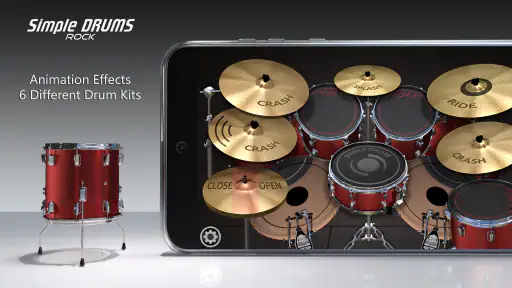
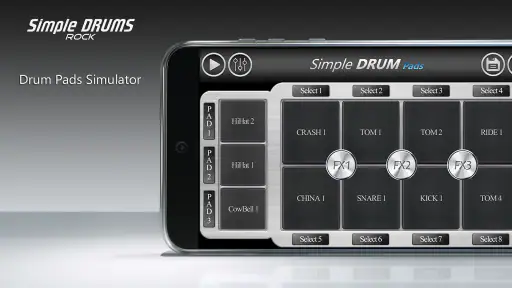
The first thing I noticed is how quickly the basic interaction makes sense. A drum simulator has to be readable at a glance, because looking for controls interrupts the rhythm. Here, the central idea is simple: tap the visible drum components and build a beat with your fingers. I did not need to spend much time learning menus before making a usable pattern, which is exactly the kind of accessibility I want from a mobile music game.
That simplicity also changes how I use it. I can pick up the phone while waiting for a download, sitting on public transport, or taking a short break and play without committing to a long session. A few minutes is enough to test a rhythm or repeat a sticking pattern. In that respect, the game works better as a pocket practice surface than as a traditional level-based game with a beginning, middle, and end.
The touch format rewards deliberate finger placement. If I tap too quickly or crowd several hits together, the result becomes messy, so the app gives me a basic lesson in timing even when I am not following a formal exercise. I found it useful to begin with a steady pulse, place the main beat consistently, and only then add extra hits. That workflow is more productive than immediately trying to fill every moment with sound.
It is also worth using headphones when possible, especially if I am trying to judge timing. The phone speaker can make several close hits blend together, while headphones make the difference between a clean sequence and a rushed one easier to notice. I would not treat that as a requirement for casual play, but it makes the simulator more useful for anyone approaching it as a small practice tool.
A practical routine for beginners
My preferred routine is short and structured. I start by tapping a simple repeating pulse with one hand, then add a second sound only after the first pattern feels stable. After that, I play the same sequence more slowly and more quickly, listening for where my timing begins to drift. This turns an otherwise playful app into a useful coordination exercise without pretending that it offers a complete drum curriculum.
More From Our News Desk

Weather by Xiaomi Review: Clear at a Glance, Less Clear Up Close

X Under Pressure: Can It Recover When Posting Goes Wrong?

Clash of Clans Is Won Between the Battles

Android Auto Makes the Case for Quieter Car Software

MobiOffice: Transforming Mobile Productivity with Seamless Integration

EA SPORTS FC™ Mobile Soccer: Redefining Mobile Sports Gaming
Another helpful approach is to use the screen as a visual map rather than staring at each individual hit. I keep my eyes near the middle of the kit and use peripheral vision to reach the surrounding pieces. That reduces the temptation to hunt for every target and makes the movement feel closer to playing an instrument. It is a small adjustment, but it makes repeated sessions less awkward.
The app is especially convenient for people who want to sketch a rhythm before trying it elsewhere. I can tap out a rough idea, decide whether the beat feels too busy, and simplify it before touching a real kit or a music-production program. It does not replace recording software, but it can serve as a quick way to test whether a rhythmic idea has a pulse at all.
There is a trade-off in using a phone, of course. The screen is smaller than a drum pad, fingers can cover parts of the interface, and the glass surface provides none of the rebound or physical resistance of real equipment. I can practice timing and coordination, but not stick rebound, pedal technique, posture, or the sound control that comes from striking different areas of a real drum.
Where it sits beside other music apps
Compared with a metronome, this game is more engaging because I am actively producing a beat instead of only listening to a click. Compared with a music sequencer, it is faster to start and less demanding, but it does not give me the same editing or arrangement control. Compared with rhythm games built around fixed songs, it feels more open because my attention is on creating hits rather than reacting to a stream of prompts.
That last comparison matters when choosing it. Someone who wants song-based challenges, scores, unlockable content, or a strong sense of progression may find the experience too loose. Someone who simply wants to tap a kit and explore rhythm may prefer this direct approach. I would choose a dedicated learning app for lessons and a real controller for performance, but I would choose this game for spontaneous, low-pressure experimentation.
Spending, pressure, and fairness
The game is free, which lowers the barrier to trying it. Its in-app purchases are listed as individual items ranging from $0.99 to $1.49. That gives the purchase context a fairly modest shape, at least from the prices shown, but a low-cost item can still matter to a player who wants to avoid spending. I would begin with the free experience and only consider paying if the available play already feels useful enough to justify it.
I am careful about separating what I can judge from what I cannot. The purchase prices are clear, but I would not claim that buying anything improves skill, removes pressure, or changes competitive standing. This is not a review of a confirmed pay-to-win system, and I would not frame it that way. The important practical point is that the core decision is whether the free drum interaction is enjoyable before any optional spending becomes relevant.
There is no reason for me to approach this as a game where progress must be protected at all costs. My sessions are based on rhythm practice and casual play, so I do not feel pushed to keep up with other players or purchase an advantage. That makes the spending question less stressful than it would be in a competitive game. Still, I recommend checking the purchase prompt carefully before confirming anything, particularly if a child is using the device.
The age rating is Everyone, which fits the straightforward musical concept. I would still treat the game as a shared-device activity rather than assuming that an age label answers every family concern. A parent can let a child explore the kit freely while keeping purchases under the usual device controls. That is sensible not because the game seems aggressive or complicated, but because any free app with optional items deserves a little spending awareness.
For me, the fairest way to judge value is by minutes of useful interaction rather than by the number of extras. If I launch it often to test beats, warm up my fingers, or entertain myself during a short wait, the free installation has already done its job. If I need a complete lesson plan, detailed recording, or serious performance control, paying for this type of mobile experience would not solve the larger problem; I would be better served by a more specialized alternative.
Does it create pressure to keep playing?
My experience feels more self-directed than pressured. I can stop after a short rhythm exercise without losing a long chain of progress or feeling that I have missed a scheduled event. That is a strength for casual use. The downside is that players who rely on goals and rewards to stay motivated may not find enough structure here to maintain a regular routine.
I would describe the pressure as coming from my own desire to improve timing, not from a visible competitive demand. That distinction makes the game suitable for relaxed practice. It also means I need to set my own targets, such as repeating a beat cleanly or switching between patterns without breaking the pulse. Without those personal goals, the experience can become a few minutes of random tapping rather than meaningful practice.
Is it competitive, and is competition fair?
I would not choose this app primarily for competition. Its strongest quality is the direct act of playing a virtual kit, not a confirmed ranking system or player-versus-player contest. Because of that, the usual questions about paid advantages and leaderboard balance are less central to my decision. There is no sensible reason to spend money here expecting a competitive edge.
That does not make the game universally fair in every possible sense. A phone with a larger screen, better audio, or more responsive touch hardware could make tapping more comfortable than an older device. That is a general limitation of mobile drum simulators, not evidence of a deliberate advantage system. For a fair personal test, I would use the same device, keep the volume consistent, and compare my own timing from session to session rather than comparing raw performance with another player.
The game supports a different kind of competition: I can challenge myself to play a cleaner beat, maintain a steadier pulse, or create a more interesting pattern than I did yesterday. That form of competition costs nothing and avoids the problem of purchases affecting outcomes. It is also more honest about what the app actually does well.
Compatibility and practical expectations
The current version is 1.9.6, and the minimum operating-system requirement is Android 6.0. That makes compatibility an important first check for anyone using an older phone or tablet. A device that meets the minimum requirement may still offer a different experience depending on screen size, touch response, and audio output, so I would not assume that every supported device feels identical.
The game has been available since Aug 29, 2015, and its reach is substantial: it has passed 50 million installs, with an average rating of 4.2 from around 116 thousand ratings. Those figures tell me that the simple concept has found a large audience, but they do not replace personal testing. A popular app can still be a poor match for someone seeking lessons, recording tools, or a realistic physical response.
The store also shows around 1 thousand written reviews. I see that as a useful sign that players have engaged with it beyond a single download, though written opinions naturally reflect different phones, expectations, and playing habits. I would pay more attention to comments about touch response and usability on devices similar to mine than to a single overall score.
What I still treat cautiously
I am comfortable judging the immediate tapping experience, the free entry point, the listed purchase range, and the app’s suitability for casual rhythm practice. I am more cautious about making claims regarding long-term progression, detailed audio options, or purchase-specific benefits unless I can observe them directly in the version being used. Those details can change over time, and they should not be filled in with assumptions.
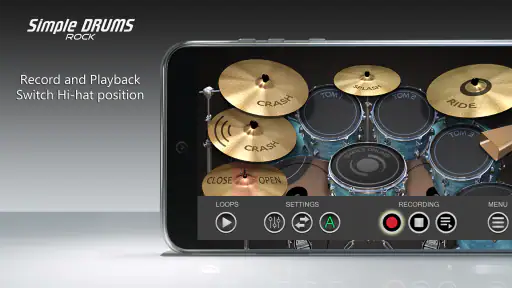
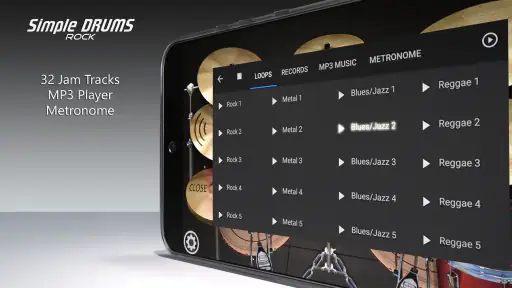
That caution is useful for readers deciding whether to install it. If your choice depends on a particular feature such as recording, lessons, song libraries, external-controller support, or advanced customization, check the current in-app experience before building your routine around it. I would not download this expecting a full studio or a teacher in your pocket. I would download it expecting a straightforward virtual drum surface.
There is also a difference between “realistic” as a sound-and-layout goal and realistic as a physical instrument experience. A screen can imitate the arrangement and response of drum hits, but it cannot reproduce the feel of sticks, foot pedals, vibration, or acoustic dynamics. For beginners, that means this is best used to develop an ear for simple timing and to explore patterns, not to replace proper technique practice.
Who should install it
I think it is a good fit for curious beginners, casual music fans, and drummers who want a lightweight way to sketch ideas. It also suits people who are intimidated by music software and want an immediate, tactile starting point. A child or adult can understand the basic interaction quickly, and the Everyone rating supports its broad accessibility.
I would also recommend it to someone who wants a private practice aid. You do not need a full kit, a dedicated room, or a long preparation period to work on simple coordination. With headphones and a clear personal goal, a short session can be more purposeful than random tapping. The app is at its best when I give it a small job: test a beat, warm up, or explore a rhythm before moving to more advanced equipment.
I would skip it if my main goal were formal instruction, professional production, or realistic performance technique. A metronome is better for strict tempo work, a lesson-focused app is better for guided learning, and a physical electronic kit is better for developing touch and coordination across real surfaces. A song-driven rhythm game is also a better choice if I need constant objectives and a strong reward loop.
My trust verdict after using it
My trust in the app comes from a modest promise that matches the experience: it is a free music game centered on playing a virtual drum set. It does not need an elaborate claim to be useful. The large install base and 4.2 average rating suggest broad appeal, while the purchase range gives me enough information to approach optional spending carefully rather than treating the app as an unexplained subscription commitment.
The most important limitation is also the easiest to understand: this is a phone screen, not a drum kit. Once I accept that, the app becomes enjoyable as a compact rhythm sandbox. I can use it during a spare moment, build a simple beat, and listen critically to whether my timing stays steady. I should not expect it to teach every aspect of drumming or compete with specialized tools.
My recommendation is therefore specific. Install it if you want immediate, low-pressure drumming practice and playful rhythm creation without paying upfront. Spend only if the free interaction already earns a place in your routine, and do not buy anything expecting a competitive advantage. For a beginner or casual player, the strongest value is the quick path from idle phone to playable beat. For a serious drummer, it is best viewed as a convenient sketchpad rather than a complete instrument.
After trying it, I would keep it available for short sessions rather than treating it as my only music app. Its directness is its charm, and its limits are clear enough to plan around. If that balance matches what you want, Simple Drums Rock - Drum Set is an easy recommendation for free experimentation, especially when a real kit or more advanced software is not within reach.
Simple Drums Rock - Drum Set Frequently Asked Questions
What storage or data should I consider before downloading Simple Drums Rock - Drum Set?
Simple Drums Rock - Drum Set is a music game built around tapping virtual drum pads, so it is worth checking that your device has enough available storage for an app and its updates. You may also want to use a Wi-Fi connection if you prefer not to download apps over mobile data. Once installed, the main activity is playing the drum kit on your screen.
Can I play Simple Drums Rock - Drum Set with headphones or at a low volume?
Yes, you can use your device’s usual audio controls while playing, including headphones or a lower speaker volume. This can be handy when practicing in a shared space or listening closely to the drum sounds. The game is centered on tapping on-screen pads, so you can choose an audio setup that suits your surroundings and your preferred way to play.
Does Simple Drums Rock - Drum Set work on older Android phones?
The Android version requires Android 6.0 or later, so a phone running an earlier version of Android will not meet its minimum operating system requirement. If your device is on Android 6.0 or newer, check its app store page for compatibility before downloading. The game is designed for touchscreen play, with taps used to trigger the virtual drum components.
What devices can run Simple Drums Rock - Drum Set?
Simple Drums Rock - Drum Set is available for Android and iOS, and the Android version requires Android 6.0 or later. It is a music game designed for touchscreens, so you can play by tapping the on-screen drum pads. If you are unsure whether your phone or tablet is compatible, check the app store page on that device before downloading.
Is Simple Drums Rock - Drum Set appropriate for children?
The game has an Everyone content rating, making it suitable for a broad audience, including children. Its basic idea is easy to understand: tap the virtual drum components to make music. As with any app, parents may want to review the store page and the device’s purchase settings, particularly because optional in-app purchases are available.
Pros
- Responsive pads make basic rhythms easy to play.
- Includes multiple drum kits with distinct sounds.
- Works well for quick practice sessions anywhere.
- Simple layout is friendly for beginners.
- Useful for experimenting with beats and fills.
Cons
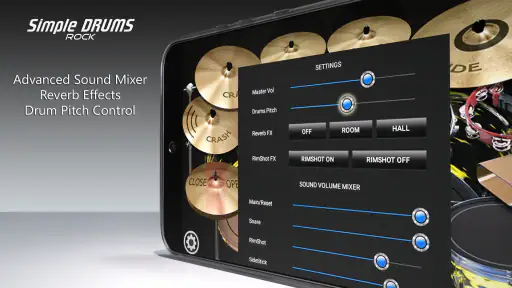
- Advanced players may find the sound customization limited.
- Some features or kits may require in-app purchases.
- Phone speakers cannot reproduce the full drum impact.
- Small screens can make fast pad combinations difficult.
- Ads may interrupt the experience in the free version.
- Category
- Music
- Version
- 1.9.6












