Rhythm Rush - Piano Music Game
- 860.00
- 4.4
- Installs
- 10.00M
- Price
- Free
Screenshots

Analysis by Reviewed
Rhythm Rush - Piano Music Game is an easy kind of game to reach for when I have a few spare minutes and want something more engaging than scrolling. Its central appeal is timing: I follow the notes, listen to the track, and try to stay in step as the pace picks up. That makes it a music game first, rather than a piano lesson, and it is best approached as a quick test of attention and coordination.
Where players can get stuck
The simple premise can make the first mistakes feel surprising. Keeping time is only part of the challenge; I also have to watch the screen closely and respond before the notes pass. When a section speeds up, reacting by tapping harder or rushing ahead does not help. I get better results by keeping my movements light and following the visual timing instead of trying to anticipate every note.
That distinction matters if you are looking for genuine piano practice. A rhythm game can help you pay attention to musical timing, but it does not teach keyboard technique or replace lessons. I would recommend it to someone who enjoys quick reflex challenges with music, not to someone who wants a structured route to playing piano.
Getting into the Groove
Right from the get-go, Rhythm Rush - Piano Music Game grabs your attention with its vibrant and user-friendly interface. You don’t need to be a piano prodigy to enjoy this game, which is one of the reasons why I love it. It’s designed with everyone in mind, whether you’re a casual gamer looking to kill some time or a music enthusiast aiming to fine-tune your rhythm skills.
Gameplay that Sings
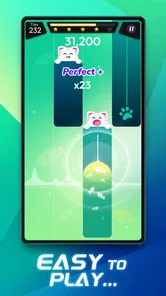
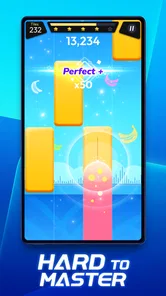
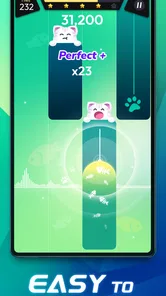
What makes this game stand out is its engaging and intuitive gameplay. You’re tasked with hitting the right notes as they scroll down your screen in time with the music. Sounds simple, right? Well, it starts off easy, but as you progress, the speed and complexity increase, making it a true test of your reflexes and rhythm.
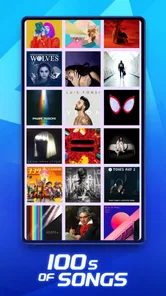
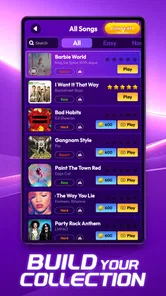
Oh, and did I mention the music? The game features an impressive collection of songs from various genres. Whether you're into classical pieces, pop hits, or even some jazzy tunes, there’s something for everyone. The sound quality is top-notch, ensuring that you get a rich auditory experience that makes you feel like you’re actually performing on stage.
Making a short session count
I find this works best as a small, focused break rather than something to leave running in the background. For a realistic routine, I might play one round while waiting for a kettle to boil, then stop instead of letting a quick pause turn into a long session. If I want to improve my consistency, I concentrate on one attempt at a time: first notice where my timing slips, then try again with a calmer touch. That is more useful than chasing a perfect run immediately.
More From Our News Desk

Weather by Xiaomi Review: Clear at a Glance, Less Clear Up Close

X Under Pressure: Can It Recover When Posting Goes Wrong?

Clash of Clans Is Won Between the Battles

Android Auto Makes the Case for Quieter Car Software

MobiOffice: Transforming Mobile Productivity with Seamless Integration

EA SPORTS FC™ Mobile Soccer: Redefining Mobile Sports Gaming
Compared with casual music apps, this gives me something active to do; compared with a dedicated rhythm game built around detailed practice tools, it feels better suited to immediate play than deliberate training. The trade-off is straightforward: the music keeps the challenge enjoyable, but the game’s basic tap-and-time idea may feel repetitive if I want deeper controls or a more realistic instrument experience.
Setup checks and recovery
When a round feels less responsive than expected, I first check the simple things: whether the device is behaving normally, whether the screen is clean, and whether another app or notification is interrupting my attention. I also make sure the audio is at a comfortable level, since trying to follow a beat I can barely hear makes timing harder. These checks are useful without assuming that every missed note means the game itself is at fault.
If a session is interrupted, I treat the next attempt as a fresh run rather than trying to compensate by tapping faster. A brief pause can reset my focus, especially after a difficult section. On Android, the game is listed for devices running version 6.0 or later; the current release is 1.9.10. If the game behaves unexpectedly after an update, restarting it and checking that the device has finished updating are sensible first steps before I decide there is a persistent problem.
Visuals and Effects
The visuals are nothing short of stunning. Each note that glides down the screen is accompanied by a burst of color, making the experience visually stimulating. The developers have done a fantastic job in creating a game that’s not only fun to play but also a treat to the eyes.
Additionally, the game’s effects are well-timed, enhancing the overall experience. Every successful note hit is rewarded with a satisfying sound effect that encourages you to keep going, pushing for that perfect score.
Challenge Accepted!
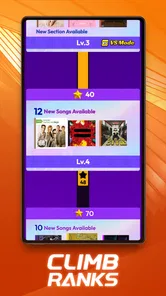
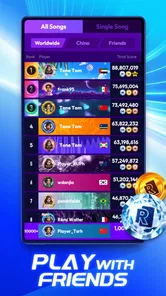
One of my favorite aspects of Rhythm Rush - Piano Music Game is the challenge it presents. There are different levels of difficulty, so you can gradually step up your game. The leaderboard feature is a great addition for those who thrive on competition, allowing you to see how you stack up against other players worldwide.
For those who prefer a more personalized experience, the game allows you to create your own playlists. This means you can jam out to your favorite tunes while challenging yourself to keep up with the rhythm.
Who it suits, and what it costs
I’d point a friend toward this if they enjoy music-led tapping games, want a casual challenge, or like the motivation of comparing scores. I’d steer away a player who dislikes quick reactions, needs a quiet, interruption-free experience, or expects a full piano-learning course. It is free to download, with in-app purchases ranging from $0.49 to $75.88 per item, so I would check the purchase prompt carefully before confirming anything, particularly if a child is playing.
Boom Studio Limited is the developer, and the game is rated for Everyone. Its average rating is 4.3 from around 22,000 ratings, with about 729 written reviews and over 10 million installs. Those figures suggest it has found a broad audience, though they cannot tell me whether its songs or challenge style will match my personal taste. I would treat them as context, not as a reason to buy anything.
Choosing it over other music games
The useful comparison is not simply whether another music game has more songs or a different look; it is what kind of attention you want to give it. Here, I am following moving notes and reacting in time, so the appeal is immediate and physical. A music-streaming app is better when I want a soundtrack without demands, while a piano-learning app makes more sense when I want instruction and progress toward playing an instrument. A more elaborate rhythm title may suit someone who wants a deeper practice structure, but it can also ask for more time and concentration than I have during a short break.
That makes this a particularly sensible choice for a commute wait, a quiet lunch break, or a few minutes at home when I want to do something with a song rather than simply hear it. I would not use it while walking through a busy place or doing another task that needs my eyes: the moving notes call for visual attention, and trying to split focus is an easy way to miss them. For a shared setting, headphones can help me follow the track without raising the volume, but I would still keep the screen in a comfortable position rather than hunching over it.
Small habits that make play smoother
One practical adjustment is to decide what I am trying to get from a session before starting. If I am there to unwind, I accept an imperfect run and stop when the game stops feeling relaxing. If I am trying to improve, I pay attention to the kind of mistake I make: tapping ahead suggests I am guessing, while missing notes after looking away points to divided attention. That simple distinction gives me something concrete to change on the next attempt without turning every round into a score chase.
I also avoid changing my tapping style every time I miss. A light, repeatable touch is easier to control than a forceful one, and holding the device steadily can make it easier to keep my eyes aligned with the notes. These are ordinary ways to reduce avoidable distraction, not special settings or hidden shortcuts. The trade-off is that a phone held for a long stretch can become tiring, so I prefer a few focused tries to a long session when my hand or attention is already worn out.
For someone deciding whether to try it, the practical question is whether the game’s visual cues and music are enough to keep the rhythm enjoyable. The song selection may matter more than the colorful presentation: a familiar track can make me want to replay, but a player with narrow musical tastes may not connect with every available choice. Since personal preference is hard to predict from an overall rating, I would sample the experience casually before making any purchase or assuming it will become a regular habit.
When the app is not the cause
Timing can feel off for reasons outside the game: background noise may make the beat hard to follow, a busy screen can pull my eyes away, or a tired hand can turn accurate taps into rushed ones. I try a calmer setting and a shorter session before blaming the controls. If the same issue continues across attempts, a device restart is a reasonable basic check; I avoid changing several things at once, because then I cannot tell what actually helped.
A practical verdict
For me, Rhythm Rush - Piano Music Game is worth trying when I want a compact music challenge rather than a serious instrument simulator. It gives casual play a clear goal and enough pressure to keep me attentive, while its quick-session nature makes it easy to fit into an ordinary day. The main question is whether its rhythm-and-reflex loop sounds fun to you. If it does, start casually, keep purchases deliberate, and see whether the music and pace hold your attention; if you want to learn piano technique or prefer slower, less reactive play, another kind of music app will be a better fit.
Rhythm Rush - Piano Music Game Frequently Asked Questions
Can I play Rhythm Rush with headphones?
Headphones can be a good way to follow the music and focus on the beat while playing Rhythm Rush - Piano Music Game. The game centers on tapping in time with songs, so clear audio may help you stay immersed in each rhythm challenge. If you prefer speakers, you can still play by following the music and on-screen cues.
Is Rhythm Rush a good choice for short play sessions?
Rhythm Rush - Piano Music Game is built around tapping along to music, a format that can fit a quick break as well as a longer session. You can start a song and focus on its rhythm without needing to learn complicated controls. How long you choose to play will depend on how many songs or challenges you want to take on.
Can beginners enjoy Rhythm Rush - Piano Music Game?
The game’s basic idea is easy to grasp: follow the beat and tap the screen in time with the music. That makes it approachable for people who are new to rhythm games, while the timing challenge can still keep play engaging. Players who are unsure can start with a song they find comfortable and build their confidence as they go.
Is Rhythm Rush suitable for children?
Rhythm Rush - Piano Music Game is rated Everyone, so it is presented as suitable for a general audience. It is a music game built around tapping in time with songs, which makes its appeal easy to understand for players of different ages. Parents can still review the game themselves and consider whether its rhythm challenges and optional in-app purchases suit their family.
What does Rhythm Rush - Piano Music Game offer?
Rhythm Rush - Piano Music Game is a music game from Boom Studio Limited. Its store summary invites players to dive into a new rhythm experience and feel the beat of songs on their fingers. The game focuses on tapping along to music, offering a straightforward way to enjoy rhythm-based play on a mobile device.
Pros
- Engaging rhythm gameplay.
- Wide variety of songs.
- Smooth user interface.
- Regular updates.
- Offline mode available.
Cons
- In-app purchases required.
- Limited free content.
- Ads can be intrusive.
- Requires high device performance.
- Steep learning curve.












