Rhythm Tiles : Piano Game
- 129.00
- 4.5
- Installs
- 10.00M
- Price
- Free
Screenshots

Analysis by Reviewed
I judge a music game less by how many songs it claims to offer than by what it asks my hands and attention to do. Rhythm Rush Lite-Be Piano Star puts the timing challenge front and center: tiles arrive with the beat, and a tap that is slightly early or late can break a run of smooth play. That simple idea makes it easy to start, but it also gives each track a clear test—can I stay with the rhythm as the pace picks up?
A rhythm challenge built around timing
As a free music game from Boom Studio Limited, Rhythm Rush is aimed at quick play rather than music lessons. Its store summary points to hip-hop and EDM, so I would approach it as an arcade-style way to follow a beat, not as a broad catalogue for every musical taste or a tool for learning piano. The distinction matters: I enjoy the focused tapping, but someone wanting realistic keyboard practice will be better served by a dedicated piano-learning app.
The appeal is in the small feedback loop. I watch the tiles, listen for the pulse, and try to make my fingers respond consistently. When a song feels manageable, I can concentrate on keeping time; when it gets busier, I have to shift from casually tapping to watching the screen more carefully. That change in attention is what gives the game its challenge without requiring a long tutorial before I can begin.
How I fit a session into the day
For me, this kind of game works best in a short break: a few attempts while waiting for a ride or winding down between tasks. I can focus on one track instead of committing to a long story or a multiplayer match, and the music gives the session more energy than a typical reflex game. If I am using headphones, I keep the volume comfortable and play somewhere I can still pay attention to what is around me; a rhythm game is not a good fit when I need to stay alert to traffic or conversation.
A practical tip is to treat the first attempt as a feel-out rather than a score chase. I listen for the beat and notice whether I am reacting to the music or simply chasing tiles with my eyes. If my timing feels inconsistent, I pause and reset my focus instead of tapping faster. That small adjustment can make a session feel less frustrating, especially when a track’s pace asks for more concentration than I expected.
The Beat of the Game
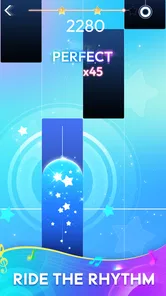
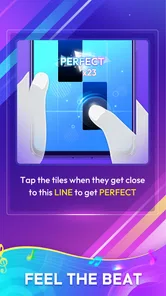
From the moment you launch Rhythm Rush Lite-Be Piano Star, you're welcomed by a vibrant and intuitive interface that just screams excitement. The main concept of the game is simple yet addictive: tap on the correct tiles as they race down your screen to the beat of the music. Sounds straightforward, right? But wait until you get into the flow of it!
Gameplay and Features
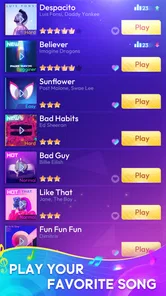
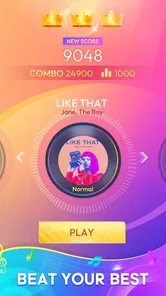
The game is packed with a variety of songs across different genres, so there's something for everyone. Whether you're into pop, classical, or even electronic music, the app has got you covered. As you progress, the songs get faster and more complex, which definitely keeps you on your toes. It's a satisfying challenge that makes you want to play "just one more song" before you realize an hour has flown by.
More From Our News Desk

Weather by Xiaomi Review: Clear at a Glance, Less Clear Up Close

X Under Pressure: Can It Recover When Posting Goes Wrong?

Clash of Clans Is Won Between the Battles

Android Auto Makes the Case for Quieter Car Software

MobiOffice: Transforming Mobile Productivity with Seamless Integration

EA SPORTS FC™ Mobile Soccer: Redefining Mobile Sports Gaming
One of the features I particularly love is the ability to unlock new songs and themes as you advance. It gives you a sense of accomplishment and something to look forward to each time you play. Plus, the game is continuously updated with new tracks, so it never gets old.
Finding the right fit
Against the usual alternatives, this sits closer to an arcade rhythm game than to a music player, a rhythm-training tool, or a full piano simulator. I would choose it when I want a quick, beat-led challenge; I would choose a music app to browse and listen without tapping, and a learning app if I wanted structured instruction. The store’s short description is simply “Rhythm Rush,” which captures the focus better than expecting a realistic instrument experience.
It is not automatically the right pick for every music fan. If you dislike reacting to moving targets, prefer a hands-off listening session, or want songs from a particular genre beyond the hip-hop and EDM emphasis, this may not match your routine. Nor would I treat it as background entertainment: keeping a run going takes attention, so it works better when I can give the screen and beat a few uninterrupted minutes.
Making each attempt more useful
One small change in how I play is to separate learning the track from trying to improve a run. On an unfamiliar song, I let the first pass show me where the beat feels steady and where I tend to lose it. On a later attempt, I can focus on those moments instead of judging the whole performance by one miss. That is a more helpful way to approach a timing game than restarting in frustration after every imperfect sequence.
I also try not to use the visual movement as my only cue. If I stare at the tiles and ignore the music, I can end up reacting late when the rhythm becomes less predictable to my ears. Listening first, then letting my eyes confirm where to tap, makes the experience feel more musical and less like a generic test of reflexes. This is especially useful with headphones, provided I am in a safe place to give the sound my attention.
For a quick everyday example, I might open it during a quiet wait before an appointment, play a song or two, and stop when I need to move on. That works because the core task is immediate and self-contained; I do not need to coordinate with other players or remember a long sequence of story events. It is less suitable for a noisy commute where I cannot hear the beat clearly, or for a moment when I need to keep checking messages and dividing my attention.
Graphics and Sound
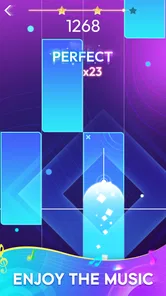
Visually, the game is a treat. The graphics are bright and dynamic, perfectly complementing the fast-paced nature of the game. But what really stands out is the sound quality. The music is crisp and clear, making your tapping experience all the more immersive. It’s like having a mini concert right at your fingertips.
Another cool feature is the ability to use headphones for an even more engaging experience. Trust me, once you plug in, you'll feel like you're in your own little musical world.
What the music focus means
The stated emphasis on hip-hop and EDM gives me a useful expectation before I install: this is most appealing if those styles suit my mood, rather than if I am searching for a neutral library that covers every musical preference. Even when I enjoy those genres, I would think of the tracks as material for a tapping challenge, not as a substitute for choosing an album and listening at my own pace. The game asks me to follow a beat actively, so the same music can feel very different here than it does in a playlist.
That focus also helps explain who may want to skip it. Someone looking for calm, uninterrupted listening may find the need to watch and react gets in the way. A player who wants to learn chords, read notation, or practice a real keyboard should choose a teaching tool instead. And if I am particularly interested in a genre that is not part of the game’s stated musical emphasis, I would check whether the available selection suits me before making it a regular habit.
Value, pace, and expectations
Rhythm Rush has a 4.4 average from around 8,400 ratings, and it has passed 10 million installs, which suggests that the quick-tap format has found a sizable audience. It is free to download, with optional in-app purchases ranging from 49 cents to $75.88 per item. I would decide whether to spend only after trying the basic loop; a purchase is not necessary to understand whether this style of play suits me, and I would check the item details before confirming any transaction.
The age rating is Everyone, and the game was released on December 19, 2023. Version 1.5.6 is the current version, with Android 6.0 as the minimum operating system. Those details make it easier to check compatibility before installing, particularly if you are setting it up on an older Android device. The game’s changing pace is a more important day-to-day consideration: a relaxed start can turn into a demanding burst of coordination, so I would not assume every session will stay casual.
Choosing it over nearby alternatives
Compared with a conventional piano-tile game, the deciding question is not whether I want to play music-themed taps in general, but whether I want a quick, beat-centered challenge with a hip-hop and EDM lean. Compared with a music player, the trade-off is obvious: I get an active task and a reason to concentrate, but I cannot simply let a playlist run while doing something else. Compared with a piano-learning app, I gain immediacy and lose structured practice. Those are different purposes, and I would not treat one as a replacement for another.
If I were choosing something for a shared room, I would also consider how much attention the session needs. A player can take a brief turn and then put the phone down, but the tapping itself is a poor match for conversation that requires constant focus. For solo downtime, that demand is part of the appeal; in a setting where I need to listen to people or surroundings, I would leave it for later.
Who gets the most from it
I think the best fit is someone who already enjoys rhythm games, likes the immediate satisfaction of responding to a song, and wants a low-commitment activity between other parts of the day. It can also suit a casual player who has never tried this format, because the central action is easy to understand: listen, watch, and tap in time. The more patient approach is to accept that a song may take a few attempts before the rhythm feels natural, rather than expecting instant accuracy.
It is a weaker fit for anyone who wants guaranteed variety across many musical styles, hands-free music, realistic piano technique, or a low-attention activity. I would also avoid playing while walking through busy areas or doing anything that calls for awareness; headphones and a fast-moving screen can pull focus away from what is happening nearby. These are not reasons to reject the game altogether, but they help define the right time and place for it.
Conclusion
All in all, Rhythm Rush Lite-Be Piano Star is a fantastic game for anyone who loves music and enjoys a good challenge. It's easy to pick up, hard to put down, and offers endless hours of entertainment. Whether you're a seasoned gamer or just looking for a fun way to pass the time, this app is definitely worth checking out. So, why not give it a try and see if you have what it takes to become a piano star?
My recommendation is strongest for people who enjoy short, focused sessions and like the satisfaction of matching taps to a track’s pulse. If I wanted a compact way to wake up my attention during a break, I would give it a try; if I wanted a quiet listening app, careful piano instruction, or a guaranteed fit for a genre outside its stated musical focus, I would look elsewhere. That is the useful distinction: it offers a beat-following game, not a replacement for those other experiences.
Rhythm Tiles : Piano Game Frequently Asked Questions
Who is Rhythm Rush Lite-Be Piano Star designed for?
Rhythm Rush Lite-Be Piano Star is a music game rated for Everyone, so its basic content is intended to be suitable for a broad audience. Its piano-tile rhythm format may appeal to players who enjoy responding to music with quick taps, whether they are new to rhythm games or already familiar with the genre.
What kind of music and gameplay can I expect?
The game is built around tapping piano tiles in time with the beat, with Hip-Hop and EDM among the styles highlighted in its description. That makes it a fit for players looking for music-led, timing-based play rather than a traditional piano-learning tool. The central challenge is to follow the rhythm as the tiles appear.
What is Rhythm Rush Lite-Be Piano Star?
Rhythm Rush Lite-Be Piano Star is a musical rhythm game that allows players to tap along to their favorite tunes. The game is designed to be engaging and fun, providing a variety of songs across different genres to keep players entertained. It is available for free on both Android and iOS platforms.
Is Rhythm Rush Lite-Be Piano Star free to play?
Yes, Rhythm Rush Lite-Be Piano Star is free to download and play. However, it might contain in-app purchases and ads. These purchases can enhance the gaming experience by unlocking additional features, songs, and removing advertisements. It's suitable for players who enjoy rhythm games without upfront costs. Optional in-app purchases are available, with individual items priced from $0.49 to $75.88.
What are the system requirements for Rhythm Rush Lite-Be Piano Star?
For Android devices, Rhythm Rush Lite-Be Piano Star requires Android version 5.0 or higher, and for iOS devices, it requires iOS 10.0 or later. The game is lightweight but ensuring enough storage space and a stable internet connection will enhance the gaming experience and allow for smoother gameplay. On Android, the current version is 1.5.6 and requires Android 6.0 or later.
Pros
- User-friendly interface for easy navigation
- Wide variety of music genres available
- Offline mode to play without internet
- Regular updates with new songs
- Free to download and play
Cons
- Contains in-app purchases for premium features
- Ads can be intrusive during gameplay
- Limited song selection in free version
- Requires device permissions for optimal use
- Graphics could be improved for better experience












