Pizza Maker Kids Cooking Games
- 146.00
- 4.6
- Installs
- 5.00M
- Price
- Free

Screenshots





Analysis by Reviewed
I tried Pizza Maker Kids Cooking Games as a light, child-focused role-playing game, and its appeal is easy to understand: the central activity is familiar, creative and simple to pick up. It is free to download, rated for Everyone, and made by Piggy Panda Inc. The game has a 4.6 average from around 3,200 ratings, with over a million installs. For a parent deciding whether it suits a short play break, those details are reassuring, though they don’t tell you how a child will respond to its pace or repeated cooking routine.
What to expect from the pace
The basic appeal is the steady sequence of preparing a pizza: work with the dough, choose toppings and get the finished creation ready. That makes the game feel more like a calm pretend-cooking activity than a demanding role-playing adventure. I’d choose it for a child who enjoys making choices and seeing a task through, rather than for someone looking for a fast-moving game with a complicated story or lots of different systems.
Because the activity is built around a recognizable routine, it can also work well in a short everyday window. A child might play while waiting for dinner or during a quiet stretch at home, then show a parent the pizza they made. One useful way to keep that moment engaging is to invite them to describe their choices—what they put on the pizza and why—rather than treating the game as something to leave running unattended.
When play gets longer
Repeated sessions are where a cooking game needs to keep offering reasons to return. The store description centers on dough, toppings and baking, so I’d set expectations around that core loop instead of assuming it offers the breadth of a large role-playing game. For children who enjoy repeating and tweaking a familiar activity, that focus can be a strength. For a child who quickly asks for new goals, settings or kinds of play, it may feel limited sooner.
A practical trade-off is that customization can make the same basic task feel personal, but it doesn’t necessarily change the kind of game it is. I’d let a child experiment with combinations first, then see whether they want to revisit the activity on another day. That is a better test of lasting appeal than expecting a short first session to prove the game will hold their attention for weeks.
Reliability and device expectations
I wouldn’t treat a cheerful cooking theme as proof that an app will run perfectly on every device. The game is currently at version 2.2 and lists Android 7.0 as its minimum operating system. That gives Android users a useful compatibility baseline, but a supported minimum does not guarantee identical performance across devices. If the game feels slow or has trouble opening, closing other active apps and reopening it is a sensible first step before deciding it is unsuitable.
For a child’s device, I’d also check that the game opens and responds as expected before handing it over, especially if the device is older or already feels sluggish. This is a simple way to avoid turning a brief cooking session into a frustrating wait. The game is free, while optional in-app purchases range from $1.99 to $59.99 per item, so I’d review purchase settings on a shared device and make sure a child knows that paid extras are not necessary to decide whether the basic activity is enjoyable.
More From Our News Desk

Weather by Xiaomi Review: Clear at a Glance, Less Clear Up Close

X Under Pressure: Can It Recover When Posting Goes Wrong?

Clash of Clans Is Won Between the Battles

Android Auto Makes the Case for Quieter Car Software

MobiOffice: Transforming Mobile Productivity with Seamless Integration

EA SPORTS FC™ Mobile Soccer: Redefining Mobile Sports Gaming
The Joy of Pizza Making
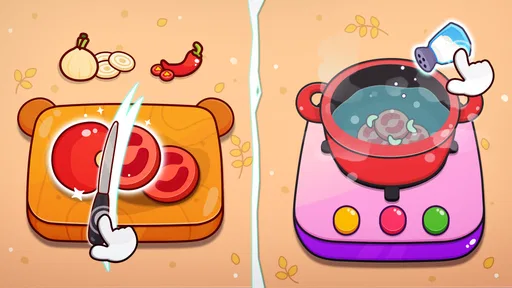
From the moment I opened Pizza Maker Kids Cooking Games, I was greeted with a vibrant and colorful interface that immediately caught my attention. The graphics are charmingly cartoonish, designed to captivate the young audience. The app’s intuitive design makes it easy for kids to navigate through various stages of pizza making. From choosing the dough to picking out toppings, each step is interactive and engaging.
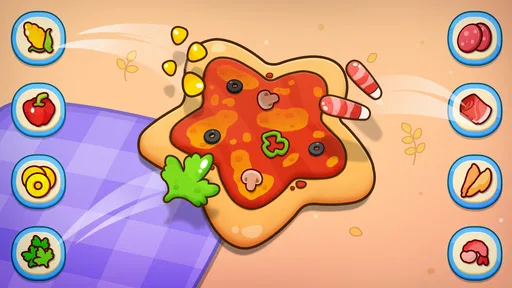
What really stood out to me was how the game encourages creativity. Kids can mix and match toppings to their heart’s content, creating everything from classic pepperoni pizzas to wacky culinary creations. This freedom not only keeps them entertained but also stimulates their imagination and decision-making skills.
Learning Through Play
Beyond just having fun, this app offers educational value. As children play, they are subtly introduced to basic cooking concepts and techniques. They learn about the ingredients that go into making a pizza and the sequence of steps required to prepare it. The game also promotes hand-eye coordination as kids drag and drop toppings and other elements onto their pizza creations.
An aspect I particularly appreciated is the app’s focus on safety. Unlike real-life cooking, there’s no risk of burns or cuts here, allowing parents to feel at ease while their kids explore their culinary curiosities. It’s a fantastic way to introduce young ones to the world of cooking without any mess or stress.
Endless Fun and Customization
Pizza Maker Kids Cooking Games doesn’t just stop at making pizzas. The app provides a variety of modes and challenges to keep things fresh. Kids can take part in timed pizza-making challenges or explore different themes and styles of pizza from around the world. This variety ensures that the game remains engaging over time, encouraging kids to come back and play again.
Moreover, the app includes options for customization, allowing players to unlock new ingredients and tools as they progress. This feature adds a layer of depth to the game, keeping it exciting as kids work to expand their virtual kitchen.
Compared with typical children’s role-playing games, this one’s cooking theme gives play a clear, hands-on focus rather than asking children to manage a broad world or follow a complex storyline. That makes it a reasonable pick for a young player who likes pretend food and creative choices, but less suitable for someone seeking exploration, strategy or a more varied set of activities. I’d also avoid presenting the game as a substitute for real cooking lessons: it can introduce a sequence and ingredients, but it remains a screen-based activity.
One small way to get more from a session is to let the child choose a theme before starting, such as making a familiar favorite or inventing an unusual combination. That gives the activity a simple goal without needing an adult to direct every tap. If a child becomes impatient with repeated steps, it may help to keep play brief and stop when interest fades instead of pressing them to finish another round.
Choosing the right moment to play
I’d treat this as a handy activity for a particular kind of downtime, not an all-purpose way to occupy a child for a long stretch. It makes sense during a short wait at home, while a parent is preparing dinner, or as a calm change of pace after a more energetic game. The pizza theme also creates an easy opening for conversation: a child can explain a topping choice, compare their creation with a real meal, or invent a silly menu name. That shared attention is where the game can feel more worthwhile than simply handing over a screen.
There is a useful distinction between a child who likes the process and one who only wants a new reward or surprise. The first may happily repeat the dough-to-baking routine, while the second may lose interest once the basic sequence is familiar. I’d watch for whether the child starts making deliberate combinations or narrating what they are doing; those are better signs of engagement than simply staying in the game. If they begin tapping through without interest, there is little benefit in stretching the session.
What parents may want to check
For a shared phone or tablet, I’d open the game once before giving it to a younger child. That quick check lets me see whether the controls feel manageable on that screen and whether the device is responsive enough for a relaxed session. It also gives a parent a chance to review purchase protections, since the game is free but includes optional purchases. A child can still enjoy the central cooking activity without being encouraged to spend, so I’d make that boundary clear before handing over the device.
Families may also wonder whether the game suits a child who is just learning to use touch controls. The familiar sequence and direct food-making theme make it easier to explain than a game with menus, a large map or a story to track, but any young player may still need a little guidance at first. I’d show the child how to make a choice, then let them try rather than completing the pizza for them. That keeps the experience theirs and quickly reveals whether the interaction feels comfortable.
How it compares with other children’s games
Against a broad role-playing game, the appeal here is its narrow focus: there is one recognizable pretend task, and a child can understand the point without learning a complicated set of rules. Compared with a general creative sandbox, it offers less open-ended scope but gives the session a clearer beginning and sequence. That trade-off can be helpful for a younger player who prefers a guided activity; an older child who wants a world to explore, longer-term goals or a changing story is more likely to prefer a different game.
It also occupies a different space from a real cooking activity. There is no kitchen mess or physical ingredient handling, which is convenient when an adult needs a quick, low-effort option. But the screen cannot teach practical skills such as measuring, preparing food or safely using kitchen tools. I’d use it as pretend play and conversation, then choose a supervised real-world task if the goal is hands-on learning.
Small trade-offs that shape the experience
The game’s strongest quality and its main limitation come from the same place: pizza making is easy to understand, but repeating a familiar sequence can become predictable. Customizing a creation may renew interest for a child who likes experimenting, yet it does not automatically provide the variety of a game built around several kinds of play. My practical tip is to set a small, child-chosen challenge—such as making a pizza with an unusual combination—rather than expecting the game itself to supply a new objective every time.
On performance, I would keep expectations modest and judge the actual device rather than assume that a simple cooking game must be effortless to run. The Android minimum is 7.0, but an older supported device can still feel different from a newer one, especially if it is already busy or sluggish. I can’t infer battery use, loading time or stability across devices from the game’s theme or version number. If it opens slowly, becomes unresponsive or interrupts play, I’d close other active apps, restart the game and try a brief session before deciding whether the device is the problem or the game is not a good fit.
In conclusion, if you’re looking for a fun, safe, and educational app to entertain your child, Pizza Maker Kids Cooking Games is a fantastic choice. It’s not just a game; it’s an experience that combines learning with play, ensuring your kids have a blast while developing valuable skills. So, why not let your little one unleash their inner chef and create the pizza of their dreams?
Pizza Maker Kids Cooking Games Frequently Asked Questions
What should I know about the cost and device requirements before downloading?
Pizza Maker Kids Cooking Games is free to download, and it is a role-playing game from Piggy Panda Inc. It runs on devices with Android 7.0 or later. Optional in-app purchases are available, so parents may want to review purchase settings before children play. These basics can help you decide whether the game is a suitable fit for your device and household.
What is Pizza Maker Kids Cooking Games about?
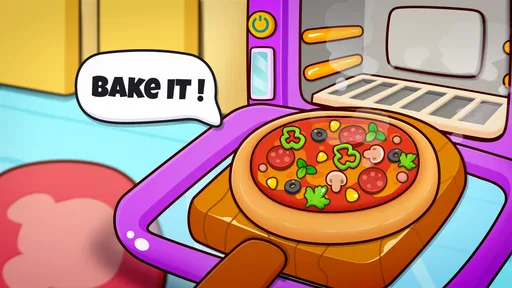
Pizza Maker Kids Cooking Games is an engaging and educational app designed for children to explore their culinary creativity. Through interactive gameplay, kids can learn how to make various types of pizzas, from selecting ingredients to baking them in a virtual kitchen. The game invites children to roll the dough, add favorite toppings, and bake their creations. This app combines fun and learning, providing an enjoyable experience for young aspiring chefs.
Is Pizza Maker Kids Cooking Games suitable for all ages?
Yes, Pizza Maker Kids Cooking Games is primarily designed for children aged 4 and up. Its simple interface and intuitive controls make it accessible for younger children, while older kids can enjoy experimenting with more complex recipes. The game has an Everyone content rating, making it a child-friendly choice for family consideration. Parents can still supervise play and review device settings to ensure the experience suits their child.
Does Pizza Maker Kids Cooking Games contain any in-app purchases or ads?
Pizza Maker Kids Cooking Games is free to download and offers optional in-app purchases, priced from $1.99 to $59.99 per item. Parents should supervise purchases and consider using device-level purchase controls before handing the game to a child. The game may also contain ads, but parents can opt for an ad-free experience by purchasing the premium version. It's advisable for parents to supervise any purchases or ad interactions.
Can Pizza Maker Kids Cooking Games be played offline?
Yes, Pizza Maker Kids Cooking Games can be enjoyed offline. Once downloaded, children can play the game without needing an internet connection. This makes it a great option for entertainment during travel or in areas with limited connectivity. However, some features might require an online connection, such as updates or purchasing additional content.
Pros
- Engaging and fun for kids.
- Boosts creativity in cooking.
- Simple user interface.
- Educational cooking games.
- No in-app purchases.
Cons
- Limited recipe variety.
- Graphics could be improved.
- Repetitive gameplay.
- No multiplayer option.
- Ads can be intrusive.