Cake Maker: Kids Cooking Games
- 102.00
- 4.4
- Installs
- 10.00M
- Price
- Free

Screenshots







Analysis by Reviewed
If you’ve ever watched a kid in the kitchen, you know they have a certain magic about them when they’re baking. It’s like watching a mini chef in action, filled with wonder and imagination. Enter Cake Maker: Kids Cooking Games, an app that perfectly captures that enchanting experience.
What to expect from a child-friendly baking game
This is a role-playing game from Piggy Panda Inc, built around the appeal of making and decorating cakes rather than competing or fighting. It is aimed at Everyone, so it can suit a shared play session with a young child and an adult nearby. The game is free to install, with optional in-app purchases priced at $1.99 per item; I’d keep that in mind if a child is playing on a device where purchases are available.
Its scale is reassuring for anyone checking whether it is widely used: it has passed 5 million installs and holds an average rating of 4.4 from around 2.8 thousand ratings. Those figures don’t tell me whether every child will enjoy it, but they do suggest that the cake-making idea has found a broad audience. It was released on February 19, 2024, and version 2.0 is listed for devices running Android 6.0 or later.
Whipping Up Fun in the Virtual Kitchen
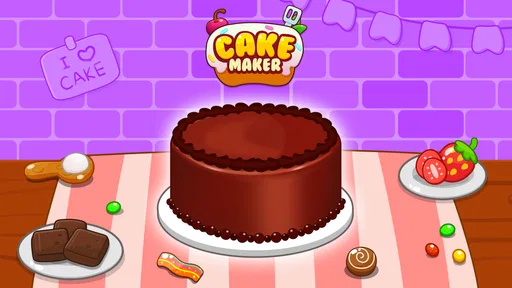
From the get-go, Cake Maker: Kids Cooking Games welcomes players into a colorful, user-friendly kitchen. The app is designed with bright, appealing graphics that are sure to capture the attention of young users. Kids can dive into the world of baking without the mess—something all parents can appreciate, right?
Once you get started, the app provides a delightful array of ingredients and tools to create your very own cake masterpiece. Whether it’s mixing flour and sugar or cracking eggs into a bowl, the app offers a realistic yet fun baking experience. And don’t worry, virtual eggs won’t end up on the floor!
Making the first session feel successful
For a first-time player, I’d treat the opening session as a chance to explore rather than as a test of baking knowledge. Let the child choose and handle the on-screen steps, then offer help only when they pause or look unsure. That small bit of patience makes the first cake feel like their own project, instead of an adult-led sequence of taps.
A practical everyday use is a short quiet activity while a meal is being prepared or during a calm break at home. It gives a child a pretend cooking task without handing over real utensils or ingredients. I would still sit nearby for younger players, especially at the start: the age rating is broad, but an adult can help with navigation and make sure the child understands any purchase prompts if they appear.
More From Our News Desk

Weather by Xiaomi Review: Clear at a Glance, Less Clear Up Close

X Under Pressure: Can It Recover When Posting Goes Wrong?

Clash of Clans Is Won Between the Battles

Android Auto Makes the Case for Quieter Car Software

MobiOffice: Transforming Mobile Productivity with Seamless Integration

EA SPORTS FC™ Mobile Soccer: Redefining Mobile Sports Gaming
Interactive and Educational
One of the most engaging aspects of this app is how interactive it is. It doesn’t just stop at baking; kids can also decorate their cakes with a variety of frostings, sprinkles, and other fun toppings. This not only keeps them entertained for hours but also allows them to express their creativity.
But it’s not all play. Educational elements are subtly integrated into the gameplay. As kids follow the recipes and instructions, they are learning basic math skills, like measuring ingredients, and following step-by-step processes, which is great for developing their cognitive skills.
Where it fits among children’s games
Compared with open-ended drawing apps, the cake-making structure gives a child a clear next action: prepare, then decorate. That can be helpful for a young player who enjoys pretend play but gets stuck when asked to create something from a blank screen. On the other hand, a child who wants to draw freely, build elaborate worlds, or manage a deeper role-playing story may find this narrower theme limiting. I see it as a focused activity, not a substitute for every kind of creative play.
One useful way to keep the session engaging is to let the child decide on a theme for the cake before tapping through the steps—perhaps a color or a special occasion—and then ask them to make the decoration match. This adds a little planning without turning the game into a lesson. The trade-off is that the experience stays within its cake-focused premise; it is best for children who enjoy repeating a familiar make-and-decorate activity, rather than those who need constant changes in setting or challenge.
Common points to consider before handing over the device
Parents may wonder whether the game is suitable for a very young child, whether it costs money to start, and whether it will hold attention for a long stretch. It is free to install and rated for Everyone, but individual comfort with screen time and in-app purchases still matters. I’d begin with a brief shared session, check how the child handles the steps, and decide from there whether it works as a regular independent activity.
It is also worth setting expectations about what “cooking” means here. The pleasure is in pretend preparation and decoration, not learning to bake a real cake or replacing time in the kitchen together. If a child is eager to measure actual ingredients, a supervised real-world recipe will be more useful; if the goal is a low-mess imaginative break, the virtual version has the advantage.
A Sweet Treat with No Calories
Let’s face it, as much as we love baking, the calories can add up. Thankfully, with this cake-making game, kids can indulge in their culinary creations without any added sugar or calories. It’s a win-win for both kids and parents!
Plus, the app offers a nice break from more intense or violent games. It’s all about wholesome fun here, allowing kids to unwind and have a good time without any stress.
Choosing the right moment to play
I find the game easiest to recommend as a small, contained activity rather than a way to fill an entire afternoon. A first session can start with the child choosing what sort of cake they want to make, moving through the preparation, and then spending a little time on decoration. That gives the play a natural beginning and ending. If the child wants to continue, you can let them make another cake; if attention drifts, there is no need to push through just to finish a session.
For a family waiting at a restaurant or sitting through a quiet stretch at home, pretend baking can be a more fitting choice than a fast-paced game with competition or combat. It gives a young child something concrete to do with their hands on the screen, while an adult can join in by suggesting a color or asking what the cake is for. I would not rely on it as a guaranteed distraction in every setting, though: children who dislike guided, step-by-step play may lose interest even when the theme appeals to them.
Small choices that make the play more engaging
A useful approach is to hand over one decision at a time instead of asking a child to plan the whole cake at once. They might choose the cake’s look first, then decide how to decorate it after the preparation stages. This keeps the task manageable for a younger player and gives them a reason to pay attention to each part. If they are comfortable with the sequence, I’d step back and let them lead rather than narrating every action.
It can also help to connect the virtual cake to something familiar without turning the game into a worksheet. A child could make a cake for a stuffed animal’s birthday or choose colors that remind them of a favorite occasion. That gives the decorating a little story, while keeping the app’s simple make-and-decorate focus intact. The benefit is imaginative play; the limitation is that the game does not replace the sensory experience of kneading, smelling, or tasting real food.
What parents may want to check first
Because optional purchases are available, I’d check the device’s purchase settings before handing it to a child who taps quickly. The game costs nothing to install, but free entry does not mean every possible in-app choice is free. I would also start beside the child and see how they respond to the prompts and controls. That is a more useful suitability check than relying on an age label alone, since confidence with touchscreens and patience for guided activities vary from child to child.
Another reasonable question is whether this is a good pick for a child who already enjoys cooking games. I’d say it can be, if they want a straightforward cake-centered activity rather than a detailed restaurant simulation or a broader cooking collection. If they expect ingredient management, a long progression, or a lot of different tasks, this focused format may feel limited. For a child who mainly wants to decorate and pretend, that narrower scope is also what makes it easy to approach.
A Sweet Treat with No Calories
Let’s face it, as much as we love baking, the calories can add up. Thankfully, with this cake-making game, kids can indulge in their culinary creations without any added sugar or calories. It’s a win-win for both kids and parents!
Plus, the app offers a nice break from more intense or violent games. It’s all about wholesome fun here, allowing kids to unwind and have a good time without any stress.
In conclusion, this is a must-have for any budding young chef. It not only entertains but also educates, creating a rich and immersive experience that parents and kids will love. So, if your child shows a keen interest in cooking or you just want to keep them occupied for a bit, it’s definitely worth a try!
Cake Maker: Kids Cooking Games Frequently Asked Questions
Is Cake Maker: Kids Cooking Games free to download, and does it cost anything to play?
Cake Maker: Kids Cooking Games is free to download. It also offers in-app purchases priced at $1.99 per item, so families should keep that in mind if a child can make purchases on the device. Parents can review purchase settings before handing over the phone or tablet, helping avoid unwanted spending while still letting children try the game.
What is Cake Maker: Kids Cooking Games?
Cake Maker: Kids Cooking Games is an engaging mobile app designed for children who love to explore their culinary creativity. The app provides a virtual kitchen where kids can create, design, and decorate a variety of cakes. It offers an interactive and educational gaming experience by teaching kids basic cooking skills while having fun.
Is Cake Maker: Kids Cooking Games safe for children to use?
Yes, Cake Maker: Kids Cooking Games is specifically designed for children and features a safe and child-friendly environment. The app contains no inappropriate content, and parental controls can be enabled to ensure a secure gaming experience. It is a great way for children to learn and play under supervision.
What features does Cake Maker: Kids Cooking Games offer?
Cake Maker: Kids Cooking Games offers a wide range of features including multiple cake recipes, decorating tools, and fun mini-games. Children can choose from different ingredients and decorations to customize their cakes. The app enhances creativity and problem-solving skills while providing entertainment through engaging gameplay.
What devices can run Cake Maker: Kids Cooking Games?
The game is available for Android devices running Android 6.0 or later. Before downloading, check the operating system version on the device your child will use, since an older version may not meet the requirement. Cake Maker: Kids Cooking Games is a role-playing game from Piggy Panda Inc, focused on playful cake-making and decoration.
Pros
- Engaging graphics capture kids' attention.
- Easy-to-follow instructions for young chefs.
- Variety of recipes keeps gameplay fresh.
- Promotes creativity and decision-making.
- No in-app purchases
- fully accessible.
Cons
- Limited to cake recipes only.
- May require adult supervision initially.
- Animations can be repetitive over time.
- Lacks multiplayer features for friends.
- Some users report occasional lag.