Pixel Blast: Robot Shooter
- 589.00
- 4.7
- Installs
- 500.00K
- Price
- Free

Screenshots

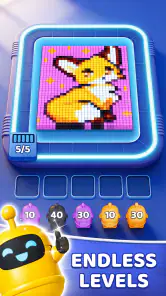

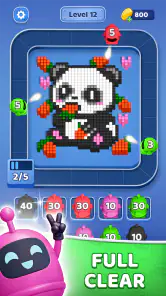



Analysis by Reviewed
Pixel Blast: Robot Shooter is the kind of puzzle game I can understand immediately: I tap, colored cubes disappear, and the board gradually becomes a cleaner, more manageable space. That simplicity is its strongest first impression. Bluetile has built a game for short sessions rather than long explanations, and I found it easy to start playing without learning a complicated control scheme.
After spending time with it, though, the more important question is not whether the first few rounds are enjoyable. They are. The real question is whether a one-tap pixel shooter can keep earning a place on your phone once the novelty of blasting cubes wears off. My answer is cautiously positive, with an important condition: it works best as a compact, low-commitment puzzle break, not as a replacement for a deep strategy game or a large progression-driven adventure.
Why the first sessions are so easy to enjoy
The appeal comes from the direct relationship between action and result. I do not need to drag pieces across the screen, memorize a long chain of commands, or study a large tutorial before making a useful move. The central activity is immediately readable: target the color cubes, clear space, and keep the grid under control. That makes the game approachable for someone who normally avoids puzzle titles that feel like homework.
The pixel presentation also helps. It gives the game a light, playful identity without asking me to take the action too seriously. The visual language suits quick phone play, especially when I want something more active than a passive scrolling session but less demanding than a conventional action game. The shooting theme adds energy to what is fundamentally a grid-clearing puzzle, so the experience feels brisk even when the underlying decisions are simple.
I particularly like how well the format fits interruptions. A short break while waiting for an appointment, a few minutes before leaving home, or a quiet pause after lunch can be enough for a meaningful session. I do not have to reserve a long block of time or remember a complex story. If I put the phone down, the game does not require the same emotional re-entry as a campaign-based title.
The robot-factory idea gives the basic loop a little more personality than a plain color-matching board. Deploying factory robots suggests that my progress is not only about tapping targets but also about building momentum through the board. Even without turning the game into a management simulator, that theme makes each cleared area feel connected to a larger process. It is a useful layer of identity, because a bare grid can become visually forgettable very quickly.
That said, the first-week appeal depends heavily on whether you enjoy repetition with small variations. If you need a puzzle game to constantly introduce new rules, elaborate stages, or a strong narrative, this may feel thin sooner than you expect. Its strength is not complexity. Its strength is that the basic interaction is clean enough to pick up instantly.
The game is free to start, which lowers the barrier for trying it during a spare moment. It is listed for Everyone, so its presentation is suitable for a broad audience, including younger players who enjoy colorful puzzle action. The free entry point is useful here because the experience is easy to judge personally: a few sessions should tell you whether the rhythm feels satisfying or repetitive.
On the store, the game has built a 4.7 average from around 20K ratings, with over 500K installs. Those figures suggest that the straightforward format has found an audience, although popularity alone does not tell me whether it will match your taste. I would treat the numbers as a reason to try it, not as proof that it offers endless variety.
What to pay attention to during the opening week
My first practical tip is to resist tapping as quickly as possible. The one-tap control makes speed tempting, but a short pause before each shot can help me read the remaining colors and avoid treating every move as an isolated target. In a grid puzzle, the best immediate hit is not always the move that leaves the cleanest next position. Watching how a cleared section changes the available space is more useful than simply chasing the most obvious cube.
A second useful habit is to play in two different modes. During a busy day, I use it as a reaction-light distraction and accept a less careful result. When I have a little more attention available, I slow down and look for a more efficient clearing order. This makes the same basic game feel less uniform, because my goal changes even when the controls do not.
The factory robots are also worth treating as part of the puzzle rather than as decoration. When deploying them, I would think about whether they help open a congested area or merely speed up a section that was already easy. The trade-off is important: using assistance for immediate convenience can be satisfying, but saving it for a position where the grid feels awkward may produce more value from the same resource. That is the kind of small decision that gives the simple loop a little more staying power.
What remains useful after the novelty fades
By the time the first excitement settles, Pixel Blast: Robot Shooter has to justify repeated visits through convenience and routine. It does not need to become a major hobby for that to happen. For me, a good long-term puzzle app can succeed by occupying a modest role: something I open when I want a few minutes of focused activity, with enough familiar structure to feel comfortable and enough decision-making to avoid being completely passive.
This game has a reasonable chance of filling that role because its controls are so easy to remember. I do not need to relearn the interface after leaving it for several days. That matters more than it sounds. Some puzzle games lose their place in my routine because returning requires remembering a complicated system, a long objective list, or a set of special rules. Here, the central action remains accessible.
The stronger long-term use case is therefore habit-based rather than completion-based. I can imagine keeping it installed for small gaps in the day, especially if I prefer a game that starts quickly and does not demand a story recap. It is also a reasonable choice for someone who wants a colorful puzzle activity without the pressure of competitive multiplayer or the time commitment of a traditional strategy title.
However, recurring value depends on how much variety you personally need. The game’s core ingredients are clear from the start: pixel visuals, color cubes, grid clearing, and robot deployment. If those ingredients remain pleasant to you, repetition can feel comforting. If you are always looking for a new mechanic, the same clarity becomes a limitation. I would not choose it as my only puzzle game if I wanted a constantly changing challenge.
Compared with familiar match-style puzzle games, this title feels more direct and action-oriented. There is less emphasis on elaborate combinations as a visual spectacle and more emphasis on making a quick shot into a crowded board. Compared with traditional logic puzzles, it is lighter and more forgiving in spirit, with a stronger arcade flavor. Compared with idle factory games, the robot theme does not make it a passive production dashboard; the player still has to engage with the grid.
That middle position is useful. Someone who finds standard match games too noisy may appreciate the cleaner shooting premise, while someone who finds pure logic puzzles too austere may enjoy the pixel action. On the other hand, players seeking a deep factory-management system should look elsewhere, and fans of highly layered match games may miss the larger collection of mechanics they are used to.
How I would fit it into a normal month
A realistic routine would be to use Pixel Blast during short breaks rather than forcing a daily target. For example, I might play a few rounds while waiting for a meal to finish, then close it without feeling that I have abandoned a major task. The game is at its best when it supports my schedule instead of trying to control it.
I also recommend changing the reason you play. One session can be about relaxing with easy clears; another can be about taking more deliberate shots and protecting the shape of the remaining grid. This is not a substitute for new content, but it can extend the life of the existing loop. Treating every session as a high-score test would make the repetition more noticeable.
Another practical approach is to avoid using robot assistance automatically. If the board is already open and readable, a normal shot may be more satisfying. If the grid becomes cramped or a color cluster blocks a useful route, the robot can feel like a meaningful intervention. The value comes from timing, not from pressing every available helper as soon as it appears.
Because the game is free, it is easy to keep installed without making a large commitment. There are optional in-app purchases ranging from $1.99 to $99.99 per item, so I would decide in advance whether I am comfortable spending anything. The free version should be evaluated on its own terms first. If the basic loop does not hold my attention, buying assistance will not solve the underlying problem of repetition.
This is also where the game may test a player’s patience. A free puzzle title can make convenience feel attractive, particularly when a board becomes less comfortable or when progress slows. I would not purchase simply to remove a moment of friction. I would only consider spending if I had already established that the game had become a regular part of my routine and the purchase genuinely improved that routine rather than replacing thoughtful play.
Where maintenance and fatigue begin to matter
The maintenance burden is fairly low in the everyday sense. I can return without rebuilding a complicated mental model, and the game’s central action is easy to remember. That makes it less demanding than puzzle apps that expect constant attention to events, collections, or layered upgrade systems. For a casual player, this low memory requirement is one of its best long-term qualities.
Still, low maintenance does not mean unlimited freshness. The game asks me to keep supplying interest to a compact loop. If I play for too long in one sitting, the color cubes and grid can start to feel like variations of the same task rather than a sequence of meaningful problems. My best experience comes from stopping while the interaction still feels crisp, not continuing until every move becomes automatic.
One source of fatigue is the gap between visual energy and strategic depth. Pixel effects and shooting language make each action feel lively, but the presentation cannot carry the experience forever. Once I know the visual vocabulary, I start judging the game by the quality of the decisions underneath. If the board does not give me enough reason to reconsider my approach, the action can become routine.
Another source is the tension between one-tap simplicity and limited control. Simple input is excellent for accessibility and quick play, but it also means I have fewer ways to express a plan. Players who enjoy manipulating several pieces at once, setting up elaborate chains, or controlling a character through a detailed environment may find the interaction too narrow.
The robot feature can help with that fatigue when I use it as a tactical choice. It can also hurt when it becomes a shortcut I activate without thinking. The difference is subtle but important: assistance should create a decision, not erase one. If every difficult position is handled by a helper, I lose part of the satisfaction that could keep the puzzle loop interesting.
I would also be careful about the game’s place on a child’s device. The Everyone age rating makes the content broadly approachable, but free games with optional purchases still deserve sensible spending boundaries. For a shared family phone or a younger player’s device, I would make sure the person using it understands that the game can offer paid items. That is not a reason to reject the game, but it is a reason to treat the purchase layer deliberately.
Device compatibility is another practical point. The game supports Android 7.0 and later, which covers older phones as well as newer ones. That makes it a more realistic candidate for a spare or family device than a game that requires a recent operating system. Even so, the best experience will depend on the individual phone and how comfortably its screen displays the grid; players with very small screens may find dense boards less pleasant to read.
The current version is 1.9.0, and that gives me a clear checkpoint when deciding whether the installed copy is up to date. I would keep the app maintained through normal store updates rather than assuming that an older installation will behave identically forever. For a game built around a compact loop, small refinements to balance or interface comfort can make a noticeable difference, even when the basic concept stays the same.
Who should keep it, and who should move on
I would recommend keeping it installed if you want a free, approachable puzzle game that works in short bursts and does not require a complicated commitment. It is especially suitable for players who like the satisfaction of clearing a board, enjoy pixel-styled presentation, and appreciate controls that can be understood almost instantly.
I would be more hesitant for someone who needs a long campaign, a rich narrative, or a large strategic system. It is also not my first choice for a player who wants every session to feel dramatically different. A deeper logic game would be better for someone who enjoys careful deduction, while a fuller match puzzle may suit someone who wants layered combinations and more elaborate progression.
The game is also a weaker fit if you know that optional purchases make free-to-play titles stressful for you. The price range of those items is wide enough that I would approach them with a firm personal limit. Enjoying the free loop without feeling pushed toward spending is central to whether the app remains relaxing.
For me, the most convincing reason to return is not the promise of endless novelty. It is the combination of quick access, readable goals, and enough tactical choice to make a short session feel active. That is a modest promise, but the game generally meets it. The important thing is to judge it as a pocket-sized puzzle break rather than expecting it to grow into an entirely different kind of game.
My long-term verdict
Pixel Blast: Robot Shooter earns a place on my phone when I want a small, colorful puzzle with an arcade pulse. Bluetile has chosen a focused concept, and the one-tap design makes the game unusually easy to revisit after a busy day or a long gap between sessions. The pixel cubes and factory robots give the clearing loop enough character to stand apart from a completely plain grid.
Its lasting value is real but limited. I can see myself returning month after month in short bursts, especially when I want something more engaging than scrolling and less demanding than a full game. I cannot promise that the same loop will satisfy players who need constant mechanical expansion. The experience asks me to manage my session length and use its robot assistance thoughtfully, because overplaying the basic pattern is the fastest route to fatigue.
My recommendation is to try it as a low-pressure puzzle habit, not as an all-purpose mobile game. If the first week leaves you enjoying the act of reading the grid and choosing when to deploy help, it has enough convenience to remain useful. If you are already tapping mechanically after a few sessions, spending more will not create the depth you are missing.
In the end, the game succeeds by knowing what it wants to be. It is free, approachable, compact, and built around immediate interaction. It does not need to dominate your attention to be worthwhile. For the right player, that restraint is a strength: Pixel Blast: Robot Shooter can become a dependable few-minute puzzle break, provided you value a comfortable routine more than an endless stream of surprises.
Pros
- Fast-paced shooting keeps short play sessions engaging.
- Robot-themed visuals give the game a distinctive arcade style.
- Simple controls make it easy for new players to start.
- Weapon upgrades add variety to combat and progression.
- Offline play is convenient when you have no internet access.
Cons
- Repeated enemy patterns can make later sessions feel predictable.
- Frequent explosions may reduce visual clarity during busy fights.
- Progression can feel slow without regular upgrade investments.
- The small-screen controls may feel cramped on some phones.
- Limited story depth may disappoint players seeking a narrative experience.

- Category
- Puzzle
- Version
- 1.9.0