Pixel Art - Color by Number
- 141.93K
- 4.5
- Installs
- 100.00M
- Price
- Free
Screenshots


Analysis by Reviewed
I like the idea behind Pixel Art - Color by Number most when I want something small and absorbing rather than a game that asks me to plan, compete, or learn a complicated system. Its numbered pixel pictures make the next move obvious, so I can pick it up for a brief pause and put it down without losing track of a story. That simplicity is the appeal, though it also means this is not the right fit if you want free-form drawing or puzzles that demand tricky solutions.
Where the free download leaves the choice
The game is free to download, while in-app purchases are listed at $5.49 to $46.99 per item. That gives a useful sense of the spending range, but it does not tell me which items are offered or whether a particular purchase is needed for a certain picture. I would start without paying and decide from my own use whether any purchase seems worthwhile; the core appeal is the act of coloring, not a promise of paid extras.
Easybrain is the developer, and the game is rated Everyone. It has an average rating of 4.5 from around 2.4 million ratings, with roughly 142,000 reviews and over 100 million installs. Those figures suggest that the format has broad appeal, but they do not guarantee that every player will enjoy its repetitive rhythm. The current version is 9.11.0, and it runs on Android 7.0 or later. It was released on October 16, 2017, so this is an established game rather than a brand-new experiment.
Reads About Pixel Art - Color by Number
A gentle loop, with a few trade-offs
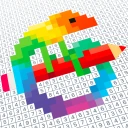
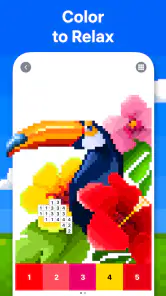
The basic routine is easy to understand: choose a pixel image, match its numbered squares to colors, and watch the picture take shape. I find that satisfying when I want a low-pressure activity, because the task gives my attention somewhere to settle without asking me to invent an image from scratch. A practical trick is to work through one color at a time instead of hopping around the grid; it makes the remaining areas easier to spot and gives the picture a clearer sense of progress.
That same routine can become monotonous. The game is not a substitute for sketching, where each mark is your own decision, or for a logic puzzle, where a solution has to be worked out. If repeated tapping feels like busywork to you, the pixel style alone may not be enough to hold your interest. I also wouldn’t treat a relaxing coloring session as a guaranteed remedy for stress; it can be a pleasant pause, but that depends on the person and the moment.
Best for a short, guided break
I’d recommend it to someone who likes tidy, guided tasks and wants a casual game that can fit into a short break. For example, after a commute, I might open a picture while waiting for dinner, color a few sections, and stop when I’m ready to do something else. It also suits players who enjoy seeing a recognizable image emerge from a field of small, ordered choices. If you want to create freely, improve drawing skills, or face a challenge with meaningful strategic decisions, a sketching app or a more demanding puzzle game would be a better match.
Compared with ordinary coloring apps, the numbered grid removes much of the decision-making: there’s no need to pick a palette or decide where a shade belongs. That can make starting easier, but it gives you less artistic control. Compared with nonogram-style puzzles, it is more about completing a picture through color matching than deducing a hidden pattern. I’d choose it when I want an easy visual routine, not when I’m looking for a puzzle that tests reasoning.
More From Our News Desk

Clash of Clans Is Won Between the Battles

Android Auto Makes the Case for Quieter Car Software

MobiOffice: Transforming Mobile Productivity with Seamless Integration

EA SPORTS FC™ Mobile Soccer: Redefining Mobile Sports Gaming

How Microsoft OneDrive Became a Mobile Productivity Giant

How Google Translate Breaks Language Barriers Effortlessly
Getting more out of each session
One useful way to decide whether the format suits you is to treat the first few pictures as a test of the process, not a race to finish. I’d notice whether I enjoy identifying the next color and seeing small patches connect, or whether I keep wishing I could choose the colors and placement myself. That distinction matters more than whether a particular image looks appealing: the central pleasure is following the numbered instructions, not designing the result.
For a quick session, I’d pick a picture that looks manageable and set a natural stopping point, such as finishing a color or a clearly bounded part of the image. That gives the session a satisfying endpoint without turning completion into an obligation. If I return later, the visible unfinished areas make it easy to resume. The one-color-at-a-time approach is especially handy on a detailed picture, where jumping between scattered squares can make progress feel hard to read.
There is a trade-off in that workflow: finishing a color can feel rewarding, but it may also mean tapping across distant parts of the grid rather than building one continuous region. If that becomes tedious, I’d switch to working on a compact area instead. The game’s appeal is its low barrier to entry, so I wouldn’t force myself into a strict method. A small change in how I approach the grid can make a session feel less like repetitive checking.
How it differs from other puzzle choices
Within casual picture games, this sits on the guided end of the spectrum. A blank-canvas drawing app asks me to make choices at every step; a traditional coloring book lets me choose shades and often decide how to interpret the outlines. Here, the numbered cells supply those decisions. That makes the game easier to start when I’m tired or short on time, but it also means the finished picture reflects the design’s instructions more than my own artistic style.
Against a conventional logic puzzle, the difference is even clearer. I’m not trying to infer a hidden answer from clues or weigh competing moves; I’m matching a visible number to its assigned color. Someone who enjoys a calm completion loop may find that welcome. Someone who expects a puzzle game to test deduction may finish a few images and feel there is little to master. I’d choose a nonogram or another clue-based puzzle when I want reasoning to be the main event, and this when I want my hands and attention occupied by a simple visual task.
It is also a poor substitute for learning to draw. Since the image is already mapped into cells and the colors are prescribed, it does not give much practice in composition, shading decisions, or freehand control. I’d use it as a casual pastime rather than a creative skill-building tool. That is not a flaw for its intended kind of play, but it is worth knowing before downloading it with the expectation of making original artwork.
What to expect from the routine
A common question is whether this is suitable for a player who only has a minute or two at a time. The format is naturally easy to dip into because there is no plot to remember or strategy to reconstruct. I can make a little progress, stop, and come back when convenient. Whether a very short session feels worthwhile depends on the image and on how much tapping I want to do, so I would think of it as a flexible pastime rather than a game built around quick rounds or a particular session length.
Another reasonable question is whether paying is required to enjoy it. I’d begin with the free download and see how the available coloring experience feels before considering any purchase. The listed purchase range is broad, and the price alone does not explain what each item provides. I would not spend simply because I had started a picture or felt pressure to complete it; I’d only consider paying if I understood the item and genuinely wanted it.
It is equally fair to ask whether the huge audience means the game will be right for you. Popularity suggests that many people like this kind of accessible pixel coloring, but individual tolerance for repetition varies a lot. If you enjoy orderly, low-stakes tasks, that may be encouraging. If you tend to lose interest when a game repeats the same basic action, a large player base should not persuade you to overlook that mismatch.
Rediscover the Joy of Coloring
When I first stumbled upon Pixel Art - Color by Number, I was instantly transported back to those carefree days of coloring with crayons. The app is essentially a digital version of those coloring books, but with a pixelated charm that’s both nostalgic and oddly satisfying. Each image is broken down into a grid of tiny squares, each marked with a number that corresponds to a specific color. All you have to do is tap the squares to fill them in with color. It’s simple, yet incredibly addictive.
Features That Keep You Hooked
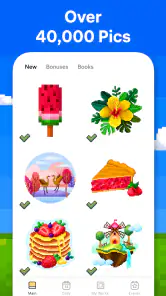
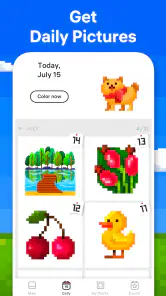
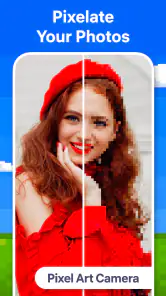
One of the coolest features of the app is its vast library of images. Whether you're into animals, landscapes, or intricate patterns, there’s something here for everyone. The developers are clearly on top of their game, regularly updating the app with new content to keep things fresh and exciting. Plus, there's a neat little tool that allows you to create your own pixel art from photos, adding a personal touch to your coloring experience.
Another feature worth mentioning is the app’s user-friendly interface. The layout is intuitive, making it easy to navigate through the various categories and find exactly what you're in the mood to color. And if you're like me and tend to get a little trigger-happy with the colors, don't worry. The app includes an undo button to save you from any coloring catastrophes.
Why It’s More Than Just a Coloring App
What sets Pixel Art - Color by Number apart from other coloring apps is its therapeutic qualities. As you tap away at the screen, watching the image slowly come to life, there’s a sense of calm that washes over you. It’s a fantastic way to unwind after a long day, allowing you to focus on something creative and relaxing. It’s no wonder that apps like these are often recommended for stress relief.
And let’s not forget the social aspect of the app. You can easily share your completed masterpieces with friends and family, or even on social media, if you’re feeling particularly proud of your work. It’s a fun way to connect with others and maybe even spark some friendly competition over who can complete the most intricate designs.
My Trust Verdict
The game is free, with in-app purchases listed from $5.49 to $46.99 per item. I appreciate knowing the stated range before deciding whether to spend, but I would not assume that paying is necessary for a satisfying first try. The rating and large audience are reassuring signs of popularity, not proof that its pace will suit everyone. I’d begin with the free experience and judge it by whether the coloring itself feels enjoyable, rather than by how many pictures I finish.
For a quiet, guided diversion, Pixel Art - Color by Number earns a place on my shortlist. Its clearest strength is that it makes starting effortless; its clearest limitation is that the same predictable tapping may not hold attention for long. If that trade-off sounds right for your downtime, it is worth trying. If you need open-ended creativity or a substantial mental challenge, I’d look elsewhere.
Pixel Art - Color by Number Frequently Asked Questions
Does Pixel Art - Color by Number offer a relaxing way to pass the time?
Yes. Pixel Art - Color by Number focuses on filling pixel-art pictures by number, giving you a simple activity to pick up when you want a break. The process is easy to follow, so the emphasis is on enjoying the coloring rather than mastering complicated puzzle rules. It may suit players who find repetitive, creative tasks relaxing.
Who developed Pixel Art - Color by Number, and what type of game is it?
Pixel Art - Color by Number is a puzzle game developed by Easybrain. Its central activity is coloring pixel-art pictures by matching numbered areas with colors. Rather than building around an elaborate storyline or demanding puzzle mechanics, it offers a straightforward, creative pastime that players can approach at their own pace.
What age group is Pixel Art - Color by Number rated for?
Pixel Art - Color by Number is rated Everyone, making it suitable for a broad audience. Its number-based coloring activity is easy to understand, though younger players may still appreciate help getting started or reminders about balanced screen time. As with any game, parents can decide whether its content and play style fit their child.
Is Pixel Art - Color by Number free to download?
Pixel Art - Color by Number is free to download and play, so you can try its number-based coloring puzzles without paying upfront. The game also offers in-app purchases, with prices ranging from $5.49 to $46.99 per item. You can decide whether to make purchases as you play; the free option is a straightforward way to explore the coloring experience first.
What is Pixel Art - Color by Number and how does it work?
Pixel Art - Color by Number is a creative app designed for both Android and iOS devices that allows users to create pixelated artwork by filling in numbered squares with corresponding colors. Users select an image from a vast library or upload their own, and then simply match the numbers on the grid with the colors to bring the picture to life. It's both a relaxing and engaging way to unwind and express creativity.
Pros
- Relaxing and stress-relieving experience.
- Improves concentration and attention to detail.
- Wide variety of designs and categories.
- User-friendly interface and controls.
- Offline mode available.
Cons
- Limited free content options.
- In-app purchases can be pricey.
- Ads can interrupt the experience.
- Color palette can be repetitive.
- No option for custom designs.
- Category
- Puzzle
- Version
- 9.11.0