Piano Music Beat 5: Song Game
- 76.00
- 4.6
- Installs
- 5.00M
- Price
- Free
Screenshots
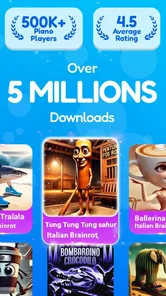
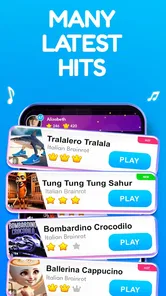
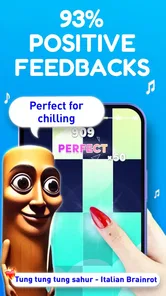

Analysis by Reviewed
I reach for Piano Music Star 5: Beat Game when I want music to be something I respond to, rather than simply something playing in the background. Its central idea is easy to grasp: follow the song, tap the notes as they arrive, and try to keep your timing steady. That makes it approachable even if you have never played piano, while still giving each round enough pressure to hold my attention. The appeal is less about pretending to perform on an instrument and more about turning a familiar tune into a quick test of rhythm and concentration.
Why the tap-to-the-beat idea works
In a music game, a simple control scheme can be a real advantage. Here, tapping tiles keeps the focus on listening and reacting, rather than learning complicated controls before the music starts. I can pick up the basic idea quickly, then pay closer attention to how the beat guides my timing. That small shift—from passively hearing a song to anticipating its next notes—is what makes a short session engaging for me.
This is also why I wouldn’t treat it as a piano-learning tool. The practice is mainly about rhythm, attention, and responding to prompts on a screen. It does not replace learning chords, hand position, reading notation, or the touch of a physical keyboard. If I wanted structured instruction or a realistic instrument experience, I’d choose a lesson app or keyboard instead. If I wanted a quick, song-led challenge without that commitment, the tap-based format would be a better match.
What a round asks of you
The basic loop is to watch for notes and tap in time with the music. That sounds forgiving, but it still asks me to divide my attention between what I see and what I hear. When I focus only on the tiles, I can lose the pulse; when I listen closely, the rhythm can help me anticipate what comes next. That makes headphones useful when I want to concentrate, although I’d keep the volume considerate in a shared space.
The game’s score gives a run a clear result and a reason to try again. For me, the most useful way to approach a tricky track is to treat a replay as practice rather than chasing a perfect result immediately. I focus on the sections where my timing slips, then try again while paying attention to the beat rather than simply tapping faster. The star score gives each run a clear outcome, but it can also tempt you into repeating a song long after it has stopped being fun. I’d set a personal stopping point: if a track is frustrating rather than satisfying, switch songs and return later.
A good fit for short breaks
Imagine waiting for a ride or taking a quiet break between tasks. A song gives me one contained activity: I can focus on timing for a while, then stop when the moment is over. That works better for me than a game that expects a long session or asks me to build a complicated setup before I can play. The screen-based controls also make the premise easy to understand at a glance, though tapping a phone never recreates the feel or sound of piano keys.
For a more deliberate session, I’d choose one song and play it twice with a different goal each time. On the first run, I’d concentrate on following the rhythm without worrying too much about the result. On the next, I’d pay attention to where my timing became uncertain. This gives repetition a purpose and helps prevent the score from becoming the only reason to continue. If I’m tired or distracted, I’d stop rather than mistake rushed taps for useful practice.
More From Our News Desk

Weather by Xiaomi Review: Clear at a Glance, Less Clear Up Close

X Under Pressure: Can It Recover When Posting Goes Wrong?

Clash of Clans Is Won Between the Battles

Android Auto Makes the Case for Quieter Car Software

MobiOffice: Transforming Mobile Productivity with Seamless Integration

EA SPORTS FC™ Mobile Soccer: Redefining Mobile Sports Gaming
How it differs from other music games
Compared with music games that emphasize free-form creation or instrument simulation, this one is about following a song’s rhythm and earning a performance result. That focused loop is a strength when I want a quick challenge, but it may feel narrow if I want to compose, improvise, or practise music theory. The game’s progression is built around playing along and opening up more songs, rather than giving me a blank space to make my own music.
That distinction helps answer a practical question: should I pick this over a piano simulator? I would if I wanted an accessible rhythm game and didn’t care about practising real keyboard technique. I’d choose a simulator or lessons if learning to play were the point. And if I wanted to arrange sounds or create a melody, a music-making app would suit me better. Those alternatives can be more demanding, but their goals are different; this game is strongest when I want a direct route into a song-based challenge.
The Musical Journey Begins
From the moment I installed Piano Music Star 5, I was hooked. The app greets you with a vibrant interface and an impressive array of songs to choose from. Whether you're into classical masterpieces or the latest pop hits, there's something for everyone. The best part? You don't need any prior piano experience to start playing. The app guides you with intuitive gameplay mechanics that make you feel like a pro in no time.
Game Mechanics that Keep You on Your Toes
What sets this game apart is its unique blend of rhythm and strategy. As you tap away on your screen, you need to hit the notes in time with the music. It sounds simple, but trust me, it requires a keen sense of timing and concentration. The levels range from easy to expert, allowing you to gradually improve your skills. And let me tell you, there's nothing quite as satisfying as nailing a complex song after a few tries.
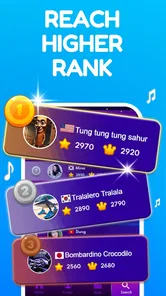
One feature I particularly enjoyed is the star rating system. After each song, you get a score based on your performance, encouraging you to replay and perfect your skills. This gamification element adds a competitive edge, making you want to climb the global leaderboard and show off your musical prowess.
Making each attempt count
For me, the most useful way to approach a tricky track is to treat a replay as practice rather than chasing a perfect result immediately. I focus on the sections where my timing slips, then try again while paying attention to the beat rather than simply tapping faster. The star score gives each run a clear outcome, but it can also tempt you into repeating a song long after it has stopped being fun. I’d set a personal stopping point: if a track is frustrating rather than satisfying, switch songs and return later.
Compared with music games that emphasize free-form creation or instrument simulation, this one is about following a song’s rhythm and earning a performance result. That focused loop is a strength when I want a quick challenge, but it may feel narrow if I want to compose, improvise, or practise music theory. The store summary describes tapping tiles to play along with familiar artists and unlock songs; I’d think of that as a progression-oriented game experience, not an open music studio.
Visuals and Sound Quality
The developers have done a fantastic job with the visuals. Each keypress is accompanied by a stunning visual effect, making the gameplay feel immersive and rewarding. The sound quality is top-notch too, with high-fidelity recordings that make you feel like you're playing on a grand piano. Whether you're using headphones or playing through your phone's speakers, the audio experience is consistently delightful.
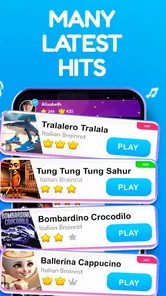
Moreover, the app periodically updates its song library, so there's always something new to look forward to. This keeps the experience fresh and exciting, ensuring you never get bored of the same old tunes.
Choosing songs with a purpose
When I’m deciding what to play, I’d start with a track whose beat I can follow comfortably rather than choosing the most demanding option just because it looks impressive. A familiar rhythm gives me a useful reference point: I can listen for the pulse and notice whether my taps are early or late. If I’m trying a less familiar song, I’d give myself a run to get used to its feel before judging my score. That small change makes the game more enjoyable for someone who wants to improve without turning every attempt into a test.
Song choice also changes the kind of break the game provides. A lively track can be a welcome distraction when I need to reset my attention, while a song with a steadier feel may be easier to follow when I’m playing in a noisy or distracting place. I wouldn’t expect the game to work equally well in every setting: if I can’t hear the music clearly or keep my eyes on the screen, a timing-based round is likely to feel more irritating than relaxing. In that situation, I’d save it for a quieter moment.
Where the challenge can get frustrating
A score-and-retry structure can be motivating, but it can also make a casual game feel like homework if I keep chasing a better result. My rule would be to replay only while I can identify something specific to improve, such as listening more carefully or staying composed through a difficult passage. If I’m repeating a track without enjoying the music or learning its rhythm, switching to another song is the sensible choice. That keeps the game’s competitive edge from taking over the reason I opened it in the first place.
There is a practical trade-off in using a touchscreen, too. Tapping is convenient and familiar, but the screen does not give the tactile feedback of piano keys. I can enjoy the rhythm and still find that my fingers are simply reacting to visual prompts, rather than developing the habits required to play an instrument. For a child or adult curious about music, that can be a fun starting point for listening and coordination; it should not be mistaken for a first piano lesson.
Who will enjoy it—and who may not
I’d recommend it most to someone who likes recognizable songs, quick rounds, and the small satisfaction of improving a score through repetition. It can also suit a casual player who wants a low-pressure entry into rhythm games, since piano experience is not needed to begin. If you prefer calm listening without reacting to prompts, or you want a realistic piano simulator, the tapping challenge may not be what you’re looking for. Likewise, anyone who dislikes replaying a track to improve a result may find the score-driven loop more demanding than relaxing.
The game is free and rated for Everyone, which makes it easy to try as a casual option. Melodya Muses is the developer, and the game has a 4.7 average from around 1,500 ratings, with over 500,000 installs. It was released on February 23, 2025, and version 2.19.0 lists Android 7.0 as the minimum operating system. Those details place it within reach of many Android users, though I’d still check that my device meets the requirement before installing.
Practical expectations before you start
A reasonable question is whether this works for someone with no music background. I think it can, because the core task is responding to the song and on-screen notes, not reading notation or knowing piano technique. A beginner can start by listening for the pulse and keeping the taps relaxed. If the timing feels difficult at first, that doesn’t mean you need musical training; it may simply take a few attempts to coordinate what you hear with what you see.
Another question is whether it suits a quick session or demands a long commitment. Its song-by-song format makes it natural to play in short gaps, and the score gives each attempt a definite endpoint. Still, the desire to improve a result can stretch a short break into repeated tries. I’d decide in advance whether I have time for one song or a few replays, especially if I’m opening it between errands or before returning to work.
Since it is free, it is easy to give the game a try without treating it as a serious investment. I would still think about the kind of music experience I want before installing: the value here is in interacting with songs, not in building a repertoire on a real instrument. Its Everyone age rating makes it broadly approachable, but adults choosing it for a younger player should still consider whether score-chasing and rapid screen interaction are the sort of play they want to encourage.
Final Thoughts
In conclusion, Piano Music Star 5: Beat Game is a must-try for anyone who loves music and gaming. Its engaging gameplay, stellar sound quality, and visually appealing interface make it a standout in the crowded world of music apps. Whether you're looking to kill some time or seriously improve your musical skills, this app has got you covered. So, why wait? Dive into the world of music and rhythm, and see if you have what it takes to become a piano star!
My honest recommendation is a little more specific: try it if you want a straightforward rhythm challenge with songs as the draw, and judge it by whether replaying tracks feels rewarding on your device. I wouldn’t choose it as a way to learn piano, and I’d pick a different kind of music game if creating music matters more to me than hitting notes accurately. For a short break built around listening, timing, and trying to improve a run, though, its simple premise is exactly the point.
Piano Music Beat 5: Song Game Frequently Asked Questions
Is Piano Music Star 5: Beat Game suitable for children?
Piano Music Star 5: Beat Game is rated Everyone, so it is presented as suitable for a broad audience. It is a music game built around tapping tiles in time with songs, making the basic idea easy to understand. As with any game, parents may wish to check the app’s age rating and decide whether its play style is right for their child.
What is Piano Music Star 5: Beat Game?
Piano Music Star 5: Beat Game is a captivating rhythm-based game where players tap on the screen to the beat of popular music tracks. The game is designed for music enthusiasts who enjoy testing their reflexes and timing. It offers a wide variety of songs across different genres, providing endless entertainment and challenges for users. Its short description is Piano Music Star, and the game’s central appeal is enjoying musical beats through tile-tapping play.
Is Piano Music Star 5: Beat Game free to play?
Yes, Piano Music Star 5: Beat Game is free to download and play. However, it includes in-app purchases and ads. Players can choose to purchase additional songs, remove ads, or acquire special items to enhance their gameplay experience. These purchases are optional and not necessary to enjoy the game.
What are the device requirements for Piano Music Star 5: Beat Game?
To run Piano Music Star 5: Beat Game smoothly, your device should have a minimum of 2GB RAM and be running on iOS 10 or Android 5.0 and above. The game is optimized for most smartphones and tablets, ensuring a seamless experience for users with compatible devices. Make sure to have enough storage space for additional downloads. The current version is 2.19.0, and the stated minimum operating-system version is 7.0.
Can I play Piano Music Star 5: Beat Game offline?
Piano Music Star 5: Beat Game can be played offline, allowing you to enjoy the game without an internet connection. However, accessing certain features, such as downloading new songs or participating in online leaderboards, requires an internet connection. Offline play is perfect for those who want to enjoy the game on the go.
Pros
- Engaging rhythm gameplay.
- Wide variety of music tracks.
- Intuitive controls.
- High-quality sound effects.
- Suitable for all ages.
Cons
- Ads can be intrusive.
- Limited free content.
- In-app purchases are pricey.
- Occasional lag on older devices.
- Requires internet connection.












