Music Piano 7: Rush Song Games
- 3.14K
- 4.8
- Installs
- 50.00M
- Price
- Free

Screenshots






Analysis by Reviewed
I find the most useful way to approach Music Piano 7: Rush Song Games is as a short, focused rhythm challenge, not a lesson or a background activity. The basic loop is easy to understand: follow the tiles, tap in time, and try to keep the song moving. That simplicity makes it inviting when I have a spare moment, but it also means the game rewards attention more than musical knowledge. If I want to relax without watching the screen, I choose something else; if I want a quick test of timing and concentration, this format makes sense.
Build a repeatable baseline
My best approach is to start with a song I already recognize, then focus on the tiles instead of trying to chase a perfect score immediately. Familiar melodies make it easier to anticipate the rhythm, while a new track asks you to react more closely to what is on screen. Once I settle into a song, I try to keep my hands relaxed and use the same tapping position throughout; changing grip mid-run can make accuracy harder, especially on a phone.
That routine also helps answer a practical question: is this suitable for quick play? Yes, the tile format is easy to pick up for a brief session, and it does not demand that you already know how to read music. I would still choose a quieter moment if I wanted to concentrate, since the speed and missed-tile feedback can be distracting when I’m splitting attention between the game and something else.
A small but useful habit is to treat each attempt as a test of one thing. On an unfamiliar track, I watch the tile spacing and work on staying calm; on a familiar one, I listen for the phrase changes instead of relying entirely on memory. If I miss, I try not to compensate by tapping harder or rushing the next notes. That reset keeps a single mistake from turning into a string of them, and it makes replaying a song feel purposeful rather than like mindless repetition.
Getting into the Groove
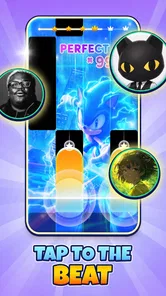
So, what’s the buzz about Music Piano 7? Right off the bat, the app greets you with a sleek and user-friendly interface. It’s the kind of app that doesn’t bog you down with complicated menus. Instead, it nudges you straight into the action with its vibrant tile gameplay. The idea is simple: tap on the black tiles as they race down your screen to play beautiful melodies. Miss a tile, and you’re treated to a jarring sound that will undoubtedly make you strive to do better next time. It's incredibly addictive in the most delightful way!
Check comfort before chasing speed
One of the standout features is its vast library of songs. From classical pieces to modern hits, there’s a little something for every music aficionado. Whether you're a fan of Beethoven or Billie Eilish, the app keeps you entertained with a plethora of tunes. The game also updates regularly, ensuring your playlist never gets stale. Plus, unlocking new songs as you progress adds a rewarding layer of accomplishment.
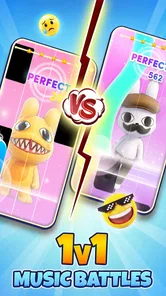
Another neat addition is the multiplayer mode. You can challenge your friends or players from around the world. It’s a fantastic way to showcase your skills and maybe even learn a trick or two from other players. The competition is fierce, but the fun is guaranteed!
More From Our News Desk

Weather by Xiaomi Review: Clear at a Glance, Less Clear Up Close

X Under Pressure: Can It Recover When Posting Goes Wrong?

Clash of Clans Is Won Between the Battles

Android Auto Makes the Case for Quieter Car Software

MobiOffice: Transforming Mobile Productivity with Seamless Integration

EA SPORTS FC™ Mobile Soccer: Redefining Mobile Sports Gaming
Before settling into longer play, I’d take a moment to look through the available settings and make the screen and sound comfortable for the place you’re in. A game built around visual cues and music is easier to enjoy when the display is easy to follow and the audio won’t bother people nearby. I also treat song unlocks as a reason to vary my choices, not as a demand to grind: repeating a track can help with timing, but switching to a different one is a better test of whether I’m reacting to the rhythm rather than memorizing a sequence.
For practical use, I’d check the volume before starting if I’m on public transport or sitting near someone who is working. The soundtrack and mistake feedback are part of the experience, but they are not always welcome in a shared space. When sound needs to stay low, I can still focus on the moving tiles, although I lose some of the musical context that helps me anticipate the beat. That is a genuine trade-off: visual play can remain possible, but it may feel less satisfying than playing somewhere I can hear the song clearly.
I also wouldn’t assume that faster always means better. If a run starts to feel frantic, I pause between attempts and return to a track whose rhythm I know. That gives me a useful reference point before I try something less familiar. This is especially helpful on a smaller phone, where keeping the screen in a steady position and avoiding awkward thumb movement can matter as much as raw reaction speed.
Use repetition without getting stuck
What I absolutely adore about this app is how it effortlessly combines learning with play. For those wanting to polish their piano skills, Music Piano 7 offers a practice mode where you can learn at your own pace. The app gently guides you, helping you improve your timing and accuracy. It's a brilliant way to hone your skills without the need for a physical instrument.
I’d keep that benefit in perspective. Tapping tiles can sharpen attention to timing and hand-eye coordination, but it is not the same as learning keys, fingering, or musical notation on a real keyboard. If your goal is to play piano pieces outside the game, a piano-learning app with structured lessons—or an actual keyboard and teacher—will serve you better. If you mainly want a light rhythm challenge, this is a more approachable place to start.
And let’s not forget the customization options. You can tailor the game to suit your style, choosing different themes and sounds. It's these little touches that make the app feel personal and engaging.
The most useful practice habit is to alternate repetition with a deliberate change. I might replay a track once to settle into its pattern, then move to another song so I can see whether my timing carries over. Repeating the same selection for too long can make success depend on remembering what comes next, rather than responding to the rhythm in the moment. A small rotation keeps the game fresh and gives me a better sense of whether I’m improving in a way that transfers between songs.
When I want a low-pressure session, I treat practice as a place to become comfortable with the controls rather than a demand to prove anything. When I want a challenge, I choose a song that asks me to pay closer attention. That distinction helps the game serve two different moods without pretending either one is formal piano instruction. The accessible tile format is a strength for casual play, while its limits become obvious as soon as the goal shifts to learning an instrument.
What a tile game can’t replace
Compared with music apps that ask you to build songs, practice an instrument, or follow a formal course, this game keeps the central task immediate: watch, tap, and keep pace. That makes it a good fit for someone who wants music-themed play without a long setup. Players who prefer composing, singing along, or learning a complete instrument may find those alternatives more satisfying, because tile accuracy alone does not provide the same creative or instructional depth.
The comparison is also about the kind of attention each option asks for. A rhythm game gives me a clear, immediate objective and quick feedback, while a music-making app gives more room to experiment and a lesson app offers a structured route through skills. I reach for this one when I want to react to a song, not when I want to make one or understand how its notes are arranged. Knowing that difference avoids expecting a tile run to provide the satisfaction of a keyboard session.
For a realistic everyday use, I’d open it while waiting for a ride or winding down after work, choose a familiar song, and play one focused run rather than trying to multitask. If I’m with a friend, multiplayer gives the session a social goal; if I’m tired or using a small screen, I’d keep to a comfortable pace instead of pushing for a personal best. Those choices make the quick-play format feel fun rather than frustrating.
It is also a reasonable option for a family member who wants an uncomplicated music-themed game, since its age rating is Everyone. I would still judge the fit by the player’s patience and comfort with rapid tapping, rather than by age alone. Someone who enjoys competing over a short run may find the multiplayer angle appealing; someone who prefers taking turns composing or discussing music will probably have a better time with a different activity.
Who will enjoy it, and who should look elsewhere
Made by Melodya Muses, this free music game is rated for Everyone and runs on Android 7.0 or later. Its current version is 2.22.0, and it has a 4.7 average from around 49,000 ratings, alongside more than 10 million installs. Those figures suggest plenty of players have tried it, though the right fit still depends on what you want from a music game.
I’d recommend it to casual players who enjoy familiar songs, quick reaction challenges, and the satisfaction of improving a repeatable run. The game has 437 written reviews, and its broad audience is reflected in its Everyone age rating. I would skip it if you dislike rapid tapping, want a quiet or purely creative music activity, or expect a tile game to teach piano technique from the ground up. It is free to play, so it is easy to try, but I’d still check the available options and comfort settings before settling in for a longer session.
For a first session, I’d keep expectations modest: try a familiar selection, see whether the pace feels comfortable, and check that the visual presentation works for your screen and hands. That tells you more than a long session spent trying to push through frustration. If the basic loop is satisfying, the song variety and repeatable runs give you reasons to return; if the central tapping mechanic is not enjoyable, more songs are unlikely to change your mind.
One question people often have is whether this can help them become better pianists. My answer is that it can make timing practice feel playful, but it does not teach the physical and musical skills needed at a real keyboard. Another is whether it works for a short break: its straightforward premise makes that a natural use, provided you can give the screen your attention. For a calm activity, a composing tool, or a guided course, I’d choose a different kind of music app.
A measured verdict for rhythm-game fans
In conclusion, Music Piano 7: Rush Song Games is more than just a game; it’s an immersive experience for anyone with a love for music. Whether you’re a seasoned pianist or a curious beginner, this app offers something for everyone. It transforms your mobile device into a dynamic piano, allowing you to create and enjoy music anytime, anywhere.
So, if you're ready to embark on a musical adventure, download Music Piano 7 and let your fingers fly across those tiles. Trust me, you won’t be able to put it down!
My more grounded recommendation is to try it if you want a compact rhythm challenge with recognizable music, not if you expect a portable instrument or a complete learning path. Its strongest use is a deliberate few minutes: choose a track, settle your hands, listen as well as watch, and use each replay to adjust one habit. The main drawback is the same simplicity that makes it approachable: rapid tile tapping leaves little room for creative expression, and missed cues can be irritating when you are tired or distracted.
For me, the verdict comes down to whether the loop itself sounds fun. If the appeal is matching moving tiles to songs and gradually getting more consistent, this is an easy game to understand and a reasonable free option to try. If I want to make music, study piano properly, or play without keeping my eyes on a screen, I would pass and choose an app built for that goal instead.
Music Piano 7: Rush Song Games Frequently Asked Questions
What kind of music game is Music Piano 7: Rush Song Games?
Music Piano 7: Rush Song Games is a music-focused game built around following songs by tapping tiles in time. Its store tagline, “All Hit Songs In Your Piano Game? Feel The Magic, Don't Miss The Tiles,” points to a quick rhythm experience rather than a piano-learning course. If you enjoy reacting to music and aiming for accurate taps, its central idea is easy to understand.
Is Music Piano 7: Rush Song Games suitable for children?
The game has an Everyone content rating, so it is intended for a broad audience. Its basic appeal is tapping tiles along with music, which can be approachable for younger players as well as adults who enjoy rhythm games. As with any mobile game, parents may want to check the app and device settings themselves before letting a child play.
Who is Music Piano 7: Rush Song Games best suited for?
Music Piano 7: Rush Song Games is a music-focused game for people who enjoy rhythm challenges and tapping along to songs. Its straightforward tile-tapping idea makes it approachable for newcomers, while the need to react quickly can keep experienced players engaged. It may especially appeal to casual players looking for a musical game that is easy to pick up.
Will Music Piano 7: Rush Song Games work on my device?
The Android version requires Android 7.0 or later, so check your device’s operating system before downloading. The game is rated Everyone, making it suitable for a broad audience. If your phone or tablet meets the minimum Android requirement, you can install it and try the rhythm gameplay. The game is also described as available for iOS, though compatibility depends on your device.
What is Music Piano 7: Rush Song Games?
Music Piano 7: Rush Song Games is an engaging mobile game that allows users to enjoy playing the piano by following the rhythm of popular songs. With a variety of tunes and difficulty levels, it provides a fun and challenging experience. The game is designed for both beginners and seasoned players, making it a versatile choice for music lovers.
Pros
- Engaging rhythm gameplay
- Wide song variety
- User-friendly interface
- High-quality sound effects
- Frequent updates
Cons
- Ads can be intrusive
- Limited free content
- In-app purchases required
- Requires internet connection
- Occasional lagging issues












