One Hand Clapping - Karaoke
- 12.00
- 4.0
- Installs
- 10.00K
- Price
- $9.99

Screenshots
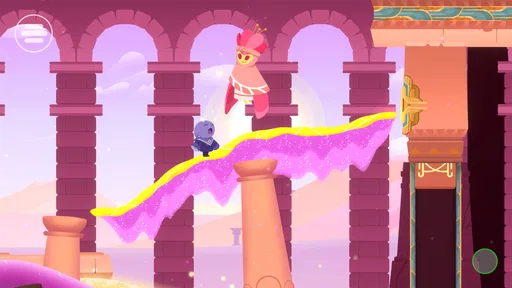
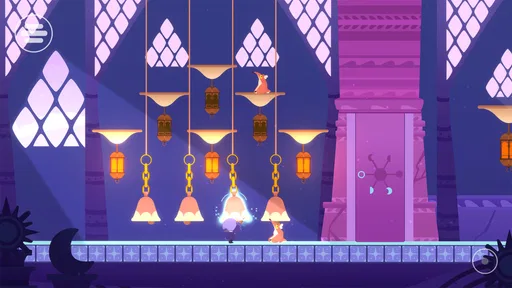
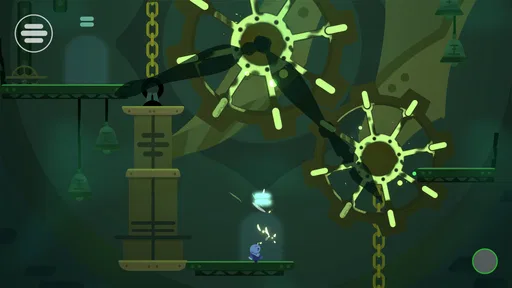
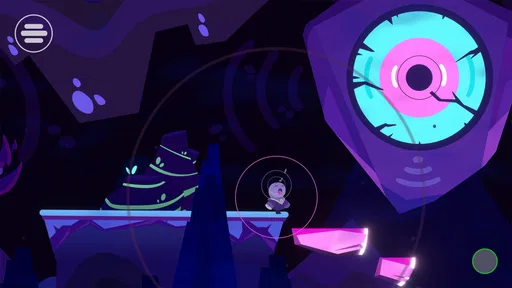
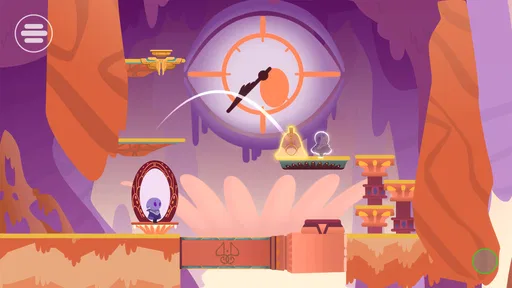

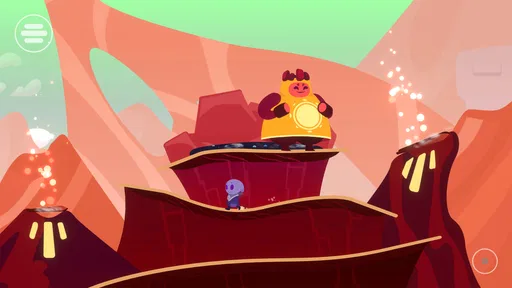
Analysis by Reviewed
I enjoy games that ask me to do something other than tap through familiar menus, and this one makes an unusually personal request: use your voice to shape what happens on screen. That premise gives One Hand Clapping a playful, slightly self-conscious charm. It is a music game from HandyGames, but it feels closer to a gentle puzzle adventure than to a rhythm game built around hitting notes on a beat.
What vocal play feels like
The main appeal is the change in how I approach a puzzle. Instead of searching for a button combination, I try a hum, a whistle, or a sung note and listen for a response. That makes experimentation part of the fun, especially when a small adjustment in pitch helps me make sense of the space in front of me. You do not need to think of yourself as a singer; being willing to make a sound and try again matters more than performing well.
That also makes this a good choice for a short, low-pressure session at home. I can imagine picking it up after work, putting my phone somewhere comfortable, and giving a puzzle my attention without needing to compete against a timer or chase a high score. The voice-led idea is particularly appealing if you are tired of games that turn every spare minute into a contest. On the other hand, if you want a conventional music game with familiar songs, beat charts, or score-focused play, this is not the same kind of experience.
Speed, surroundings, and practical trade-offs
I would set expectations around thoughtful trial and error rather than constant speed. The vocal controls are the point, so a puzzle may take a little experimentation before I find a sound that works. A useful habit is to start with a comfortable, steady hum, then change one thing at a time instead of jumping between pitches. That gives me a clearer sense of how my voice is affecting the scene and keeps the challenge from feeling random.
The same mechanic shapes where I would play. A quiet room makes it easier to hear myself and feel at ease trying a sound more than once. On a bus, in a shared office, or beside someone who is sleeping, the need to vocalize can be awkward even if the game itself is calm. Headphones may help me focus on the game’s audio, but they do not remove the fact that my voice is part of the control scheme. If privacy is important, I would save it for home rather than expecting it to work like a silent tap-based game.
Who will enjoy it—and who may not
I’d recommend it to curious players, people who like gentle puzzles, and anyone who wants a game that makes sound feel interactive rather than decorative. It can also be a relaxed way to play with a friend nearby: one person can experiment with humming while the other watches how the environment responds. That turns a puzzle into a small shared activity without requiring either person to be confident at singing.
I would steer away from it if you need silent play, prefer precise touchscreen controls, or want a brisk sequence of challenges with obvious right answers. Vocal input is expressive, but it also asks for patience and a little willingness to feel silly. The experience depends on your surroundings and comfort level as much as on your gaming taste, which is a meaningful trade-off rather than a minor detail.
More From Our News Desk

Weather by Xiaomi Review: Clear at a Glance, Less Clear Up Close

X Under Pressure: Can It Recover When Posting Goes Wrong?

Clash of Clans Is Won Between the Battles

Android Auto Makes the Case for Quieter Car Software

MobiOffice: Transforming Mobile Productivity with Seamless Integration

EA SPORTS FC™ Mobile Soccer: Redefining Mobile Sports Gaming
Sing Your Way Through
I remember downloading One Hand Clapping with a mix of curiosity and skepticism. How could a game possibly use my voice as a controller? But, trust me, the moment I started humming my way through beautifully designed levels, I was hooked. The mechanics are simple yet ingenious. You sing, hum, or even whistle to interact with your surroundings, solving puzzles and unlocking paths. Each level offers something new, keeping the gameplay fresh and exciting.
The Beauty of Simplicity
Visually, this game is a masterpiece. The art style is minimalistic, yet it conveys a profound sense of wonder and exploration. The developers have done a fantastic job of creating a world that feels alive and vibrant without overwhelming your senses. The sound design complements the visuals perfectly, creating an immersive experience that draws you in from the moment you start playing.
The controls are intuitive, which is essential for a game that relies on vocal input. I was pleasantly surprised by how responsive the game was to my voice, even when I was just mumbling tunes to myself. The game’s ability to interpret and respond to different pitches is nothing short of impressive.
A Unique Challenge
One of the best things about One Hand Clapping is its ability to challenge you in a way that feels rewarding rather than frustrating. The puzzles are cleverly designed to test your vocal range and creativity. As someone who’s not exactly the next big singing sensation, I found the game encouraging rather than daunting. It’s forgiving enough for beginners but offers depth for those who want to fine-tune their vocal skills.
However, I must admit, playing in public places might attract a few curious stares. But honestly, that’s part of the fun! It’s a game that encourages you to let go of your inhibitions and just enjoy the moment.
Performance and value
My performance verdict is less about chasing speed and more about setting up a comfortable play space. I would not expect vocal puzzles to feel as immediate as tapping a control, and a moment spent listening and adjusting is part of the design rather than proof that the game is struggling. I also would not claim that a particular phone will make the voice response better; what matters most in practice is whether I can hear the game and make sounds without feeling rushed or self-conscious.
One practical tip is to pause between attempts and reset my voice to a comfortable pitch instead of forcing a high or low note. That keeps experimentation manageable and makes it easier to notice which change helped. If a room is noisy, moving somewhere quieter is a more sensible first step than repeatedly changing my approach. These small adjustments matter more here than they would in a game controlled entirely by the screen.
The game is rated Everyone, and its current version is 1.0.51, with a minimum OS requirement of 7.1. It costs $9.99, so I would treat it as a considered purchase rather than a throwaway download. The average rating is 4.2 from 129 ratings, with 10 written reviews and over 5K installs. Those figures suggest a modest audience, but they do not tell me whether its unusual voice-based play will suit you; the best question is whether you actually want to make sounds while gaming.
Choosing the right way to play
For a practical session, I would treat the first few minutes as a sound check rather than a test of musical ability. Find a comfortable place to hold or rest the phone, make a few ordinary speaking-range sounds, and notice whether the game audio is easy to hear. Then try a steady hum before reaching for a whistle or an especially high note. This is not about finding a perfect technique; it is a way to start with a repeatable sound, so changes in the puzzle are easier to interpret.
That approach is especially useful when playing with someone else. One person can make the sounds while the other watches the screen and suggests a small adjustment, such as holding a note more steadily. Swapping roles can make the experience less intimidating for a shy player, and it turns the game into a cooperative living-room activity without changing its basic appeal. I would still keep the room relaxed: an audience that treats every attempt like a performance can make a playful mechanic feel like pressure.
Compared with familiar rhythm games, this is less about matching a sequence accurately and more about discovering how sound affects a puzzle. Compared with ordinary mobile puzzle games, it trades silent, precise tapping for a more personal input that can feel expressive but is less convenient in public. That distinction is worth considering before paying. If your idea of a music game is learning songs or chasing a score, a rhythm title is the better fit. If you want a puzzle to respond to the sound you make, this offers a notably different kind of interaction.
When voice control becomes the constraint
The same feature that gives the game its identity can also narrow when it is comfortable to play. A noisy room makes it harder to listen carefully, while a very quiet shared space can make vocalizing feel intrusive. I would not plan on using it as a quick distraction during a commute or in a waiting room. It makes more sense as a deliberate home game, when I can focus on both the audio and the puzzle without worrying about disturbing anyone.
Players who are self-conscious about singing should know that the appeal is not a polished performance. Humming or speaking a sound can be a more natural starting point, and trying a simple, stable note is often more useful than attempting a tune. Still, if making any sound aloud is uncomfortable, the central interaction is unlikely to become a minor detail. In that case, a conventional touchscreen puzzle will probably be more enjoyable, even if it does not offer the same unusual connection between player and environment.
I would also avoid treating a missed response as a reason to push the voice harder. Returning to an easy pitch, changing one element at a time, and checking the room’s noise level are calmer ways to troubleshoot. That keeps the experience approachable and avoids turning a gentle puzzle into a vocal endurance exercise. The game is most inviting when experimentation stays light.
Reliability and device expectations
Because voice is the control method, consistency matters more than raw speed. A player needs to hear what is happening and make a sound comfortably; that is the useful baseline for judging whether a session feels smooth. I would not promise the same experience in every room or on every device, since surroundings and personal comfort can affect how easy it is to play. If the response seems unclear, I would first simplify the sound and reduce background noise before assuming that the game itself is at fault.
The listed minimum operating system is 7.1, and the current version is 1.0.51. Those details help with basic compatibility checks, but they do not replace checking that your own device and setup suit the way you want to play. If you are deciding whether it will fit a busy daily routine, the more important question is not whether it opens quickly; it is whether you have a few quiet minutes to give its audio-led puzzles proper attention.
There is also a difference between a game that is easy to start and one that is easy to play anywhere. The premise is simple to understand, but the vocal input makes the setting part of the experience. I would expect a comfortable pace rather than instant response after every sound, because listening, trying again, and noticing a change are part of how these puzzles work. That makes it a poor substitute for a quick silent game, but a reasonable choice when I can settle in without rushing.
Final Thoughts
In the end, One Hand Clapping is more than just a game; it’s an experience. It invites you to explore a world where your voice is the key to unlocking mysteries and overcoming obstacles. Whether you’re a seasoned gamer or someone who enjoys casual play, this game offers something unique that’s worth trying.
So, if you’re looking for a break from the usual tap-and-swipe games and want to embark on a vocal adventure, give One Hand Clapping a try. It’s a delightful reminder that sometimes, the best way to play is to sing your heart out.
One Hand Clapping - Karaoke Frequently Asked Questions
What does the game involve, and what should I expect from its music-focused gameplay?
One Hand Clapping is a music game built around using your voice to shape your surroundings and solve challenges. Its central idea is that vocal sounds are part of how you interact with the world, rather than simply background audio. If you enjoy creative games that invite experimentation, its voice-led approach offers a distinctive change from conventional button-focused play.
What is One Hand Clapping and what platforms is it available on?
One Hand Clapping is an innovative puzzle platformer game that encourages players to use their voice to solve puzzles and progress through levels. The game is available on multiple platforms, including Android and iOS, as well as on PC and consoles. It offers a unique gaming experience where players can experiment with their vocal pitches, singing, and humming to interact with the game's environment.
How does the voice control mechanism work in One Hand Clapping?
In One Hand Clapping, players use their voice to control the game mechanics. The game uses your device's microphone to detect changes in pitch and volume, allowing you to manipulate platforms, move objects, and solve puzzles. It's essential to have a quiet environment and a functioning microphone for the best experience. The game provides a unique opportunity to explore your vocal range as you interact with the colorful and engaging world.
Is One Hand Clapping suitable for all ages?
Yes, One Hand Clapping is designed to be suitable for players of all ages. Its simple controls and non-violent gameplay make it an excellent choice for younger audiences as well as adults. The game focuses on creativity and problem-solving, offering a family-friendly experience that encourages players to use their voices in fun and imaginative ways. The charming graphics and soothing soundtrack further enhance its universal appeal.
Do I need any special equipment to play One Hand Clapping?
To play One Hand Clapping, you primarily need a device with a working microphone, such as a smartphone, tablet, or computer. While no additional equipment is required, a quiet environment can help in accurately capturing your voice inputs, ensuring a smoother gameplay experience. Headphones can also enhance the audio experience but are not mandatory. The game is designed to be accessible, allowing most players to enjoy it without needing specialized gear.
Pros
- Innovative vocal-based gameplay.
- Unique musical puzzle-solving.
- Beautifully designed environments.
- Encourages creativity and musicality.
- Accessible for all ages.
Cons
- Requires a microphone to play.
- Limited replay value after completion.
- Can be challenging for tone-deaf users.
- Short gameplay experience.
- No multiplayer features.













