

One Big Word
- 0.00
- 0.0
- Installs
- 10.00K
- Price
- Free

Screenshots
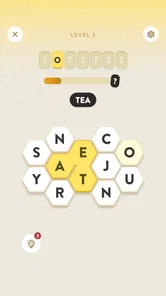
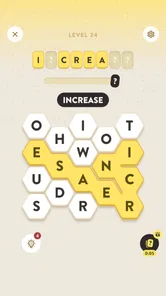
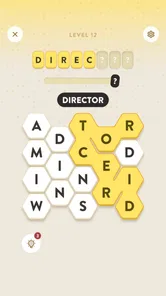
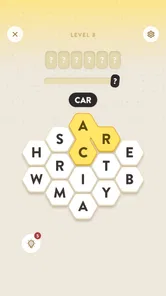
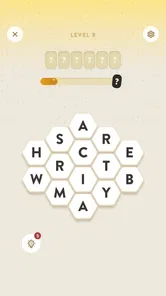
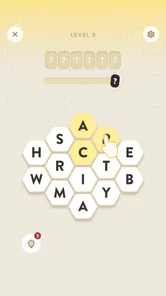
Analysis by Reviewed
I found One Big Word most interesting as a small, easy-to-share word game rather than as a serious vocabulary course. Its central idea is simple: each level points toward a larger target word, while the player searches for smaller words along the way. That gives the game a pleasant sense of discovery without requiring a long tutorial or a complicated ruleset.
Because it is free and rated for Everyone, it is the sort of game I could imagine leaving on a shared tablet for short turns. One person can try a few guesses while waiting for dinner, another can take over later, and nobody needs a long uninterrupted session to understand what is happening. The catch is that shared use works best when everyone treats progress as communal entertainment rather than as a private competition.
Fugo Games is the developer, and the game belongs firmly in the word puzzle category. It is available for devices running Android 8.0 or later. The current version is 0.1.10, and the game has passed around ten thousand installs, so I would approach it as a relatively small, focused release rather than a huge established platform with a deep social ecosystem.
How One Big Word works in a shared home
The appeal comes from the layered objective. I am not simply trying to find one answer from a blank screen. I am looking for smaller words that help me reach the larger word hidden in the level. That structure changes the mood of a typical word puzzle: instead of immediately asking, “What is the answer?”, I start asking, “What can these letters or clues build toward?”
That makes it naturally suitable for a shared device. A child can suggest a short word, a parent can notice a longer possibility, and someone else can connect the discoveries to the level’s main goal. Even when one player is holding the device, the others can participate verbally. I like that arrangement because it does not require the game to pretend it has multiplayer features; the household creates its own turn-taking system.
A realistic use case is a short evening break after everyone has finished eating. I would open a level, give each person one attempt or one suggestion, and stop before the activity becomes tiring. The game’s format supports that kind of informal rotation better than a long narrative game would. It also avoids the pressure of setting aside a full gaming session, which is useful when a shared tablet is used for many unrelated tasks.
There is a small but important trade-off here. If the household shares one game installation, progress can become difficult to interpret. A solved level may represent one person’s skill, a group effort, or a lucky suggestion from someone passing by. That is not a flaw for casual family play, but it matters if you want a clean personal record. I would decide in advance whether the goal is cooperation or individual achievement.
More From Our News Desk

 Gmail
GmailGmail in a Busy Inbox: Who Benefits Most?
From first account to crowded workday, Gmail earns its place through dependable search and flexible sorting—but its best fit depends on how much inbox maintenance you can tolerate.

 Prime Video
Switching to Prime Video: What Changes in Your Viewing Routine
Prime Video can make a compelling second home for streaming, but switching means learning a different catalog, rental layer, and route from browsing to playback.

 Universal TV Remote Control
Universal TV Remote Control Works Best as a Reliable Backup
A phone remote earns its place through quick setup and reliable habits. Here is how to get more from Universal TV Remote Control—and where its limits show.

 Weather - By Xiaomi
Weather by Xiaomi Review: Clear at a Glance, Less Clear Up Close
Xiaomi’s weather app makes everyday forecasts quick to scan, but its calm surface can leave useful details and recovery paths harder to find than they should be.

 X
XX Under Pressure: Can It Recover When Posting Goes Wrong?
A resilience-focused review of X, examining setup, mistaken posts, interruptions, weak connections, and the gaps that matter when recovery needs to be dependable.

 Clash of Clans
Clash of Clans Is Won Between the Battles
Its raids are quick; its community is a long-term project of coordination, teaching, rivalry, and shared responsibility—with all the friction that entails.
Latest News



What to expect before handing over the device
The game is free to download, which removes the biggest barrier to trying it with other people. However, in-app purchases range from $1.49 to $5.99 per item. I would not hand the device to a young player without first agreeing on how purchases are handled. The important point is not the amount alone; it is that a free starting point can still lead to paid options during play.
For a shared household, I would keep payment decisions with the adult who owns the device or account. That does not require inventing a special family setup. A simple spoken rule is enough: anyone may play, but nobody buys anything without asking. If the device is used by several people, that boundary is more practical than assuming every player understands the difference between a free game and optional paid items.
I also recommend deciding whose progress matters before beginning. If a parent wants to play alone later, a child’s guesses could alter the available path or completion state. If the point is to relax together, that same shared progress is a benefit. The game is more enjoyable when the household chooses one of those approaches instead of discovering the conflict halfway through a session.
On a personal phone, the setup is simpler. I can use it as a private pocket puzzle and return whenever I have a spare moment. On a family tablet, the same simplicity creates a coordination question: should the next player continue the current level, or start a fresh attempt? I would use a small household convention, such as leaving the device on the current puzzle and saying whose turn is next.
Why the smaller words matter more than they first appear
The smaller-word step is not just decoration around a final answer. It gives me a way to make progress when the main word is not obvious. I can explore shorter possibilities, test how they relate to the level, and gradually narrow my thinking. That is a useful design choice for mixed-age play because a younger player may contribute an easy word even when an older player sees the larger pattern.
My first practical tip is to treat every short word as information, not merely as a point-scoring move. When I get stuck, I look for common, familiar words before attempting unusual vocabulary. This helps prevent the common mistake of chasing an impressive answer too early. In a group, it also gives less experienced players a meaningful role instead of making them wait for the strongest word finder.
My second tip is to say possibilities aloud when playing together, but keep the guesses organized. Several people calling out random words can make the puzzle feel noisy rather than collaborative. I would let one person suggest, another person check the letters or prompt, and a third person connect the result to the larger target. That informal division makes the game feel more like a shared puzzle-solving exercise.
A third useful approach is to stop briefly after a failed attempt. Word games often become harder when I rush, because I keep repeating the same mental pattern. A short pause lets me return to the available letters or clues with a different perspective. In a household setting, that pause also gives quieter players time to contribute without having to compete with the fastest speaker.
These habits do not turn the game into a formal educational tool, and I would not describe it that way. They simply make the core mechanic more rewarding. The game is at its best when the player enjoys the process of building toward the large word, not when every level is treated as a test of advanced vocabulary.
Coordination on a shared device
One Big Word can work well in a home where people already share games casually, but it needs a little cooperation. I would not assume that every member of the household wants the same experience. One person may enjoy solving independently, while another may prefer to suggest words from the sofa. The game can support both styles, but the household has to choose how to use it.
For individual turns, I would give each player a clear stopping point: one level, one attempt, or a few minutes. That prevents a single confident player from taking over the entire session. For cooperative play, I would keep the device in one place and let everyone discuss the current puzzle. The second method makes better use of the game’s conversational quality, while the first protects personal ownership of progress.
There is also a practical issue with interruptions. If someone leaves halfway through a puzzle, the next person may not know which words have already been considered. I would keep a short spoken record or use a piece of paper beside the tablet. That sounds old-fashioned, but it avoids repeating guesses and gives the group a sense of continuity without claiming that the game itself provides a shared coordination system.
Another trade-off concerns attention. Because the game is built around words, it is easy for spectators to offer answers before the player has had time to think. In my experience, that can remove the most satisfying part of the puzzle. I would agree on a short quiet period before hints from the group. This is especially helpful when adults and children are playing together, since different players may need different amounts of time.
If the household wants a game with clearly separated profiles, competitive leaderboards, or structured multiplayer, this would not be my first choice based on the experience here. Its strength is the puzzle itself and the way people can discuss it informally. A more account-focused alternative would be better for families who need strict personal progress boundaries. I would choose this one when flexibility matters more than formal separation.
Age, trust, and the meaning of an Everyone rating
The Everyone content rating makes sense for a word puzzle that can be played by a broad audience. Still, an age rating does not answer every household question. It does not decide who should make purchases, how much screen time is appropriate, or whether a child is ready to play without supervision. Those decisions remain part of the family’s normal device rules.
For younger players, I would focus on whether they enjoy experimenting with words rather than whether they can finish levels quickly. The game can become a gentle conversation starter about spelling and vocabulary, but I would avoid presenting it as homework. If a child finds the target-word structure frustrating, another puzzle with more visual guidance may be a better fit.
For older children and adults, the main question is tolerance for repetition and uncertainty. Word games can feel satisfying when a solution gradually appears, but they can also feel slow if the player wants immediate action or a strong story. I would recommend it to someone who enjoys pausing over language, not to someone looking for fast reflexes, elaborate progression, or constant novelty.
Trust also matters around paid items. The game costs nothing to start, but the presence of in-app purchases means I would explain the household rule before play begins. On a shared device, that conversation is more important than the game’s age label. A child-friendly activity can still need adult supervision when the device is connected to a payment method.
I would also be realistic about privacy and account expectations. A shared installation is convenient, but it should not be treated as a private space for each family member. If someone wants personal progress, personal habits, or uninterrupted solving, a separate device is the cleaner arrangement. If the goal is a common puzzle on the coffee table, sharing is perfectly reasonable.
Where it stands beside familiar word-game alternatives
Compared with a traditional crossword, One Big Word feels more guided because the level is organized around reaching one larger word through smaller discoveries. A crossword usually gives me a grid, crossing answers, and a broad set of clues. That format rewards patience and general knowledge in a different way. I would choose the crossword when I want a longer, more deliberate session, and this game when I want a compact puzzle with a clearer central destination.
Compared with a daily word-guessing game, this experience appears less dependent on a single dramatic attempt. The smaller-word path gives me more ways to engage with the level. That is useful when I am playing with someone else, because the group can contribute gradually rather than waiting for one person to identify the answer immediately.
Compared with a word-search puzzle, the appeal is not simply scanning a dense arrangement for hidden terms. The larger target gives the solving process a sense of direction. I would recommend it to players who like making connections between words. Someone who prefers visually spotting every possible word in a grid may find a dedicated word-search game more direct and relaxing.
It also differs from vocabulary-learning apps. I would not use it as a structured study plan because the emphasis is on solving and discovery, not on lessons, definitions, or a carefully staged curriculum. Its value is recreational. It can encourage attention to language, but that is a side benefit rather than a replacement for a learning program.
The free entry point makes comparison easy: there is little reason not to test whether the central mechanic suits you. The paid items are the point at which I would become more selective. If you dislike optional spending in otherwise simple puzzle games, check the purchase boundary before settling it on a shared device. If you are comfortable with that arrangement, the cost structure does not change the basic appeal of the word mechanic.
Who should play it, and who should skip it
I think it is a good match for people who enjoy word puzzles but do not always have time for a full crossword. It also suits households that like talking through a puzzle together. The game’s best social quality is that a person who is not holding the device can still make a useful contribution by suggesting a small word or noticing a connection.
It is less suitable for anyone who wants a strong competitive framework, detailed personal profiles, or a large collection of clearly separated modes. I would also skip it if your ideal mobile game depends on quick reactions, rich graphics, or a story that keeps unfolding. The attraction here is narrow and specific: finding a route from smaller words to a bigger one.
Players who become frustrated by uncertain answers should try it in short sessions rather than forcing a long run. A shared household should be especially careful about this. One person’s enthusiasm can turn into another person’s pressure if everyone is expected to solve at the same speed. The game works better when participation is optional and suggestions are welcome but not demanded.
For a personal device, I would use it during brief pauses when I want something more engaging than scrolling but less demanding than a full game. For a shared tablet, I would reserve it for cooperative turns and keep purchase decisions with an adult. Those two use cases feel quite different, and the game is more successful when expectations match the device’s role.
My household verdict
After looking at it as both a private puzzle and a shared-device activity, I see One Big Word as a focused, approachable word game with a useful cooperative edge. The route through smaller words gives everyone a possible entry point, which is why I can imagine it working around a kitchen table or during a short family break.
Its limitations are equally clear. It does not replace a full crossword collection, a structured vocabulary course, or a multiplayer game with formal accounts. Shared progress can blur personal ownership, and the in-app purchase range of $1.49 to $5.99 per item means adults should set a simple spending rule before younger players begin.
Still, those boundaries are easy to manage if the household is honest about what it wants. I would install it for casual cooperative solving, short individual sessions, and word-loving friends who enjoy discussing possibilities. I would look elsewhere for strict account separation, intense competition, or a richer progression system.
As a free game for Everyone from Fugo Games, it earns consideration because its idea is immediately understandable while leaving room for conversation and clever thinking. My recommendation is to treat it as a shared puzzle invitation rather than a personal achievement tracker. With that expectation, it offers a pleasant way to turn a few spare minutes into a small group challenge.
One Big Word Frequently Asked Questions
Who developed One Big Word, and what kind of game is it?
One Big Word is a word game developed by Fugo Games. It is free to download and is rated Everyone, making it a puzzle option for a broad audience. The game’s short description is simply “One Big Word,” while its central idea is to work through word puzzles. If you enjoy games that focus on vocabulary and finding words, its premise may appeal to you.
What is One Big Word and how does the game work?
One Big Word is a word-based puzzle game centered on creating or identifying words from a limited set of letters. Its straightforward concept makes it easy to start, while the puzzles gradually test vocabulary, spelling, pattern recognition, and speed. The game’s stated premise is that every level hides one big word, and players find small words to reach it. Depending on the version and mode available, players may progress through levels, complete daily challenges, or compete for higher scores by finding the best possible word combinations.
Is One Big Word suitable for beginners and younger players?
Yes, One Big Word is generally accessible to beginners because the core gameplay is simple to understand and does not require previous experience with word games. However, some puzzles can become challenging as new levels introduce less common words or tighter letter combinations. Parents should still review the game’s age rating, advertising, and available online features before allowing younger children to play. Its Everyone rating also makes it suitable for a broad audience, though individual children may find some word puzzles more challenging than others.
Does One Big Word require an internet connection to play?
The need for an internet connection may depend on the version of One Big Word and the features you use. Basic puzzles may be available offline after installation, but daily challenges, leaderboards, advertisements, cloud synchronization, updates, or other online services can require connectivity. It is best to check the app’s store listing and test the game in airplane mode before relying on it without internet access.
Are there in-app purchases or advertisements in One Big Word?
One Big Word is free to download and offers in-app purchases priced from $1.49 to $5.99 per item. Purchases can potentially include hints, extra attempts, ad removal, or other convenience features, depending on the platform and release. Before downloading, review the Google Play or App Store payment information, and use parental controls if the application will be played by children.
Pros
- Simple wordplay makes it easy to start playing immediately.
- Short rounds are ideal for quick breaks or casual sessions.
- Helps improve vocabulary
- spelling
- and pattern recognition.
- Clean interface keeps attention focused on the puzzle.
- Suitable for players who enjoy relaxed
- low-pressure challenges.
Cons
- Some puzzles may feel repetitive after extended play.
- Difficulty can vary noticeably between individual challenges.
- Players seeking action or rich visuals may find it too basic.
- Limited variety may reduce long-term appeal for frequent players.
- A missed word can be frustrating when several answers seem possible.













