Marimba, Xylophone, Vibraphone
- 142.00
- 4.8
- Installs
- 500.00K
- Price
- Free
Screenshots
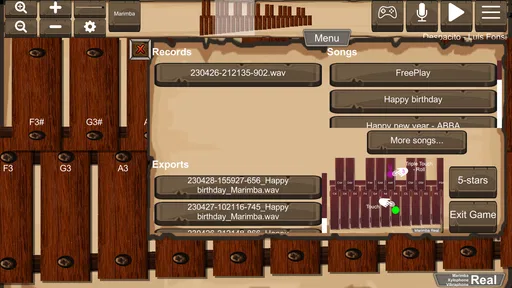
Analysis by Reviewed
I picked up Marimba, Xylophone, Vibraphone expecting a quick novelty: tap a few colored bars, play a familiar melody, and move on. That first impression is partly right, but it misses the more interesting question. The app is a small virtual percussion instrument, and its real test is whether it remains useful after the first few minutes of curiosity disappear. In my experience, it works best when I treat it as an immediately available practice surface rather than as a complete music-learning system.
Developed by sonOS, this free music game brings marimba, xylophone, vibraphone, and glockenspiel-style sounds to an Android device. It is aimed at Everyone, so the basic idea is easy to understand: open it, touch the bars, and hear the notes. The current version is 2.6, and it runs on Android 6.0 or later. That broad compatibility matters for an app with such a focused purpose, because it can turn an older spare phone or tablet into a simple musical toy.
What stays useful after the first week
I find the first week is when this little instrument shifts from a novelty into a tool: the trick is to give each visit a small purpose, such as copying a rhythm or finding a tune by ear. That keeps the taps from becoming aimless and makes its different tones easier to compare. The longer-term question is whether that simple routine continues to fit your musical habits.
The first few minutes are genuinely inviting
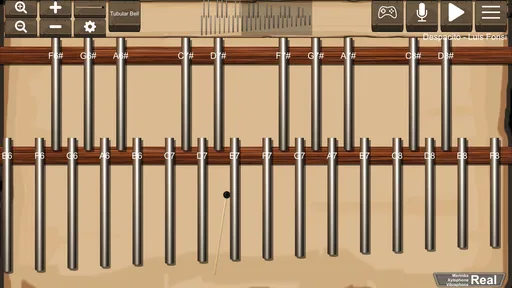
The strongest part of the experience is the low barrier between opening the game and making a sound. There is no instrument to assemble, no tuning to check, and no need to understand musical notation before trying it. I can tap a bar, listen, adjust my timing, and immediately hear whether the result feels right. That direct response makes it especially approachable for children, beginners, and anyone who wants to experiment without committing to lessons.
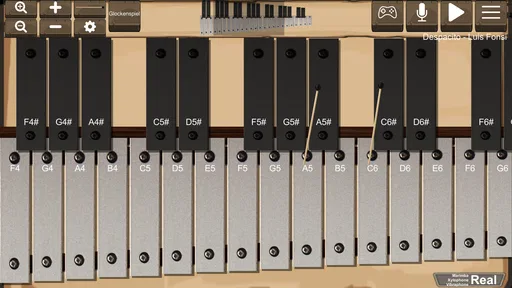
The different instrument choices also give the first session more variety than a single digital xylophone would provide. A marimba-like voice feels warmer and rounder, while a glockenspiel-style tone is brighter and more pointed. The vibraphone option suggests a softer, more floating character, and the xylophone sound sits closer to the familiar classroom instrument many people already recognize. Even without a large feature set, changing the tone can make the same short melody feel noticeably different.
I found the app most enjoyable when I stopped trying to play a full song and focused on short patterns. Repeating three or four notes exposes timing mistakes quickly. It also makes the screen feel less like a toy piano and more like a compact percussion surface. A beginner can use that approach to learn where notes sit, while a more experienced player can test a rhythm or melodic fragment before moving to a physical instrument.
A practical companion for small everyday moments
A realistic use case is a quiet break during the day. Suppose I am waiting for an appointment or sitting with a child who is restless. This game gives us something more active than watching a video: we can create a rhythm, copy each other, and take turns inventing short patterns. Because the interaction is so immediate, it does not require a long setup or a prepared lesson.
More From Our News Desk

Weather by Xiaomi Review: Clear at a Glance, Less Clear Up Close

X Under Pressure: Can It Recover When Posting Goes Wrong?

Clash of Clans Is Won Between the Battles

Android Auto Makes the Case for Quieter Car Software

MobiOffice: Transforming Mobile Productivity with Seamless Integration

EA SPORTS FC™ Mobile Soccer: Redefining Mobile Sports Gaming
It can also help with memory. I sometimes hum a phrase, then try to find the notes by ear on the bars. That is a modest exercise, but it encourages listening instead of simply following a visual guide. For a child, the same activity can become a game of “find the next sound.” The app does not need to promise a formal curriculum to be useful in that role.
Another worthwhile workflow is using it as a sketchpad. If a melody appears in my head, I can tap a rough version before forgetting it. The phone is not a replacement for a keyboard, recording setup, or notation app, but it is faster than opening a more complicated music tool. The limitation is equally clear: I have to remember or manually record the idea elsewhere if I want to develop it later.
Where it differs from ordinary music apps
Compared with a piano simulator, this game feels more focused on individual struck notes and rhythmic clarity. That makes it a better fit for simple melodic patterns and percussion-style practice, but a worse choice if I want chords, sustained harmony, or a broad keyboard range. A piano app usually offers more conventional songwriting possibilities; this one offers a more tactile bar-by-bar experience.
Compared with a metronome, it is much more playful but much less disciplined. A metronome is the better tool when I need dependable tempo practice. Here, I have to create my own structure. That freedom is pleasant during exploration, yet it can become a weakness for someone who wants guided progress, measured exercises, or a clear practice plan.
Compared with a dedicated music-learning game, this app is less demanding and less instructional. There is no reason to expect the same progression, feedback, or lesson design from a compact virtual instrument. I would choose this one for spontaneous playing and sound exploration, not for a complete path from beginner to performer.
Small techniques that make it more rewarding
One useful habit is to begin with a two-note exchange rather than immediately tapping across the whole instrument. I play one note, answer it with another, and gradually add a third. This reveals whether the spacing between taps feels controlled. It also prevents the common first-session problem of touching everything quickly and learning nothing about the sounds.
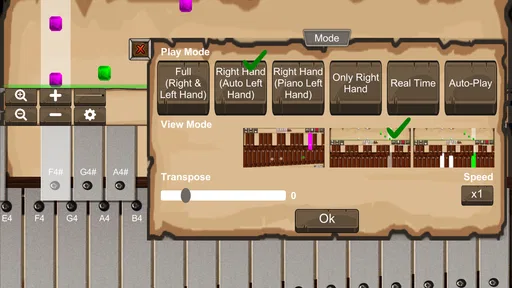
A second technique is to alternate hands, even on a phone. The display is not a full physical instrument, but assigning the left side to one hand and the right side to the other can make repeated patterns more comfortable. I keep the movements small and avoid chasing speed. The benefit is not virtuoso performance; it is learning to separate rhythm from random tapping.
A third approach is to compare the same phrase across the available instrument sounds. I play a simple ascending pattern, switch from a bright tone to a warmer one, and listen to how the mood changes. This is a surprisingly good introduction to timbre. It teaches that the notes alone do not define a musical idea; the character of the instrument matters too.
Does it earn a place over the following months?
Over the following months, I would judge its place by how often I genuinely reach for a quick sound check, a short family activity, or a low-pressure practice moment. It works best when convenience matters more than lessons or recording, so I would keep it as a focused companion rather than expect it to become a complete music setup.
The recurring value depends on your reason for installing it
The app has meaningful month-to-month value for someone who wants a lightweight instrument for occasional practice. I can return to it when I need to test a melody, entertain a child, or spend a few minutes with rhythm. Its narrow focus is an advantage in those moments because there is little to configure before playing.
For a person hoping to improve through a structured routine, the value is more limited. The app can support a routine, but it does not appear to provide the routine itself. I would need to bring my own exercises, song fragments, or timing goals. That is not necessarily a flaw, but it changes the responsibility: the app supplies the surface, while I supply the lesson.
This distinction determines whether it survives beyond the novelty period. If I install it because I want a digital marimba to touch occasionally, it has a clear reason to remain available. If I install it expecting a complete course, a large song library, or a competitive game loop, the initial excitement is likely to fade sooner.
Who will get the most from it
Beginners are the obvious audience, but not only because the controls are simple. The app is useful for people who are curious about percussion and want to hear the basic idea before buying or borrowing a physical instrument. It can also suit parents looking for a creative, low-pressure activity that does not require musical experience from the child or adult.
Music students may find it helpful for quick ear work and melodic recall. I would not use it as my only practice tool, but I can imagine opening it to check a short phrase away from the instrument room. Songwriters and hobbyists may appreciate the same immediacy when a tune needs to be tested quickly.
The strongest fit is someone who values convenience over depth. The app is free, has an Everyone content rating, and has reached over 500 thousand installs, which reflects the appeal of a simple instrument that many people can try without a financial decision. Popularity alone does not make it a good match, but it does fit the idea of an accessible, casual music game.
Who should skip it
I would skip it if I needed accurate physical-keyboard technique. Touching a glass screen does not teach the same hand position, rebound, spacing, or resistance as playing a real marimba, xylophone, or vibraphone. It can support musical curiosity, but it cannot reproduce the physical feedback that makes those instruments demanding.
I would also look elsewhere if my main goal were composing complete arrangements. A dedicated workstation, piano app, or notation tool will be more suitable for layering parts, saving ideas, and revising a piece. This game is better understood as an instrument window than as a full production environment.
People who need guided lessons may also become frustrated. Without a personal plan, it is easy to spend several sessions repeating random taps. I get more from it when I decide on a narrow task before opening it: identify a melody by ear, repeat a rhythm evenly, or compare two instrument voices. Without that intention, the experience can feel thin.
The maintenance burden is pleasantly small, but not zero
There is very little ongoing maintenance in the usual sense. I do not need to tune a virtual instrument, replace strings, arrange a stand, or carry anything beyond the device. That convenience is one of its lasting strengths. It is ready for a short session in places where a real percussion instrument would be impractical.
The real maintenance burden is personal structure. To keep the app useful, I have to create variety myself. I can rotate between ear exercises, rhythm copying, melody finding, and sound comparison. A simple weekly intention is enough: one session for timing, one for listening, and one for free play. This prevents the app from becoming a button-tapping habit with no musical purpose.
Device context matters too. A phone gives portability, but the bars may feel cramped during faster passages, especially for larger fingers. A tablet can make the playing area more comfortable, while a small screen favors short patterns. I would treat screen size as part of the experience rather than assuming every Android device will feel identical.
What causes fatigue over time
The first source of fatigue is repetition. Once I have explored each instrument sound and played a few familiar patterns, the basic interaction does not automatically generate new goals. The app’s simplicity is inviting at first, but simplicity also means I must invent the next challenge.
The second is the lack of physical sensation. A real bar gives feedback through vibration, resistance, and the sound filling a room. A phone offers visual contact and audio output, but the experience can become less immersive during longer sessions. I enjoy it more in short bursts than in extended practice.
The third is the gap between tapping notes and making music. A sequence can be technically correct and still sound flat if the rhythm is uneven or the phrasing is careless. The app lets me hear that result, but it does not necessarily explain how to fix it. I have to listen critically and repeat the passage with a specific correction in mind.
There is also a social limitation. A child may enjoy taking turns with another person, but the app itself does not replace playing with a teacher, ensemble, or friend. If motivation depends on external feedback, a more guided or connected music experience may last longer.
How the rating fits my experience
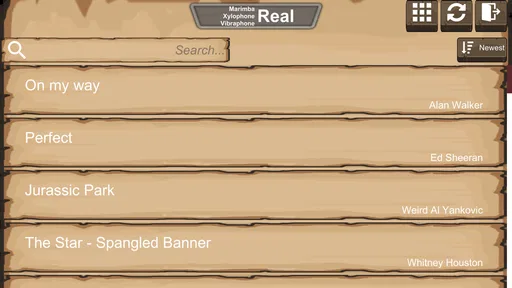
The game holds an average rating of 4.8 from around 2.9 thousand ratings, alongside 142 written reviews. I can understand why it receives strong reactions: it delivers its central idea quickly, costs nothing, and offers several recognizable percussion voices in one compact app. Those are meaningful advantages when expectations are modest.
I would interpret that rating as approval of the focused experience, not proof that it replaces a real instrument or a complete learning platform. Someone who wants a simple marimba or xylophone simulator may be very satisfied. Someone searching for composition tools, lessons, or advanced performance control should read the rating more cautiously and judge the narrower purpose instead.
My long-term verdict
After the novelty fades, I still see a place for this game, but it is a specific place. It earns space on my device as a quick musical sketchpad, an accessible introduction to struck-note instruments, and a casual activity for short breaks. Its free price removes the biggest barrier to trying it, while the Everyone rating makes it easy to recommend for family-friendly experimentation.
I would not keep it as my main music tool. The absence of a stronger learning structure means its long-term value depends on my own ideas, and the touch screen cannot reproduce the technique of a physical instrument. Those are important limitations rather than minor complaints. They define who should install it and how long each session should be.
My recommendation is simple: try it if you want immediate access to marimba, xylophone, vibraphone, and glockenspiel-style playing without turning the experience into a serious project. Give each sound a fair test, then return with a small goal instead of tapping randomly. If that lightweight routine still feels useful after several weeks, Marimba, Xylophone, Vibraphone has earned its place. If you need lessons, recording, realistic technique, or a deeper game loop, move to a more specialized alternative rather than expecting this compact instrument to grow into something it was not designed to be.
Overall, I see it as a durable little utility disguised as a music game. It does not offer endless content, but it does offer a dependable reason to open it: make a sound, test an idea, and put the device away. Its lasting strength is convenience with just enough variety to support intentional short sessions.
Marimba, Xylophone, Vibraphone Frequently Asked Questions
Can I use the app without knowing how to read music?
Yes. The app is designed around tapping instrument bars, so you can start exploring sounds and making simple melodies without reading sheet music. It can also be a relaxed way to learn where notes sit and how different tones fit together. If you already read music, you can use that knowledge to guide your playing, but it is not a requirement for trying the instruments.
Which instruments can I play in Marimba, Xylophone, Vibraphone?
The game focuses on marimba, xylophone, and vibraphone, with a store summary that also describes a glockenspiel among its percussion instruments. It is a music game by sonOS, intended for playing these mallet-instrument sounds on a mobile device. If you are choosing it for one particular instrument, check the current app presentation before downloading so you know what is available in the version offered for your device.
What is Marimba, Xylophone, Vibraphone?
Marimba, Xylophone, Vibraphone is a virtual percussion instrument app that lets you play three mallet instruments directly on your Android or iOS device. During testing, the app felt easy to understand, with a keyboard-style layout designed for tapping notes and experimenting with melodies. It can be useful for casual musicians, beginners, music students, or anyone who wants a portable way to practice basic percussion sounds.
How do you play the instruments in the app?
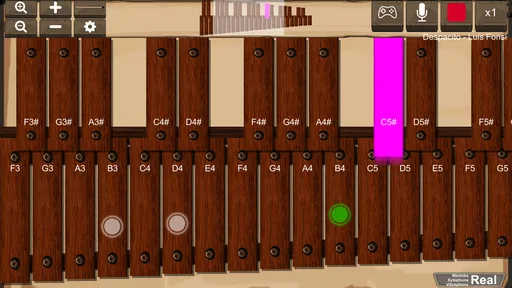
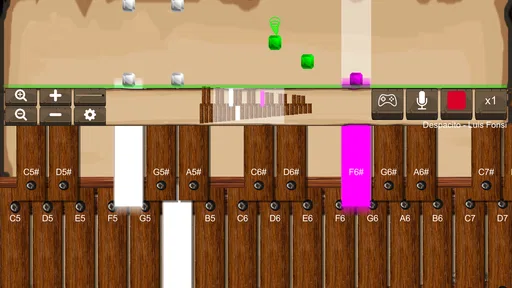
Playing is straightforward: choose the marimba, xylophone, or vibraphone, then tap the displayed bars to produce different notes. The instruments are arranged visually so users can follow scales and create simple tunes without needing previous percussion experience. A larger phone or tablet provides more comfortable spacing, while smaller screens may require more precise tapping when playing faster melodies or several notes in succession.
Does Marimba, Xylophone, Vibraphone work for beginners and music practice?
Yes, the app is suitable for beginners because its controls are simple and do not require complicated setup. It can help users become familiar with note positions, basic melodies, rhythm ideas, and the different tones of mallet instruments. However, it should be viewed as a convenient practice and entertainment tool rather than a complete replacement for a real instrument, professional lessons, or advanced music-production software.
Pros
- Responsive touch controls make notes easy to play accurately.
- Multiple instrument sounds add variety beyond a standard marimba.
- Simple layout is suitable for beginners and casual practice.
- Works well for short musical experiments and rhythm exercises.
- Useful for learning note positions without carrying a real instrument.
Cons
- Small screens can make fast melodies difficult to play comfortably.
- Sound quality may not satisfy experienced percussionists.
- Limited customization can reduce its value for advanced users.
- Virtual playing lacks the physical feel of real mallets and bars.
- Long sessions may become repetitive without recording or lesson tools.












