Harmonica Real
- 167.00
- 4.9
- Installs
- 100.00K
- Price
- Free
Screenshots
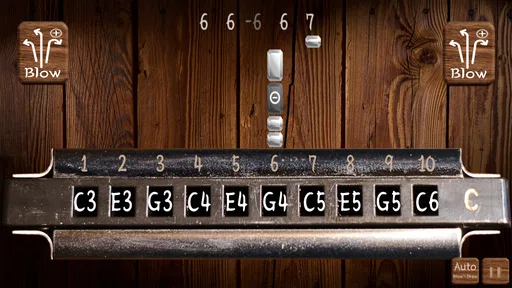
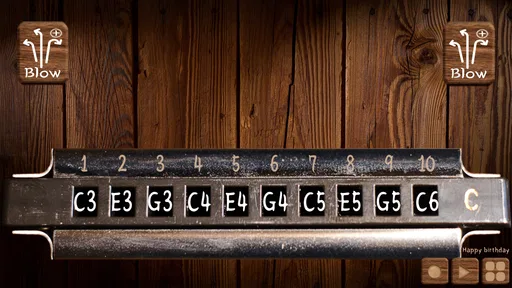
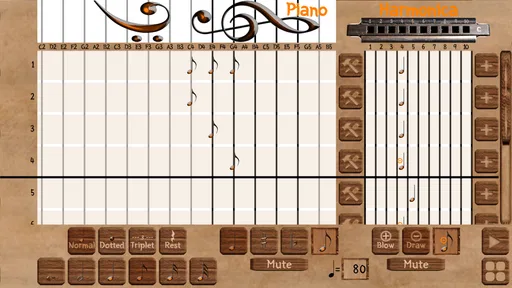
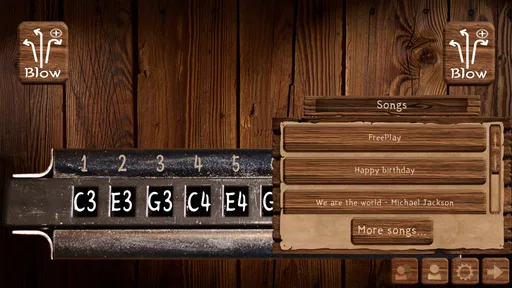
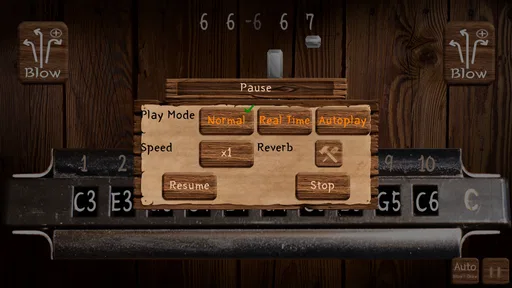
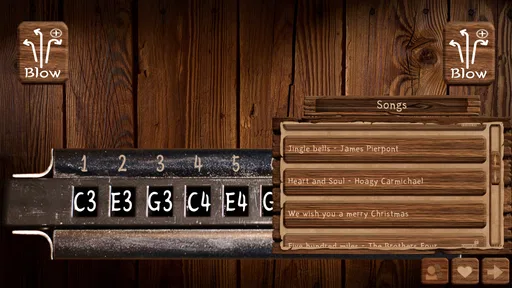
Analysis by Reviewed
I found Harmonica Real most interesting as a small, focused music game rather than a complete learning platform. Its purpose is immediately understandable: you open it, choose the virtual harmonica, and start trying to play. That simplicity is its strongest quality, especially for anyone who wants a quick musical distraction without setting up a physical instrument. The experience is built around the sound and feel of a harmonica, not around a large collection of modes or a complicated progression system.
Developed by sonOS, this free game belongs to the music category and is suitable for Everyone. It was released on January 21, 2025, and version 2.1 is the version I reviewed. The store presents it as a harmonica with a convincing timbre, and that description matches the central appeal: the app is at its best when you treat it as a pocket instrument for experimenting with melodies, rhythm, and breath-like phrasing through touch.
How the interface feels to read and navigate
The first thing I appreciated was the narrow scope. There is no need to learn a complicated menu structure before making sound. For a casual player, that matters more than it may seem. Music apps can easily become crowded with buttons, presets, lessons, recording panels, and social features. A virtual harmonica has a much clearer starting point, so a curious user can understand the basic idea quickly.
That clarity also makes the game approachable for people who are not comfortable with technical music software. If you have ever opened a digital audio workstation and immediately felt lost among tracks and controls, this is a very different experience. The instrument itself is the focus. I would recommend beginning with a few minutes of unstructured exploration rather than trying to reproduce a song immediately. That gives you time to learn where the playable areas are and how precisely your fingers need to land.
Readability is most important when the screen is being used as an instrument rather than a menu. Small controls can become difficult to distinguish once your attention is divided between the display and the sound. I found that the app works best when the phone is held steadily and the screen is kept free from glare. A larger display may also feel more comfortable than a very compact phone because your fingers have more room to move without covering neighboring areas.
There is a useful difference between an interface being simple and an interface explaining everything. This game leans toward simplicity. That is good for immediate play, but a beginner who expects a guided lesson may need to discover some of the interaction through trial and error. I see that as a reasonable trade-off for a lightweight instrument, although it means the app is more inviting to experimenters than to users looking for a structured course.
Learning the touch response without getting frustrated
My practical advice is to start slowly and use one finger at a time. Trying to imitate a fast harmonica passage immediately can make the controls feel less responsive than they really are, because hurried movements often land between the intended areas. Once the basic notes feel predictable, you can introduce short repeated patterns and then vary the timing.
More From Our News Desk

Weather by Xiaomi Review: Clear at a Glance, Less Clear Up Close

X Under Pressure: Can It Recover When Posting Goes Wrong?

Clash of Clans Is Won Between the Battles

Android Auto Makes the Case for Quieter Car Software

MobiOffice: Transforming Mobile Productivity with Seamless Integration

EA SPORTS FC™ Mobile Soccer: Redefining Mobile Sports Gaming
This approach also helps separate two different questions: whether the sound is pleasant and whether your technique is accurate. The app can provide a convincing musical color, but it cannot automatically give a beginner the same physical feedback as a real harmonica. A physical instrument responds to breath, embouchure, and hand position in ways a touchscreen cannot fully reproduce. For me, the virtual version is better understood as a way to explore ideas than as a replacement for practicing the mechanics of an acoustic one.
Motor, sensory, and hearing considerations
A touchscreen instrument can be easier than a real harmonica in some ways. You do not need to hold a mouthpiece, control airflow, or coordinate breathing with finger movement. That makes this game potentially useful for someone who wants to explore harmonica-style melodies without the physical demands of blowing into an instrument. It also avoids the noise and setup associated with practicing a real harmonica around other people.
At the same time, touch interaction creates its own demands. Accurate tapping or sliding may be difficult for users with limited fine-motor control, hand tremors, joint pain, or difficulty maintaining a stable grip. The app’s simplicity does not remove those challenges. A stylus might improve precision for some players, while others may find that it makes the experience less natural. I would test both approaches rather than assuming one is universally better.
For users with reduced vision, the main issue is likely to be distinguishing playable areas and judging finger placement. Increasing the device’s general text size may not solve every instrument-related problem, because the important interaction is visual and spatial rather than purely textual. Good lighting, a clean screen, and a larger device can make a meaningful difference. If a player relies on a screen reader, this is not the kind of app I would choose without first checking how the playable surface behaves with that setup.
For users who are sensitive to sound, the harmonica timbre can be enjoyable in short sessions but may become tiring if played continuously at a high volume. I recommend starting with the device volume low and using headphones only when they are comfortable. Headphones can make the notes easier to hear in a noisy room, but they also remove some awareness of the surrounding environment, so they are not ideal in every situation.
One subtle strength is that the app lets the player control the pace of exploration. There is no pressure to keep up with a band or a lesson, so someone who needs extra time between actions can play in short, self-directed bursts. That makes it more flexible than rhythm games built around strict timing. The trade-off is that players who need explicit visual guidance, large targets, or adjustable practice modes may find the experience less accommodating.
What the sound is good for
The harmonica character is the reason to choose this particular game over a generic piano or keyboard app. I enjoyed using it to sketch a melody while waiting for an idea to develop, especially when I wanted a bluesy or folk-like color rather than a clean, polished keyboard tone. It is also a fun way to introduce a child to the basic idea of pitch and musical phrasing, provided an adult is nearby if the child needs help handling the device.
However, a realistic timbre should not be confused with a complete simulation of a harmonica. A person who wants to learn bends, breath control, vibrato, or the physical techniques of a specific harmonica style will still need a real instrument or a more specialized teaching tool. This app can support curiosity and musical imagination, but it is not the right endpoint for serious technique training.
Using it in everyday situations
I can easily imagine opening it during a short break, playing a few notes, and closing it without committing to a full gaming session. That is where the free format and focused design make sense. It works as a pocket instrument for idle moments, a way to test a melodic idea, or a simple activity to share with someone who has never held a harmonica.
A realistic scenario would be composing a short tune away from your usual instruments. You might hear a melody while walking, remember only its rough shape, and use the app to find the notes before the idea disappears. The harmonica tone can help you decide whether the phrase suits that character. Later, you could transfer the idea to a real harmonica, keyboard, or another instrument. I would not rely on it for precise notation, but it can be useful at the earliest, most informal stage of creating music.
It is also suitable for a quiet demonstration. If a friend asks what a harmonica might sound like, you can provide a quick example without carrying equipment. The app is less suitable for a public performance, because a phone speaker is not designed to project like an acoustic instrument and touch control can feel less dependable when you are under pressure.
The Everyone age rating makes it approachable for family use, but age suitability does not guarantee that every child will find the controls easy. Younger players may tap randomly and enjoy the sound without needing instruction, while older beginners may want a clearer path toward recognizable songs. I would frame it as creative play rather than a formal lesson, particularly when introducing it to children.
How it compares with the usual alternatives
Compared with a physical harmonica, this game is cleaner, quieter, and easier to carry. It removes the cost and maintenance of an instrument and avoids the initial difficulty of producing a controlled note with your breath. The physical harmonica wins for authentic technique, expressive airflow, and the tactile satisfaction of holding a real object. If your goal is to become a harmonica player, this app is a useful preview but not a substitute.
Compared with a piano or keyboard app, the advantage is personality. A keyboard layout is usually more familiar and may make note relationships easier to see, but it does not give the same reed-like character. A keyboard app is likely the better choice for learning basic pitch patterns or playing chords, while this one is better when the harmonica sound itself inspires you.
Compared with rhythm games, Harmonica Real feels less competitive and more open-ended. There is no need to chase a score or react to a stream of targets. That makes it friendlier for relaxed experimentation and for players who dislike timing pressure. On the other hand, anyone who wants goals, unlocks, songs to follow, or a strong sense of progression may find it too bare.
Its popularity suggests that the focused concept has found an audience: it has passed one hundred thousand installs and holds a 4.9 average from around two thousand ratings, with more than one hundred sixty written reviews. Those figures are encouraging, but they do not change the kind of product this is. A high rating can reflect how well it delivers a simple promise; it does not mean the app offers the depth of a full music studio or a dedicated educational course.
Remaining barriers and sensible expectations
The biggest limitation is the gap between a convincing sound and a complete instrument simulation. A player may enjoy the timbre but still miss the expressive control of breath and embouchure. Touchscreens also provide less physical feedback than strings, keys, or holes on a real harmonica. That can make it harder to build muscle memory, especially for someone hoping to move quickly from the app to an acoustic instrument.
Another barrier is the absence of a clearly structured learning path for users who need step-by-step support. I would not install this expecting lessons, notation practice, or a guided curriculum. It is more effective when you already know what you want to experiment with, even if that goal is simply finding a few pleasant notes.
There is also a situational limitation: the app depends on the phone screen being usable as a playing surface. Gloves, wet fingers, crowded transport, poor lighting, and unstable one-handed use can all make musical control less comfortable. In those circumstances, a physical harmonica may actually be easier to operate, despite its own learning curve. For users who need hands-free interaction, this is unlikely to be the right tool.
Before installing, I would ask myself what kind of musical experience I want. If I want a quick, free way to explore harmonica-colored melodies, the answer is favorable. If I need recording, detailed editing, accompaniment, accessibility controls tailored to a particular disability, or a formal course, I would look at a different category of app. Choosing it for the wrong purpose is more likely to disappoint than any problem with its central idea.
Version 2.1 feels like a sensible fit for a compact mobile game because it keeps attention on playing rather than turning the experience into a crowded production suite. The minimum operating system is Android 7.1, which makes it relevant to people using older compatible devices as well as newer phones. I still recommend checking how the instrument feels on your own screen size before judging it, since touch comfort can vary substantially from one device to another.
My inclusive verdict
I would recommend Harmonica Real to curious beginners, casual musicians, families looking for a simple sound-based activity, and experienced players who want a quick sketching tool with a distinctive timbre. Its strongest inclusive quality is that it lowers the entry barrier to trying harmonica-like music: no physical instrument, breath technique, or noisy practice space is required.
I would be more cautious for users who depend on large, highly adjustable controls, hands-free operation, screen-reader-first navigation, or precise motor assistance. The app’s uncluttered concept may help some people, but its playable surface still asks the user to see and touch accurately. Those needs should guide the decision more than the attractive rating.
My final view is positive but specific. This is not a replacement for a real harmonica, a music-production workstation, or a teaching app. It is a focused mobile game that makes spontaneous musical play easy and gives it a recognizable harmonica flavor. Its best use is turning a spare minute into a small creative experiment. If that sounds like what you want, the fact that it is free and rated for Everyone makes it an easy app to try; just keep your expectations centered on exploration rather than comprehensive training.
Harmonica Real Frequently Asked Questions
What age rating does Harmonica Real have, and is it suitable for children?
Harmonica Real is a music game rated Everyone, making it suitable for a broad audience, including children. Its central activity is playing a virtual harmonica, so it can offer a simple way to explore sounds and melodies. Parents can still review the app’s store page and device settings before downloading, especially if they want to check how it fits their child’s use of mobile games.
What is Harmonica Real, and what can I do with it?
Harmonica Real is a virtual harmonica game designed to let you play melodies directly on your Android or iOS device. After opening it, you can interact with an on-screen harmonica by tapping or sliding across the available holes. It is mainly intended for casual playing, musical experimentation, practice, and entertainment rather than replacing a physical harmonica or professional music equipment.
Is Harmonica Real suitable for beginners who have never played harmonica before?
Yes, Harmonica Real can be useful for beginners because it provides an accessible way to understand the basic layout and playing concept of a harmonica without requiring an instrument purchase. You can experiment with different holes, listen to the resulting notes, and gradually practice simple tunes. However, the app may not teach complete breathing techniques, bending, or advanced musical theory on its own.
Does Harmonica Real work without an internet connection?
The basic playing experience may be available offline once the application has been installed, which is convenient when you want to practice or experiment away from Wi-Fi or mobile data. Nevertheless, some elements can depend on an internet connection, such as advertisements, store links, updates, analytics, or additional content. It is best to launch the app online at least once after installation.
Does Harmonica Real include realistic sound and responsive controls?
The game is designed to imitate the experience of playing a harmonica through touch controls and recorded or digitally produced notes. Its stated focus is a really real harmonica timbre, and responsiveness generally depends on your device, screen size, audio settings, and how quickly you tap or move between holes. It can be enjoyable for simple melodies and demonstrations, although the sound and expressive control may not match a real harmonica or a dedicated music-production application.
Pros
- Responsive touch controls make notes easy to play.
- Includes several harmonica tones for different musical styles.
- Useful for practicing melodies without carrying a real instrument.
- Simple interface is suitable for beginners.
- Quick to open and start playing with minimal setup.
Cons
- Sound quality depends heavily on your device’s speakers or headphones.
- Touch controls may feel less expressive than a physical harmonica.
- Some features or instruments may require in-app purchases.
- Ads can interrupt practice sessions in the free version.
- Limited realism for advanced players seeking detailed breath control.












