KidloLand Kids & Toddler Games
- 1.17K
- 4.6
- Installs
- 10.00M
- Price
- Free
Screenshots



Analysis by Reviewed
When I want a young child to have something to explore that feels more active than a video, I look for short, clear activities and simple goals. KidloLand Kids & Toddler Games is an educational game from IDZ Digital Private Limited, aimed at preschoolers and toddlers. Its appeal is variety: a child can move among early-learning activities rather than being asked to sit through one long lesson. I see it as a useful option for shared play or brief stretches of independent exploration, though it works best when an adult helps set limits and chooses what fits the child.
Small goals make it easier to begin
For a very young player, the first goal should be understandable right away: tap, listen, match, or try again. That kind of low-pressure start matters more than a complicated reward system at this age. I’d introduce the game alongside a grown-up, pick one activity, and let the child work out what happens when they interact. If they lose interest, there is little reason to insist; a short, positive session is a better starting point than turning screen time into a task.
This is especially practical during a quiet moment at home, such as while dinner is being prepared. I would sit nearby, invite the child to choose an activity, and use the play as a prompt for conversation: name what appears, count together, or ask what they noticed. The app can provide a focus, but the adult’s comments help turn tapping into a more social learning moment.
Progress is more than a score
With preschool learning, progress often shows up in small signs: a child recognizes a familiar symbol, remembers what to do next, or becomes more willing to try without immediate help. I would watch for those changes rather than expecting a conventional level ladder or a measurable result from every session. A parent can also make the activity more useful by asking the child to explain or point out what they just explored, then stopping before attention fades.
The game is free to download, rated Everyone, and has an average rating of 4.4 from around 41,000 ratings. It has reached over 10 million installs, so it is a familiar choice for many families, but popularity alone does not tell me whether its style suits a particular child. I’d use a first session to see whether the activities feel clear and comfortable for your family, rather than treating the rating as a guarantee.
What's Inside KidloLand?
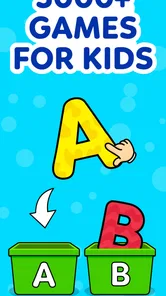
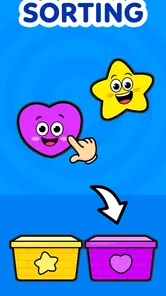
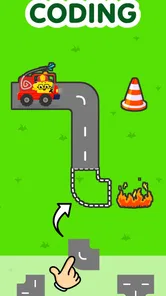
From the moment you open KidloLand Kids & Toddler Games, you're greeted with a colorful world that’s like a kid's dream come true. The app is packed with over 2000 interactive nursery rhymes, songs, stories, and educational activities. I was amazed at how comprehensive it is. Whether your child is into singing along to nursery rhymes or playing engaging educational games, there's something for everyone.
One thing that stood out to me was the variety of content. We're talking about alphabets, numbers, shapes, colors, animals, you name it. It's designed to cater to different learning stages, which is fantastic because it grows with your child. I found that particularly neat because it means you won’t have to keep looking for new apps as your child develops.
More From Our News Desk

Weather by Xiaomi Review: Clear at a Glance, Less Clear Up Close

X Under Pressure: Can It Recover When Posting Goes Wrong?

Clash of Clans Is Won Between the Battles

Android Auto Makes the Case for Quieter Car Software

MobiOffice: Transforming Mobile Productivity with Seamless Integration

EA SPORTS FC™ Mobile Soccer: Redefining Mobile Sports Gaming
Learning Meets Fun
Let’s face it, kids have the attention span of a goldfish. But the games and activities in KidloLand are so engaging that even the most easily distracted kids will stay hooked. My niece, who usually hops from one thing to another, spent almost an hour exploring the different games. That’s an eternity in toddler time!
What I love most is the way the app integrates learning with play. For example, there's a cute game where kids can learn numbers by popping balloons. It’s simple, yet so effective. The interactive nature of the app encourages kids to participate actively, which is way better than passively watching videos.
Making sessions work in a real routine
I wouldn’t hand a toddler an open-ended session and assume the game will set the family’s boundaries. A useful approach is to decide the stopping point before opening it: one activity while waiting for food, or a song and a short game during a quiet break. That makes it easier to end on a natural pause instead of negotiating after the child is deeply absorbed. If the child is playing independently, staying within reach also lets you redirect them when they need help.
For a child who likes repetition, returning to a familiar activity can be more valuable than constantly chasing something new. Repeating a simple task gives them room to anticipate what comes next and try it with less prompting. I’d treat variety as a menu, not a requirement to sample everything in one sitting. That is a small but useful trade-off: lots to choose from can prevent boredom, but too much switching may make it harder for a young child to settle into one idea.
User-Friendly for Kids and Parents
As a parent, I really appreciate how intuitive the app is. The interface is super user-friendly, making it easy for kids to navigate on their own. But don't worry, it's also designed with safety in mind. There are no pesky ads that could lead your child to unwanted content, and there’s a parental control feature that lets you manage what your child can access. It’s like having peace of mind in an app.
Downloading and setting up the app is a breeze. It's available on both Android and iOS, and you can get started with a free trial. The premium subscription, though, is where the real magic happens. It unlocks all the content, and trust me, it’s worth every penny.
Choosing it over a single-purpose alternative
Compared with a basic alphabet or counting app, KidloLand’s broader mix is appealing when a child’s interests change from day to day. It can also be a better fit than a video-only option when you want the child to make choices and respond to what is on screen. The flip side is that a broad collection may feel less focused than a dedicated phonics or number-learning tool. If your main goal is practicing one specific skill, a tightly focused app—or an offline activity with blocks, picture cards, or a book—may be easier to use deliberately.
I’d also avoid assuming that “educational” means every session needs to teach something new. Songs and stories can be enjoyable without turning into a lesson, and a child may prefer those to a game on a particular day. An adult can make a quick choice based on energy and mood: a calm listening activity when the child is tired, or a more interactive one when they are ready to tap and respond. That kind of selection is more realistic than expecting one app to suit every moment.
Cost, access, and a sensible trial
Although the game is free to start, it includes optional in-app purchases, with items priced from $1.99 to $59.99. I’d take time to look at the available choices with a parent before making a purchase, especially if the child can navigate the device. The practical question is whether the free experience gives your family enough to judge the style and whether paying for broader access would actually change how often you use it. There is no need to buy simply because a child enjoys one activity.
It is also worth thinking about the device as part of the routine. A toddler may tap quickly or need help finding the activity they want, so a grown-up nearby can keep the session intentional and avoid handing over a phone when the child is already upset. If you need a reliable way to occupy a child without supervision, this is not the right substitute. It is better treated as a shared or supervised tool than as a dependable fix for every difficult moment.
Why KidloLand Stands Out
In a market flooded with educational apps, it's hard to find one that genuinely delivers on its promises. But KidloLand does just that. It's a perfect blend of education and entertainment, which is what makes it stand out. The developers have clearly put a lot of thought into creating a resource that’s both fun and beneficial for kids.
Another thing that impressed me is how regularly the app gets updated with new content. This keeps it fresh and exciting, so your child is always looking forward to discovering something new. Plus, it’s an app that you can feel good about letting your child use, knowing that they’re learning while having fun.
Who is likely to enjoy it—and who may not
I’d recommend trying it if your household wants one place to move between early-learning play, songs, and stories, especially when a child is too young for long, structured lessons. It can suit a preschooler who enjoys choosing activities and benefits from a parent joining in now and then. For a child who gets overwhelmed by colorful menus or keeps switching before engaging, I would start with one activity together and see how it goes rather than presenting the whole collection at once.
It may not be the best match for families who want a strictly curriculum-led program, a single skill taught in depth, or screen-free learning. In those cases, a focused lesson app or hands-on play may offer clearer structure. The best sign that this game is working is not simply that a child stays occupied; it is that they are interested, comfortable, and sometimes carry a word, sound, or idea from play into conversation afterward.
How I’d judge its pace over time
For a toddler, a sensible progression is often less about unlocking a difficult next stage and more about growing comfortable with familiar actions. I’d give the child time to repeat activities before offering a new one, then notice whether they begin to anticipate the next tap or answer. That approach makes the game feel like a small practice space rather than a race through a collection. If an activity starts to feel too easy, changing the kind of activity may be more useful than asking the child to stay with it longer.
There is also a practical difference between a child choosing freely and an adult curating the options. When attention is scattered, I’d open the game with a simple invitation—“let’s find a number activity”—and help the child settle before stepping back. When they are calm and curious, letting them browse can support choice-making. This flexible approach is one of the collection’s strengths, but it does mean the adult supplies some of the structure that a formal lesson plan might provide.
Questions worth considering before settling in
If you’re wondering whether a toddler can use it without help, I’d say some children may manage familiar interactions, but I would not count on fully independent use every time. Young players can need help choosing an activity, understanding what to do, or stopping when the session is over. For a first try, sit together and see whether your child can follow the activity comfortably; that gives you a better answer than age labels alone.
If your main concern is whether it replaces a focused learning tool, my answer is no. Its range makes it useful for varied, low-pressure exploration, while a dedicated phonics or counting app may be preferable when you want sustained practice in one area. And if you’re deciding whether to pay, try the free version as a way to judge fit first. Optional purchases can broaden access, but the right choice depends on whether your family will use that wider selection often enough to matter.
For a realistic outing, I’d use it during a short wait when a child is settled and an adult can stay close—not as a promise of uninterrupted quiet. Before opening it, I’d agree on one activity and a clear stopping point, then put the device away when that activity ends. That small routine helps keep the game from becoming the default response to every delay, while still making it handy for a particular moment when shared screen time suits the family.
Wrapping It Up
All in all, KidloLand Kids & Toddler Games is a fantastic app for parents looking to give their kids a head start in learning. It's engaging, educational, and delightful, ticking all the right boxes. Whether you’re at home or on the go, it's like having a portable classroom that fits right in your pocket.
If you haven’t tried it yet, I’d highly recommend giving it a go. It might just become your new favorite parenting tool. Who knew learning could be this much fun?
KidloLand Kids & Toddler Games Frequently Asked Questions
Is KidloLand Kids & Toddler Games free to download, and what should parents know about purchases?
KidloLand is free to download, but it also offers in-app purchases. Families can spend different amounts depending on which purchases they choose, so it is worth checking the available purchase options and setting device controls before a child uses the app. This can help parents manage costs and avoid unexpected charges while still letting their child explore the game.
Who is the developer of KidloLand Kids & Toddler Games?
KidloLand Kids & Toddler Games is developed by IDZ Digital Private Limited. Knowing who makes an app can be useful when deciding whether to install it for a child. The game is in the educational category and is intended to make preschool learning part of a playful app experience, so parents can consider whether that general focus fits their family’s needs.
What does KidloLand Kids & Toddler Games offer?
KidloLand is an educational game for young children, with preschool learning activities and toddler games. Its focus makes it a potential option for families looking for playful ways to introduce early learning through an app. It is free to download, though some content may involve in-app purchases, so parents may want to review purchase settings before handing the device to a child.
Is KidloLand Kids & Toddler Games suitable for a child who is just starting to use apps?
KidloLand is rated Everyone, which can help parents understand its general content classification when deciding whether it suits their family. As with any app intended for children, a parent or caregiver can explore it first and choose whether its activities and on-screen interactions feel appropriate for the child’s age, interests, and experience with a touchscreen.
What age group is KidloLand Kids & Toddler Games suitable for?
KidloLand Kids & Toddler Games is designed for children aged 1 to 8 years. The app offers a variety of activities tailored to different developmental stages, ensuring that each age group can find engaging content that is both educational and entertaining. Parents can select games that are appropriate for their child's age and skill level.
Pros
- Wide variety of educational games
- Engaging animations and graphics
- Offline play available
- Kid-friendly interface
- Regular content updates
Cons
- Requires subscription for full access
- May contain in-app purchases
- Limited customization options
- Some content may need supervision
- Can be large in size to download













