Hexout - Color Hexa Puzzle
- 937.00
- 4.9
- Installs
- 100.00K
- Price
- Free

Screenshots





Analysis by Reviewed
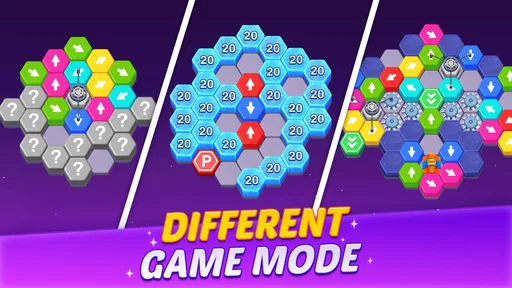
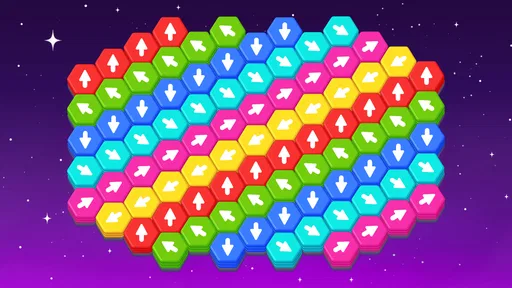
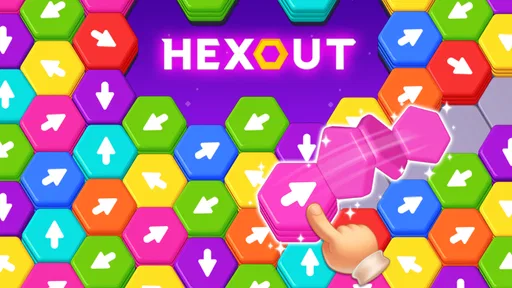
I approached Hexout - Color Hexa Puzzle expecting a simple color-matching distraction, but its arrow-based board gives the usual tile puzzle format a more deliberate feel. The basic idea is easy to understand: tap colored hexagon tiles and sort them away in the direction allowed by their arrows. What makes each board interesting is that removing one piece can expose, block, or change the order of the moves that follow.
That makes this a puzzle game rather than a reflex test. I can play slowly, inspect the arrangement, and decide whether a move is genuinely useful or merely looks convenient. The game is free, rated for Everyone, and developed by Metajoy, so it is easy to approach as a casual mobile experience. At the same time, the later challenge comes from planning several removals ahead instead of tapping the first available tile.
How the basic board workflow feels
My normal session starts with a quick scan of the whole board rather than an immediate tap. I look for tiles whose arrows point toward a clear route and then check whether another hexagon is sitting in the way. This small pause matters because a move that appears safe may leave a color cluster or directional blockage that is harder to resolve afterward.
The controls are naturally suited to a phone. Tapping a tile is direct, and the hexagonal layout makes the board visually distinct from the square grids used by many familiar match-three games. I do not need to learn a complicated control scheme before playing. The main learning curve is understanding how the arrows govern the order of removal and how much of the board I should read before committing.
For a short everyday session, the game works well. I can open it while waiting for coffee, play a few boards, and stop without needing a long uninterrupted run. It is also a reasonable choice for someone who wants a quiet puzzle instead of a game built around rapid reactions, constant competition, or complicated character systems.
The color design is central to reading the board, but the arrows prevent the game from becoming a basic color-recognition exercise. I am not simply grouping matching shades. I am checking color relationships alongside direction and access. That combination gives each tap a consequence, which is why a board can feel simple at first and then demand a reset in the middle of a solution.
My repeatable opening habit
I found it useful to divide every board into three observations. First, I identify the tiles that can leave immediately. Second, I notice which pieces are acting as blockers. Third, I look for areas where removing one tile seems likely to open several others. This is more reliable than following a single color from one side of the board because the arrows can make the best first move unrelated to the largest visible group.
More From Our News Desk

 Gmail
GmailGmail in a Busy Inbox: Who Benefits Most?
From first account to crowded workday, Gmail earns its place through dependable search and flexible sorting—but its best fit depends on how much inbox maintenance you can tolerate.

 Prime Video
Switching to Prime Video: What Changes in Your Viewing Routine
Prime Video can make a compelling second home for streaming, but switching means learning a different catalog, rental layer, and route from browsing to playback.

 Universal TV Remote Control
Universal TV Remote Control Works Best as a Reliable Backup
A phone remote earns its place through quick setup and reliable habits. Here is how to get more from Universal TV Remote Control—and where its limits show.

 Weather - By Xiaomi
Weather by Xiaomi Review: Clear at a Glance, Less Clear Up Close
Xiaomi’s weather app makes everyday forecasts quick to scan, but its calm surface can leave useful details and recovery paths harder to find than they should be.

 X
XX Under Pressure: Can It Recover When Posting Goes Wrong?
A resilience-focused review of X, examining setup, mistaken posts, interruptions, weak connections, and the gaps that matter when recovery needs to be dependable.

 Clash of Clans
Clash of Clans Is Won Between the Battles
Its raids are quick; its community is a long-term project of coordination, teaching, rivalry, and shared responsibility—with all the friction that entails.
Latest News



A realistic example is playing during a short commute. I may have only a few minutes and do not want to spend the entire time experimenting. In that situation, I use the first moments to find an obvious exit, make one or two low-risk moves, and then reassess the new shape. If the board becomes confusing, I would rather restart my thinking than tap repeatedly and hope the arrangement solves itself.
This approach also makes the game more accessible to younger players. The age rating is Everyone, and the central interaction is easy to explain: follow the arrows, remove the tiles, and pay attention to what becomes available. Adults who enjoy logic puzzles may appreciate that the simple presentation does not remove the need for careful sequencing.
Settings and practical checks before settling in
Because this is a compact puzzle game, I would check the available in-game settings before building a regular routine. In particular, I look for sound, vibration, notification, and visual options when they are present in a mobile game. Those choices affect whether the app feels comfortable in a quiet room, on public transport, or during a quick break. I would not assume every option exists; the useful habit is to inspect the settings screen once rather than search for controls during a board.
I also pay attention to how the game behaves after a mistake. A puzzle is much more pleasant when restarting or undoing a poor decision is clear, but I would not treat an undo control as something guaranteed by the concept alone. If the current version offers a restart route, I use it early when my plan has collapsed instead of trying to rescue every bad sequence. That keeps the game focused on solving rather than on protecting a doomed attempt.
The current version is 0.0.43, and the minimum operating system is Android 8.0. That makes compatibility a practical check for anyone using an older device. On a supported phone, the game’s simple board presentation should be less demanding than a visually heavy action title, but a player should still keep the app updated through the normal store process when an update is available.
The game has passed the early discovery stage with over 100 thousand installs and an average rating of 4.9 from around 20 thousand ratings. I see that as a useful sign that the basic loop is connecting with players, not as proof that every person will enjoy it. People who dislike slow planning or color-led puzzles may still find the experience repetitive even when the wider response is positive.
Small habits that make solving faster
My first useful shortcut is to search for dependency chains. If tile A blocks tile B, and tile B blocks a larger group, A has more value than its size suggests. I try to remove the earliest piece in that chain rather than the most visually prominent tile. This is a non-obvious shift: I am prioritizing access, not appearance.
The second habit is to avoid spending all my attention on one color. Color can draw the eye toward a cluster, but the arrows decide whether that cluster is actually ready. I compare a tempting color move with a less attractive directional move and choose the one that increases the number of future options. In practice, the best move often looks less satisfying because it does not immediately clear the biggest area.
The third habit is to leave a mental checkpoint after a clean sequence. When several tiles have opened successfully, I pause and note what the board now allows before tapping again. This prevents a fast streak from turning into careless play. It is especially helpful when the board changes enough that the original plan is no longer relevant.
I also recommend using a two-pass rhythm. On the first pass, I make only moves that are clearly safe. On the second, I reassess the blocked sections and decide whether a more committed sequence is needed. This reduces random tapping and gives the puzzle a repeatable structure. It is a good method for players who want to improve rather than simply finish a board by trial and error.
Where the puzzle becomes demanding
The difficulty is not mainly about speed. It comes from limited information and the cost of choosing the wrong order. A board may contain several apparently valid taps, yet only some of them preserve a workable route. That creates a gentle form of tension: I am rarely under a timer-like pressure, but I still need to respect the consequences of each action.
Experienced players can treat the board as a sequence of gates. A gate is a tile or compact group that controls access to a larger section. Once I identify one, I stop asking which piece can disappear now and start asking which removal changes the board most. This way of reading the layout is more efficient than scanning every tile equally.
There is also a trade-off between certainty and speed. A cautious player can inspect every arrow and delay a move until the route is obvious. A faster player may accept a small amount of risk and learn from the result. I prefer caution when a board has several interlocking sections, but I move more quickly through open areas where one removal does not create many new dependencies.
That distinction helps explain who should skip this game. If you want a match-three title with constant cascades, bright rewards, and immediate feedback, this may feel too restrained. If you prefer narrative progression, competitive leaderboards, or action controls, the focused tile-clearing format may not offer enough variety. A traditional crossword or Sudoku app may be a better alternative when you want a puzzle with fixed rules and no color-based visual scanning.
On the other hand, people who enjoy sorting games but find match-three mechanics too frantic may prefer this design. It offers a more thoughtful pace and makes spatial order important. Compared with a standard color-matching game, I spend less time chasing combinations and more time managing access. Compared with a sliding-block puzzle, the hexagon-and-arrow presentation feels more immediate because the intended directions are visible on the pieces.
Limits I noticed during longer play
The same focused design that makes a short session appealing can become a limitation over a longer one. The core action remains centered on tapping and sorting, so players who need frequent changes of mode may eventually want another game alongside it. I would treat this as a specialist puzzle for repeated short sessions rather than a complete all-purpose gaming experience.
Color dependence can also matter. In a dim room, on a small screen, or for someone who has difficulty distinguishing certain shades, the board may demand more effort than the simple controls suggest. I would test the visual clarity on the device I intend to use and check whether the available display options improve comfort. If the colors remain difficult to separate, a symbol-heavy puzzle would likely be a better choice.
Another limit is that careful planning can feel like overthinking when I only want a few effortless taps. The arrows add meaning to each move, but they also mean that casual experimentation may not always be satisfying. I have learned to choose this game when I am in the mood to observe patterns, not when I want a completely passive break.
Since the game is free, it is easy to try without making it a major commitment. Still, I would approach any free mobile title with ordinary awareness around optional store interactions and device settings. I do not let that distract from the puzzle, but I do review the app’s current behavior on my own phone instead of assuming that every device will feel identical.
Who gets the most from Hexout
The strongest reason to try Hexout is its clear decision loop: every tap changes access to the next useful move. That is enough to give the game personality without burying the player under rules. Newcomers can understand the objective quickly, while experienced puzzle fans can improve by recognizing dependencies and preserving future options.
I would recommend it to someone who likes sorting, spatial planning, and short sessions that can be paused mentally between boards. It is also suitable for players who want a calm alternative to reaction-based mobile games. The Everyone rating makes it approachable for a broad audience, although younger players may still benefit from learning the idea of planning one or two moves ahead.
I would be more cautious about recommending it to someone who needs a strong sense of progression, a story, or a wide selection of mechanics. The game’s appeal rests on arranging and clearing the hexagonal tiles, so its value depends on whether that loop stays interesting for you. If you enjoy mastering a compact rule set, that focus is a strength. If you need constant novelty, it may feel narrow.
My verdict after building a routine
After using the opening scan, dependency checks, and two-pass rhythm, I found the game more satisfying than its short description might suggest. It is not just a matter of tapping colored pieces away. The arrows turn each board into a small planning exercise, and the best solutions usually come from preserving options rather than grabbing the first available removal.
Metajoy has kept the entry point straightforward, which is important for a puzzle designed to be played in spare moments. The free price and broad age rating make trying it easy, while the strong average rating and growing install count suggest that the central idea has found an audience. I would still judge it by the kind of attention I want to give a game, not by popularity alone.
For me, this is a good companion puzzle when I want something quiet but not mindless. I would install it on a supported Android device, inspect the settings before playing regularly, and use the board-reading habits above to avoid random moves. The current version, 0.0.43, gives the app a clearly identifiable starting point for that experience, while the compact format leaves room for players to decide whether its focused style suits them.
My final recommendation is simple: try Hexout - Color Hexa Puzzle if you enjoy color sorting with a spatial twist and like improving through repeatable habits. Skip it if you want action, story, or a constant stream of different puzzle types. For the right player, its restrained design is exactly what makes it work: the board is easy to read, the rules are quick to learn, and the real challenge appears when you stop tapping impulsively and start planning the route.
Hexout - Color Hexa Puzzle Frequently Asked Questions
What kind of puzzles does Hexout - Color Hexa Puzzle offer?
Hexout - Color Hexa Puzzle is a puzzle game focused on colored hexagon tiles and arrow-based moves. Its central challenge is to decide which tiles to clear and in what order, making each move part of a small planning problem. If you enjoy visual puzzles that are easy to understand at a glance but reward careful choices, its sorting-focused concept may appeal to you.
Who developed Hexout - Color Hexa Puzzle, and what is its age rating?
Hexout - Color Hexa Puzzle is developed by Metajoy and is rated Everyone. That makes its content suitable for a broad audience, although parents may still want to check how a child responds to the puzzle challenges and review the store page before downloading. The game’s colorful tile-based concept is centered on sorting and problem-solving rather than action-heavy gameplay.
What does the arrow mechanic do in Hexout - Color Hexa Puzzle?
The game’s short description centers on tapping and sorting colored hexagon tiles away with arrows. This gives the puzzle a direction-based element: you need to consider how the tiles are arranged and choose moves thoughtfully rather than simply matching colors at random. If you enjoy puzzles that combine visual sorting with planning, this mechanic gives you a clear way to test those skills.
Is Hexout - Color Hexa Puzzle free to download, and what devices can run it?
Hexout - Color Hexa Puzzle is free to download, and it is available for Android devices running version 8.0 or later. It is a puzzle game from Metajoy, with an Everyone content rating, making it broadly accessible. Before installing, check that your device meets the minimum operating-system requirement so the game can run as intended.
What is Hexout - Color Hexa Puzzle and how is it played?
Hexout - Color Hexa Puzzle is a relaxing yet challenging puzzle game based on arranging colored hexagonal pieces. The main objective is usually to place, match, or clear hexagons according to the rules shown in each level. Its simple controls make it easy to start, while the increasing complexity of the boards requires careful planning, color recognition, and an efficient order of moves.
Pros
- Simple rules make it easy to start without a lengthy tutorial.
- Short puzzle sessions fit well into quick breaks or commutes.
- Color-matching gameplay feels relaxing and visually satisfying.
- Gradually harder layouts provide a steady sense of progression.
- Works well for players who prefer calm
- non-competitive games.
Cons
- Some levels may feel repetitive once the core pattern becomes familiar.
- Color-heavy visuals can be difficult for players with color-vision deficiencies.
- Limited gameplay variety may reduce long-term appeal for some users.
- A wrong placement can be frustrating when several shades look similar.
- Puzzle-focused play may feel too slow for fans of fast-paced games.