Dream Notes: Cute Music Game
- 28.00
- 4.0
- Installs
- 5.00M
- Price
- Free

Screenshots


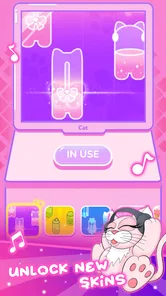


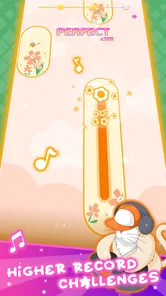

Analysis by Reviewed
I can see this working as a small shared-device game: one person can play a tune, then hand the phone or tablet to someone else for a turn. The cute presentation makes it approachable for a casual household session, while the rhythm-game format gives everyone something immediate to try. I’d treat it as a game to enjoy together in short bursts, rather than assuming progress or preferences will automatically suit every person using the same device.
Sharing a screen without sharing expectations
On a family or shared tablet, it helps to agree whose turn it is and whether anyone is trying to continue a particular level. That simple handoff avoids the familiar problem of a younger player tapping through something another person wanted to explore. I would also check the device’s usual account and purchase settings before handing it over: the game is free to start, but it includes optional in-app purchases priced from $1.99 to $39.99 per item. That makes a quick conversation about purchases more useful than relying on the word “free” alone.
For a brief everyday use, I can picture a child waiting while a parent finishes an errand, or siblings taking turns after dinner. The music and visual theme give the game a clear appeal for that kind of downtime, but a shared screen can be awkward if one person wants quiet or another wants to replay a section. Headphones can help keep the sound personal, though they also make it harder for others to follow along; for a group turn-taking session, the device speaker may be the more sociable choice.
Who will enjoy the rhythm, and who may want another game
I’d recommend trying it if you like tapping along to music and want a playful presentation rather than a serious practice tool. It is also a reasonable pick for someone new to rhythm games, since the controls are easy to approach. If you are choosing between this and a conventional music player, the distinction is simple: this is meant to be played, not used as a way to browse or listen to a personal music library. Players who want precise instrument training, a deep song catalog, or a competitive rhythm challenge may be better served by a different kind of music app or game.
One practical tip is to begin with a short session and pay attention to whether the timing feels comfortable on your device. Rhythm games depend on matching what you see and hear with your taps, so the experience can feel less satisfying if the screen is small, the environment is noisy, or the player is distracted. That is not a verdict on the game; it is a reminder that this format works best when you can focus for a few minutes. I would avoid treating a missed note as a test of musical ability, especially for a child: timing games reward practice, and a relaxed pace is part of the fun.
Age, trust, and sensible boundaries
The game is rated Everyone, so its stated age context is broad, and the cute style is likely to be comfortable for mixed-age play. Still, I would keep a child’s use within the same boundaries I use for any free game with optional purchases: explain that buying something is different from earning or unlocking play, and make sure the device’s purchase approval is handled by the adult responsible for it. The rating can help with an initial decision, but it does not replace a parent’s judgement about screen time, sound, or spending.
Dream Notes is made by Three Cookers Game, and its current version is 7.9. It has an average rating of 3.8 from around 2,400 ratings, with over 1 million installs. Those figures suggest it has reached a sizeable audience, while the middling average is a useful reminder to approach it as a light entertainment option rather than a guaranteed favorite. It is free to download, and the game was released on February 6, 2024; it runs on Android 5.1 or later.
More From Our News Desk

Weather by Xiaomi Review: Clear at a Glance, Less Clear Up Close

X Under Pressure: Can It Recover When Posting Goes Wrong?

Clash of Clans Is Won Between the Battles

Android Auto Makes the Case for Quieter Car Software

MobiOffice: Transforming Mobile Productivity with Seamless Integration

EA SPORTS FC™ Mobile Soccer: Redefining Mobile Sports Gaming
Making a shared session work
In a household, I would treat a turn as a small activity with a clear beginning and end, rather than pass the device around while everyone is distracted. That makes it easier to notice whether a player is enjoying the rhythm or simply tapping quickly to get through it. It also gives younger players room to try at their own pace without feeling that they are holding up someone waiting for a turn. If there is only one device available, a simple spoken agreement about who plays next can prevent the game from becoming a source of friction.
Shared use also changes what counts as a good session. A person playing alone may want to focus on timing, while a group may care more about taking turns and reacting to the music together. I would avoid assuming that one person’s progress represents everyone’s preferences. If the device is used by several people, let each player decide whether they want to continue or start a fresh turn, and avoid making the game a test of who gets the highest result. That approach keeps the experience light, which is where this kind of cute rhythm game is most appealing.
Small choices that improve the experience
Before a longer play session, I would check the volume in the room and settle on a comfortable way to hear the cues. The game depends on music as well as visual timing, so playing beside a television or lively conversation can make it harder to follow. Headphones suit a solo turn, while speakers work better when other people are watching and joining in. Neither option is automatically best; the choice depends on whether the session is meant to be personal or social.
I would also avoid judging the game from a single rushed attempt. A rhythm game can feel unfamiliar at first, especially if the player is new to tapping in time, and a short, calm trial gives a fairer sense of whether its style clicks. If it feels frustrating, pausing and returning later is more useful than repeating the same section while annoyed. That is a practical way to distinguish a learning curve from a mismatch: some players enjoy improving their timing, while others would rather have music playing in the background without needing to respond to it.
How it fits among music games
Compared with a music streaming app, Dream Notes asks for attention and interaction instead of offering a passive listening session. Compared with a dedicated instrument-learning app, it is better approached as entertainment than instruction. And against more competitive rhythm games, its cute, accessible framing seems more suited to casual play than to players seeking a demanding score chase. That makes its appeal fairly specific: it gives music fans a playful activity, but it is not a substitute for a player’s own playlists, lessons, or a deeper challenge.
That distinction matters when choosing something for a family device. If the goal is a quick shared activity that can be picked up without musical experience, I can see the attraction. If the goal is to practise an instrument, listen to particular songs, or compare performance with other players, I would choose a tool built around that purpose instead. The most useful question is not whether it is the best music game in general, but whether a cute, tap-along game matches the kind of moment you want to fill.
Ever dreamed of a world where your notes come alive? Welcome to Dream Notes: Cute Music Game, where every keystroke transforms into a magical melody. This game isn’t just about hitting the right notes; it’s about embarking on a whimsical journey through sound and imagination.
Exploring the World of Dream Notes
From the moment I launched Dream Notes: Cute Music Game, I was greeted with an enchanting landscape that felt like stepping into a storybook. The graphics are nothing short of adorable, with pastel colors and charming animations that captivate both kids and adults alike. It’s like being in a dream where music and art collide to create something truly unique.
Gameplay That Hits the Right Note
The gameplay is as captivating as its visuals. Imagine a rhythm game where each note played contributes to a symphony of dreams. The controls are intuitive, making it easy for anyone to pick up and start playing. But don’t be fooled by its simplicity; as you progress, the challenges become more complex, requiring both skill and timing to master.
One of my favorite features is the way the game integrates music into the storyline. Each level you complete unlocks a new piece of the narrative, making you feel like you’re writing the story with your own musical notes. It’s a refreshing take on the genre, keeping you invested in what happens next.
A Soundtrack to Remember
No music game would be complete without a killer soundtrack, and Dream Notes definitely delivers. The tunes are catchy and beautifully composed, each track adding a layer of depth to the game’s enchanting atmosphere. Whether you’re a fan of classical, pop, or electronic music, there’s something here for everyone to enjoy.
The sound design deserves a special mention. The way the notes resonate with each action creates an immersive experience that pulls you deeper into the dream world. It’s not just a game you play; it’s a world you live in.
Final Thoughts
In the end, Dream Notes: Cute Music Game is more than just a game; it’s a delightful escape into a world where music and dreams intertwine. It’s perfect for those moments when you need a break from reality and want to lose yourself in something beautifully crafted. Whether you’re a seasoned gamer or just looking for something fun to pass the time, this game is definitely worth checking out.
So, grab your headphones, dive into this charming musical universe, and let Dream Notes sweep you off your feet. Who knows? You might just find your own melody waiting to be discovered.
A realistic place for it in the day
I can imagine opening the game during a short wait when a child has already finished a book or needs a simple activity before heading home. It suits that gap better than a long, involved session: the music gives the moment a focus, and the tap-based play is easy to explain without turning the device into a lesson. For an adult sharing the screen, joining in for a turn can make the activity feel less like handing over a phone and more like doing something together.
For a quiet household, I would keep expectations modest. This is still a music game, so it may not be the best choice when someone nearby is trying to rest or concentrate. Nor would I use it as background entertainment while multitasking, since the fun depends on following the musical cues. A better use is a deliberate few minutes when the player can pay attention, with the device set at a volume that works for everyone in the room.
Account and device habits worth considering
On a device used by both adults and children, I would make the adult responsible for the device’s account and purchase decisions before anyone starts playing. The optional purchases make that a sensible household boundary, even if a child only intends to enjoy the free play. I would not assume that a shared game automatically separates people’s activity or preferences; instead, agree on how to hand over the device and keep any important account decisions with the person who manages it.
Another useful habit is to decide whether the device is being used for a solo session or for a group. In the first case, headphones can reduce noise and help the player focus. In the second, speakers let everyone hear the tune and follow the turn. This small choice can prevent a common mismatch: one person thinks they are watching together, while the player has made the music private. It also makes it easier to set a natural stopping point when the household needs the device for something else.
What to expect before choosing it
People often want to know whether a music game will suit someone who has never played one. I think this is a reasonable place to try the genre if the player enjoys music and does not mind tapping along, but the best test is a short session rather than a promise that it will suit everyone. A beginner who likes cute visuals may be drawn in; someone who gets impatient with timing-based play may prefer a puzzle game or a music player instead.
It is also worth separating enjoyment from musical skill. A successful run in a rhythm game is about responding to the game’s cues, not proving that someone can sing or play an instrument. That makes it approachable for casual players, but it also explains why it will not replace lessons or structured practice. If your household is looking for a tool that teaches notes or technique, I would choose a learning app designed for that job and use this one only as a playful diversion.
My household verdict
For a shared Android device, I see Dream Notes as a low-pressure option for short turns, especially when the household enjoys cute presentation and music-themed play. The Everyone age rating gives a broad starting point for considering younger players, while adult oversight still matters because of optional purchases and ordinary screen-time boundaries. It is free to try, but I would make the purchase rules clear before handing over the device.
I would skip it for a household that needs a music-learning tool, a dependable way to play a personal song collection, or a highly competitive rhythm challenge. For everyone else, the strongest case is simple: it can turn a spare few minutes into a shared, cheerful activity, as long as players take turns, keep the sound comfortable, and understand that a cute music game is not the same thing as a lesson or a music library.
Dream Notes: Cute Music Game Frequently Asked Questions
Is Dream Notes: Cute Music Game suitable for someone who has never played a rhythm game?
Yes. Its basic idea is easy to grasp: follow the notes on screen and tap along with the music. That makes it approachable for newcomers, while the different difficulty levels mentioned in the game’s description can give players room to take on more challenging rhythms as they become familiar with the controls. The cute cat theme also gives the experience a light, welcoming feel.
What should I know about the game’s age rating before downloading it?
Dream Notes: Cute Music Game is rated Everyone, so its content is presented as suitable for a broad audience. It is a music game centered on tapping notes in time with songs, with cute cats as part of its theme. Parents can still consider whether the optional in-app purchases are appropriate for their household and review purchase settings on the device before letting a child play.
Does Dream Notes: Cute Music Game have a free download, and what might cost extra?
Dream Notes: Cute Music Game is free to download and play, but it includes optional in-app purchases. Individual purchases range from $1.99 to $39.99, so it is worth checking the purchase options before confirming anything. You can start playing without paying; any spending is a choice rather than a requirement to download the game.
What is Dream Notes: Cute Music Game all about?
Dream Notes: Cute Music Game is a rhythm-based music game that combines adorable graphics with engaging gameplay. Players tap on notes as they appear on the screen, syncing with the music’s beat to earn points. The game features various songs, customizable characters, and different difficulty levels, making it enjoyable for both casual and hardcore music game fans.
Is Dream Notes: Cute Music Game free to play?
Yes, Dream Notes: Cute Music Game is free to download and play. However, like many free-to-play games, it offers in-app purchases. These purchases can enhance the gaming experience by providing additional songs, cosmetic items, or other bonuses. While it is possible to enjoy the game without spending money, some players may choose to make purchases to access exclusive content.
Pros
- Engaging and entertaining musical gameplay.
- Charming and visually appealing graphics.
- Regular updates with new songs and features.
- Easy to learn for players of all ages.
- Supports offline play mode.
Cons
- Limited song selection without in-app purchases.
- Some ads can be intrusive at times.
- Requires significant storage space.
- Occasional in-game lag on older devices.
- In-app purchases can become costly.













