Cytus
- 31.71K
- 4.6
- Installs
- 10.00M
- Price
- Free

Screenshots

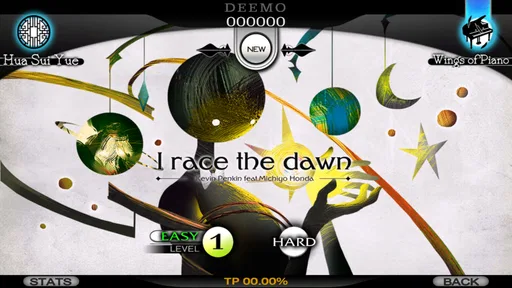
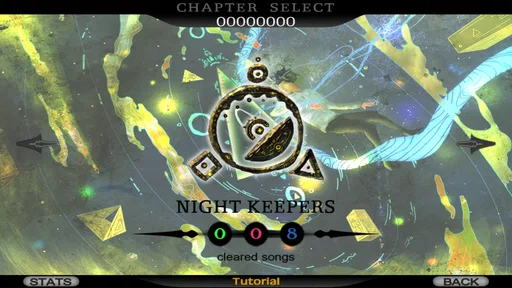
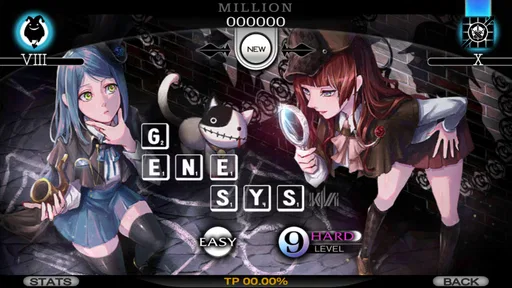
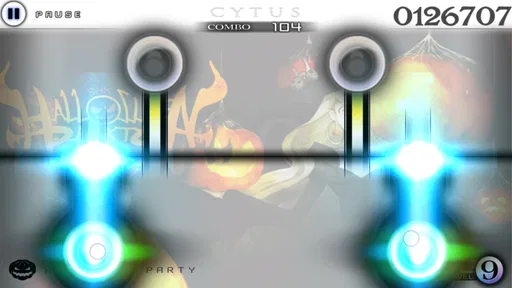
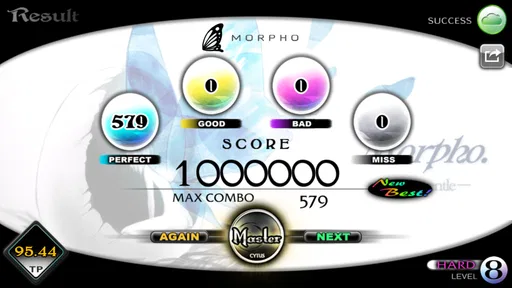

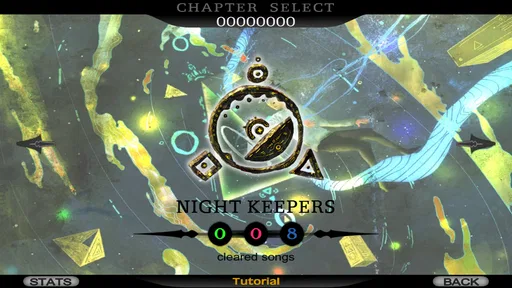
Analysis by Reviewed
I first noticed Cytus because it treats a music game less like a collection of buttons and more like a moving visual instrument. Notes appear around a scanning line, and the challenge comes from reading their position and timing the touch. That simple idea gives every track a strong sense of motion, but it also means the game asks for quick visual decisions and accurate finger placement. After spending time with it, I see a stylish rhythm game with real personality, although its presentation and speed will suit some players much better than others.
Developed by RAYARK, this free music game has grown into a well-established choice in the mobile music category. It carries a 4.6 average from around 575 thousand ratings, with more than 10 million installs. Those figures suggest a large and active audience, but they do not tell you whether its particular control style will feel comfortable. My advice is to judge Cytus by the way you interact with music, not simply by its popularity.
Reading the screen and finding your way around
I find the screen easiest to understand when I treat the moving line as a cue to prepare, not just a signal to tap at the last moment. This section looks at how that small change in attention can make the opening songs feel more readable, while also showing why dense charts still demand practice.
A visual layout with a clear central idea
The main play area is immediately recognizable once a song begins. A horizontal scanning line moves through the screen, while notes sit above or below it. You tap notes as the line reaches them, and longer or more demanding patterns require you to follow the rhythm rather than wait for a single obvious target. I found this easier to understand than a cluttered lane-based interface because the screen has one dominant visual event: the line crossing the notes.
That clarity is helpful for new players. Instead of learning several unrelated controls, you learn how the line behaves and how different note shapes respond to it. The game communicates its basic rule through motion, so a short practice session can be more useful than reading instructions. For someone who enjoys learning by watching and doing, this is one of Cytus's strongest design decisions.
At the same time, the display can become visually busy when many notes arrive close together. The interface is attractive, but decorative backgrounds, animated elements, and dense note arrangements can compete for attention. I recommend starting with calmer songs and playing on a larger screen if your phone allows it. A tablet can make note spacing easier to judge, though the game remains designed around touch rather than a physical controller.
Navigation is approachable, but the content can feel layered
Moving between songs and sections is generally understandable, yet Cytus is not built like a plain music player where every track is presented in one simple list. Its presentation encourages exploration, and that gives the game atmosphere, but it can also make the available content feel less immediate. If you prefer selecting a song instantly from a familiar alphabetical menu, you may need a little patience while learning where everything sits.
More From Our News Desk

Weather by Xiaomi Review: Clear at a Glance, Less Clear Up Close

X Under Pressure: Can It Recover When Posting Goes Wrong?

Clash of Clans Is Won Between the Battles

Android Auto Makes the Case for Quieter Car Software

MobiOffice: Transforming Mobile Productivity with Seamless Integration

EA SPORTS FC™ Mobile Soccer: Redefining Mobile Sports Gaming
The visual style is part of the experience, not merely decoration. Menus, song presentation, and artwork help create the feeling of entering a fictional musical world. I enjoyed that sense of discovery, especially when I was in the mood to browse rather than rush into a particular track. However, players who need very direct navigation may find the presentation more elaborate than necessary.
One useful habit is to separate learning the interface from testing your rhythm. Spend a few minutes exploring the song area without worrying about a perfect score. Once you know how to reach the tracks and understand the available difficulty choices, the actual play becomes less mentally crowded. This small adjustment matters for younger players and for anyone who finds unfamiliar menus tiring.
Text and visual contrast deserve attention
The game relies heavily on visual timing, and that creates an important distinction between readable menus and readable gameplay. Text may be manageable while the moving line and notes are more demanding. Small screens, glare, low brightness, or a busy background can make the targets harder to separate. I had better results with the phone held steadily, the display free from reflections, and the play area viewed straight on rather than at an angle.
This is not a title I would recommend assuming that visual accessibility will be automatic. Players with reduced vision may struggle to distinguish note shapes, judge exact positions, or track fast movement. Players with color-vision differences should personally test the free portion before spending money, because the important information is presented through visual design and timing rather than text alone.
How the game teaches without overexplaining
Cytus benefits from showing its rules in action. The first songs can teach the relationship between the scanning line and the notes more naturally than a long tutorial could. I found that repeating an easier track is worthwhile because it builds visual prediction: instead of reacting after the line arrives, you begin preparing for the next note while still handling the current one.
That learning curve is also where the game becomes more demanding. A player who understands the rule may still need considerable practice to read rapid patterns. The difference between knowing what to do and physically doing it is significant here. In my experience, the game rewards short, repeated sessions more than one long attempt, particularly when a difficult chart starts causing rushed taps.
Touch control and motor demands
The controls are simple in theory: tap, hold, and follow the moving timing point with your fingers. In practice, accuracy depends on fine motor control, steady hand positioning, and the ability to use several fingers without covering nearby notes. The game does not need a complicated command set, but it can still be physically intense because the timing window leaves little room for hesitation on faster patterns.
Players with limited dexterity may find slower songs comfortable while dense charts are frustrating. The challenge is not only speed. It is also the need to place a finger in the correct location while watching the next event. If one hand tires, shifting the phone or changing posture can affect accuracy. I prefer resting the device on a stable surface during demanding songs rather than gripping it in the air.
A practical technique is to keep the device supported and use the lightest touch that still registers. Pressing hard does not improve timing, and excess force can make repeated taps tiring. I also suggest playing with clean, dry fingertips and taking breaks when accuracy begins to fall. Those details sound ordinary, but in a rhythm game they can make the difference between reading a pattern and fighting the screen.
External controls are not the reason to choose Cytus. Its design is built around direct touch, so players who need a keyboard, gamepad, switch setup, or alternative pointing method should not assume that an accessory will reproduce the intended experience. This is one of the clearest situations in which another type of game may be a better fit.
Sensory load: music, motion, and repetition
As a music game, Cytus combines continuous audio with moving visual targets. That combination is satisfying when the song and chart match your concentration, but it can become tiring if you are sensitive to repeated motion, quick flashes, or layered sound. I would approach it cautiously if fast animation or strong rhythmic repetition causes discomfort in other games.
Headphones can make the beat easier to follow, but they also increase the intensity of the experience. In a shared room, playing quietly through the phone speaker may be more practical, although surrounding noise can make timing harder. The best choice depends on whether your priority is concentration, comfort, or avoiding sound that affects people nearby.
The Teen content rating is worth considering for families. It places the game in a category that may not be suitable for every child, so parents should look at the presentation and decide whether the tone fits the player. The rating alone does not explain personal sensitivity, but it is a useful reminder not to treat the game as automatically intended for young children simply because it is available on a phone.
Short sessions, travel, and shared spaces
Cytus works well when I have a few uninterrupted minutes and want an activity that demands attention immediately. A single song can create a complete session, which makes the game more practical than a long-form adventure when I am waiting somewhere or taking a short break. The trade-off is that rhythm play requires concentration, so it is a poor choice while walking, crossing streets, or doing anything that already needs visual awareness.
Its situational accessibility changes with the environment. Bright sunlight can reduce screen readability, while a moving vehicle can make precise taps uncomfortable. In a quiet room, the audio may be immersive; in a crowded place, it may be difficult to hear the beat clearly. I would treat it as a focused activity rather than something to play casually in the background.
For a realistic everyday example, imagine a commuter sitting at a station with ten minutes before departure. Cytus can fill that gap neatly: choose a manageable song, play one or two attempts, and stop without needing to remember a complicated story. If the same commuter is standing on a busy platform, however, the game becomes a poor choice because looking down and reacting to fast notes reduces awareness of the surroundings.
When it works for different players
The game is a strong match for people who enjoy electronic music, visual rhythm challenges, and gradual improvement. It also suits players who like replaying a track to refine timing rather than moving through a story once. The satisfaction comes from recognizing patterns, correcting a missed tap, and eventually keeping control when the chart becomes busy.
I would be more cautious recommending it to someone who wants a relaxed music app, a simple tap toy, or a game that can be played with one slow finger. Cytus may look elegant, but its advanced songs can be demanding. A player who dislikes repetition may also lose interest because mastery depends on returning to the same material and learning its structure.
Compared with a conventional rhythm game built around fixed vertical lanes, Cytus feels more fluid because the scanning line changes the way you read space. Compared with a music player, it offers much more interaction but far less passive listening. Compared with a casual puzzle game, it places greater pressure on timing and continuous attention. Those differences matter: the best alternative depends on whether you want musical immersion, low-pressure play, or a predictable control layout.
Free access and the question of spending
Cytus is free to start, which makes it easy to test the central control system before deciding whether it belongs on your device. That is especially important for accessibility because no description can tell you exactly how your eyes, hands, and concentration will respond to the moving charts. I would play the available material first, paying attention to comfort rather than only asking whether the songs are enjoyable.
In-app purchases range from $0.99 to $129.99 per item. That wide span means I would approach additional content deliberately instead of buying impulsively after a good session. Decide what you want from the game first: occasional play, a larger music library, or long-term chart practice. The free entry point reduces the risk of trying it, but it does not remove the need to keep spending within a personal limit.
Players should also remember that enjoyment is not measured only by how much content they unlock. If the core scanning-line control causes eye strain or hand fatigue, purchasing more songs will not solve that problem. In my view, the sensible order is to test comfort, learn the interface, and only then consider optional purchases.
Performance, updates, and practical expectations
The current version is 10.1.8, and the minimum operating system is Android 5.0. That makes the game potentially usable across a broad range of Android devices, although compatibility on paper does not guarantee an equally comfortable experience on every screen. Rhythm games are particularly sensitive to touch response, display behavior, and audio timing, so an older phone may feel less dependable even when it meets the operating-system requirement.
Before serious play, I would close demanding background apps, keep the device stable, and test a few songs at a comfortable volume. If taps feel late or inconsistent, first check posture, screen cleanliness, and whether the device is busy. A player who cares about improving scores should avoid judging personal ability until the phone itself feels responsive.
Long sessions can expose limitations that are not obvious during the first song. Hand position, screen heat, battery use, and concentration all affect performance. I prefer treating Cytus as a sequence of focused attempts rather than an endless session. That approach is healthier for comfort and often produces better results because tired reactions can make a chart seem harder than it really is.
What still creates barriers
The biggest barrier is the absence of a truly low-demand control mode. The game can be approachable at the beginning, but its central mechanic remains dependent on visual tracking and precise touch. There is no reason to expect that changing a menu setting would remove the need to see moving notes, hear or feel the rhythm, and coordinate fast responses. Players who need slower pacing, stronger visual separation, or alternative input should investigate other music games before committing.
Another barrier is the gap between the calm appearance and the physical challenge. The polished artwork may suggest a gentle experience, yet difficult charts can require rapid, repeated movements. That mismatch can surprise players who choose it for the atmosphere alone. I think the game communicates its style very well, but it does not necessarily communicate how demanding mastery can become until you reach those charts.
Shared-device use can also be awkward. A phone positioned for accurate taps may not be easy for another person to view, and sound preferences differ from player to player. In a family setting, it helps to agree on a quiet place and a reasonable session length. For users with motor or sensory needs, personal testing remains more valuable than assuming that a popular design will suit everyone.
My inclusive verdict
I recommend Cytus to players who want a distinctive touch-based music game and are comfortable with visual motion, repeated practice, and precise timing. Its scanning-line mechanic is memorable, its presentation has a clear identity, and its short-song structure fits focused breaks. RAYARK has created something more expressive than a basic sequence of taps, and that is why the game continues to stand out in a crowded mobile category.
My recommendation is more cautious for players with visual, motor, hearing, or sensory needs that make moving targets and rapid touch timing difficult. The game can still be worth trying at an easier level, with a supported device and a comfortable environment, but I would not describe it as broadly accessible by default. If alternative input, reduced motion, or a slower pace is essential, another music game with those options will likely serve you better.
For everyone else, the free starting point makes the decision straightforward: install it, try the basic interaction, and notice how your body responds after several songs rather than judging it from one impressive track. If the line, notes, and music begin to feel like one readable pattern, Cytus can become an absorbing practice game. If they remain visually tiring or physically awkward, no amount of admiration for the artwork will change that. Its best quality is also its main limitation: the same precise, animated design that creates its musical character demands a particular kind of attention.
With a Teen rating, optional purchases, and a long-running presence on Android, it is best approached as a focused game rather than a passive soundtrack. I would keep it installed for moments when I want a concentrated musical challenge, while choosing something gentler for tired evenings or situations where I need to stay aware of my surroundings. That balance gives Cytus its fairest chance to shine without ignoring the players it may leave behind.
Cytus Frequently Asked Questions
Can I play Cytus on both Android and iOS?
Cytus is a mobile music game, so check the app store for your device before downloading. The game is developed by RAYARK and has been available since April 5, 2012. If you use more than one platform, keep in mind that purchases and progress may not automatically transfer between devices or operating systems; check the account and store details relevant to your setup.
How much does Cytus cost, and what are the in-app purchases for?
Cytus is free to download, with in-app purchases available for players who want to access additional content. Individual purchases range from around one dollar to around 130 dollars, so review the purchase options carefully before confirming anything. If a child will be playing, consider enabling purchase controls on the device and discussing which optional content, if any, is appropriate.
How much storage should I have available before installing Cytus?
Cytus is a music game, so installing it and adding music content can use space on your device. Before downloading, make sure you have room for the app and any additional content you choose to access. Leaving some free storage can also help with updates and normal device use, especially if you plan to build a broad selection of tracks.
What age group is Cytus intended for?
Cytus has a Teen content rating, so it is generally intended for teen players and older. Its focus is rhythm gameplay, music, and illustrated story chapters. Parents or guardians should still check the game’s presentation and available content to decide whether it suits a younger player, and should consider any in-app purchases when setting expectations for play.
Who makes Cytus, and is it still maintained?
Cytus is developed by RAYARK, a studio known for music games. The game was released on April 5, 2012, and its current version is 10.1.8. That long-running history may appeal to players looking for an established rhythm title, while the version information is useful to check against your device before downloading.
Pros
- Excellent rhythm-game controls with responsive tap and hold notes.
- Large song library spanning electronic
- classical
- pop
- and experimental styles.
- Stylish visuals and story elements give performances a distinctive atmosphere.
- Multiple difficulty levels make songs approachable for beginners and challenging for experts.
- Offline play lets you enjoy many tracks without a constant internet connection.
Cons
- Some songs and content may require in-app purchases or extended progression.
- High-level charts can feel extremely demanding on smaller phone screens.
- The interface may take time to learn because of its many menus and systems.
- Long sessions can become repetitive if you prefer varied gameplay mechanics.
- Older devices may experience occasional performance issues with visual effects.












