

Crossword Master - Word Puzzle
- 7.27K
- 4.8
- Installs
- 10.00M
- Price
- Free
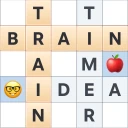
Screenshots
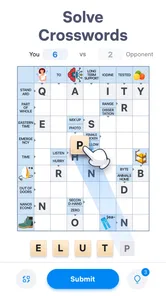
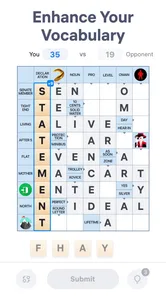

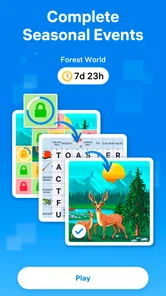

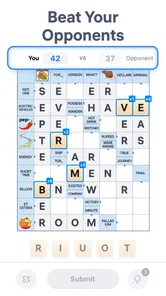
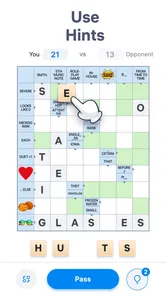
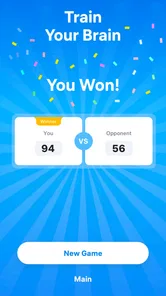
Analysis by Reviewed
I often reach for a word game when I have a few spare minutes, but I don’t always want to commit to a long puzzle. Crossword Master - Word Puzzle is aimed at that sort of pause: it’s a free crossword game from Easybrain, with a daily-puzzle focus and a straightforward format. I’d consider it for casual vocabulary practice, though it suits some playing styles better than others.
Finding a comfortable way into the puzzles
Crosswords can be unexpectedly hard to begin when a clue uses an unfamiliar expression or when you have not solved this style of puzzle for a while. I find it helps to avoid treating an empty board as a test. Start with clues that feel approachable, then let the crossing letters give you a foothold on answers that initially seem vague. That small change in approach is useful here because the game is most enjoyable when I can make steady progress without turning every pause into a demand to finish immediately.
A useful everyday routine is to open a puzzle during a short wait, solve the clues that come naturally, and leave the stubborn ones for another moment. I would not spend a hint simply because I have not answered a clue straight away. First, I’d reread the wording, check the answer length, and consider whether letters from intersecting answers point toward a different interpretation. This is a practical way to preserve the satisfaction of solving while still keeping the session relaxed.
Checking the basics before troubleshooting
If the game appears slow to respond, I’d begin with simple checks: allow it to finish loading, tap carefully to see whether the screen registers input, and close and reopen it if it seems stuck. Those steps are not special crossword techniques, but they can distinguish a temporary app hiccup from a clue that merely needs more thought. If the puzzle is responding normally, switching to another clue and returning later is often more useful than repeatedly tapping the same answer.
Before installing, it is sensible to check that the device meets the minimum operating-system requirement. Crossword Master runs on Android version 7.0 or later. If it is already installed but a session behaves oddly, I’d avoid assuming that every problem is caused by the puzzle itself: a momentary device slowdown or an interrupted load can make a straightforward game feel unresponsive. Restarting the app is a reasonable first recovery step before deciding that the clue or board is at fault.
Getting Started with Crossword Master
Once you install Crossword Master - Word Puzzle, you’re greeted with a clean, intuitive interface. The app doesn’t bombard you with ads right off the bat, which is a refreshing change from many other games out there. You start by choosing your difficulty level, and let me tell you, whether you’re a crossword newbie or a seasoned pro, there’s something here for everyone. I started with the easy level just to get a feel for it, and it was smooth sailing!
Features That Stand Out
What I love about this app is its extensive word library. The puzzles are not only challenging but also educational, with a wide array of words that might even impress your English teacher. Plus, the app offers hints, so you don’t feel stuck and frustrated. It’s like having a helpful nudge from a friend when you just can’t think of that one word.
More From Our News Desk

 Gmail
GmailGmail in a Busy Inbox: Who Benefits Most?
From first account to crowded workday, Gmail earns its place through dependable search and flexible sorting—but its best fit depends on how much inbox maintenance you can tolerate.

 Prime Video
Switching to Prime Video: What Changes in Your Viewing Routine
Prime Video can make a compelling second home for streaming, but switching means learning a different catalog, rental layer, and route from browsing to playback.

 Universal TV Remote Control
Universal TV Remote Control Works Best as a Reliable Backup
A phone remote earns its place through quick setup and reliable habits. Here is how to get more from Universal TV Remote Control—and where its limits show.

 Weather - By Xiaomi
Weather by Xiaomi Review: Clear at a Glance, Less Clear Up Close
Xiaomi’s weather app makes everyday forecasts quick to scan, but its calm surface can leave useful details and recovery paths harder to find than they should be.

 X
XX Under Pressure: Can It Recover When Posting Goes Wrong?
A resilience-focused review of X, examining setup, mistaken posts, interruptions, weak connections, and the gaps that matter when recovery needs to be dependable.

 Clash of Clans
Clash of Clans Is Won Between the Battles
Its raids are quick; its community is a long-term project of coordination, teaching, rivalry, and shared responsibility—with all the friction that entails.
Latest News



Another noteworthy feature is the daily puzzles. They keep the game interesting and ensure that you have a reason to come back every day. It’s like a little treat to look forward to, and completing them gives you a satisfying sense of accomplishment.
Why You’ll Keep Coming Back
The competitive aspect of Crossword Master is a real hook. There’s a leaderboard where you can see how you stack up against other players. It’s motivating to see your name climb up the ranks as you improve. Trust me, it’s addictive in the best way possible!
Moreover, the app is designed to be lightweight and doesn’t hog your phone’s resources, which means it runs smoothly without draining your battery. This aspect, combined with occasional updates that bring in fresh puzzles and features, makes it a keeper on my device.
Playing at Your Own Pace
For a practical routine, I’d use a daily puzzle as a short break rather than treating it like a long study session. If I’m waiting for a coffee or winding down before bed, I can give a clue a try, pause when my attention shifts, and return later. The useful habit is to read each clue carefully before spending a hint: checking the word length and the letters already filled by crossing answers can reveal whether I’ve misunderstood the clue or simply need another moment.
Hints are helpful when a puzzle stalls, but I wouldn’t use them automatically. I’d first try a different clue and work back to the difficult answer from its crossing letters. That makes the hint a last resort, and it turns a stuck moment into a chance to practise instead of just filling the board as quickly as possible. If you prefer to solve every answer unaided, the option to reach for assistance may feel less satisfying; if you like a gentle nudge, it can keep a brief session from ending in frustration.
Who It Suits—and What to Check
This is a good fit if you enjoy compact word challenges, want a light way to exercise vocabulary, or are returning to crosswords after a long break. Someone who wants a large, traditional newspaper-style grid or a deep collection of puzzle formats may be happier with a dedicated crossword publication or another word-game app. The daily format gives you a simple reason to come back, but it may not provide the variety a player expects from a broader puzzle collection.
The choice between this game and a conventional crossword source comes down to what I want from a session. A newspaper-style puzzle is a better fit when I want a larger grid and a longer, more absorbing solve. A broad word-game collection may suit me better when I want to switch between different puzzle types. Crossword Master is the more focused option for a quick crossword habit, particularly when a daily challenge and a competitive element help me return to it. That focus is also a limitation: if I tire of the same general kind of activity, variety elsewhere may matter more than the convenience of a compact daily game.
If a puzzle seems not to respond as expected, I’d start with ordinary checks rather than assume the clue is broken: make sure the game has finished loading, confirm the screen is registering taps, and close and reopen the app if it has become unresponsive. On first use, checking that the device can install and run the current release is also sensible; the game’s minimum operating-system requirement is version 7.0. These basic steps are useful for many mobile games, but they can’t solve a clue that is simply unfamiliar, so rereading its wording is worth trying too.
It’s rated for Everyone, and the game is free to download, with optional in-app purchases priced at $9.99 per item. I’d check the purchase prompt before confirming anything, especially if a child is playing or the phone is shared. The game has a 4.5 average from around 224,000 ratings, and more than 5 million installs, which suggests a substantial audience, though popularity alone can’t tell you whether its clue style will suit you.
Making a short session work
For a realistic use case, I’d open a puzzle while waiting for a bus or during a quiet break between tasks, rather than starting when I have only a few seconds to spare. I can solve the obvious answers first, use the crossings to narrow down uncertain words, and stop when I need to return to what I was doing. This approach keeps the game from competing with work or conversation, and it makes the daily format feel like a small routine rather than an obligation to maintain a streak or finish at any cost.
There is also a useful distinction between practising vocabulary and learning a word deeply. A crossword can prompt me to recall a word and notice how it fits with other answers, but I would not treat a solved clue as a full lesson in its meaning or usage. If an unfamiliar answer catches my attention, I can make a mental note to look it up elsewhere. That makes the game a pleasant prompt for curiosity, while avoiding the expectation that a casual puzzle will replace a dictionary, language course, or more structured study tool.
Who may prefer another kind of word game
I’d recommend giving it a try if you like crosswords, value short play sessions, or want a gentle way to keep familiar vocabulary active. It can also suit someone returning to word puzzles who would rather build confidence with manageable attempts than begin with an expansive grid. The daily challenge and leaderboard may add motivation for players who enjoy a little comparison, although I would not let a ranking decide whether a session was worthwhile.
On the other hand, I would skip it if I mainly want a large archive of themed puzzles, a wide rotation of word-game formats, or an entirely solitary experience without competitive framing. A traditional crossword source is likely a better choice for a longer, more involved solve; a varied puzzle collection makes more sense if I want to alternate crosswords with other kinds of word challenges. The best choice depends less on which option is universally better and more on whether I want a compact daily crossword or breadth and depth.
Final Thoughts
In conclusion, Crossword Master - Word Puzzle is more than just a game; it’s a fun way to enhance your vocabulary and keep your mind sharp. It’s perfect for anyone looking to spend their free time in a more enriching way. So, if you’re on the hunt for a new app to download, give this one a whirl. You might just find yourself hooked like I did!
My practical verdict is that it works best as a low-pressure crossword companion, not as a replacement for every kind of word puzzle. Easybrain’s game was released on April 26, 2024, and its current version is 1.11.0. If you like short sessions, daily challenges, and the option to ask for a nudge, I think it’s worth trying. If you need extensive puzzle variety or prefer solving without competitive elements, a more traditional crossword source may be a better match.
A sensible way to decide
I’d give it a fair trial by fitting a few puzzles into ordinary spare moments, rather than judging it after one clue that happens to be outside my vocabulary. Notice whether the daily format makes it easy to return, whether hints help without taking away the fun, and whether the leaderboard feels encouraging or distracting. If those parts suit the way you like to play, the game has a clear place as a light crossword companion. If what you really want is a deep, varied puzzle library or a longer challenge, choosing a more comprehensive alternative is the more practical decision.
Crossword Master - Word Puzzle Frequently Asked Questions
Is Crossword Master - Word Puzzle easy to understand for someone new to crossword games?
Crossword Master - Word Puzzle is a word game focused on daily crossword puzzles, so it may appeal to newcomers as well as people who already enjoy solving clues. Its central activity is clear: work through a crossword and use vocabulary to find answers. If you are new to the format, expect a learning curve as you get used to interpreting clues and fitting words into a grid.
Does Crossword Master - Word Puzzle offer a reason to return to it regularly?
The game’s focus on daily crossword puzzles gives players a simple reason to come back and solve another puzzle as part of a regular routine. That makes it a natural fit for short sessions when you want a word-based brain-training activity. If you prefer games built around a continuing story or a large social community, this crossword-focused format may feel more straightforward.
Is Crossword Master - Word Puzzle suitable for children?
Crossword Master - Word Puzzle is rated Everyone, so its age rating makes it suitable for a broad audience. It is a word game built around crossword solving, which can make it a relaxed option for people who enjoy language puzzles. As with any app, parents may want to review its in-app purchase options with younger players before letting them play.
What devices can run Crossword Master - Word Puzzle?
Crossword Master - Word Puzzle is available for Android and iOS devices. On Android, it requires version 7.0 or later, so checking your device’s software version before downloading is a sensible first step. If your device meets that requirement, you can install the game and try its crossword format for yourself.
What is Crossword Master - Word Puzzle?
Crossword Master - Word Puzzle is an engaging mobile application designed for both Android and iOS devices, which brings the classic crossword puzzle experience to your fingertips. It combines traditional crossword puzzles with modern features, offering various difficulty levels, hints, and daily challenges. Whether you're a beginner or an expert, this app provides hours of intellectual fun.
Pros
- Challenging puzzles boost cognitive skills
- Intuitive interface enhances user experience
- Regular updates keep content fresh
- Offline mode available for uninterrupted play
- Hints system aids in difficult puzzles
Cons
- Ads can be intrusive during gameplay
- Limited free hints without purchase
- Occasional glitches in older devices
- Requires internet for some features
- May be too challenging for beginners













