Crazy Color: Color by Number
- 1.05K
- 4.8
- Installs
- 500.00K
- Price
- Free

Screenshots



Analysis by Reviewed
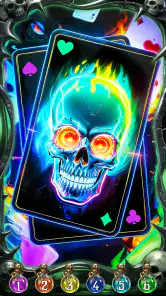
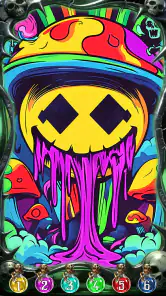
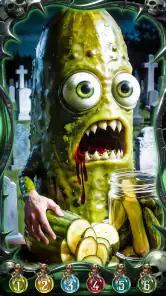
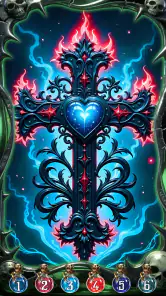
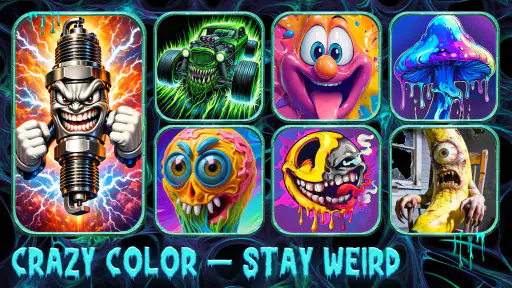
I spent time with Crazy Color: Color by Number as a dark, unusual board game rather than treating it like a typical relaxing coloring app. Its appeal is immediate: instead of flowers, landscapes, or polished illustrations, it leans into cursed bottles, strange mutants, and internet-style meme art. That gives the familiar color-by-number format a mischievous personality. I found it easiest to enjoy in short sessions, when I wanted a simple visual task without the pressure of competition or a complicated story.
The game is free to start, made by Special Coloring Studio, and sits in the board category. It has built a sizeable audience, with more than 500 thousand installs and a 4.8 average from roughly 6 thousand ratings. Those figures suggest that the odd theme is not a tiny niche, but they do not change the basic experience: this is still a tap-and-fill coloring game, best suited to people who enjoy repetition, completion, and deliberately weird artwork.
How the interface feels to read and navigate
The first thing I noticed is that the visual identity is much darker and louder than standard coloring-by-number games. The artwork is designed to make you look twice, and that can be a strength when ordinary coloring books feel bland. The numbered areas give the session a clear purpose, while the limited task of matching a color to its marked spaces keeps the interface understandable even when the picture itself looks chaotic.
I did not need to learn a complicated ruleset before starting. The core loop is familiar: choose a picture, identify the indicated color, and fill the matching sections. That simplicity matters for people who prefer predictable navigation. You can focus on the image instead of remembering cards, turns, resource systems, or a long chain of menus.
At the same time, the dark artwork can make visual scanning more demanding than it would be in a bright, high-contrast coloring book. Some players will enjoy searching through a busy mutant or bottle illustration, while others may find the small numbered areas tiring. My practical advice is to treat each image as a sequence of small targets rather than trying to understand the whole picture at once. I had a better time when I worked from one visible cluster to the next.
The best way to make the interface manageable is to slow down before tapping. Rapid tapping is tempting when several areas look similar, but careful scanning reduces mistakes and makes the session feel calmer. This is especially useful if you are playing on a smaller phone, where the artwork has less room to breathe.
Why the unusual art helps some players
Many color-by-number games rely on soothing scenery, animals, or decorative patterns. This one has a sharper sense of humor. The cursed and mutant imagery gives me a reason to see an image through to the end, because I want to discover how the finished composition looks. That can help players who lose interest in generic coloring themes.
More From Our News Desk

Weather by Xiaomi Review: Clear at a Glance, Less Clear Up Close

X Under Pressure: Can It Recover When Posting Goes Wrong?

Clash of Clans Is Won Between the Battles

Android Auto Makes the Case for Quieter Car Software

MobiOffice: Transforming Mobile Productivity with Seamless Integration

EA SPORTS FC™ Mobile Soccer: Redefining Mobile Sports Gaming
The trade-off is that the same art direction may be uncomfortable for people who want a gentle, quiet visual experience. The Teen content rating is worth taking seriously here. The game is not the choice I would make for a young child, a classroom seeking neutral imagery, or anyone who dislikes grotesque or unsettling subjects. The theme is not a small decoration around the gameplay; it is central to the product’s identity.
Motor control, tapping, and sensory comfort
From a motor perspective, the basic interaction is approachable because it is built around selecting areas rather than dragging a character, timing a jump, or coordinating several controls at once. That makes it more suitable for relaxed one-handed play than many action-oriented games. I could pick it up while sitting on a sofa or waiting for something, complete a few sections, and stop without losing the thread.
However, simple tapping does not automatically mean effortless tapping. Color-by-number images can contain narrow or tightly packed spaces, and precision becomes more important as a picture fills in. Players with limited fine-motor control may find repeated small taps tiring, particularly during a long session. I would recommend using a larger screen when possible and taking breaks before accuracy turns into frustration.
There is also a sensory question. The dark palette and bizarre subjects may be engaging for someone who likes high-contrast, expressive art, but they can feel visually busy for someone who is sensitive to clutter or prefers low-stimulation designs. I found the game more comfortable when I played with the screen at a moderate brightness instead of turning it up aggressively. That is not a special setting in the game; it is simply a practical adjustment that made the artwork easier to tolerate.
People who rely on touch precision should also consider the difference between a phone and a tablet. On a phone, the compact display makes the smallest sections more demanding. On a tablet, the same style of image can feel less cramped. I would not choose this title expecting it to replace a dedicated accessible coloring tool, but the straightforward interaction gives it a reasonable starting point for casual players who can comfortably tap small targets.
Using it in everyday situations
One realistic use is a short decompression break after work. I can imagine opening it for ten minutes while waiting for dinner, choosing a strange illustration, and filling a few color groups without committing to a full game. There is no need to coordinate with another player, and the board-game label describes its structured, puzzle-like format more than a social table experience.
It can also work during travel or waiting-room downtime, provided the surrounding conditions are suitable. A bright outdoor environment may make a dark illustration harder to read, while a noisy place can make any visually focused activity less comfortable. In a quiet room, the repetitive matching process is easier to settle into. If you need something that can be played with minimal attention while talking to someone, this is less ideal: finding small numbered areas still demands concentration.
For families, I would make the choice based on the individual child rather than assuming that a coloring game is automatically child-friendly. The Teen rating and deliberately strange imagery make it better for older players who understand the tone. For adults who enjoy memes, odd creatures, or deliberately ugly-cute art, the theme may be exactly what separates it from the many polished but interchangeable alternatives.
Where it fits among other coloring and board games
Compared with a traditional coloring book, the main advantage is guidance. You do not need to decide which shade belongs in each area, so the game removes much of the creative uncertainty. That is useful when I want a clear task rather than an open-ended art project. The disadvantage is that the finished result is less personal: the pleasure comes from completing the image, not from choosing an original color scheme.
Compared with a physical board game, it is far more convenient but much less social. There are no pieces to arrange, opponents to read, or shared table moments to enjoy. The board classification makes sense as a digital puzzle category, but I would not recommend it to someone searching for strategy, negotiation, or multiplayer interaction. A conventional board game is the better option when the goal is conversation and competition.
Compared with calmer digital coloring apps, this game wins on personality and loses on universal comfort. A soft landscape app may be better for bedtime, meditation, or children. This one is better when the player wants something visually odd and slightly rebellious. The choice is not really about which format is superior; it is about whether the artwork motivates you to keep tapping.
Its free price makes trying the central idea easy, but the presence of in-app purchases means I would pay attention before buying anything. Individual purchases range from $1.99 to $59.99, so the free entry point should not be confused with an entirely purchase-free experience. I would first decide whether the art style and basic loop hold my attention, then consider spending only if the extra content genuinely improves my routine.
Small habits that improve the experience
My first useful habit was to avoid chasing every tiny unfilled section immediately. I worked through the more obvious areas first, which reduced the visual noise and made the remaining spaces easier to identify. This is a simple workflow, but it matters in images with busy outlines and many small compartments.
My second tip is to use the game as a stopping-point activity rather than an endless commitment. Completing one portion of an image can feel satisfying, while trying to finish everything in one sitting can turn a relaxing task into repetitive work. Short sessions are also kinder to your hands and eyes, especially on a phone.
A third trade-off is choosing the artwork for readability instead of choosing only by subject. The most grotesque or detailed picture may be the most entertaining, but a less crowded design can be a better first session if you are testing whether the number-matching format suits you. I would start with an image whose sections are easy to distinguish, then move toward the busier art once the interaction feels natural.
Another practical point concerns interruptions. Because the game is based on incremental filling, it suits moments when you may need to put the phone down quickly. That is more convenient than a timed puzzle or a competitive match. Still, I would not open it when I need to remain fully alert to a conversation, a crossing, or another task. The visual search is simple, but it is not mindless.
Remaining barriers and who should skip it
The biggest barrier is the combination of small areas and intense artwork. Players with reduced vision, hand tremors, or difficulty distinguishing crowded shapes may find the experience less comfortable than the store summary suggests. I would test a single picture before making it a regular activity, preferably on the largest screen available. If precise repeated tapping is already tiring in other apps, this may not be the right coloring game.
The theme is another firm boundary. Someone looking for wholesome family illustrations, realistic scenery, or a soothing palette should choose a different title. The Teen rating is not just a technical label to ignore; it aligns with the game’s use of cursed objects, mutants, and meme-oriented humor. That content may be funny to one player and unpleasant to another.
There is also limited creative freedom in the basic concept. If your enjoyment comes from experimenting with unusual color combinations, a blank digital canvas or a conventional coloring app will give you more control. Here, the satisfaction is closer to completing a visual puzzle. That distinction is important because the screenshots may attract people who expect an art tool, while the actual experience is more guided and repetitive.
Finally, players who dislike optional spending should approach the free download with a clear personal limit. The game can be sampled without paying, but its purchase range means it is sensible to avoid impulse buying during a long session. I found the strongest reason to play was the odd artwork and the completion loop, not the promise of collecting everything available.
My inclusive verdict
I would recommend Crazy Color: Color by Number to adults and older teens who want a low-pressure board-style activity with a distinctive dark sense of humor. Special Coloring Studio has taken a familiar format and given it a clear personality, which makes it easier to remember than another collection of generic flowers. The free entry point, simple tapping, and progress-by-small-sections structure also make it convenient for short breaks.
I would be more cautious for players with visual or motor challenges, not because the interaction is complicated, but because small targets and crowded illustrations can create real friction. The same applies to anyone sensitive to unsettling imagery or strong visual clutter. A calmer coloring app, a larger-screen option, or a physical coloring book may be more comfortable in those cases.
The game runs on Android 7.0 and later, and its current version is 1.39.287. It was released on July 13, 2023, so it is an established option rather than a brand-new experiment. I would still judge it by a short personal test: can you read the numbered areas comfortably, do you enjoy the mutant-and-meme art, and does repeated tapping feel relaxing instead of tedious?
For me, the answer is yes in the right context. I would open it when I want a guided distraction, a strange image to complete, and no demand to compete or perform. I would skip it when I need social play, open-ended creativity, very gentle visuals, or the broadest possible accessibility. That balance is what makes it worth trying: its strongest feature is not the coloring mechanic itself, but the way its weird artwork gives that mechanic a reason to keep going.
Crazy Color: Color by Number Frequently Asked Questions
What is the age rating for Crazy Color: Color by Number?
Crazy Color: Color by Number is rated Teen, so it may be more suitable for older children and adults than for young children. The game’s dark, unusual theme includes cursed bottles, mutants, and meme art. If you are choosing it for someone else, consider whether that style fits their preferences before downloading.
What is Crazy Color: Color by Number?
Crazy Color: Color by Number is a relaxing digital coloring app built around numbered illustrations. After selecting an image, you tap the matching color areas to complete the artwork step by step. The app is designed for casual use, whether you want a short creative break or a longer coloring session, and it generally offers categories and pictures with different levels of detail.
Is Crazy Color: Color by Number free to download and use?
Crazy Color: Color by Number is free to download, although some optional purchases are available. In-app purchases range from $1.99 to $59.99 per item, so check purchase prompts carefully if you want to keep spending under control. The core idea is still number-based coloring, while purchases may provide additional options or content.
Does Crazy Color: Color by Number work without an internet connection?
Some basic coloring activities may be available offline, but the exact offline functionality can vary by device, app version, and the images you have already opened or downloaded. An internet connection may still be required for advertisements, new artwork, cloud features, updates, or premium content. If offline access is important to you, test a few pictures after temporarily disabling your connection.
Is Crazy Color: Color by Number suitable for children?
The simple tap-to-color controls make Crazy Color: Color by Number easy for many children to understand, but parents should review the app before allowing independent use. Its Teen age rating and dark, weird artwork—including cursed bottles and mutants—are worth considering when deciding whether it is appropriate for a particular child. Enable parental controls where appropriate, and avoid saving payment information on a child’s device.
Pros
- Simple color-by-number controls are easy for beginners to learn.
- Large image library offers designs for different moods and interests.
- Helpful hints make difficult or tiny sections easier to complete.
- Completed artwork can be saved and shared from the app.
- Relaxing gameplay works well for short breaks or casual sessions.
Cons
- Some pictures and tools may require watching ads or making purchases.
- Frequent ads can interrupt the coloring experience between images.
- Tiny sections may be difficult to select accurately on smaller screens.
- The app may need internet access for certain images or features.
- Coloring options can feel repetitive after extended use.
- Category
- Board
- Version
- 1.39.287













