Country Living Color by Number
- 22.00
- 4.9
- Installs
- 10.00K
- Price
- Free

Screenshots
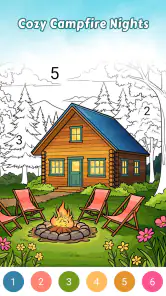
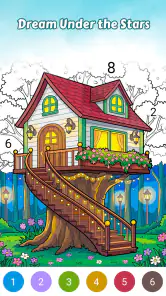

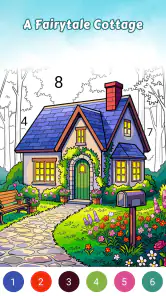
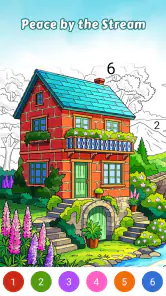
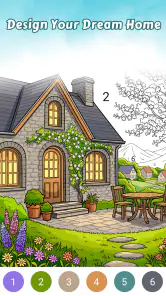
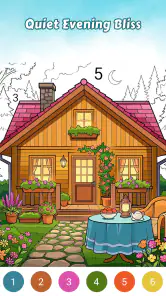
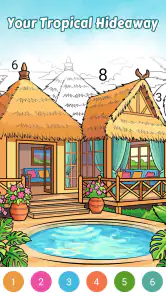
Analysis by Reviewed
I spent time with Country Living Color by Number as a quiet, tap-based board game, and its appeal became clear almost immediately: it turns familiar rural scenes into small, manageable coloring projects. Instead of asking me to draw, mix colors, or make artistic decisions from scratch, it gives me numbered areas and lets me build an image one tap at a time. That makes it easy to pick up when I want something calm rather than competitive.
The idea is simple, but the atmosphere matters. The artwork focuses on warm country homes, rustic details, and peaceful living scenes, so the experience feels closer to a digital coloring book than to a traditional board game. I found it especially suitable for short breaks, winding down in the evening, or keeping my hands occupied while listening to a podcast. It is free to start, rated for Everyone, and developed by ColorVerse Game Studio.
How the coloring routine works in everyday use
My usual session begins with choosing a country-themed picture and scanning the unfinished areas before tapping anything. The numbered structure gives the whole image a clear order. I can work through the visible sections methodically, or jump between areas when I want a less deliberate pace. That choice is small, but it changes the mood: following the numbers feels tidy and focused, while moving around the picture feels more casual.
The best part of the baseline workflow is that there is no pressure to produce a perfect drawing. The game handles the difficult visual decisions, while I provide the attention. A few taps gradually turn a pale outline into a complete scene, which gives each session a satisfying sense of progress without demanding a long commitment. I never needed to understand painting techniques to enjoy it.
That simplicity also makes the game approachable for people who normally avoid puzzle or art apps. There is no complicated board to memorize and no opponent waiting for a mistake. A child can understand the basic interaction, while an adult can use it as a low-effort way to settle down after work. The Everyone age rating fits that broad accessibility.
One realistic use case is a ten-minute evening break. I can open a picture, complete a handful of numbered spaces, and stop without feeling that I have abandoned a complicated task halfway through. On a longer weekend session, I can stay with one scene and pay more attention to the way the finished colors balance across the house, garden, or surrounding countryside. The same basic controls support both habits.
There is a trade-off, though. If I want a board game with meaningful choices, tactical planning, or a strong win condition, this is not the right kind of experience. Its board-game classification describes the structured, picture-completion format more than traditional tabletop competition. The reward comes from finishing an image, not from outsmarting another player or solving a difficult strategic position.
More From Our News Desk

Weather by Xiaomi Review: Clear at a Glance, Less Clear Up Close

X Under Pressure: Can It Recover When Posting Goes Wrong?

Clash of Clans Is Won Between the Battles

Android Auto Makes the Case for Quieter Car Software

MobiOffice: Transforming Mobile Productivity with Seamless Integration

EA SPORTS FC™ Mobile Soccer: Redefining Mobile Sports Gaming
Settings that are worth checking before settling in
I recommend taking a moment to look through the available settings before starting a regular routine. In a color-by-number game, small interface choices can affect comfort more than people expect. A relaxed player may prefer a clean screen with fewer interruptions, while someone working through tiny sections benefits from anything that makes the active area easier to identify. I treat this first check as part of setting up the game, not as unnecessary menu browsing.
It is also worth checking how the game handles taps on completed or incorrect areas. The most comfortable workflow is one where I can keep a steady rhythm without worrying that an accidental touch will disrupt the picture. When I am using one hand, I naturally make shorter, more deliberate movements. When I have both hands free, I can reposition the device more often and inspect small spaces from a better angle.
Screen comfort is another practical concern. I found that a moderate brightness level works better than using the brightest display, especially during nighttime sessions. The scenes are designed to feel warm, but a bright phone can still make a relaxing activity tiring. I also prefer to pause briefly between pictures rather than continuing automatically through a long stretch of coloring.
Device compatibility is fairly broad: the game runs on Android versions from 7.0 onward. That is useful if I am reviewing it on an older phone or recommending it to someone who does not upgrade frequently. Still, the experience depends on the particular screen. Small numbered sections are naturally easier to inspect on a larger display, while a compact phone is more convenient for one-handed use.
The current version is 1.0.5, so I approach it as a focused and relatively young product rather than a huge coloring platform with years of accumulated systems. That is not automatically a weakness. The uncluttered presentation helps the central activity stay understandable, but users who expect a deep library of tools, extensive customization, or elaborate progression may find the scope modest.
Faster patterns that make sessions smoother
After using the basic method for a while, I noticed that the fastest approach is not simply tapping as quickly as possible. Rapid tapping causes more missed spaces and makes it harder to see which parts of a scene still need attention. I get better results by grouping nearby numbered areas and clearing one visual region at a time. For example, I may finish the house before moving to the garden, then handle the smaller decorative details last.
This regional approach has a second advantage: it makes unfinished work easier to spot. When I jump randomly around a picture, the remaining spaces can feel scattered. Completing one area creates a visible block of progress, which keeps the session motivating. It also reduces the chance that I will overlook a narrow section hidden among already colored parts.
For detailed pictures, I use a two-pass habit. On the first pass, I complete the larger, obvious areas and leave tiny sections alone. On the second, I inspect the scene more slowly and search for small gaps. This is more reliable than zooming or repositioning constantly from the beginning, because the main shapes become clearer once the larger portions are filled.
Another useful habit is to stop before attention drops too far. These games are forgiving, but tired eyes make small areas feel more difficult than they really are. If I start tapping without looking carefully, I lose the relaxing quality that brought me to the game. Shorter sessions are often more enjoyable than forcing myself to finish a picture in one sitting.
I also think the game works well alongside another quiet activity, but only when that activity does not require visual attention. Listening to music or spoken audio is a natural match. Watching a video at the same time is less practical because the coloring requires enough concentration to distinguish numbered sections. That makes it a better companion for audio than for multitasking with another screen.
These habits reveal an important strength: the game can support either a meditative pace or a completion-focused routine. I can use it to relax with no concern for efficiency, or I can organize my taps and finish scenes more systematically. It does not force one style, which is helpful for different moods.
Where the simple design starts to feel limited
The same focused design that makes the game approachable also sets clear boundaries. I would not choose it for creative control. The numbered format determines the coloring process, so I am completing an arranged image rather than designing my own country scene. Anyone looking for freehand brushes, personal palettes, or the ability to import a photograph should consider a dedicated coloring or drawing app instead.
It is also not a strong alternative to traditional board games when social interaction is the main goal. There is no reason to gather friends around the phone for a competitive match. The experience is individual and reflective. That is perfect when I want quiet time, but it means the game cannot replace a strategic tabletop title, a word game with shared turns, or a multiplayer puzzle.
The free entry point is welcome, although in-app purchases range from $0.99 to $39.99 per item. I would keep that in mind before treating the game as a completely cost-free long-term hobby. The sensible approach is to enjoy the accessible portion first and decide later whether additional purchases fit my habits. I would not buy anything simply because a picture is taking longer than expected.
That purchase structure can matter particularly for families. Since the age rating is Everyone, a parent may consider it suitable for a child, but the device owner should still manage purchasing carefully. The game’s calm presentation does not remove the need for ordinary attention around optional spending. I see it as family-friendly in tone, while purchase decisions should remain with the adult managing the device.
The rating is a strong positive signal, with a 4.9 average from around 87 ratings and 22 written reviews. I read that as evidence that the central idea is connecting well with its early audience, not as a guarantee that every player will enjoy the limited format. Someone who loves gentle coloring will probably understand the appeal quickly; someone who needs constant novelty or challenge may not share that reaction.
Its reach is still relatively modest at over 10K installs. That fits the feeling of a specialized title rather than a massive mainstream game. I actually like that distinction because it sets a realistic expectation: this is a small, specific relaxation game, not an enormous platform competing with every puzzle and art app on the phone.
Who should make it part of a regular routine?
I would recommend it to adults who enjoy coloring books but want a cleaner, more guided digital format. It is also a good choice for anyone who finds competitive games stressful or who wants an activity that can be paused easily. The country-living theme gives the pictures a consistent identity, so it feels more purposeful than a random collection of unrelated coloring pages.
It may suit older children as well, especially those who enjoy completing visual tasks and can follow numbered areas independently. The interaction is straightforward enough to learn quickly, and the finished images provide a clear result. I would still introduce the purchase settings before handing over the phone, particularly on a shared device.
I would skip it if my main goal were to improve drawing skills. The game does not ask me to practice line control, shading, composition, or color selection. I would also skip it if I needed a deep progression system or a reason to return based on competition. Its repeat value comes from the pleasure of completing more scenes and returning to the same calming routine.
Compared with a physical coloring book, it is more convenient and less messy. I do not need pencils, a table, or storage space, and I can carry the activity in my phone. The physical alternative still wins for people who enjoy paper texture, collecting finished pages, or stepping away from screens. Compared with a general digital coloring app, this game feels more focused because its rustic country theme gives the experience a consistent mood rather than presenting an unlimited creative canvas.
Compared with a conventional board game, it is much less social and much less strategic. That is not a flaw if I want solitary relaxation, but it is a decisive difference when choosing what to install. I see it as a board-inspired coloring pastime, not a replacement for a game night.
My verdict after building a repeatable habit
Country Living Color by Number works because it understands the value of a small, predictable task. I can open it without learning a complicated system, choose a warm rural picture, and make visible progress through simple taps. The most rewarding sessions come when I use a deliberate rhythm: check the interface first, clear larger regions, return for details, and stop while the activity still feels restful.
Its limitations are equally clear. The game offers guided completion rather than genuine artistic freedom, private relaxation rather than multiplayer play, and a focused theme rather than endless variety. Optional purchases also mean that “free” should be understood as a way to begin, not necessarily a promise that every future item will cost nothing.
For me, that balance is acceptable. I would keep it installed for quiet evenings, short waiting periods, and audio-listening sessions where I want something gentle to do with my hands. I would not choose it for a competitive challenge, a creative drawing project, or a shared board-game experience. If those distinctions match what I am looking for, Country Living Color by Number is an easy recommendation: a modest, soothing board-style game with a clear routine and a pleasant rustic identity.
Country Living Color by Number Frequently Asked Questions
Is Country Living Color by Number suitable for children?
The game is rated Everyone, and its simple tap-to-color format can make it approachable for a broad range of ages. Children who enjoy farm animals, flowers, and countryside scenes may find it appealing, while adults can use it as a relaxed creative activity. As with any game that offers optional purchases, a parent or guardian may want to review purchase settings before a child plays.
What does Country Living Color by Number offer?
Country Living Color by Number is a board game centered on painting warm, rustic country-living scenes by number. You create cozy artwork by tapping the numbered sections and matching them with colors. Its country-inspired subject matter gives the coloring activity a gentle, homey feel, making it a natural fit for players who like peaceful scenes rather than fast-paced challenges.
What is Country Living Color by Number?
Country Living Color by Number is a relaxing digital coloring app inspired by the peaceful charm of rural life. It offers numbered illustrations featuring countryside landscapes, farm animals, gardens, homes, flowers, and other nature-themed scenes. You simply select a color and tap the matching numbered areas to complete each picture, making it accessible even if you have little drawing experience.
How does the coloring system work?
The app uses a paint-by-number format, so every illustration is divided into numbered sections. After choosing a color from the palette, you tap the areas marked with the corresponding number. This makes the experience straightforward and calming, while completed images gradually reveal detailed countryside artwork. Hints or assistance may be available if you have difficulty locating a small or hidden section.
Is Country Living Color by Number free to download and play?
Country Living Color by Number is free to download, with optional in-app purchases ranging from $0.99 to $39.99 per item. You can begin with the free experience, but some content or benefits may involve a purchase. Check the purchase options shown on your device before confirming any transaction, especially if children will be using the game.
Pros
- Relaxing coloring sessions suitable for stress relief and quiet downtime.
- Simple tap-to-fill controls make it accessible for casual players.
- Country-themed artwork offers a pleasant change from generic coloring books.
- Progress is easy to follow
- with unfinished pictures available at a glance.
- Works well for short play sessions when you have only a few minutes.
Cons
- Some pictures may require patience because detailed areas are time-consuming.
- Frequent hints can reduce the challenge for players who prefer no assistance.
- The rural theme may feel repetitive if you prefer varied subjects.
- Small sections can be difficult to select accurately on compact screens.
- Some features or artwork may depend on ads or in-app purchases.
- Category
- Board
- Version
- 1.0.5











