Budge World: Learning & Fun
- 1.34K
- 4.3
- Installs
- 10.00M
- Price
- Free

Screenshots




Analysis by Reviewed
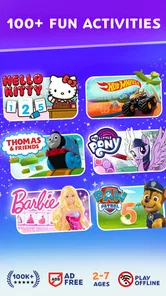
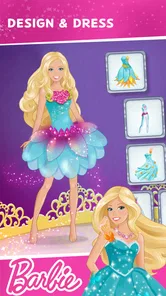
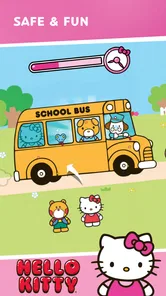
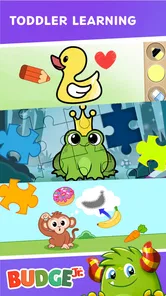
When I first open a preschool game for a child, I want to know two things quickly: what can they actually do, and how much help will they need to get started? Budge World: Learning & Fun is a colorful collection of play activities built around familiar characters, including PAW Patrol, Barbie, Thomas, Hello Kitty, and Crayola. It is an educational game from Budge Studios, aimed at young children, and its appeal is easy to understand: a child can move between playful activities without having to commit to one long lesson.
What to expect from the first visit
The first impression is lively and character-led rather than classroom-like. That can be a real advantage when a toddler is reluctant to sit through a formal learning app; familiar faces give them a reason to look around. Budge World is free to install, rated Everyone, and has attracted over 10 million installs, so it is a well-established option in the children’s game category. I would think of it as a supervised activity box, not a replacement for books, conversation, or hands-on play.
There is a practical catch to keep in mind before handing over the device: in-app purchases range from $6.99 to $47.99 per item. A child may be more interested in tapping a locked activity than understanding what a purchase means, so I recommend an adult exploring first and setting expectations before play. The game’s average rating is 4.2 from around 33,000 ratings, which gives a broad sense of how other players respond, but it cannot tell you whether its particular activities suit your child.
Getting ready without turning setup into a task
My simplest approach is to open Budge World together the first time, browse at the child’s pace, and let them choose one activity that catches their eye. That small choice makes the session feel like their playtime rather than a lesson assigned by an adult. Budge Studios has kept the overall idea approachable, but a young child may still need help distinguishing an activity they can enter from one that leads toward a purchase or another step.
For an easier first session, keep it short and sit nearby rather than trying to explain every screen. Watch where the child taps, then offer one clear prompt such as “Which one would you like to try?” This also gives you a chance to see whether the interface feels manageable for their age and motor skills. The current version is 2026.3.0 and the minimum Android requirement is 5.1, useful checks if you are installing it on an older device.
What Makes Budge World So Engaging?
First off, Budge World: Learning & Fun is bursting with vibrant colors and adorable characters that instantly grab kids' attention. The developers nailed it when it comes to visual appeal. It’s like a party on your screen—inviting, exciting, and full of surprises.
The app is cleverly designed to cater to kids' short attention spans. It offers a slew of mini-games, activities, and challenges that are educational yet entertaining. Whether it’s math, science, or creativity, there’s something for every curious mind.
More From Our News Desk

Weather by Xiaomi Review: Clear at a Glance, Less Clear Up Close

X Under Pressure: Can It Recover When Posting Goes Wrong?

Clash of Clans Is Won Between the Battles

Android Auto Makes the Case for Quieter Car Software

MobiOffice: Transforming Mobile Productivity with Seamless Integration

EA SPORTS FC™ Mobile Soccer: Redefining Mobile Sports Gaming
Educational Content That Doesn’t Feel Like Homework
One of the things I absolutely loved about Budge World is how seamlessly it weaves learning into gameplay. Kids can explore subjects like math and language arts through interactive puzzles and quizzes. The learning activities are so engaging that kids won’t even realize they’re honing their skills. It’s like sneaking veggies into a delicious smoothie!
The app also gets creative with storytelling. Imagine your child diving into a world where they can interact with their favorite characters while learning important lessons. It’s like a modern twist on the classic bedtime story, only more interactive and hands-on.
Customization and Personalization
Budge World truly shines with its customization options. Kids can create their own avatars, which adds a personal touch to the app. It’s a fantastic way for them to express themselves and feel more connected to the content. Plus, the app’s intuitive design makes it easy for kids to navigate and engage with the activities.
Parents will appreciate the detailed progress reports. You can track your child’s learning journey and see which areas they excel in or need a little more practice. It’s like having a digital report card that keeps you in the loop.
Safe and Kid-Friendly Environment
Safety is a top priority for any parent, and Budge World doesn’t disappoint. The app is free from ads and external links, ensuring a safe browsing environment for kids. It’s comforting to know that your child can explore without accidentally stumbling onto something they shouldn’t.
The app also has robust parental controls. You can set playtime limits and manage the content your child can access. It’s all about giving you peace of mind while your little one embarks on their learning adventure.
Let’s Talk About the Fun Factor
Now, onto the fun part! Budge World is packed with entertaining activities that cater to different interests. From racing games and creative painting to solving mysteries and puzzle challenges, there’s never a dull moment. My personal favorite was the art section where kids can unleash their creativity—it’s like having a mini Picasso in the making!
The app frequently updates with new content and events, ensuring that kids always have something fresh to look forward to. It keeps the excitement alive and makes learning a continuous journey.
Choosing it for the right kind of play
For a first meaningful success, I would aim for a tiny, visible win: let the child pick a character-led activity, help them understand the basic interaction, and then let them finish that activity without jumping between screens. That is more useful than trying to sample everything at once. If they want to return to the same game, repetition is not wasted time; it can help them feel confident before an adult introduces a different kind of challenge.
In everyday use, this works best as a short wait-time or quiet-time option: for example, a parent can sit with a child after lunch, let them choose a painting or puzzle activity, and use the result as a reason to talk about colors, shapes, or the choices they made. The screen is then a prompt for shared conversation rather than a substitute for it. I would avoid treating a completed activity as proof of mastery; the more useful sign is whether the child can explain what they tried or wants to try it again independently.
Compared with a single-purpose alphabet or number app, Budge World offers a broader mix of character-based play and creative activities, which may help when a child quickly tires of one format. The trade-off is that a broad collection can be less focused: if your main goal is systematic phonics practice, a dedicated reading tool is likely a better fit. Likewise, a child who prefers open-ended building with physical toys may get more from hands-on play than from switching among screen activities.
Where a parent may need to step in
The child-friendly presentation does not remove the need for adult judgment. The purchase range makes it sensible to review what is accessible before independent play, and young children may not understand why some choices are unavailable. I would explain simply that an adult handles purchases and keep the first session close by. This is also a good time to check whether the particular activities hold your child’s attention; a familiar character can attract them, but it does not guarantee that every game will be a match.
One useful way to prevent aimless tapping is to agree on a small routine: choose one activity, play it, then decide together whether to repeat or stop. It gives the child a clear endpoint without making the experience feel like a timed lesson. If a child becomes frustrated by menus or wants to move rapidly from one option to another, staying beside them and narrowing the choice to two visible options can make the first visit calmer.
Parents often wonder whether this can work for a child who is not yet reading. The character-led presentation and simple activity choices may make it approachable, but I would still try it together rather than assume every screen is self-explanatory. For a child who needs explicit instruction or a tightly structured learning sequence, an adult-led workbook, a dedicated subject app, or an offline activity may be more effective. The right choice depends less on the number of activities and more on how your child responds to them.
Making a short session feel worthwhile
A practical way to fit the game into family routines is to give it a clear place rather than making it the default answer to every quiet moment. I would use it while waiting for a meal or during a brief pause when an adult can stay close, then put the device away when the chosen activity is finished. That makes the transition out of screen time easier to discuss and helps keep the game as one option among drawing, picture books, and toys.
If a child enjoys the creative activities more than the puzzles, I would follow that interest instead of steering every visit toward a lesson. Ask them to describe a color choice or explain what they made; those small conversations are a useful way to connect screen play with language and attention. For a child who prefers clear goals, an adult can suggest one activity and let them try it, while still allowing them to decide whether they want another turn.
The variety also creates a trade-off for parents: a child may be excited by the characters but still need help choosing what to do. Rather than browsing through every option, I would point out two possibilities and let them select between them. That keeps the choice manageable and makes it easier to notice which kinds of play genuinely hold their interest, instead of mistaking rapid switching for engagement.
Who is likely to enjoy it—and who may not
I see this as a better fit for a young child who responds to familiar characters, enjoys trying different kinds of activities, and benefits from an adult nearby at the beginning. It can also suit a caregiver who wants a flexible game for occasional shared play rather than a formal course with a fixed sequence. The range of activities gives families room to follow a child’s mood, whether they are more inclined to make something or solve a small challenge.
I would be more cautious if your main priority is a tightly organized curriculum, a specific reading or math skill, or independent use without adult guidance. A dedicated learning app may make the learning path clearer, while a book, puzzle, or art materials can be a better choice when you want a break from screens. If a child becomes upset by locked choices or has trouble moving between activities, that is a sign to stay involved or choose a simpler, single-purpose option.
Before installing, it is also worth considering how the device is shared at home. If a child will use a family tablet, an adult can open the game first, explore the available choices, and make the purchase boundary clear. For a first-time user, the aim is not to unlock everything or explore every character; it is to find one activity the child can enjoy without confusion and see whether they ask to return to it.
Final Thoughts
Overall, Budge World: Learning & Fun is an app that delivers on its promise. It’s a delightful blend of education and entertainment, wrapped up in a safe and engaging package. Whether you’re looking to supplement your child’s learning or just want them to have a blast while playing, this app is worth a download.
The app masters the art of combining fun with meaningful learning experiences. It’s like having a trusty sidekick that makes education enjoyable and effortless. So, if you’re on the hunt for an app that’ll keep your child entertained and educated, give Budge World a whirl. You might just find it becomes a staple in your digital library!
My recommendation is to treat the free install as a chance to judge the fit, not as a promise that every activity will be available without extra spending. Budge World is strongest for families who want a varied, character-driven option to explore together and are comfortable guiding a young child through the first choices. If you prefer a completely focused curriculum, minimal screen use, or a game a child can navigate with no adult nearby, another approach may suit you better. For a first try, though, a short shared session and one finished activity are enough to see whether its mix of learning and familiar characters clicks at home.
Budge World: Learning & Fun Frequently Asked Questions
Is Budge World: Learning & Fun free to download?
Yes. Budge World is free to download, so families can try the game before deciding whether to pay for additional content. It includes in-app purchases, with individual items ranging from $6.99 to $47.99. If a child will use the device, a parent or caregiver may want to review purchase settings first and decide whether to restrict transactions.
What kind of activities can children find in Budge World?
Budge World is an educational game that brings together play and learning through activities for children. Its world features familiar characters including PAW Patrol, Barbie, Thomas, Hello Kitty, and Crayola. The app is intended to make learning enjoyable, and its character-led activities may appeal to children who already recognize these brands. Families can try the free content to see which activities suit their child.
What devices can run Budge World: Learning & Fun?
Budge World: Learning & Fun is an educational game from Budge Studios for Android devices running Android 5.1 or later. Before downloading, check that your device meets this requirement and has enough available storage for the app. The game is free to download, so families can try it before deciding whether its optional paid content is right for them.
What is Budge World: Learning & Fun?
Budge World: Learning & Fun is an interactive educational app designed for children. It combines learning with entertainment through a variety of games, puzzles, and activities that cover subjects like math, reading, and creativity. The app aims to engage young minds by making education enjoyable and accessible. Its playful world features familiar characters such as PAW Patrol, Barbie, Thomas, Hello Kitty, and Crayola.
Is Budge World safe for children to use?
Yes, Budge World is designed with child safety in mind. The app features a secure environment without any inappropriate content. Additionally, it provides parental controls to monitor and manage your child's activity, ensuring a safe and educational experience for kids of all ages. As with any app used by a child, a parent or caregiver should review the available settings and supervise purchases through the device.
Pros
- Engaging educational content for kids.
- Safe
- ad-free environment for children.
- Wide variety of mini-games and activities.
- User-friendly interface with intuitive navigation.
- Regular updates with new content.
Cons
- Requires subscription for full access.
- Limited offline functionality.
- Some games may become repetitive.
- In-app purchases can add up.
- Occasional loading time delays.