Aliens vs Zombies: Invasion
- 2.47K
- 4.7
- Installs
- 1.00M
- Price
- Free

Screenshots
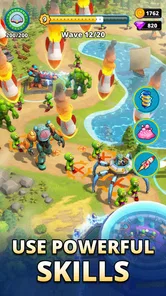
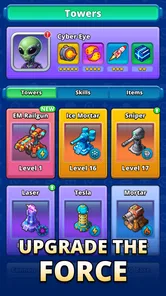
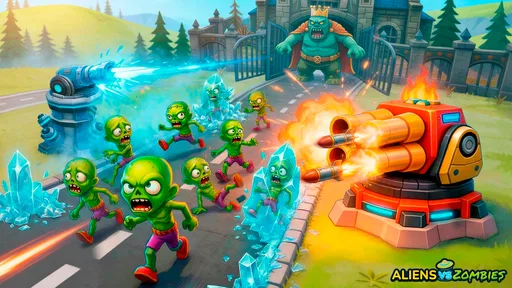
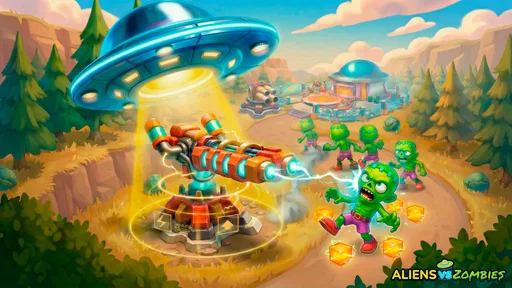
Analysis by Reviewed
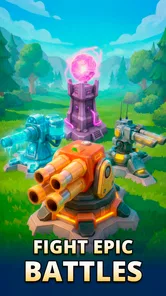
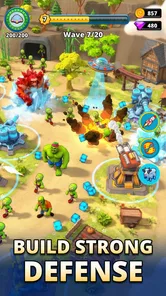
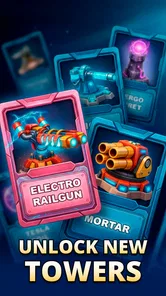
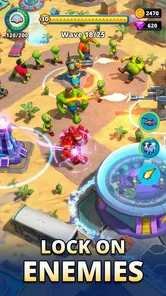
I can see Aliens vs Zombies: Invasion working best as a short, shared-device strategy game: one person can set up a defense, then hand the phone to someone else to see how the plan holds up. Its alien-and-zombie conflict gives the tower-defense format a clear hook, while the central task—protecting a base with towers—makes it easy to understand before anyone has learned every tactical detail. I like that kind of immediate premise for a household game, though sharing a screen is not the same as having separate profiles or coordinated multiplayer, so I would treat it as a game to take turns with rather than assume everyone’s progress is neatly separated.
How it fits into a shared household routine
In my experience, tower defense suits those small stretches when a device is free: a break between chores, a quiet moment on the sofa, or a turn after someone else has finished using the phone. The appeal here is that the threat and objective are easy to explain. Aliens and zombies are coming; your job is to use towers to stop them reaching your base. A younger player can grasp that basic goal, while someone more strategic can think about where to spend attention and how to respond as a wave develops.
That makes it a natural candidate for pass-and-play in the everyday sense, even if I would not confuse that with a built-in shared mode. One household member can play a run, then describe what worked before another takes a turn. The useful conversation is about decisions—whether a defense felt too thin, or whether a placement was worth repeating—not about a complicated collection of rules that takes a long time to explain. If the device is also used for school, work, or other games, agree whose turn it is before opening the app; that simple boundary is more practical than assuming the game will manage household routines for you.
There is a trade-off to this style of sharing. Strategy games invite experimentation, and different players may have very different ideas about how to defend the same base. That can be fun when turns are casual, but frustrating if one person expects to preserve a particular plan or continue exactly where they left off. I would let the person currently playing make the tactical calls, then let the next player start with a fresh approach when the opportunity comes. It keeps the game social without turning every placement into a committee decision.
Set expectations before passing the device
A shared phone or tablet raises a practical question: whose game progress is being used? I would not assume separate household members have independent saves, profiles, or account boundaries. Before a child or another family member plays, check how the app is currently set up on that device and whether it is connected to an account or store settings that belong to someone else. This is ordinary device housekeeping, not a special feature of the game, and it helps prevent confusion over progress or purchases.
In-app purchases are available, with individual items ranging from under a dollar to just under a hundred dollars. That wide span is worth treating seriously on a shared device. I would review the device’s purchase approval and payment settings before handing it to a child, and make clear that buying something requires permission. The game is free to download, but free entry does not mean every optional purchase is trivial. A quick household rule—ask first, and do not enter a payment password without the account holder—can prevent an otherwise enjoyable turn from becoming an awkward surprise.
There is also a useful distinction between trying a game and committing to it. Since it costs nothing to get started, a household can see whether the tower-defense loop suits its players before deciding whether it deserves regular device time. I would avoid treating any purchase as necessary simply because one player becomes invested. First see whether the basic experience holds attention; if it does not, spending more is unlikely to solve the mismatch. That is particularly important when several people share the same screen and do not agree on what makes a game worth paying for.
More From Our News Desk

Weather by Xiaomi Review: Clear at a Glance, Less Clear Up Close

X Under Pressure: Can It Recover When Posting Goes Wrong?

Clash of Clans Is Won Between the Battles

Android Auto Makes the Case for Quieter Car Software

MobiOffice: Transforming Mobile Productivity with Seamless Integration

EA SPORTS FC™ Mobile Soccer: Redefining Mobile Sports Gaming
Taking turns without stepping on each other’s plans
For a low-friction shared session, I would make turns self-contained: let one person play until they naturally stop, then pass the device rather than interrupting mid-decision. Tower defense rewards watching how a defense performs, so a spectator can learn from the result without needing to control every moment. If two people are playing at different skill levels, the more experienced player can explain the reasoning behind a choice instead of simply taking over. That makes the game more welcoming while preserving the less experienced player’s chance to experiment.
A small practical tip is to talk about one decision at a time. “Let’s see what happens if we reinforce this area” is more useful than trying to plan every move for another person. The game’s core setup—defend a base using towers against hostile waves—gives those conversations a clear focus, but I would not claim that it offers a particular team mode or shared planning system. The coordination described here happens between people in the room, not through a feature I can promise is built into the app.
The same approach helps when the device has to be put down unexpectedly. If a player is likely to be interrupted, it is better to choose a convenient stopping point than to hand the phone over while someone else is making a tactical choice. I find that a modest expectation makes strategy games more pleasant on shared devices: play when you have a little attention to spare, and do not treat every session as something the household must finish together.
Age, trust, and who should play
The game has an Everyone 10+ age rating. For a household, I would use that as a prompt to consider the actual player rather than assume the same rule suits every child. The conflict involves aliens, zombies, and defending a base, so a parent can decide whether that theme feels appropriate for a particular child. If you are introducing it to a younger player, playing nearby at first gives you a chance to see how they respond and to explain the purchase rule before they explore the app on their own.
Public reception is strong: the game has a 4.7 average from around 55,000 ratings, with roughly 2,500 written reviews and more than a million installs. Those figures suggest that many players have tried it, but they do not tell me whether it fits your household’s preferences. I would weigh the tower-defense premise, the alien-and-zombie theme, and the presence of optional purchases more heavily than popularity alone. A child who enjoys planning and defending a base may find the premise engaging; someone who dislikes combat themes or wants a purely cooperative family activity may be happier with a different kind of game.
It is also worth being honest about attention. A strategy game asks the player to observe what is happening and make choices, which can be a plus for someone who likes thinking through a challenge. It is not automatically the best choice for a very brief distraction while another person is waiting to use the device. If your household needs a game that supports clear, separate turns or explicit collaboration, check that those needs are met before building a routine around this one. I would choose it for informal shared play, not as a substitute for a purpose-built multiplayer or family-account experience.
What the strategy angle offers—and where it may not suit
Compared with a casual action game, a tower-defense title puts more weight on preparation and placement than on reflexes alone. That is the main reason I would recommend this one to someone who likes to think ahead. The base gives the conflict a concrete objective, and the mix of aliens and zombies keeps the theme distinct from a generic wave of attackers. For players who enjoy trying a defense, observing its weaknesses, and changing their approach, that premise gives each decision a reason to matter.
On the other hand, players who want a story-led adventure, direct character control, or a relaxed puzzle with no combat framing should look elsewhere. The short description positions the experience around aliens versus zombies, and that is the lens I would use when deciding whether to install it. Tower defense can also feel demanding if someone wants to play without considering what is happening on screen. I would not recommend it as a background activity for a player who prefers to tap through without engaging with a plan.
One way to get more out of a shared session is to treat a failed attempt as information rather than a verdict. Ask what part of the defense seemed vulnerable, then let the next player test a different idea. This is a better household habit than having the most experienced person dictate the “correct” strategy, especially when the game is being introduced to a child. I cannot promise a particular upgrade system or hidden tactic, so my advice is to base experiments on what the game actually presents during play, and to keep the discussion focused on choices you can observe.
Practical details and my household verdict
Aliens vs Zombies: Invasion is a free strategy game from GAMEGEARS LTD. It was released on November 15, 2024, and its current version is 2609.30.1133; it requires Android 7.0 or later. Those details make it straightforward to assess compatibility on an Android device, while the free download lets a household try the core game before deciding whether it deserves a place in the rotation. Optional purchases are separate from that initial decision, and I would keep payment approval with the device’s account holder.
My recommendation is for households that already enjoy tower defense and are comfortable sharing a device informally. It gives players a simple premise to talk about, offers room for different defensive approaches, and can turn a spare moment into a small strategy challenge. I would skip it if your priority is separate family profiles, explicit team play, a purchase-free environment, or a theme without zombies and combat. Those are not minor preferences; they shape whether the game feels convenient and appropriate at home.
For a household that wants to test the fit, I would start with one adult or older player exploring the game, then invite another person to take a turn once the basic objective is clear. Set a purchase boundary, decide how you will handle progress on the shared device, and let each player try their own approach rather than promising a coordinated mode. With those expectations in place, this is a lively, accessible option for a casual strategy session. Its strongest household quality is not a special sharing feature but a premise that makes it easy to watch, discuss, and take turns; its main limitation is that the family has to supply the coordination itself.
A practical first session and the limits of sharing
For a realistic evening test, I would let one person try the game while the rest of the household is nearby, then ask the next player to describe what they would change before taking a turn. That small pause turns watching into part of the activity without requiring anyone to agree on a single strategy. It also helps answer the first useful question: does the player enjoy making defense decisions, or would they rather have a game where the action is more immediate?
On a device used by several people, I would keep the first session deliberately modest. Check that the phone or tablet has enough space and that its owner is comfortable with the game being installed, then avoid making assumptions about shared progress. If each person wants a private campaign or a reliable way to continue their own plan, a game designed around separate accounts is a better fit. Here, the household arrangement is part of the experience, not something the title can be expected to solve.
That is also why I would not treat this as a guaranteed quick-play option for every spare minute. The objective is easy to explain, but a player who is absorbed in a defense may not want to stop at the exact moment another person asks for the device. Agreeing on a natural handoff before starting is a simple way to avoid that friction. For people who enjoy watching, discussing, and trying a new approach, that brief coordination can be part of the fun; for anyone who needs firm, independent session boundaries, a more explicitly turn-based option may be easier at home.
Aliens vs Zombies: Invasion Frequently Asked Questions
What kind of game is Aliens vs Zombies: Invasion?
Aliens vs Zombies: Invasion is an action game built around a conflict between alien forces and zombies. Players can expect combat-focused stages in which they face waves of enemies, use available weapons or abilities, and work toward completing objectives. The exact mechanics and presentation can vary by version, so check the current store listing and screenshots to confirm the features offered on your device before downloading.
Is Aliens vs Zombies: Invasion free to download, and does it include purchases?
The app may be available as a free download, but that does not necessarily mean every feature or item is free. Games can include optional in-app purchases, advertisements, or progression systems that encourage additional spending. Review the price, purchase details, and recent user feedback on the Google Play Store or Apple App Store before installing, and use your device’s purchase controls if children may play.
Can I play Aliens vs Zombies: Invasion offline?
Offline availability depends on how the current version handles gameplay, advertising, account features, and data synchronization. Some stages may work without a connection, while other functions could require internet access. The store description does not always make these details clear, so check its latest listing and reviews, then test the game with connectivity disabled if offline play is important to you.
Which devices support Aliens vs Zombies: Invasion?
Compatibility depends on the game’s current release and the operating system version installed on your phone or tablet. Before downloading, confirm that your device meets the minimum requirements shown on its app-store page and has enough free storage for installation and updates. Availability may also differ between Android and iOS, and older devices can experience slower performance even when they meet the stated requirements.
Is Aliens vs Zombies: Invasion suitable for children?
The game features combat involving zombies and aliens, so its intensity may not suit every child. Age ratings and content labels can differ by country and platform; check the rating on the store page rather than relying on the title alone. Also review whether the app contains ads, in-app purchases, or online features, and consider using parental controls to manage access and spending.
Pros
- Quick-to-learn controls make it easy to jump into a round.
- Short missions suit casual play sessions.
- The alien-versus-zombie theme gives the action a clear identity.
- Enemy waves provide a straightforward challenge to overcome.
- Suitable for players who enjoy arcade-style combat.
Cons
- Repeated wave-based fights may feel monotonous over time.
- Difficulty can become frustrating when enemies overwhelm the player.
- The simple gameplay may not satisfy players seeking deep strategy.
- Visual effects and busy combat can make action harder to follow.
- Progress may feel slow if upgrades or rewards require repeated play.