

Yugioh Card Maker
- 21.00
- 4.0
- Installs
- 50.00K
- Price
- Free
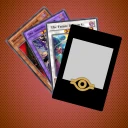
Screenshots
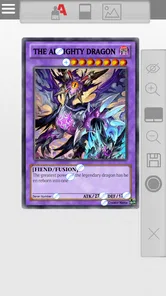
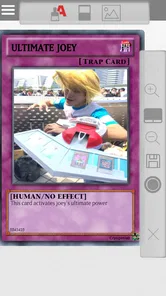
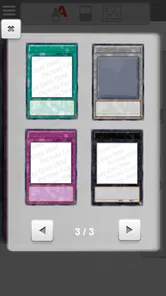
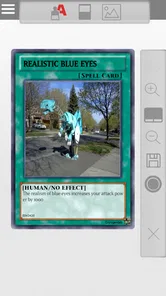
Analysis by Reviewed
I approached Yugioh Card Maker as a small creative tool rather than as a full card game. That distinction matters. It does not ask me to build a deck, manage a collection, or play a duel. Its purpose is to help me turn an idea into a custom Yu-Gi-Oh!-style card, then use that result for jokes, fan concepts, personal projects, or quick sharing with friends.
After spending time with it, my opinion is fairly clear: this is most useful when I already have a playful concept in mind and want to turn it into a recognizable card format without learning a complicated design program. It is less convincing for anyone looking for professional illustration tools, deep layout control, or a complete replacement for a desktop graphics editor. The app’s appeal comes from speed and accessibility, not from trying to become an all-purpose design studio.
What to consider before installing
The first decision is whether the idea matters more than perfect visual control. If I want to make a funny monster for a group chat, invent a card based on an inside joke, or sketch a fan-made concept, the focused format works in my favor. The card structure gives the result an immediate identity, even when the artwork and text are simple.
If I instead need polished promotional artwork, carefully managed typography, layered image editing, or a print-ready file, I would begin with a general design application. Those tools usually take longer to learn, but they offer more control over spacing, image treatment, and final presentation. This app is aimed at the moment between having an idea and having something shareable.
It is also worth considering the audience. The content rating is Everyone, which makes the concept approachable for younger users as well as longtime fans. Still, the quality of the finished card depends heavily on the image and wording I provide. A simple interface can remove technical barriers, but it cannot turn a vague idea into a good joke or a balanced card description by itself.
The app comes from AppTecc and sits in the comics category. That placement makes sense because the experience is closer to fan creativity and visual storytelling than to a traditional game. I would not install it expecting dueling rules, a campaign, or a card collection. I would install it when I want to create a card-shaped image.
The workflow is best for quick ideas
My preferred workflow is to decide the card’s personality before opening the editor. I first choose whether the result should be funny, dramatic, deliberately overpowered, or based on a real person or everyday object. Then I prepare a short name and a concise effect. This saves time because the limited canvas encourages direct writing rather than long explanations.
More From Our News Desk

 Gmail
GmailGmail in a Busy Inbox: Who Benefits Most?
From first account to crowded workday, Gmail earns its place through dependable search and flexible sorting—but its best fit depends on how much inbox maintenance you can tolerate.

 Prime Video
Switching to Prime Video: What Changes in Your Viewing Routine
Prime Video can make a compelling second home for streaming, but switching means learning a different catalog, rental layer, and route from browsing to playback.

 Universal TV Remote Control
Universal TV Remote Control Works Best as a Reliable Backup
A phone remote earns its place through quick setup and reliable habits. Here is how to get more from Universal TV Remote Control—and where its limits show.

 Weather - By Xiaomi
Weather by Xiaomi Review: Clear at a Glance, Less Clear Up Close
Xiaomi’s weather app makes everyday forecasts quick to scan, but its calm surface can leave useful details and recovery paths harder to find than they should be.

 X
XX Under Pressure: Can It Recover When Posting Goes Wrong?
A resilience-focused review of X, examining setup, mistaken posts, interruptions, weak connections, and the gaps that matter when recovery needs to be dependable.

 Clash of Clans
Clash of Clans Is Won Between the Battles
Its raids are quick; its community is a long-term project of coordination, teaching, rivalry, and shared responsibility—with all the friction that entails.
Latest News



A useful trick is to write the effect as if another person will read it in a few seconds. Long text can make a custom card feel crowded, especially when the joke depends on a single punchline. I get better results when I keep the central idea visible and move secondary details out of the card rather than trying to include everything.
For a realistic everyday example, I could make a birthday card for a friend whose special ability is always finding the last slice of pizza. Instead of sending a plain message, I could create a monster with the friend’s nickname, a suitable image, and a playful effect describing that talent. The finished image would work as a message attachment or a small surprise. That is the kind of low-pressure use where the app feels more valuable than its modest scope suggests.
Another practical use is brainstorming. I can create several rough versions of a character, compare their names and effects, and keep the one that communicates the idea best. I would not treat those drafts as finished artwork, but they can help me decide what a fan project, comic gag, or themed gift should look like before investing more time elsewhere.
Where the focused format wins
The strongest advantage is that the familiar card format does much of the visual organizing for me. I do not have to start with a blank page and decide where every element belongs. The recognizable structure gives a rough concept enough context to feel like a card immediately.
That focus also makes it easier to involve someone who is not comfortable with design software. A child, casual fan, or friend who only wants to make one silly creation is more likely to finish a project when the task feels contained. The app’s free entry point helps here, although optional purchases are listed at $2.49 per item, so I would still check the purchase choices before committing to a larger creative session.
The meme angle is another genuine strength. A custom card can communicate a joke through several layers at once: the image, the name, the apparent power, and the formal-sounding effect text. That combination is more distinctive than placing a caption over a random picture. When the joke is built around the card language itself, the format becomes part of the humor.
I also like the difference between making a card for private amusement and making one for public display. For a private joke, rough edges can be charming. A slightly absurd effect or an intentionally dramatic title may be exactly what makes the result work. The app supports that casual attitude better than a highly polished design suite, where I might spend more time adjusting details than enjoying the idea.
The current version is 2.0.0, and the app supports devices running Android 7.0 or later. That gives it a reasonably broad place on older compatible phones, though I would still judge the experience on the particular device rather than assume every screen will feel equally comfortable. Card editing benefits from enough room to read text and inspect the image, so a very small display may make the process less pleasant.
Small decisions that noticeably improve the result
One non-obvious lesson is that image choice matters more than I expected. A busy photograph can compete with the card frame and make the subject difficult to recognize. I get cleaner results from an image with one obvious focal point, strong contrast, and enough empty space around the character or object. Even without advanced editing, selecting the right source image improves the finished card immediately.
A second useful technique is to separate the joke from the explanation. The card should carry the quick version, while the message sent with it can provide the context. If I place the entire story inside the effect text, the card becomes harder to read and the humor loses its timing. A short effect often feels more authentic to the format than a paragraph explaining every detail.
Third, I would make a deliberately weak version before making an exaggeratedly powerful one. This sounds backwards, but it helps reveal whether the concept is funny or interesting without relying on huge numbers or dramatic claims. Once the basic idea works, I can make a stronger version for comic effect. This workflow is especially useful for fan concepts because it keeps the personality of the card ahead of empty decoration.
I would also save the original image and text separately before experimenting. A creative app is more enjoyable when I can revise freely, and keeping the source material means I can rebuild a favorite idea if I decide the first version is too crowded. This is a simple habit, but it reduces the cost of trying unusual layouts or alternate jokes.
Where another type of app may fit better
The usual alternatives fall into a few broad groups. A general image editor is better when I need layers, detailed retouching, custom backgrounds, or precise control over every visual element. A meme generator is better when the main goal is adding text to an image quickly. A presentation or poster tool is better when I want a larger composition with several characters, captions, and decorative elements.
Those alternatives may also suit a project that needs consistent branding. If I am preparing a series of cards with a shared visual identity, I may prefer a tool that lets me duplicate a template and adjust individual components with more control. This app is more attractive for one-off creations or small batches where the recognizable card concept matters more than exact uniformity.
I would skip it if I need official cards, tournament-ready material, or anything that could be mistaken for an authorized product. A custom maker can produce a fan-style image, but that does not make the result an official card or a playable addition to a real collection. I would also choose another tool for commercial artwork, detailed print preparation, or a serious illustration project.
There is a trade-off in choosing a specialized editor: the narrower the purpose, the less useful it becomes outside that purpose. That is not a flaw for the right user. It simply means I would not keep this installed as my main creative app. I would keep it for card ideas, fan humor, and quick visual gifts, then switch to a broader editor when the project grows beyond that frame.
What the free starting point really means
The app is free to install, which makes trying the basic concept easy. That is important because the value is personal: someone who enjoys inventing cards may return often, while someone who only wants one polished image may decide a different editor is more efficient. The listed in-app purchase price of $2.49 per item is modest in isolation, but repeated purchases can change the overall cost of a larger project.
My advice is to begin with one small creation and judge the workflow before buying anything. I would test the kind of card I actually want to make, not an imaginary best-case project. Can I express the joke in a short effect? Does the image look clear on my phone? Is the result good enough to send to the intended person? Those answers tell me more than the installation itself.
The cost of switching is low for casual users because the app’s purpose is narrow and easy to understand. If it does not match my needs, I can move to a meme editor or graphics app without having to rebuild an entire collection or learn a complex game system. The real investment is time spent creating ideas, so I would preserve any text and images I care about before changing tools.
For families, I would set expectations around purchases before handing over the device. The Everyone rating makes the app broadly approachable, but the presence of optional items means the person using it should know which parts are free and which may involve a charge. That is a practical consideration, especially when a child is experimenting enthusiastically with multiple card concepts.
How established interest should influence your choice
The app has an average rating of 4.0 from around 500 ratings, with a little over 20 written reviews. I read that as a sign of a generally positive but not overwhelming experience. It has also passed 50 thousand installs, so it is not an obscure experiment with no audience at all. Those figures make me comfortable recommending a trial, but they do not replace testing the editor against my own expectations.
Popularity is less important here than fit. A person who loves card jokes may get more from a simple focused tool than from a highly rated general editor. Someone who values professional control may feel limited even if the app works exactly as intended. I would use the audience numbers as reassurance that the concept has found interest, not as proof that it is the best choice for every creative task.
My recommendation for different kinds of users
I recommend it to Yu-Gi-Oh! fans who enjoy fan-made ideas, people who want a distinctive meme format, and families looking for a light creative activity. It is also a good choice for anyone who wants to make a personalized digital gift without learning a full graphics package. The best results come from users who enjoy writing a short effect and choosing an image with a clear visual joke.
I would recommend caution to users who care about exact professional presentation. If the card is part of a larger illustration, a printed project, or a polished social media campaign, I would start elsewhere and use this app only for rough concepts. I would also skip it if I am searching for an actual card game, because creating an image and playing a duel are completely different experiences.
My final view is that this is a pleasant specialist tool with a clear purpose. It wins through immediacy: I can begin with a joke or character idea and turn it into something recognizable without wrestling with a blank canvas. Its limitations become obvious when I ask for detailed editing, broad design flexibility, or official gameplay relevance.
My recommendation is to try it when the card format itself is part of the fun. Start with one short, visually clear concept, keep the text concise, and decide afterward whether the available options justify any purchase. For quick fan creations and playful memes, it earns a place on my device. For serious design work, I would switch to a broader editor rather than forcing this focused app to do a job it was never meant to handle.
Yugioh Card Maker Frequently Asked Questions
Is Yu-Gi-Oh! Card Maker suitable for children?
The app has an Everyone age rating, and its focus is creating custom Yu-Gi-Oh!-inspired cards and memes. Children can use it for creative projects, though parents may want to guide younger users when they choose artwork or share designs. The app is a fan-made creative tool, not an official Yu-Gi-Oh! game or a source of tournament-legal cards.
What is Yu-Gi-Oh! Card Maker?
Yu-Gi-Oh! Card Maker is a fan-oriented card creation tool that lets users design custom cards inspired by the Yu-Gi-Oh! trading card game. It typically allows you to add a card name, artwork, type, attribute, level, effect text, attack, defense, and other visual details. It is mainly intended for creative projects, casual duels, collections, and sharing designs rather than official tournament play. The app is listed in the Comics category and is developed by AppTecc.
Can cards created with Yu-Gi-Oh! Card Maker be used in official Yu-Gi-Oh! tournaments?
No. Cards made with Yu-Gi-Oh! Card Maker are unofficial creations and are not recognized as legal cards for sanctioned Yu-Gi-Oh! tournaments, official events, or competitive online platforms. They can be useful for testing ideas or playing casually with friends, but you should always use genuine, officially released cards when participating in organized play. The app does not grant any official status to custom designs.
Is Yu-Gi-Oh! Card Maker free to download and use?
Yu-Gi-Oh! Card Maker is free to download, with in-app purchases priced at $2.49 per item. The app’s current version is 2.0.0, and it requires Android 7.0 or later. Check the app store page before installing to review its current compatibility and purchase details, and use the official store rather than an unofficial download source.
What can I customize when creating a card?
The available customization options can vary by version, but card makers commonly let you edit the card title, artwork, card category, attribute, level or rank, description, attack, defense, and sometimes set information or rarity-style elements. You may also be able to preview the finished design and save it as an image. Because these are custom cards, careful wording and balanced statistics are important if you plan to use them in casual games.
Pros
- Easy-to-use interface for designing custom Yu-Gi-Oh! cards
- Offers creative freedom for fan-made card concepts
- Useful for planning decks
- fan projects
- and custom duels
- Card previews make it easy to check the final design
- Lightweight app that works well on most modern devices
Cons
- Some advanced customization options may be limited
- Created cards may not follow official tournament rules
- Image quality can vary depending on the source artwork
- May include ads or prompts for optional purchases
- Not an official Konami app or connected to the real card game











