WN Social (Worldnoor)
- 47.00
- 3.7
- Installs
- 1.00M
- Price
- Free

Screenshots

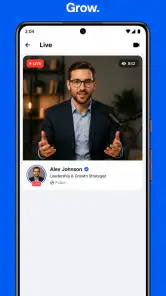
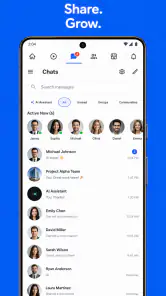
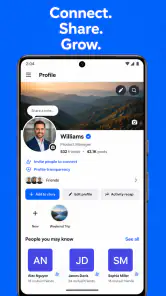
Analysis by Reviewed
I tried WN Social as a social networking app with a slightly different priority from the usual mainstream platforms: it presents itself as a place where privacy and freedom of speech matter. That positioning immediately made me think about shared phones, household conversations, and the small boundaries that become important when more than one person uses the same device. My overall impression is that it can be worthwhile for people who want another social space, but it works best when every household member treats it as an individual account rather than a communal noticeboard.
WN Social is free to use, belongs to the Social category, and comes from Posh Enterprise Inc. It has reached over a million installs and holds an average rating of 3.7 from around three thousand ratings, which suggests a real user base but also a mixed experience rather than universal approval. It is aimed at Teen users, so I would not treat it as a child-focused family app or assume that its social environment is suitable for younger children simply because it is easy to install.
Using WN Social Around a Shared Household
Why a shared-device scenario needs care
The most realistic household use case is not everyone passing one account around. It is one phone or tablet being used at different times, with each person maintaining a separate identity and remembering to switch accounts or sign out properly when necessary. That sounds obvious, but social apps are full of personal messages, follows, reactions, and posting history, so a casual handoff can expose much more than intended.
I would be comfortable recommending it on a family tablet only when the adults in the home agree on clear account boundaries first. A parent might use it to follow conversations and communities that matter to them, while a teenager uses a separate account to build their own social circle. The important point is that the device can be shared without making the profiles shared. WN Social is a social network, not a household coordination tool, and treating it like a family calendar would create confusion.
In everyday use, I found that the app makes more sense when I approach it with a specific purpose. I might open it during a break to catch up on posts, take part in a discussion, or publish something for my own network. I would not use it as the place where everyone in the home records shopping needs, school reminders, or urgent messages. A conventional messaging app, shared notes app, or family calendar is better for those jobs because those tools are designed around direct coordination rather than public or semi-public social activity.
Setting boundaries before the first post
The first useful household rule is simple: decide whose account is open before anyone starts browsing or writing. On a shared device, I would check the visible profile identity at the beginning of every session, especially before commenting or publishing. A mistaken reaction is awkward; a post made from the wrong account can be much harder to explain.
I would also keep personal conversations separate from household logistics. If I need to tell someone at home that dinner is ready, I would say it directly or use a private family channel elsewhere rather than assuming a social feed will deliver the message quickly. This is one of the less obvious trade-offs with WN Social: a platform built around personal expression can encourage people to mix public identity, private relationships, and practical errands unless they deliberately keep those purposes apart.
More From Our News Desk

Clash of Clans Is Won Between the Battles

Android Auto Makes the Case for Quieter Car Software

MobiOffice: Transforming Mobile Productivity with Seamless Integration

EA SPORTS FC™ Mobile Soccer: Redefining Mobile Sports Gaming

How Microsoft OneDrive Became a Mobile Productivity Giant

How Google Translate Breaks Language Barriers Effortlessly
For a shared tablet, I would avoid leaving the app open on a profile when handing the device to another person. I would close the session or use the device's own user separation if available. That is not a special WN Social feature; it is a sensible layer of protection around any social app. The same habit matters when a teenager borrows a parent's phone, when siblings share a tablet during travel, or when a guest uses a household device for a few minutes.
There is another boundary I consider important: do not use one person's account as the family's public voice. A parent posting on behalf of a teenager, or a teenager replying for a parent, blurs responsibility and can make later conversations uncomfortable. Separate accounts preserve context. They also make it easier for each person to decide what they want to share, whom they want to follow, and how visible their social activity should be.
Coordination without turning the feed into a noticeboard
WN Social can support indirect coordination in the sense that household members may discover the same topics, exchange opinions, or point one another toward a post. I can imagine a family discussing an interesting conversation over dinner and then showing each other relevant content. That is a pleasant secondary use, but it depends on everyone being online at the right time and seeing the same material. It should not replace a direct message for anything important.
A practical routine is to use the app for discovery and discussion, then move decisions to a more suitable channel. For example, I might find a local-interest conversation, send the idea to a family member through a direct method, and use a shared list to decide what to do. This two-step workflow prevents a social feed from becoming the single source of truth for plans. It also helps when one person does not use the app regularly or prefers not to join the same online communities.
The privacy angle makes this separation even more useful. A household may share a physical address, schedule, or travel plans, but that does not mean those details belong in a social post. I would keep posts general unless I had considered who could read them and how long the information might remain useful. WN Social's privacy-focused identity may appeal to people who think carefully about these issues, but no social platform removes the need for good posting judgment.
Another useful habit is to agree on what counts as an urgent message. If someone needs an immediate response, WN Social should not be the only route. A phone call or direct household channel is more dependable for time-sensitive matters. The app is better for conversations that can wait, personal updates, and participation in a wider social environment.
Teen access, age context, and trust
The Teen content rating is an important part of the decision for families. I read it as a signal that the app is intended for older children and teenagers rather than young kids, but I would still make the choice based on the individual teenager's maturity and online habits. An age label is not a substitute for conversation about strangers, personal information, screenshots, arguments, and the difference between a public opinion and a private disclosure.
For a teenager using WN Social, I would establish expectations before installation: do not share identifying details casually, do not meet an online contact without an adult-approved plan, and pause before responding to hostile discussions. These are not accusations about the app; they are basic rules for participating in any social network. The platform's emphasis on freedom of speech may attract open debate, but open debate can also expose users to opinions and exchanges they find unpleasant.
I would not recommend installing it for a younger child simply because an older sibling already has it. The Teen rating makes that shortcut especially poor. A parent should consider whether the child can manage account boundaries, recognize manipulative behavior, and ask for help when a conversation becomes uncomfortable. If the answer is no, waiting is more sensible than trying to supervise every moment of use.
Trust works better here than pretending a parent can control every interaction. I would ask a teenager what they enjoy reading, which discussions feel useful, and what makes them uncomfortable. That approach gives the young user a reason to speak up. At the same time, parents should remember that a teenager's account is not automatically a family account. Respecting privacy at home means not reading everything by default, while responsible supervision means staying available when something genuinely worrying happens.
What the app feels like in regular use
My experience with WN Social is shaped less by complicated setup and more by the quality of the social environment I choose to enter. The app's store summary points toward privacy and freedom of speech, and that gives it a clear identity compared with networks that feel dominated by entertainment, advertising, or carefully polished public personas. I appreciate having a platform where the stated purpose encourages me to think about control over my online participation.
That identity is also where the main trade-off appears. Freedom of speech can make a platform feel more open, but openness does not guarantee that every discussion will be thoughtful, welcoming, or useful. I would expect to spend some time deciding which conversations deserve attention and which are better ignored. Someone who wants a tightly moderated, highly predictable social feed may prefer a smaller private community or a platform with stronger filtering and clearer topic boundaries.
The app is more appealing to people who want to explore an alternative social space than to people searching for a complete replacement for every service they already use. If my friends, relatives, or favorite groups are concentrated elsewhere, WN Social cannot solve that social graph problem by itself. A network becomes valuable through the people and conversations available to me, not only through its stated principles.
The current version is 3.1, and the app supports devices running Android 7.0 or later. That broad compatibility is useful for households with an older Android phone or tablet that does not run the newest operating system. I would still check the device's available storage, performance, and account setup before making it the family's shared social device, because an older device can make any modern social app feel less responsive even when it meets the minimum requirement.
Privacy expectations and everyday habits
Privacy is the reason many readers will probably consider WN Social, so I think it deserves a practical interpretation rather than a slogan. I value an app that presents privacy as part of its identity, but I still decide carefully what I post, who can connect with me, and whether a household detail belongs online at all. Privacy is partly a platform matter and partly a user habit.
On a shared device, I would review the account currently in use before opening notifications or replying to a discussion. I would also avoid saving personal drafts where another household member might see them. These small steps are easy to overlook because the device feels familiar, yet social content can be more sensitive than ordinary browsing history.
For families, I would make one more distinction: privacy from the platform, privacy from other users, and privacy from people who share the device are three different concerns. WN Social's privacy-oriented positioning addresses the first concern in spirit, but the second still depends on what I publish and whom I engage with. The third depends heavily on device habits, account separation, and whether someone leaves a session open.
How it compares with familiar social alternatives
Compared with a mainstream network built around a large existing friend list, WN Social feels more like an intentional alternative. Its appeal is strongest when I want to try a social environment associated with privacy and freedom of speech rather than simply follow the same contacts I already see elsewhere. The cost of that choice is that I may need to persuade friends or relatives to join, and the conversations I want may not be as easy to find.
Compared with a private messaging app, it serves a different purpose. Messaging is better for direct household coordination, sensitive conversations, and quick answers. WN Social is better when I want to participate in a broader social setting or share something beyond one small group. Using the two together is more realistic than expecting one platform to handle both jobs.
Compared with a moderated community forum, WN Social may appeal to someone who wants a wider personal network and a more general social identity. A focused forum is often better for detailed advice, specialist knowledge, or a clearly defined interest. I would choose WN Social for general social participation, then move to a focused community when I need depth and reliable topic expertise.
Compared with a family-focused app, it lacks the household-first mindset that makes shared tasks easy to organize. That is not a defect in itself; it simply means the app should be assigned the right role. I would use it for personal social activity and keep chores, schedules, emergency contacts, and shared responsibilities in tools designed for those purposes.
Who should try it, and who should skip it
I think WN Social is a reasonable choice for adults and mature teenagers who want to explore a social network with privacy and freedom of speech at the center of its identity. It is also a practical option for someone with an older compatible Android device who wants a free way to join a different online community. The fact that it has passed a million installs shows that it is not an obscure experiment with no audience at all.
I would be more cautious if my main goal were to keep a household organized. The app is not where I would manage shared shopping, school pickups, medical reminders, or urgent travel changes. I would also hesitate to recommend it to someone who dislikes open-ended social discussion, wants a very controlled feed, or expects every friend to be available immediately.
People who are especially sensitive to account mix-ups should use it only on a device with clear user separation. Likewise, anyone who wants a social app for a young child should look elsewhere and choose a product designed for that age group. The Teen rating should guide that decision rather than being treated as a minor label.
My household verdict
After using WN Social, I see its best role as a personal social space that can coexist with a shared household device, provided the boundaries are deliberate. I like its clear focus on privacy and freedom of speech, and I appreciate that it is free and available on older Android versions. Those qualities make it easy to try without turning the decision into a major commitment.
The limitations are just as important. A social network cannot automatically become a family communication system, and an open discussion environment will not suit everyone. The Teen rating calls for thoughtful adult guidance, while shared-device use demands careful attention to which account is active. None of those issues makes the app unusable, but they do change how I would introduce it at home.
My recommendation is to treat WN Social as an individual account-based social network, not as a shared family workspace. Install it when you value an alternative social environment and are willing to manage your own boundaries. Keep direct coordination elsewhere, talk honestly with teenagers about trust and online behavior, and give every household member a separate identity. Used that way, it can be a useful addition to a digital routine; used as a catch-all for family life, it is the wrong tool.
WN Social (Worldnoor) Frequently Asked Questions
Who is WN Social designed for?
WN Social is a social app for people who want to connect with others and take part in online conversations. Its store summary presents it as a platform that respects privacy and freedom of speech, making those priorities part of its identity. The app is rated Teen, so users and families should consider that age guidance when deciding whether it is appropriate.
What is WN Social (Worldnoor)?
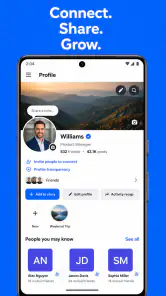
WN Social, also known as Worldnoor, is a social networking application designed for connecting with people, sharing posts, photos, videos, and updates, and discovering content from different communities. During our review, the app felt focused on general social interaction rather than one specific interest. Users can create a profile, follow or connect with others, and use the platform to communicate and participate in discussions.
Is WN Social free to download and use?
WN Social is generally available as a free download for Android and iOS devices, allowing users to create an account and access its main social features without an upfront purchase. However, availability, optional services, advertising, or certain features may vary depending on the version and region. Before downloading, check the official app-store listing for current pricing, supported devices, and any in-app purchase information.
What can I do with WN Social?
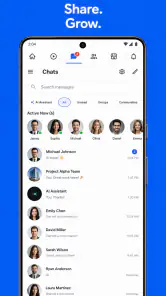
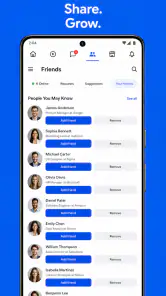
With WN Social, users can build a personal profile, publish status updates, share multimedia content, browse posts, and interact with other members through reactions, comments, or messaging features where available. The experience is intended for meeting people and keeping up with online communities. The exact tools may change as the platform receives updates, so some functions can differ between Android and iOS.
Is WN Social safe and private to use?
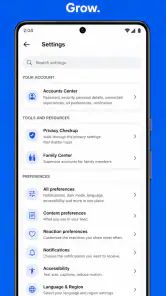
As with any social network, privacy and safety depend partly on the information you choose to share and how you manage your account. We recommend reviewing Worldnoor’s privacy policy, checking profile visibility settings, and avoiding the publication of sensitive personal details. Users should also be cautious when communicating with strangers, use strong login credentials, and report or block suspicious accounts or inappropriate content.
Pros
- Connects users through a global
- culturally diverse social network.
- Supports sharing photos
- videos
- posts
- and everyday updates.
- Offers messaging features for more direct conversations with contacts.
- Provides a familiar social-media layout that is easy to navigate.
- Available on mobile devices for convenient access while traveling.
Cons
- The user base may be smaller than on major social networks.
- Content quality and activity can vary significantly by region.
- Privacy settings should be reviewed carefully before posting personal details.
- Some features may feel limited compared with larger established platforms.
- Performance may depend on connection quality and device compatibility.

- Category
- Social
- Version
- 3.1