Tor OBD2 Diagnostics
- 118.00
- 3.8
- Installs
- 1.00M
- Price
- Free
Screenshots
Analysis by Reviewed
I find that the most useful thing about a phone-based vehicle diagnostic tool is not simply seeing a number on a screen; it is being able to check what the car is reporting before deciding what to do next. Tor OBD2 Diagnostics is aimed at that practical moment, pairing with an ELM327 Bluetooth or Wi-Fi adapter to help you inspect a car or motorcycle. It is free to install, though some items are offered as in-app purchases, and I would treat it as a useful companion rather than a substitute for a proper mechanical diagnosis.
When the connection is part of the job
Because the app works with an adapter, the first question is whether your adapter and vehicle are compatible. Bluetooth and Wi-Fi are both supported connection types, but the adapter still has to communicate with the vehicle correctly. I would check that before relying on the app for a particular model. A phone showing no vehicle data does not automatically mean the car has a fault; the adapter, its connection, or vehicle compatibility may be the issue.
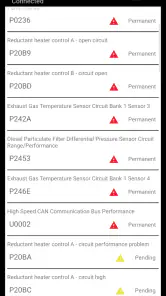
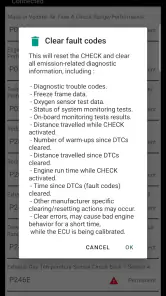
That distinction matters when a warning light appears. A code can give you a useful starting point for a conversation with a mechanic, but it is not, by itself, proof of which part has failed. I would write down the code and the circumstances in which the light appeared, then get the cause checked before clearing anything. Turning off a warning without fixing its cause can make it harder to notice if the problem returns.
A practical fit for the garage and the driveway
The app makes the most sense for a driver who already has an ELM327 adapter, enjoys checking basic vehicle information, or wants a little more context before arranging a repair. It also covers motorcycles, which makes it more flexible than a car-only tool for someone who maintains both. If you do not own a compatible adapter, remember that installing the app alone does not create a connection to your vehicle.
For example, if a dashboard light comes on before a weekend trip, I would park safely, connect the adapter, and use the reading as an initial clue—not as permission to keep driving. A serious symptom such as unusual noises, smoke, overheating, or poor braking calls for stopping and getting qualified help, regardless of what a phone screen reports. That is where a professional inspection is a better choice than trying to diagnose everything yourself.
Unveiling the Dashboard
First off, getting started with Tor OBD2 Diagnostics is as smooth as a Sunday drive. You just need a compatible OBD2 Bluetooth adapter, and you're ready to hit the digital road. The app’s interface is clean and intuitive, making even the least tech-savvy among us feel like a pro. Once connected, it feels like you’ve opened a secret passageway into your car’s brain.
Features That Steal the Show
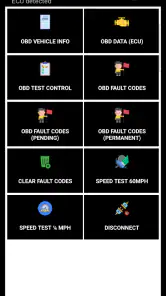
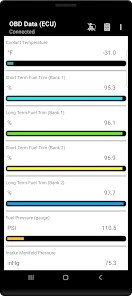
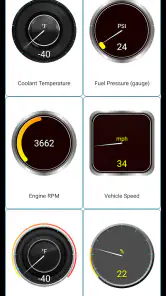
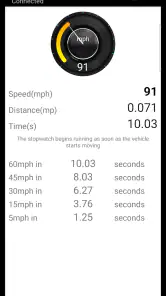
Let’s talk features because, trust me, this app is packed. From reading and clearing diagnostic trouble codes to monitoring real-time engine data, Tor OBD2 Diagnostics offers it all. Imagine having the power to see your car’s speed, RPM, fuel consumption, and more, right on your phone. It’s like turning your vehicle into a high-tech gadget.
More From Our News Desk

Weather by Xiaomi Review: Clear at a Glance, Less Clear Up Close

X Under Pressure: Can It Recover When Posting Goes Wrong?

Clash of Clans Is Won Between the Battles

Android Auto Makes the Case for Quieter Car Software

MobiOffice: Transforming Mobile Productivity with Seamless Integration

EA SPORTS FC™ Mobile Soccer: Redefining Mobile Sports Gaming
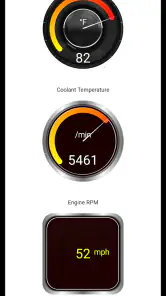
What really caught my attention was the customizable dashboard. You can set it up just the way you like it, displaying the information you care about most. Whether you're a data junkie or just curious about what’s happening under the hood, this app gives you the front-seat view.
Using readings without over-trusting them
For a calmer first session, I would start with the diagnostic code and only a few live readings that answer a question I already have. Too many numbers at once can be distracting, especially if you are trying to compare behavior over time. A useful habit is to note the conditions—such as whether the engine is cold or warmed up—so a later reading has some context instead of becoming a number without a clear comparison.
Real-time vehicle information is best checked while parked. Even if a dashboard can display readings, I would not try to study a phone while driving; a passenger can monitor it, or you can review the information after stopping. This keeps the app in its proper role: a way to inspect and understand the vehicle, not another screen competing for attention on the road.
Making a short check more useful
I would approach a first scan with one clear question rather than treating the dashboard as a general-purpose control panel. If the question is whether a warning has left a stored code, read that first and keep a note of the result. If the question is how the engine behaves after it warms up, choose only the readings relevant to that check. This makes it easier to tell useful information from numbers that are interesting but not actionable.
A practical habit is to record the code and the conditions around it before discussing a repair: when the warning appeared, whether the engine was cold or warm, and whether the vehicle felt different. That small record can help a mechanic understand the sequence instead of starting with a vague report that a light came on. I would avoid repeatedly clearing a code just to see whether it returns; preserving the initial clue is usually more useful than making the dashboard look tidy.
Driving Insights
One of my favorite aspects is how this app provides insights into your driving habits. Are you too heavy on the pedal? Is your fuel efficiency not up to par? The app offers feedback that can help you not just catch potential issues early but also improve your overall driving efficiency. It’s like having a driving coach, minus the backseat driver vibe.
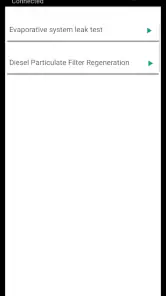
Plus, those pesky warning lights that seem to have a mind of their own? With this app, you can finally decode what they’re trying to tell you. No more guessing games at the mechanic’s.
Everyday use beyond a warning light
Not every useful check begins with a fault. If I were comparing how a vehicle behaves on a familiar commute, I would use a repeatable routine: check the same readings under similar conditions, keep the phone out of the driver’s hands, and compare observations only after stopping. That is a more grounded way to notice a change than trying to interpret a single number in isolation. It also helps keep curiosity from turning into a distraction.
For someone with both a car and a motorcycle, having one phone-based tool to try across both can be convenient, provided each vehicle and adapter communicate properly. I would still treat every connection as vehicle-specific rather than assume a successful session with one guarantees a successful session with the other. If a motorcycle is being checked before a ride, the same rule applies as with a car: a reassuring screen cannot overrule a worrying mechanical symptom.
Where it sits among diagnostic options
Compared with a dedicated scan tool, this approach puts the display on a device you already carry, which can be convenient for quick checks and viewing data in a familiar format. A workshop scanner or professional mechanic is still the stronger option when a fault needs deeper testing, a repair decision, or expertise beyond reading codes. I see the app as a bridge between noticing a warning and having an informed discussion—not as a replacement for either a repair manual or a technician.
It also differs from simply searching a warning light online. A search can explain general possibilities, but a reading from the vehicle gives you a more specific starting point to discuss. Neither replaces diagnosis: a code can point toward a system without proving which component is responsible, and general advice may not fit your vehicle’s exact situation. The useful middle ground is to collect the code and symptoms, then choose whether a qualified inspection is warranted.
If a connection drops or the app shows no readings, I would first check that the adapter is seated properly, confirm the phone is using the adapter’s Bluetooth or Wi-Fi connection as appropriate, and try again while parked. If it still will not communicate, checking the adapter and vehicle compatibility is more useful than repeatedly clearing or changing vehicle data. This simple recovery approach also helps separate a connection problem from a possible vehicle fault.
When a connection does not come through
A failed session can be frustrating because it leaves two possibilities open: the phone and adapter have not established communication, or the vehicle is not responding as expected. I would work through those possibilities one at a time instead of treating a blank screen as a diagnosis. Make sure the adapter is properly seated, check that the phone is using the matching connection type, and retry only when the vehicle is safely parked. If that changes nothing, pause and verify compatibility rather than making several changes at once.
That measured approach matters most when a warning has appeared. A connection problem is not evidence that the vehicle is healthy, just as a successful connection does not prove that every system has been checked. If the vehicle is behaving abnormally, I would put safe handling and professional advice ahead of getting the app to connect. The phone tool is most valuable when it adds context without delaying a sensible decision.
Who should choose it—and who should pass
Tor OBD2 Diagnostics is a reasonable fit for curious owners who want a hands-on look at vehicle information and are comfortable pairing a phone with an adapter. It is less suitable if you want a guaranteed diagnosis without learning what a code means, need repair instructions, or expect an app to fix a mechanical problem. In those cases, a mechanic or a more specialized diagnostic tool is the safer route.
The app is also not the best first purchase for someone who wants a complete diagnosis but has no compatible adapter. The hardware is part of the setup, so I would check that requirement before expecting a phone-only experience. On the other hand, if an adapter is already available and the goal is to gather a useful clue before booking service, this can be a practical way to make that first conversation more informed.
Tor OBD2 Diagnostics has an average rating of 3.8 from around 28,000 ratings, and it has been installed over a million times. Tor OBD2 Diagnostics is developed by Tor OBD2 Diagnostics, is rated for everyone, and version 9.9.0.6 requires Android 5.0 or later. Those details make it accessible to many Android users, while the adapter requirement remains the practical gatekeeper. The app’s connectivity is central to the experience: a working adapter and a sensible place to check readings matter more than simply opening the app.
It is free to download, with in-app purchases listed at $3.49 per item. I would begin by checking whether the basic workflow meets your needs before paying for anything, especially if you only expect to scan occasionally. The app is best judged by whether it helps you get a relevant reading from your own vehicle, not by how many dashboard values you can put on screen.
What to expect from setup and continued use
The most useful preparation happens before a warning appears: know where the vehicle’s diagnostic port is, keep the adapter accessible, and understand whether it connects to your phone through Bluetooth or Wi-Fi. That avoids trying to solve a setup puzzle at the roadside when you are already concerned. I would also make the first attempt at home or in another safe place, so you can learn the connection steps without traffic or time pressure.
For everyday use, I would not leave the app open just to watch numbers change. A short, purposeful check is easier to interpret and less likely to turn into screen-watching. If you plan to compare readings on different days, write down the driving conditions too; a changed route, temperature, or engine state can make a comparison less meaningful. The app supplies a view of vehicle information, but the owner still has to decide what comparison is fair.
Wrapping It Up
In a world where technology is advancing at breakneck speed, Tor OBD2 Diagnostics proves to be a valuable companion for anyone wanting to understand their vehicle better. It’s not just about diagnosing problems; it’s about empowering you with knowledge. After all, knowledge is power, especially when it comes to something as essential as your car.
So, next time you’re puzzled by a dashboard light or curious about your car's performance, remember that this app is like having a mechanic in your pocket. Just plug in, connect, and drive with confidence. Happy motoring!
Tor OBD2 Diagnostics Frequently Asked Questions
Is Tor OBD2 Diagnostics free to download, and are there in-app purchases?
Tor OBD2 Diagnostics is free to download, so you can install it and explore the app without paying an upfront purchase price. It also offers in-app purchases priced at $3.49 per item. Keep in mind that an ELM327 adapter is needed to connect the app to a vehicle, and that hardware is separate from the app download.
Can Tor OBD2 Diagnostics identify a problem without a mechanic?
Tor OBD2 Diagnostics can help you view vehicle information and diagnostic trouble codes when it is connected through a compatible ELM327 adapter. Those readings can offer a useful starting point for understanding a warning or performance concern, but they are not a substitute for a mechanic’s inspection. Treat diagnostic results as information to interpret, especially before attempting repairs or making decisions about vehicle safety.
Can I use Tor OBD2 Diagnostics with a motorcycle?
Tor OBD2 Diagnostics is described as a vehicle and motorcycle diagnostic application, so it may be useful for checking a motorcycle when you have a compatible ELM327 Bluetooth or Wi-Fi adapter. The adapter is essential: the app relies on it to communicate with the vehicle. Before downloading, check that your motorcycle supports OBD2 and that your adapter works with it.
What do I need to connect Tor OBD2 Diagnostics to my vehicle?
You will need an ELM327 OBD2 adapter that connects to your vehicle’s OBD2 port and communicates with your phone over Bluetooth or Wi-Fi. The app uses that connection to access vehicle information, so downloading the app alone is not enough to run diagnostics. Check that the adapter is compatible with both your vehicle and your phone before relying on it.
What is Tor OBD2 Diagnostics and what does it do?
Tor OBD2 Diagnostics is an advanced vehicle diagnostics app designed for car enthusiasts and mechanics alike. It connects to your car's OBD2 port to provide real-time data, diagnostic trouble codes, and performance metrics. This app helps users diagnose vehicle issues, monitor performance, and understand their car's health without needing specialized equipment. It is intended to work with an ELM327 Bluetooth or Wi-Fi adapter, which provides the connection to the vehicle.
Pros
- User-friendly interface for quick diagnostics
- Supports various car models and brands
- Real-time data monitoring is highly accurate
- Affordable compared to professional tools
- Frequent updates with new features
Cons
- Limited features in free version
- Requires Bluetooth adapter for connection
- Some advanced features are hard to use
- Occasional connectivity issues with older cars
- In-app ads can be intrusive
- Category
- Auto & Vehicles
- Version
- 9.9.0.6