

The Bible in pictures
- 46.00
- 4.7
- Installs
- 50.00K
- Price
- Free

Screenshots

Analysis by Reviewed
I can see this working best in a household where people want a visual starting point for Bible stories rather than another long reading session. The Bible in Pictures turns the material into illustrated episodes, which can make it easier for a child or a newcomer to follow the main events. I’d use it as a shared conversation aid: look through a story together, pause at an image, and ask what each person thinks is happening. That approach makes the illustrations useful without treating them as a substitute for the full text.
Making a shared session work
A small bit of coordination can make a shared session feel more relaxed. Before opening the app, I’d agree on who is choosing the story and whether the group wants to browse freely or focus on one episode. That prevents one person from taking over the phone and gives quieter family members a chance to join in. If people have different interests, taking turns choosing is an easy way to keep the session welcoming without needing a formal schedule.
It can also help to decide what the group wants from the pictures. A younger child might enjoy noticing characters and actions, while an older reader may want to ask why a scene matters or what happened before it. I wouldn’t force everyone to discuss every image. A short pause when someone is curious is usually more natural than stopping at every panel, and it keeps the app from feeling like homework.
A shared screen needs a little planning
On a family tablet or phone passed between relatives, I’d set expectations before handing it over. Agree on whether someone is browsing alone or whether the app is being used together, and keep any personal reading routine separate from a group session. That is a practical boundary, not a feature of the app: shared access can blur where one person’s exploration ends and another’s begins. If you want everyone to follow a different pace, taking turns or choosing a story together is simpler than assuming the app will manage household routines for you.
A realistic use is a quiet few minutes after dinner: an adult and child choose a story, look at the pictures, and talk about the people and choices shown. I’d keep the session open-ended rather than turning it into a quiz. A picture may prompt questions that need a fuller answer, and that is a good moment to bring in a printed Bible or a trusted explanation. The app is most useful as an invitation to discuss, not as the final word on every passage.
Visual Storytelling at Its Best
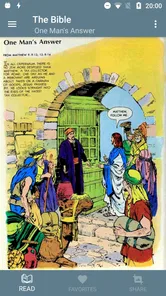
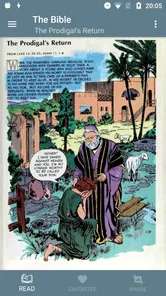
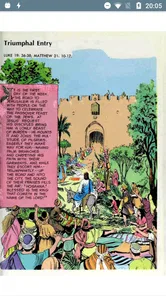
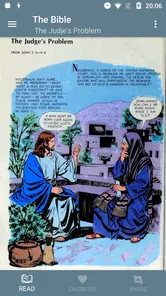
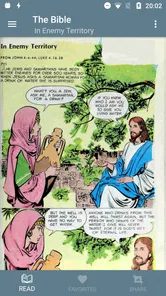
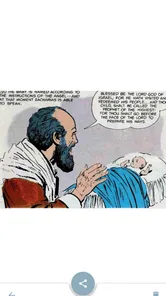
The first thing that struck me about The Bible in Pictures is its vibrant, high-quality images. Each story is depicted through stunning illustrations that capture the essence and emotions of biblical tales. It's like having a graphic novel version of the Bible right at your fingertips. If you're a visual learner, this app is a game-changer. You get to see the stories unfold in a way that’s both engaging and easy to understand.
Easy Navigation and User-Friendly Interface
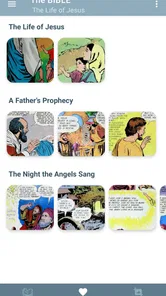
One of the things I appreciate most about this app is its user-friendly interface. Everything is organized neatly, making it super easy to find your favorite stories or explore new ones. Whether you're a tech newbie or a seasoned app user, navigating through the app is a breeze. Plus, the way the stories are categorized allows you to jump right into any part of the Bible you're interested in.
More From Our News Desk

 Gmail
GmailGmail in a Busy Inbox: Who Benefits Most?
From first account to crowded workday, Gmail earns its place through dependable search and flexible sorting—but its best fit depends on how much inbox maintenance you can tolerate.

 Prime Video
Switching to Prime Video: What Changes in Your Viewing Routine
Prime Video can make a compelling second home for streaming, but switching means learning a different catalog, rental layer, and route from browsing to playback.

 Universal TV Remote Control
Universal TV Remote Control Works Best as a Reliable Backup
A phone remote earns its place through quick setup and reliable habits. Here is how to get more from Universal TV Remote Control—and where its limits show.

 Weather - By Xiaomi
Weather by Xiaomi Review: Clear at a Glance, Less Clear Up Close
Xiaomi’s weather app makes everyday forecasts quick to scan, but its calm surface can leave useful details and recovery paths harder to find than they should be.

 X
XX Under Pressure: Can It Recover When Posting Goes Wrong?
A resilience-focused review of X, examining setup, mistaken posts, interruptions, weak connections, and the gaps that matter when recovery needs to be dependable.

 Clash of Clans
Clash of Clans Is Won Between the Battles
Its raids are quick; its community is a long-term project of coordination, teaching, rivalry, and shared responsibility—with all the friction that entails.
Latest News



That organization is useful when someone has only a few minutes or does not know where to begin. Rather than trying to read from the start, I’d pick a story that has come up in a conversation or that a child already recognizes. For a group, choosing together can be quicker than browsing on behalf of everyone. One practical trade-off is that a quick entry point encourages exploration, but it may also lead readers to jump between stories without noticing how they connect. If continuity matters, I’d agree on a small sequence of stories before starting.
Perfect for All Ages
This app is not just for adults; it’s perfect for kids too! The illustrations are not only beautiful but also child-friendly, making it a great tool for introducing children to biblical stories. The app transforms the sometimes complex narratives of the Bible into digestible, visual pieces that can capture the imagination of young and old alike.
For children, I’d treat “all ages” as a reason to share the app, not as a promise that every story will suit every child equally. Parents can browse alongside younger readers and decide which material fits their family’s values and the child’s maturity. Older readers may also want to compare an illustrated retelling with the wording and context of a particular passage, especially when they are studying rather than simply exploring.
That makes adult presence especially useful on a shared device. A child may be ready to look at pictures independently but still need help understanding unfamiliar names, conflict, or choices in a story. I’d use the illustrations as prompts: ask what the child noticed, then offer context when they ask for it. This gives the adult room to tailor the conversation instead of assuming that a single presentation will land the same way for every age.
Moreover, it’s a fantastic resource for family bonding. You can sit together and explore the stories, making it a shared experience. It’s fun, educational, and a great way to discuss values and teachings with your little ones.
Choosing it alongside other ways to read
Compared with a standard Bible-reading app, this one puts visual narrative first. That can be a real advantage when someone finds dense text difficult to enter, or when you want a quick, shared introduction to a story. A printed Bible or a text-focused app is the better choice for close reading, checking exact wording, or following a study plan. I’d use the pictures to spark interest, then switch formats when the conversation needs more context. That two-step routine is a practical way to enjoy the accessible presentation without mistaking an illustrated retelling for every kind of Bible study.
The formats also suit different moments. An illustrated story is handy when people are sitting together and want a common point to look at; a text version is easier when one person wants to read quietly, mark a passage, or compare wording. If your main aim is to build a consistent reading habit, a dedicated text-led tool or a physical Bible may fit better. If your aim is to make a familiar story approachable in a short shared session, the visual approach has a clearer advantage.
Practical limits and expectations
I would not choose this as the only resource for a classroom or a serious study group. A picture-led retelling can make the broad action easier to follow, but it cannot do all the work of explaining context, interpretation, or the wording of a passage. A teacher or group leader should be ready to add a text source when precision matters. Likewise, someone looking for audio-led listening or a daily reading plan would be better served by a tool designed specifically around those needs.
It is also worth thinking about how people share a device. If several relatives use the same phone, one person’s browsing may shape what the next person sees or chooses, even without any household coordination built into the app. I’d keep expectations simple: use it together, take turns, or agree that a person can explore privately. If a household needs separate profiles or carefully managed individual progress, this may not be the right fit for that routine.
The app is free, developed by Sunnary, and is listed for Everyone. It has a 4.8 average from around 1.3 thousand ratings, with more than 50 thousand installs. It first appeared on February 9, 2019, and version 5.1.8 supports Android 4.1 and later. Those details make it approachable for people using older Android devices, though the age label should not replace a parent’s own judgement about a child’s reading.
Who will get the most from it
I’d recommend it to visual learners, families looking for a low-pressure way to start a Bible conversation, and anyone who wants to browse familiar stories in a graphic, approachable form. It is less suitable as a sole resource for someone seeking detailed scripture study, careful comparison between translations, or a structured course. The key trade-off is clarity through pictures versus the nuance that comes from reading a passage in full. If that distinction is clear, it is easy to decide when this app fits and when another format serves better.
It is a particularly sensible choice when the household already has a Bible or another text source nearby. You can let the pictures do the first job—drawing people into the story—and then use the other resource to answer questions that need more depth. For a person reading alone who prefers uninterrupted text, that extra step may feel unnecessary; for a family trying to begin a conversation, it can be exactly the point.
Why You Should Download It
If you're on the fence about downloading this app, let me give you a little nudge. It's not just an app; it's a whole new way to experience the Bible. Whether you're using it for personal study, teaching your kids, or just exploring the stories for fun, it’s a versatile tool that fits into any lifestyle. Plus, having the Bible come to life in such a visually appealing manner is something everyone should experience at least once.
For a shared device, I’d make the choice based on how your household likes to read and talk. If pictures help people gather around a story, the app has a clear role; if everyone wants private, text-led study, separate reading materials may work better. I also wouldn’t assume that a child can navigate every story independently just because the app is listed for Everyone. A little adult guidance keeps the experience suited to the person using it.
A household-sized verdict
My recommendation is to treat this as a visual companion, not a replacement for every other way of reading. It earns its place when a family wants a common story to look at and discuss, especially when dense pages might make someone switch off before they begin. The best results come from choosing a story with a purpose, letting the pictures prompt questions, and having a fuller source available when the group wants more detail.
If your household values individual accounts, private study routines, or carefully structured lessons, a text-focused alternative is likely the better starting point. But if you want a free, approachable way to bring children and adults around a Bible story for a few minutes, I think this app is worth trying. Its strongest contribution is not that it answers every question; it gives people something concrete to look at, talk about, and follow up together.
So, if you're ready to dive into the biblical world like never before, go ahead and give The Bible in Pictures a try. It's more than just an app; it's a journey through the most famous stories ever told, all through the power of illustrations.
The Bible in pictures Frequently Asked Questions
Who publishes The Bible in Pictures, and what kind of app is it?
The Bible in Pictures is a comics app from Sunnary, presenting Bible-related material in a visual format. It may appeal to readers who prefer illustrated storytelling or want a picture-based way to explore biblical themes. The app is free, and its content rating is Everyone, so it is presented for a broad audience.
What is 'The Bible in Pictures' app about?
'The Bible in Pictures' app is designed to provide a visually engaging way to explore the stories of the Bible. By offering a wide array of illustrations and artworks, users can enjoy a more immersive experience. This app is suitable for all ages, making it a great tool for both personal study and teaching children about biblical stories.
Is 'The Bible in Pictures' app free to download and use?
Yes, 'The Bible in Pictures' app is free to download. However, while the basic features are available at no cost, there may be in-app purchases or premium content that require payment. These optional purchases can enhance the user experience by providing additional illustrations or more detailed story insights.
Does 'The Bible in Pictures' app require an internet connection?
'The Bible in Pictures' app requires an internet connection for initial download and for accessing certain features such as updates or online content. However, once downloaded, many of the core features, including viewing illustrations and basic story access, can be used offline, making it convenient for on-the-go usage.
Is 'The Bible in Pictures' app suitable for children?
Yes, 'The Bible in Pictures' app is designed with families in mind and is suitable for children. The app includes child-friendly illustrations and simplified stories that make biblical tales accessible and enjoyable for younger audiences. Parental guidance is recommended to help children understand the stories better and to discuss the moral lessons conveyed.
Pros
- Visually engaging illustrations.
- Child-friendly storytelling.
- Easy to navigate interface.
- Includes multiple languages.
- Offline access available.
Cons
- Limited to major Bible stories.
- No audio narration option.
- App size may be large.
- Requires in-app purchases.
- Limited interactive elements.











